Guide Team Lead
You can see everything your team's Session Managers can see, and change almost none of it. That is deliberate — the read-only default is what makes it safe to hand out the role widely.
- Look at anything session-shaped. The Sessions list, any session's detail, any candidate's detail, Applicant Status, the VEC submission screen.
- The Renewal Monitor, which is open to every signed-in user. Checking whether a club member's license is lapsing is not a privileged act.
-
The two day-of session actions, on a session's own page:
- Refresh candidates
- Create retest payment
Those two exist because they are a key part of actually running a session and the Session Manager might not be available to do them for you.
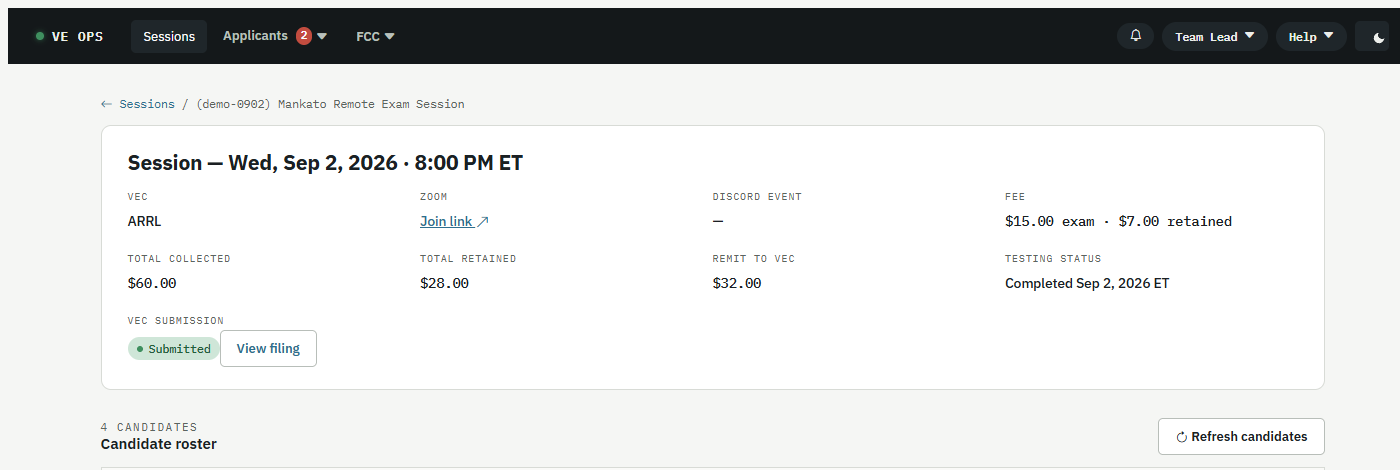
What is not there is the point. A Session Manager looking at this same session also gets Email candidates, Mark session completed and Submit to VEC, and their sidebar carries Unmatched Payments. Yours does not, and that is the whole difference between the two roles on this screen.
Everything else: emailing candidates, matching an unmatched payment, editing the VE roster, changing any setting, filing to the VEC. If one of those needs doing, it goes to a Session Manager or a Team Admin.
Your account records an assigned manager. That is a note about who you report to. It grants nothing and takes nothing away.
- Session Manager — the same flow, with the write actions
- Roles and permissions