Repository navigation
Installation
English | Nederlands
Choose your program:
- Claude in the Claude app (easiest)
- Claude Code in the terminal
- ChatGPT desktop and Codex
- Any other program: via install.md
The easiest route. You need Claude Pro or higher and the Claude app for Mac or Windows (claude.com/download).
Add the plugin. You do this once, in the ordinary Claude window:
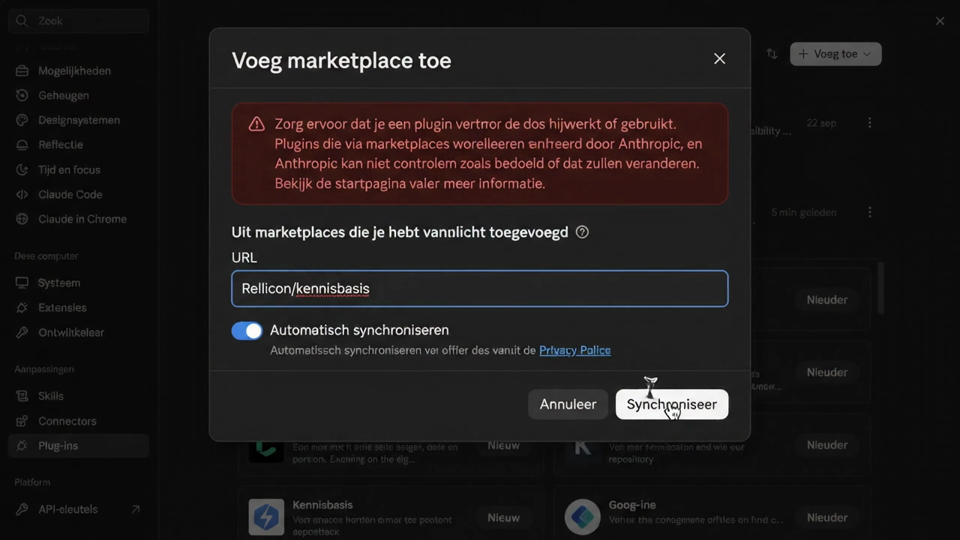
Click the image for the 10-second video. The app in the video is set to Dutch.
- Click your name in the bottom left and choose Settings.
- Go to Plugins.
- Click Add in the top right and choose Add marketplace.
- Enter as URL:
Rellicon/kennisbasis. Leave Sync automatically on and click Sync. - Install Kennisbasis under the marketplaces you have added.
The plugin now belongs to your Claude account. You can also do this on claude.ai in your browser; the result is the same.
Get started. Use Claude Code in the Claude app for this:
- Open Claude Code (in the sidebar, or the Code tab) and choose a folder to work in, for example your home folder.
- Type
/kennisbasis:kennis-introand follow the questions.
Why Claude Code: there Claude can reach a folder on your computer and the instruction file it reads in every conversation. The plugin is also available in the ordinary chat, but there Claude runs in the cloud and cannot reach your vault. Cowork can reach folders you point it to, but has not been tested with Kennisbasis yet.
If you do not see the plugin in Claude Code, update the Claude app and restart it.
With Sync automatically on, you get new versions on their own.
If you use Claude Code in the terminal, type these two lines, one at a time:
/plugin marketplace add Rellicon/kennisbasis
/plugin install kennisbasis@rellicon
Then start a new conversation and type /kennisbasis:kennis-intro.
As a plugin, the commands get kennisbasis: in front, such as /kennisbasis:catchup.
The package contains plugin.json, .codex-plugin/plugin.json and a local catalog in .agents/plugins/marketplace.json.
- Download
kennisbasis-openai-<version>.zipfrom the latest release and unpack it in a permanent place. - If you have the Codex CLI, run
codex plugin marketplace add .from that unpacked folder. You can also open the folder as a project; the catalog belongs to the project folder. - Restart the desktop app, open the plugin library and choose the source Rellicon. Install Kennisbasis.
- Start a new local conversation and ask: "Use kennis-intro to set up my knowledge base." Give access to the chosen vault folder when the app asks for it.
Local catalogs do not work in every version of the app. If it fails, use the install.md route below. The package has not been published in the OpenAI plugin library yet.
In ChatGPT, the signposts live in ~/.kennisbasis/chatgpt.md. The skills read that file themselves; ChatGPT does not load it on its own. So start every conversation with catchup and end it with save-context.
For Gemini CLI, Mistral Vibe, or if a plugin does not work.
- Download this repo (green Code button, then Download ZIP) and unpack it, for example in Documents.
- Open your AI program and choose that folder as the working folder.
- Open
install.md, copy everything below the line and paste it into your AI program. - The assistant installs the skills, helps with Python, and then starts with
/kennis-intro.
Next: Commands.