Repository navigation
Network and Sync Problems
Problems reaching AniDB or GitHub: why commands are not sent, network access, credentials, cooldowns and bans, AniDB reply codes, queue states, missing library entries and failed updates. Read it when the status bar shows Offline, a red blocked counter or a pause message, or when an update does not work.
What Animatic connects to:
| Purpose | Endpoint | Notes |
|---|---|---|
| UDP API |
api.anidb.net:9000 by default (the server anidb.udp_server and the local port anidb.local_port can only be changed in the settings file; Options has no field for them) |
IPv4 only. The client binds 0.0.0.0 on the configured local port (default 29456) and never uses another port: if it cannot be bound the run stops with an error naming anidb.local_port and nothing is sent. Each exchange waits up to 20 s and a first timeout is retried once |
| HTTP API | http://api.anidb.net:9001/httpapi |
Plain HTTP; every HTTP request (anime records, the title list, cover pictures) is spaced at least 2 s from the previous one; 60 s timeout |
| Titles dump | https://anidb.net/api/anime-titles.xml.gz |
Public download, at most once per 24 hours, bounded as described in Disk space, temporary files and leftovers |
| Cover pictures |
https://<image host>/images/main/<picture>, HTTPS; the host AniDB announced at the last login, else anidb.image_server (cdn.anidb.net) |
One picture per request, only when an anime detail window opens on an anime whose cover is not in the covers folder; never offline or during a ban; spaced with every other HTTP request; no Referer; at most 16 MiB; 60 s timeout; after a failed try the same anime's cover is not requested again for an hour. Turn it off with Download anime covers when a detail window opens (Tools → Options… → AniDB account → Downloads) |
| Update check and download |
https://api.github.com/ and https://github.com/ (plus the CDN hosts GitHub redirects asset downloads to), HTTPS only |
Not AniDB: no flood spacing and no cooldown. Anonymous: sends your IP address and User-Agent: Animatic/VERSION, no credentials or library data. Bounded sizes and timeouts. Used only for update checks and downloads you start, plus the optional startup check |
Animatic enforces AniDB's request spacing for the whole program, not per run: UDP packets are
2 s apart for the first five, then 4 s apart (10 idle minutes restart the burst), and HTTP
requests 2 s apart. The time of each request is saved in the database before it is sent, so
restarting Animatic does not shorten the gaps (after a restart the first packet waits 4 s from
the last one). The client also re-authenticates when a session expires. With Run the command
queue automatically on, one login is kept between runs and looked after in between (an idle
logout, a keep-alive command, a PING behind a router; see
Automatic runs); those packets
keep the same spacing. A long queue therefore
takes a long time; that is not a hang. AniDB also asks clients not to repeat requests: the
title list is requested at most once per 24 hours, an anime at most once per 24 hours and a file
at most once per 7 days (see Request limits). The
HTTP client uses its default settings and Animatic sets no proxy of its own; the
UDP API cannot use an HTTP proxy.
| Message | Cause and action |
|---|---|
network error: cannot resolve <server>: … |
DNS failure, no internet connection, or a wrong anidb.udp_server value in the settings file |
network error: no IPv4 address for <server> |
The name resolves to IPv6 only. The UDP client needs an IPv4 address |
network error: cannot bind UDP port N: …; the port is set by anidb.local_port … |
Another program already uses the local UDP port. Close it, or change anidb.local_port in the settings file (a free port above 1024; see the Settings reference). Animatic never picks another port by itself, because AniDB bans clients that show many different source ports. Nothing was sent and the commands stay queued; the next run is allowed after 60 s |
no reply from AniDB (timeout) |
Outbound UDP to the server is blocked or lost. Allow outbound UDP to the server's port, and replies back to the local port (NAT and router behavior is outside Animatic) |
HTTP error: HTTP status 5xx |
A server-side failure from the HTTP API; counted toward the command's retry budget |
AniDB unavailable, retry in N min |
Animatic's own wait after AniDB answered 600, 601, 602 or 604, or after the HTTP API answered status 429 (treated as a 30-minute wait). The text shows the wait that is left |
no reply to the AniDB login (AUTH); the next try is allowed in … |
The login got no answer. Animatic waits longer after every further unanswered login: 30 s, 2 min, 5 min, 10 min, 30 min, then 2 hours, and starts over after a successful login. The step survives restarts. Check your internet connection, anidb.udp_server and anidb.local_port in the settings file and your firewall |
cannot save the AniDB request state, nothing was sent: … |
The database could not record the time of the request, so Animatic did not send it (disk full or database locked). Retried after 60 s |
Automatic command queue run postponed (<reason>); it starts when that is over |
Only with the automatic option on. The reason is one of Work offline is on, the AniDB account is not set, an AniDB cooldown is active, another task is running, a library restore is in progress, an import is in progress, imported settings are waiting for review, the settings recovery notice is open (the Settings recovered window is still open) or some changes are not saved to the database yet. Nothing is wrong: the run starts by itself when the reason is gone, and nothing was sent meanwhile. The Log also says Automatic command queue run started when it starts |
AniDB session upkeep failed: … |
The keep-alive command or the PING that looks after a kept login got no answer or an error (shown after the usual cause text). The login is forgotten, the usual cooldown starts for network errors and bans, and the next run logs in again |
Logged out of AniDB: the session was idle / … automatic queue runs are off / The AniDB session ran out while idle; the next run logs in again
|
Routine: the kept login ended after idle_logout_minutes without commands, because you switched the automatic option off, or because AniDB ended it while idle. The keep-alive commands (UPTIME, PING) themselves write nothing to the Log |
Transient network failures never lose queued work: the command stays in the queue and syncing pauses for 60 seconds (see Cooldowns and bans).
Work through this list from the top; the first line that applies is the cause.
-
Work offline is on (Work offline (keep commands queued) in Tools → Options… → AniDB account). The right of the status bar shows Offline (yellow dot). Click it
to go Online, or untick Work offline. Nothing
is sent while it is on, and the Log says
Offline mode is enabled; commands remain queued. -
Nothing started the queue. Queued commands wait until you choose Tools → Run command
queue, click Run command queue on the Queue page or press
Ctrl+Shift+S, unless you switched on Run the command queue automatically (off by default). MyList removals are never sent automatically, even then. -
A cooldown is active. The status bar shows
AniDB sync paused until <time>: <reason>and Run command queue is disabled. See Cooldowns and bans. -
The account is not set.
authentication: username and password requiredappears and the command is blocked. Enter them in Tools → Options… → AniDB account. -
Commands are blocked. The red
N blockedin the sidebar andN blocked command(s)in the status bar mean permanent failures; read Last error on the Queue page. See Queue states. -
Another task is running, an import or the review of imported settings is open, a restore
is in progress or commands are not saved yet. An automatic run says
Automatic command queue run postponed (…); it starts when that is over; Run command queue is disabled while an import is pending. - The queue is long. Every packet keeps AniDB's spacing (2 s for the first five packets, then 4 s), so many commands take minutes. That is not a hang; Cancel works between commands.
What Animatic does with the replies it understands. "Cooldown" means all AniDB requests pause; see Cooldowns and bans.
| Code | AniDB's meaning | What Animatic does |
|---|---|---|
| 200, 201 | Login accepted (201: a newer AniDB client version exists) | Continues |
| 500 | Login failed | Blocks the whole queue: authentication: login failed: wrong username or password
|
| 501, 506 | Session expired or invalid | Forgets the session, logs in again and retries once |
| 502 | Access denied | Blocks the whole queue: authentication: access denied
|
| 503 | Client version outdated | Blocks the queue until Animatic is updated |
| 504 | Client banned | Blocks the queue with no timed cooldown; update Animatic |
| 505 | Illegal input or access denied | At login: authentication: illegal input or access denied (is the client registered?); on a command: that command is blocked with illegal input: …
|
| 555 (and 510, which Animatic treats the same way) | Banned | Cooldown of 30 minutes; commands stay queued |
| 598 | Unknown command | That command is blocked; the run continues |
| 600, 601, 602 | Server error (600), out of service (601) or server busy (602) | Cooldown of 30 minutes |
| 604 | Server timeout | Cooldown of 60 seconds |
| 309, 394 | Encrypted session setup failed (API key not defined, no such user) | Blocks the whole queue: authentication: API key not defined in your AniDB profile or authentication: no such user
|
| Anything else unexpected | The command is blocked as unexpected reply <code>: <text>
|
The 30-minute and 60-second pauses are Animatic's own conservative choices unless AniDB sent a duration; the project has no recorded observation of AniDB's real ban lengths.
Animatic sends its own registered AniDB clients (animatic version 1 on UDP, animatichttp
version 1 on HTTP), so there is nothing to register or enter: the account (Tools → Options… →
AniDB account) needs only a user name and password, and optionally an API key. The client
identifiers are built in, are not settings, and change only when a release registers a new client version with AniDB (an ordinary version bump does not change them); a
settings file that still holds the old client keys has them ignored (see the
Settings reference). Client errors below mean AniDB refused that
built-in registration. For the details see
AniDB client registration.
The queue runs on its own only if you switch on Run the command queue automatically
(off by default; see Automatic runs).
It never sends MyList removals: the Queue page says N MyList removals wait for you to click Run command queue. Tools → Run command queue and the Run command queue button on the
Queue page
take a snapshot of the current in-memory options (saved or not) at the moment you click.
With Work offline (keep commands queued) ticked they send nothing, log Offline mode is enabled; commands remain queued, and leave the queue alone; an automatic run is postponed instead.
| Message (in the Last error column, the Log or the status bar) | Meaning | Effect | Action |
|---|---|---|---|
authentication: username and password required |
Missing user name or password | Blocks the whole queue (no timer) | Enter them, then Retry failed |
authentication: login failed: wrong username or password |
Login code 500 | Blocks the whole queue (no timer) | Correct the credentials, then Retry failed |
authentication: illegal input or access denied (is the client registered?) |
Login code 505 | Blocks the whole queue (no timer) | Check the user name, password and API key; if they are right, AniDB may be refusing the built-in client, so update Animatic or report it |
authentication: API key not defined in your AniDB profile / no such user
|
Encrypted-session setup failed (codes 309, 394) | Blocks the whole queue (no timer) | Fix or clear the API key; check the user name |
authentication: access denied |
A later command was refused (code 502) | Blocks the whole queue (no timer) | Check the account |
client version outdated - update Animatic, or report this if it is already the latest version |
Code 503: AniDB refuses the client version Animatic's built-in registration sends | Blocks the whole queue (no timer) | Update Animatic; if it is already the latest release, report it (Reporting problems); then Retry failed |
AniDB refuses Animatic's built-in client registration (reply 504): … |
Code 504: AniDB bans the built-in client name and version | Blocks the whole queue, no timed cooldown | Update Animatic (a release carries a newly registered client version); if it is already the latest release, report it; then Retry failed |
authentication: HTTP API rejected the client registration (…) |
The HTTP API refused Animatic's built-in HTTP client (animatichttp) |
Only the HTTP commands (anime records) are blocked; UDP commands keep running. The Log says Command blocked: N queued HTTP commands blocked: <reason>. Update Animatic, or report this if it is already the latest version. There is no HTTP client setting to change: the client is built in |
Update Animatic; if it is already the latest release, report it; then Retry failed |
After a fatal credential or client error the status bar shows N blocked commands and the Log shows
Command blocked: N queued commands blocked: <message>. Correct the cause, optionally Save
options, then click Retry failed on the Queue page, then Run command queue. A wrong password that you
keep retrying will keep failing; stop and fix it first.
Credentials live in the system keystore, or in plain text in the settings file when Options says no keystore is available. Do not paste them into bug reports; see Privacy-safe support.
When the network fails, the server is unavailable or AniDB bans you, Animatic stops the whole queue run and stores a cooldown so that it holds across restarts and new jobs. (A refused or outdated client is different: it blocks the queue until you update Animatic, with no timer; see Credentials and client registration.)
- It is stored in the library database (an expiry time and the reason), so it belongs to that database. Another database or machine does not know about it; waiting still makes sense because the server-side condition remains.
- While it is active, Run command queue (menu, Queue page and
Ctrl+Shift+S) is disabled (hover for the text) and the status bar and Queue page showAniDB sync paused until HH:MM:SS: <reason>in local time. A run started through another path logsAniDB sync is paused for another …and sends nothing. - Retry failed does not bypass a cooldown. It only unblocks entries; the run still checks the stored cooldown first, and a stored value that cannot be read never locks syncing.
- There is no control to clear a cooldown, and editing the database to remove it is not supported. The cooldown exists to avoid immediate repeat requests after a refusal.
| Condition | Pause | What happens to the command |
|---|---|---|
| Connectivity failure: DNS, connect, TLS, timeout, no reply | 60 s | Stays queued, no attempt is counted |
No reply to the login (AUTH) |
30 s, then 2 min, 5 min, 10 min, 30 min, 2 h for each further unanswered login; reset by a successful login | Stays queued, no attempt counted |
| UDP server code 604 | 60 s | Stays queued, no attempt counted |
| UDP server codes 600, 601, 602 | 30 min | Stays queued; code 600 counts one attempt |
AniDB unavailable, retry in N min |
The duration given (HTTP 429: 30 min) | Stays queued |
Ban: UDP codes 510, 555; HTTP 403; HTTP banned / error 500 |
30 min (Animatic's conservative default when no duration is known) | Stays queued; a ban never blocks entries |
| HTTP status ≥ 500 or malformed server answers | 60 s | The command counts an attempt; after 5 counted attempts it is blocked |
| Local storage errors while applying a reply | 60 s | Counts an attempt |
Code 598 (unknown command), 505 on a command (illegal input: …), unexpected reply codes, protocol errors, XML errors |
none | That command is blocked and the run continues with the next |
Notes:
- The ban text may include the server's wording. If you see
client banned by AniDB: …, stop starting more runs and wait. - A run that finishes sends a logout. Cancel acts between commands: a command already in flight can take up to about 45 s for UDP (a 20 s timeout, retried once, plus packet spacing) or 60 s for HTTP to end. Closing the window does not wait for it.
- Durations are Animatic's own conservative choices unless AniDB supplied one; the project has no recorded production AniDB observation to cite for AniDB's actual ban lengths.
The Queue page lists every saved command with its Status and Last error. The sample library below has four pending commands and one blocked command, and Animatic is working offline.
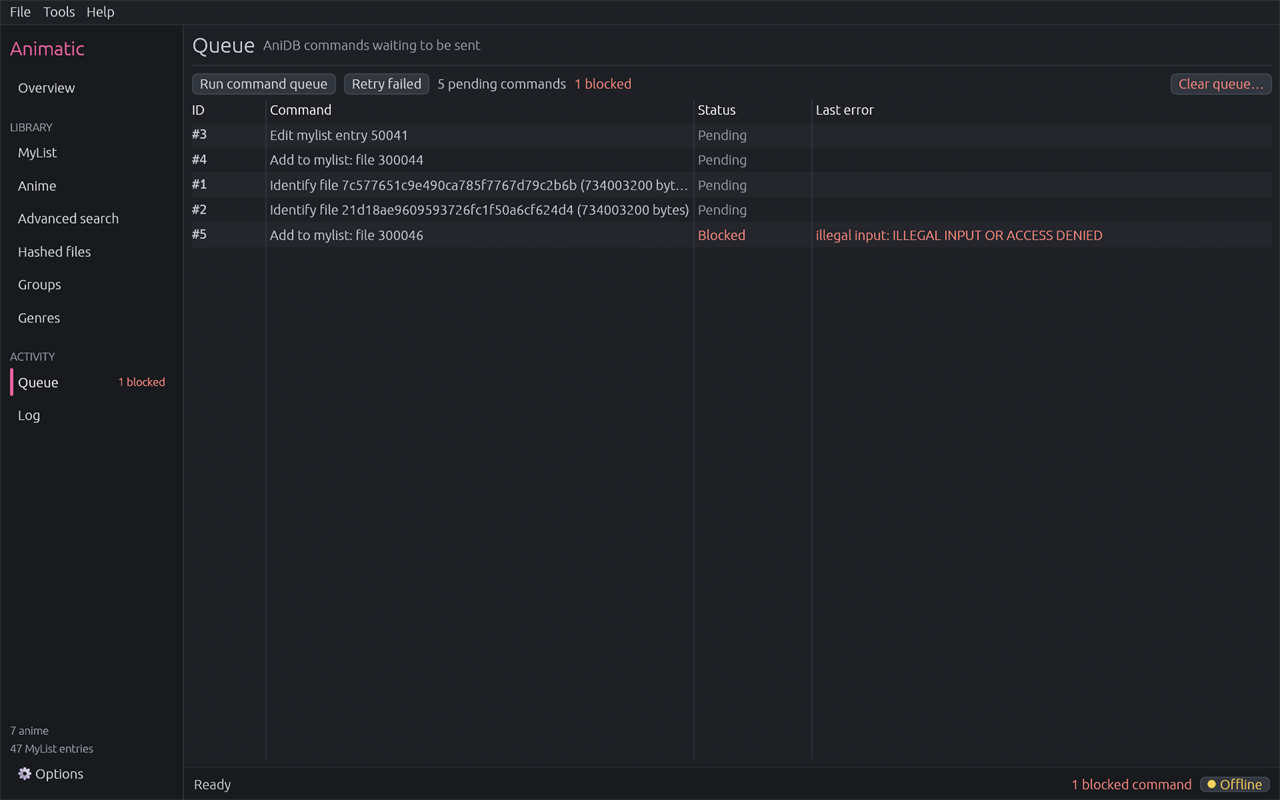
The Queue page. The toolbar shows Run command queue, Retry failed, 5 pending commands and the red 1 blocked; Clear queue… is at the right.
There are three different situations, and they are handled differently.
| State | Where you see it | Meaning | What to do |
|---|---|---|---|
| Pending | Status Pending, no retries |
Waiting to run | Nothing; run the queue |
| N retries | Yellow status | Failed N times with errors that count toward the budget (at most 5) |
Wait; it becomes Blocked at 5 |
| Deferred (not a separate label) |
Pending or N retries, with a Last error such as a timeout or ban |
Not attempted again because of connectivity or a cooldown, which do not count as attempts | Wait out the cooldown, fix connectivity, run again |
| Blocked | Red Blocked, red N blocked in the toolbar and status bar | A permanent failure, a protocol/format error, rejected credentials, or an unreadable stored command. It is skipped by runs and stays visible | Read Last error, fix the cause, then Retry failed |
| blocked commands (refreshing) | Red text | A newer blocked event arrived than the data on screen; the view is refreshing | Wait a moment |
| Not saved yet | Yellow N commands not saved yet in the status bar |
The command is only in memory | See below |
Rules that matter:
- Retry failed is enabled only when something is blocked. It unblocks and resets the attempt counter of every blocked command, merges multiple edits of the same MyList entry into the latest, and does not touch the cooldown. It does not clear Last error text; a stale message can remain until the command is retried or removed.
- Clear queue… (the red button on the Queue page, enabled while the queue is not empty) deletes every queued command, including unsynchronized MyList edits and blocked commands, after you confirm Discard commands in the "Clear the command queue?" dialog. It does not undo the optimistic local state those edits already applied, so the local view can then disagree with AniDB. It does not clear the cooldown. There is no per-command discard in the interface; to drop one command you must clear the whole queue, so make a backup first when other work is pending.
- A blocked MyList edit whose entry no longer exists on AniDB says
mylist entry N no longer exists on AniDB; the edit is kept (blocked): discard it from the queue or refresh the entry. Retrying it fails again; only Clear queue discards it from the interface. - An unreadable stored command is blocked with
unreadable queued command: …rather than being deleted. Because Animatic cannot read it, such a row cannot overlay its pending intent onto values received from AniDB; readable queued edits are preserved over remote values. -
file unknown to AniDBafter identification is a normal answer for a file AniDB does not know, not an error, and is not queued again. - Command identifiers are never reused, so an older reply cannot erase newer intent.
Two connections write to the database: the background worker and the interface. A long write (for example an import, a title merge or a large registration) makes the other side wait.
| Side | Wait before giving up | What you see |
|---|---|---|
| Worker | 30 s | A failed job reports the database error |
| Interface | 1.5 s | The behavior below |
-
A MyList edit that cannot be saved reports
<action>: the database is busy with a background write; nothing was changed, try again. The edit is not applied; repeat it. -
A queued command (identify, title download, refresh) that hits a busy database is kept in
memory: the Log says
Database busy: queued command is NOT saved yet, retryingand the status bar showsN commands not saved yet. Animatic retries every half second and logsSaved N previously unsaved commandswhen it succeeds. At most 1000 are held; beyond that you getNOT queued: <command> (database busy and 1000 commands are already unsaved). - Closing the window makes one final attempt of up to 5 s. If the database is still busy, the unsaved commands are lost, and nothing records them anywhere (Animatic writes no log file). Do not quit while the unsaved counter is non-zero.
- Causes of long busy periods: a legacy import (each collection is one transaction), the titles merge, another program touching the files (backup tool, antivirus, sync client) or a second Animatic instance. Wait for the running job to finish or cancel it.
-
Unable to refresh library: …means the background snapshot failed; a later reload (File → Reload,F5) usually succeeds once the contention ends.
-
Loading your whole AniDB MyList is a two-step export, not a download. Animatic never walks
your MyList entry by entry (AniDB forbids it). Tools → Request MyList export… asks AniDB to
prepare an export (up to 24 hours; AniDB sends a message when it is ready), you download the
file from AniDB's export page, and File → Import → MyList export… merges it. See
Full-account MyList import.
Tools → Fetch MyList statistics only fetches counts (kept and shown on Overview).
Tools → Download anime
titles fetches the public titles dump only. Tools → Full update… (after a confirmation) or
--full-updatequeues the titles dump plus lookups for the files and anime your hashed local files already reference, leaving out what was requested too recently (see the next point). Library content comes from an AOM import, from hashing and identifying files, from the anime detail window's Refresh from AniDB, from a MyList export import and from your own edits. -
MyList export messages.
A MyList export is already queued on AniDB…is information, not an error: wait for AniDB's message.MyList export not requested: … allowed after …means one was requested within 24 hours. A blocked Request MyList export command withunexpected reply 317means AniDB no longer knows the template; it needs a new Animatic version. An import that ends withMyList export not imported, the library was not changed: …names why the file was refused (for examplelarger than the … byte limit,truncated export,root element is <…>, a missing element or an invalid value); nothing was written. Download the export again, or open an issue without attaching the file (it holds your account's library). - Not every hashed file is known to AniDB. A file AniDB does not know logs
file unknown to AniDB. -
Download anime titles failures leave your existing titles and the "last updated"
timestamp unchanged: the download is validated (XML, gzip end-of-stream and CRC, size and
count limits) and merged in a single transaction only when complete. Errors you may see
include
titles dump larger than the N byte download limit,… decompressed limit,unexpected data after the compressed titles dump,invalid compressed body: …andtitle longer than N bytes. Format and size errors block the title-list download command; connectivity errors pause syncing instead (see Cooldowns and bans). After a block, use Retry failed or queue the download again from the Tools menu once the cause is gone and 24 hours have passed since the failed attempt (next point). A download is not resumable. -
"Skipped" or "allowed after …" instead of a download or refresh. AniDB asks clients not
to request the same data again and again, so Animatic does not send the title list more than
once per 24 hours, an anime more than once per 24 hours or a known file more than once per 7
days, counted from the last request it sent, even if that request failed or was cut off
(the time is saved before sending, so a crash or restart does not reset it). Download anime
titles and Refresh from AniDB then queue nothing and log
… allowed after <date time>; a command already in the queue finishes as… skipped: …without an error. Wait until the time shown; there is no way to bypass it (and no setting), because sending sooner risks a ban. See Request limits. - Cached MyList displays include optimistic local state for queued edits; a blocked or cleared edit can leave the local view different from AniDB.
- A file lookup that explicitly reports "not in MyList" removes the local MyList rows for that file, unless a queued local edit for the entry exists. A malformed successful reply is a protocol error, never treated as absence. If an entry vanished after an online run, check the Log for the identification result and compare with AniDB's website before assuming data loss; a backup taken before the run is the way back.
How updating works and what it changes: Updating Animatic. The update path is separate from AniDB: an update failure never touches the command queue or an AniDB cooldown, and an AniDB cooldown never blocks it.
| Symptom | Cause and action |
|---|---|
| No check happens at startup | By design when Check for updates at startup is off, Work offline is on, or settings were recovered from a backup. Help → Check for updates… still works |
| Help → Check for updates… is disabled or the platform is reported unsupported | Only Windows and Linux on x86_64 are supported. Download releases manually elsewhere (none are built) |
| The check fails, or reports a rate limit | Unauthenticated GitHub API requests are limited per IP address, and a firewall, proxy or offline machine also fails. Nothing is retried automatically; try again later. A manual check always shows the error, a startup check writes it only to the Log |
| The check reports "not found" or the release feed as unavailable | GitHub answers HTTP 404 when the release data is not visible to an anonymous client: the repository's releases are not publicly readable, or nothing is published. This is an error, never "up to date". Animatic has no token or sign-in setting, so until the releases are publicly readable, update manually (Releases). This guide does not state whether the repository is currently public |
| "Animatic is up to date" although a newer tag exists on GitHub | Only published, non-draft releases with a valid CalVer tag that is strictly newer than the running version are offered. On the default Stable channel prereleases (release candidates, -rc.N) are not offered: switch Tools → Options… → Updates → Release channel to Beta to be offered them. Other prerelease forms, drafts and older versions are never offered on either channel, and the platform archive and SHA256SUMS must be present and correctly named. If the newest eligible release is incomplete the check reports an error instead of offering an older one |
| Download or verify fails (size, SHA-256 or archive error) | Nothing was installed. The staged files are in a private temporary folder that is removed when the update is dropped or Animatic exits. Retry; if the SHA-256 check keeps failing, do not install and download manually from the releases page as described in Releases, and report it |
| Install or Restart now is disabled | They are blocked while a job is running, an AOM import is in progress, imported settings are waiting to be applied, or some changes are not yet saved to the database; Restart is also blocked while settings recovered from a backup are unsaved (use Save options). The reason is shown in the window. Finish or cancel that work first |
| Install fails with a permission or read-only error | The folder holding the executable must be writable by your account. There is no elevation. Update the copy the way it was installed (administrator copy, package manager) or move Animatic to a user-writable folder |
| Install refuses because the executable does not match | The running file is not the one Animatic started from (moved, replaced or launched through an unusual path). Restart Animatic normally and try again |
LICENSE-vVERSION and NOTICES-vVERSION beside the executable |
Left by an update from an older Animatic. The next successful update removes them and replaces LICENSE and NOTICES instead; you can also delete them by hand. A folder or symlink named LICENSE or NOTICES makes the install stop before anything changes; rename it |
An empty .animatic-update.lock file beside the executable, or a message that another install is running |
Created by the install step; the OS holds an advisory lock on it only while an install runs. The empty file is harmless and may remain. The message means another Animatic process holds the lock: wait for it or close that instance |
Dot-prefixed files next to the executable (.animatic-recovery-*.exe, .animatic-restore-*, or helper files from self-replace such as .__selfdelete__.exe) or a renamed old executable |
.animatic-recovery-*.exe is the Windows copy of the previous executable made before the swap; it is removed after a successful install and kept after any failed one. Other files are left if the machine lost power or Animatic was killed mid-install. Animatic never deletes them automatically. Check which executable starts, and delete leftovers by hand only after confirming a working copy |
| The window says the installation did not finish and the program files may be in an unknown state | The swap itself failed. Animatic stops offering updates and does not restart by itself. Check that the executable still starts; the message names the recovery copy and, if the old file was not restored, which file to copy to which name. Otherwise install the release manually (Releases). Restart Animatic by hand before trying again |
| Animatic does not start after an update | Download the archive for your platform from the releases page, verify SHA256SUMS, and run or copy the executable from it (Releases). Your database and settings were not changed by the update |
| The documentation beside the executable is older than the program | Expected: an update replaces only the executable, LICENSE and NOTICES. Replace the whole folder from a newly downloaded archive to refresh the bundled documents |
| Restart did not start a new window | The new process is started only after the old one exits, with only your --database path (and ANIMATIC_SETTINGS when it was set). Start Animatic yourself; nothing is lost because settings were saved before closing |
The check, download and install are bounded by byte limits and timeouts and run on their own thread, so a slow or stuck GitHub connection never freezes the window; use Cancel during a download, or close Animatic (which cancels it). Closing during the short install step waits for it.
- AniDB synchronization for how the queue, request limits and automatic runs work.
- Updating Animatic for the update flow.
- Troubleshooting for the symptom index and message index.
- FAQ for short answers, for example why commands are not sent.
- Reporting problems if a message here does not match what you see.