Repository navigation
Rename Patterns
Worked patterns, common pitfalls, every diagnostic, self-test patterns, and how to check a pattern against one of your own files before applying it. You need this page only for a custom pattern; the built-in naming conventions work without it (see Choosing how files are named).
The language itself is in Rename language; every function and property is in Functions and objects.
A pattern runs from its first line to its last. The value of the whole pattern (all lines joined) is the new file name, extension included. A good way to start is to begin from a built-in convention and shorten it, or to build a short pattern up in small steps and read the Example: line after every step.
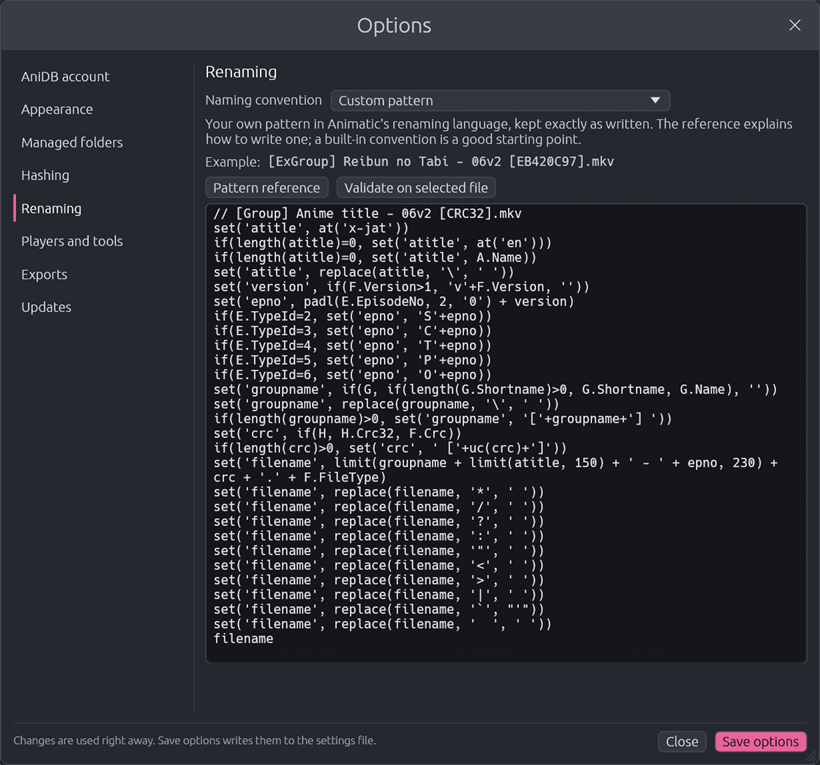
Custom pattern in Tools → Options… → Renaming. The text in the editor is the default convention, which you can cut down.
-
Open Tools → Options… → Renaming and choose Custom pattern in the Naming convention list.
-
Replace the editor text with a first version:
A.Name + '.' + F.FileTypeThe Example: line below the list shows
Reibun no Tabi.mkvfor the fictitious file. (F.FileTypeis the extension without the dot.) -
Add the episode number, two digits wide:
A.Name + ' - ' + padl(E.EpisodeNo, 2, '0') + '.' + F.FileTypeExample:
Reibun no Tabi - 06.mkv. -
Add the group only when the file has one, and the CRC:
set('grp', '')
if(G, set('grp', '[' + G.Shortname + '] '))
grp + A.Name + ' - ' + padl(E.EpisodeNo, 2, '0') + '.' + F.FileType
Example:
[ExGroup] Reibun no Tabi - 06.mkv. Lines that onlyseta value add nothing to the name; only the last line makes text. -
Select a real, identified file on Hashed files and press Validate on selected file (see Verify a pattern). For the sample library's Sakura Signal episode 3 by Hanabi you would see
[Hanabi] Sakura Shingou - 03.mkv. -
Click Save options (or keep working: Options changes take effect immediately).
The Pattern reference button next to the example opens a window with these basics and recipes (see Rename language).
The examples use fictitious data only. Reference file (invented, in the style of the sample library; its release is a version 2 so the version examples have something to show):
| Item | Value |
|---|---|
A.Name |
Sakura Shingou (also its x-jat main title); its English official title is Sakura Signal
|
A.Year |
2024 |
E |
regular episode (TypeId 1), EpisodeNo 3, English title A Song for the Rooftop; the anime's special is EpisodeStr S1
|
F |
Version 2, Crc 5a1d0c3e, FileType mkv, ResolutionString 1920x1080
|
G |
Shortname Hanabi, Name Hanabi Subs
|
H |
Crc32 5A1D0C3E
|
Results below are the text the pattern evaluates to; the path rules then apply. All examples are meant to be validated with the steps in Verify a pattern.
A.Name + ' - ' + E.EpisodeNo + '.' + F.FileType
Sakura Shingou - 3.mkv. Padding to a fixed width is padl(E.EpisodeNo, 3, '0'), giving Sakura Shingou - 003.mkv.
set('ver', '')
if(F.Version > 1, set('ver', ' v' + F.Version))
A.Name + ' - ' + padl(E.EpisodeNo, 2, '0') + ver + '.' + F.FileType
Sakura Shingou - 03 v2.mkv; with Version 1 it is Sakura Shingou - 03.mkv. Initializing ver on the first line matters: an unset variable would read as False and add the word False to the name. The default pattern uses the three-argument if for the same reason.
'桜信号 第' + padl(E.EpisodeNo, 2, '0') + '話 ' + E.Name + '.' + F.FileType
With the reference file the result is 桜信号 第03話 A Song for the Rooftop.mkv (the kanji title is invented). Non-ASCII characters are fine inside string literals and in data; they are never valid as bare identifiers or operators. Names are Unicode all the way (no code page conversion), and length rules count UTF-16 units or UTF-8 bytes, see Component validation.
For the sample library's anime titled Kiriyama no Tourou: Hi no Michi (a colon in the title), episode 1:
function('clean', replace(replace(replace(param1, ':', ' -'), '/', ' '), '?', ''))
set('series', clean(A.Name))
set('folder', series + '\')
set('ep', padl(E.EpisodeNo, 2, '0'))
folder + series + ' - ' + ep + '.' + F.FileType
Kiriyama no Tourou - Hi no Michi\Kiriyama no Tourou - Hi no Michi - 01.mkv. With no base path the new folder is created inside the file's current folder; with the Downloads rule's rename destination S:\Anime it is S:\Anime\Kiriyama no Tourou - Hi no Michi\…. Without clean, the colon in the title would be rejected (":" is not allowed in a name).
set('grp', '')
if(G, set('grp', ' [' + if(length(G.Shortname) > 0, G.Shortname, G.Name) + ']'))
set('crc', '')
if(H, set('crc', ' (' + uc(H.Crc32) + ')'))
A.Name + ' - ' + padl(E.EpisodeNo, 2, '0') + grp + crc + '.' + F.FileType
Sakura Shingou - 03 [Hanabi] (5A1D0C3E).mkv. Without a group the group part vanishes; without a local hash the CRC part vanishes. G.Shortname is only read when G is bound.
set('sub', '')
if(E.IsSpecial, set('sub', 'Specials\'))
sub + A.Name + ' - ' + E.EpisodeStr + '.' + F.FileType
A regular episode 3 gives Sakura Shingou - 3.mkv; special 1 gives Specials\Sakura Shingou - S1.mkv. ('Specials\' is a valid literal because strings have no escapes.) E.EpisodeStr is unpadded; E.EpisodeStrPadded would change with the stored episode counts.
set('t', at('en'))
if(length(t) = 0, set('t', at('x-jat')))
set('filename', t + ' - ' + padl(E.EpisodeNo, 2, '0') + '.' + F.FileType)
if(length(t) = 0, '', filename)
Prefers the English title (Sakura Signal - 03.mkv), falls back to the romaji title, and returns an empty result (which blocks the rename with the empty-name error) when neither exists.
join(' - ', A.Name, padl(E.EpisodeNo, 2, '0'), E.Name) + '.' + F.FileType
Sakura Shingou - 03 - A Song for the Rooftop.mkv. join skips empty values, so an episode without a stored title gives Sakura Shingou - 03.mkv with no dangling separator. Titles containing characters that file names cannot hold need replace first, as in the sanitizer example.
A.Name + ' (' + A.Year + ') - ' + padl(E.EpisodeNo, 2, '0') + ' [' + F.ResolutionString + '].' + F.FileType
Sakura Shingou (2024) - 03 [1920x1080].mkv. A.Year can be a range such as 2010-2012; it is only text here, which is fine. Do not compare it with a number.
if(F.ResolutionHeight >= 1080, 'HD', 'SD') + '\' + A.Name + ' - ' + padl(E.EpisodeNo, 2, '0') + '.' + F.FileType
HD\Sakura Shingou - 03.mkv. A folder per group is if(G, G.Shortname, 'no group') + '\' + …, giving Hanabi\…. Both create the folders under the rename destination (or the file's folder).
set('s', replace(replace(A.Name, ':', ' -'), '/', ' '))
set('season', if(E.IsSpecial, '00', '01'))
s + '\Season ' + season + '\' + s + ' - S' + season + 'E' + padl(E.EpisodeNo, 2, '0') + '.' + F.FileType
Sakura Shingou\Season 01\Sakura Shingou - S01E03.mkv. Every episode that is not a regular one (specials, credits, trailers, parodies and other episodes) uses Season 00; a credit and a special with the same number would then collide, and a collision is refused (see Collisions). The built-in Title - S01E06 - episode title (media servers) convention names the credits C05 instead, which avoids that.
AniDB has one credit type for both. This recipe, also in the in-app reference, tells them apart by the English episode title:
set('ep', E.EpisodeStr)
if(E.TypeId = 3, set('ep', if(contains('Ending', et('en')), 'ED', 'OP') + padl(E.EpisodeNo, 2, '0')))
A.Name + ' - ' + ep + '.' + F.FileType
A credit episode 2 titled Ending gives Sakura Shingou - ED02.mkv, Opening 2 gives Sakura Shingou - OP02.mkv, and a trailer 2 keeps Sakura Shingou - T2.mkv.
Each item below follows from the implementation.
-
Unknown names evaluate to
False. A misspelled variable, property or function does not fail; it yields the BooleanFalse, and joined with text it becomes the wordFalse:filenmae + '.mkv'evaluates toFalse.mkv. The plan accepts that name, because the result is text. Only a result that is entirely a Boolean is rejected (1 = 1, or a final line such asfilenmae). Always validate on a real file and read the result. -
Truthiness depends on type. Literals,
limit,padl,substr,trim,split,join,sc,tc, theat/ettitles, user function parameters and text properties such asA.Nameare falsy.if('abc', 'a', 'b')isb. Testlength(x) > 0or compare explicitly.count,strtointand Int64 properties (A.Size, dates) are falsy as well. -
+is right-associative. Trailing numbers are added:'S' + E.EpisodeNo + F.Version(episode 3, version 2) isS5, notS32. Put a string at the end, or convert one number to text first ('S' + padl(E.EpisodeNo, 1, '0') + F.VersionisS32). -
notbinds to the next operand only:not 1 = 2is(not 1) = 2. Writenot (1 = 2). -
Doubles cannot be text arguments. Number literals and arithmetic results warn when passed to
lc,uc,padl(x, …),replaceand similar, and any warning blocks the rename. -
Comparisons across types fail hard.
A.Year = 2010stops the pattern whenever the year text is empty or a range such as2010-2012(it works for2024), and comparing a mistyped property (False) with a text such as'x'stops it too. Compare same-typed values (A.StartYear = 2010). -
Whole-line comments only. A trailing
// noteis a syntax error. A line ending with_is joined to the next line with no space; a name ending in_at the end of a line will be swallowed as a continuation. - Tabs between tokens are syntax errors. Indent with spaces, or not at all (leading tabs are trimmed).
-
Every line is part of the name. A stray line like
E.EpisodeNo > 1, a loneA.Nameor an unset variable addsTrue,Falseor text to the result. Useset(…)orif(cond, set(…))for work, and let only the last line produce the name. -
Unbound objects are hard errors.
G.Shortnamefor an ungrouped file stops the pattern (…Attribute Shortname parent object not found!). Guard withif(G, …). -
User function parameters are falsy
WStrs, and a function must be defined before it is called; a call before the definition yieldsFalse. -
replaceruns once. Three spaces become two when replacing' 'with' ';replacerepeatdoes not change that. -
lcanducare ASCII-only, andtccapitalizes after spaces only. -
Sanitizing is manual.
: ? * " < > |in a result make the plan fail, with no automatic substitution. A backslash or slash in a title creates folders. -
An empty
F.FileTypeloses the extension. The result ends with., which is trimmed. - Custom patterns accept the pending-title stand-in. See the guard under Planning rules.
-
E.EpisodeStrPaddedis data dependent. Its width follows the highest stored episode number of the type, so a fixedpadl(E.EpisodeNo, 2, '0')is more stable. -
Hmedia properties are mostly empty for files Animatic hashed itself. -
getanimerebinding is ignored; the first binding of a name wins. -
forbodies must produce strings, and unset accumulator variables read asFalse. - Runaway patterns stop with an error. A loop over an enormous range, a function that calls itself without end, or a text that keeps growing ends the run with a hard error once it reaches the evaluation limits; nothing is renamed.
-
The editor's Example line uses a fictitious file. It has no MyList entry, so
M.Storagethere is an unbound-object error even though your real files have an entry; properties the fictitious file does not carry (for exampleA.Size) readFalsethere. Use Validate on selected file for the real check. -
F.Crcis lower case,H.Crc32upper case. Wrap either inuc(…)when the case matters, as the built-in conventions do. - A name that already exists is never replaced. Two files that would get the same name collide; the first is renamed and the other is blocked. Include something that differs (group, resolution, version) when you drop it from the pattern.
| Where it appears | Text (abridged) | Cause | Fix |
|---|---|---|---|
| Editor and preview | The renaming pattern is empty. … |
Blank pattern | Write a pattern or choose a naming convention |
| Editor and preview | The renaming pattern has a syntax error: … |
See Compile errors | Fix the construct near the quoted position |
| Editor and preview | The renaming pattern has a syntax error: The pattern is nested too deeply (…) |
More than 1,000 parser levels (a very large number of nested parentheses or lines) | Simplify the pattern |
| Preview | The built-in naming convention needs the anime title, which has not been fetched yet. … |
Title missing or the stand-in | Fetch the anime from AniDB |
| Preview | The built-in naming convention needs the episode number, which is not known yet. … |
Episode number 0 or unknown | Fetch the episode |
| Preview | The renaming pattern failed to run: <message> |
Hard error (division by zero, bad conversion, unbound object, a limit, …) | Fix the expression; guard optional objects |
| Preview | The pattern ended with the truth value "True"/"False" instead of a file name. … |
The whole value is a Boolean | Make the last line the name |
| Preview | The pattern produced an empty file name; nothing would be renamed. … |
Empty result | Make the last line produce the name |
| Preview | Renaming "<old>" to "<name>" would result in an invalid file name (<reason>); rename skipped! |
Component validation | Sanitize in the pattern |
| Preview (yellow) |
The pattern reported warnings, so its result cannot be trusted. Renaming stays disabled until they are fixed: followed by • PARSERUN: … lines |
Wrong argument count, Double as text, bad set name |
Fix each listed call (argument counts) |
| Preview |
No file entry for file <fid>!, Can't autorename file, Episode <eid> is missing for File <fid>!, Can't autorename file, Anime <aid> is missing for File <fid>!
|
Library rows missing | Identify the file; fetch the anime/episode |
| Batch rename | The file is not identified by AniDB |
The file has no fid
|
Identify it first |
| Rename…, Validate on selected file, batch rename | A file or folder already exists at the target path |
The target is taken on disk | Change the pattern or move the other file |
| Batch rename | <current path of the earlier file> would get the same name; only the first of the two can be renamed |
Two selected files get one name | Make the names differ |
| Validate on selected file | Select a file identified by AniDB on the Hashed files page, then validate again. |
No file is selected | Click an identified file on Hashed files |
| Validate on selected file, Rename… | The selected file is not identified by AniDB |
The selected row has no fid
|
Identify it first |
| Rename…, Validate on selected file | The selected file is no longer in the list |
A new search hid the selected row | Clear the search |
Apply (log, Not renamed:) |
destination already exists: <path> and the other move messages (list) |
Apply found a destination that appeared after the preview, or a problem with the move | Change the pattern or move the other file |
These patterns do not depend on the selected file's metadata. Paste one into the pattern editor, choose an AniDB-identified hashed file and press Validate on selected file. Pasting replaces your pattern in the live settings, and a normal exit saves them, so copy your own pattern text somewhere first and put it back (or use Restore my custom pattern if you chose a built-in convention) before closing the application.
| Pattern | Expected result | Plan |
|---|---|---|
'x' + 1 + 2 |
x3 |
valid (no extension) |
'x' + 1 + 2 + '.mkv' |
x12.mkv |
valid |
10 - 3 - 2 |
9 |
valid |
'a' + 5 div 2 and 'n' + 7 mod 4
|
a2 and n3
|
valid |
if('abc', 'yes', 'no') + '.mkv' |
no.mkv |
valid |
if(lc('abc'), 'yes', 'no') + '.mkv' |
yes.mkv |
valid |
if(not 1 = 2, 'a', 'b') + '.mkv' |
b.mkv |
valid |
if(not (1 = 2), 'a', 'b') + '.mkv' |
a.mkv |
valid |
if(count('aaa', 'aa') = 2, 'ok', 'no') + '.mkv' |
ok.mkv |
valid |
if(count('aaa', 'aa'), 'y', 'n') + '.mkv' |
n.mkv |
valid |
if(in(2, 1, 2, 3), 'y', 'n') + '.mkv' |
y.mkv |
valid |
if(numeric('03'), 'y', 'n') + '.mkv' |
y.mkv |
valid |
replace('a b c', ' ', ' ') + '.mkv' |
a b c.mkv |
valid |
limit('abcdefgh', 5, '~') + '.mkv' |
abcd~.mkv |
valid |
padl('7', 3, '0') + '.mkv' |
007.mkv |
valid |
tc('hELLO wORLD') + ' ' + sc('hELLO wORLD') + '.mkv' |
Hello World Hello world.mkv |
valid |
uc('abcé') + '.mkv' |
ABCé.mkv |
valid |
substr('Sakura Shingou', 8, 3) + '.mkv' |
Shi.mkv |
valid |
split('a-b-c', '-', 2) + '.mkv' |
b.mkv |
valid |
join(' - ', 'a', '', 'b') + '.mkv' |
a - b.mkv |
valid |
max(2.6, 1) + '.mkv' |
3.mkv |
valid |
strtoint('$1F') + '.mkv' |
31.mkv |
valid |
for('i', 1, 3, 'x' + i) + '.mkv' |
x1x2x3.mkv |
valid |
set('x', 5) then x + 1 + '.mkv' (two lines) |
51.mkv |
valid |
unknownname + '.mkv' |
False.mkv |
valid: the engine cannot tell |
'ok.' |
ok. |
valid; the target has no trailing dot |
1 = 1 |
True |
error: truth value |
if(1 = 2, 'x.mkv') |
empty | error: empty file name |
set('x', 'y') |
empty | error: empty file name |
lc('A', 'B') + '.mkv' |
warning PARSERUN: Function lc: Lc must have 1 parameter, found 2 parameters.
|
blocked |
lc(5) + '.mkv' |
warning PARSERUN: Syntax error, value can not be converted to a string.
|
blocked |
'bad:name.mkv' |
bad:name.mkv |
error: ":" is not allowed in a name. ('a:b.mkv' is not an error on Windows: a: is read as a drive root and the target is a:\b.mkv.) |
'NUL.mkv' |
NUL.mkv |
error: reserved device name |
'a//b.mkv' |
a//b.mkv |
error: empty folder or file name |
1 / 0 |
none | error: The renaming pattern failed to run: Division by zero
|
for('i', 1, 1000000, 'x') |
none | error: The renaming pattern failed to run: The pattern stopped after 100000 steps; …
|
padl('x', 200000, '0') |
none | error: The renaming pattern failed to run: The pattern built a text longer than 128 KiB.
|
'a' // note |
none | syntax error: Right part of expression missing!
|
'x' + 'y' & 'z' |
none | syntax error: Missing right parentesis!
|
Multi-line patterns (enter each on separate lines):
function('f', param1 + '!')
f('hi') + '.mkv'
Expected hi!.mkv.
// comment
'a' + _
'b' + '.mkv'
Expected ab.mkv.
- Open Hashed files and select a file that AniDB has identified (an identified file with its anime, episode and file rows in the library). A built-in convention also needs a stored anime title and a positive episode number; the identify reply normally provides both.
- Open Tools → Options… → Renaming and choose Custom pattern. The example line shows the name for a fictitious file as you type, and a red syntax error appears while the text does not compile.
- Press Validate on selected file. It runs the same planning as Rename… without touching any file: the evaluated result (
Result for the selected file:), red errors, yellow warnings, and, when the plan could be applied or the file already has that name,The pattern is valid for this file. - Only Hashed files → Rename… followed by Rename file moves the file (or Rename N selected… for several files). Check the path in the dialog first; the new path and
Current pathare both shown in full.
Editing the text clears the previous validation result. Validation uses the pattern text currently in the editor, saved or not.
The behavior of the engine is covered by unit tests that run on every change (the built-in conventions' output, counter widths, Unicode, user functions, target paths, reserved names, length limits and the evaluation limits). For developers: see Development and rename-api.md.
- Rename language: syntax, values, limits, the in-app reference.
- Functions and objects: every function and property.
- Targets and apply: how the result becomes a path.
- Renaming files: previews, batch and automatic rename.