Add Security Transaction Type
Home>Extensions>Security Transaction Loader>Add Security Transaction Type
When you click on Add Transaction Type the following screen is displayed:
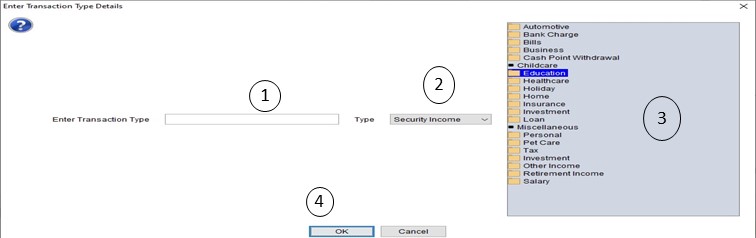
- Enter a unique Transaction Type (1). This must match the field in the .csv file
- Select the type of change (2). There are five types:
- Security Income - creates an income transaction to the security. This is added to the Investment Account but also identifies which Security it is applied to. It comes up as a miscellaneous investment income
- Security Dividend - same as Security Income but identified as a DIvidend
- Security Cost - the opposite of Security Income, identified as miscellaneous investment expense
- Investment Income - creates an incoming bank transfer into the Investment Account
- Investment Cost - creates an outgoing bank transfer from the Investment Account
- Select the expense or income category you wish to show on the transaction (3)
- Click on OK (4)
If the data is valid this screen will close.