Quote Loader Securities
Home>Extensions>Quote Loader>Securities
The securities table looks like this:

There will be an entry for each unique Ticker from your Investment Accounts. All Securities assigned to an Investment Account with a holding greater than zero will be listed. In addition if you have selected 'Include Securities with no holdings' on the Parameters tab (see) the list will also contain those Securities that do not have holdings and those Securities in the Moneydance Securities Table that have 'Show on summary page' selected.
Quote Loader also helps with duplicate Tickers (see).
Quote Loader retrieves prices from the various sources using the Ticker. This is constructed from the three fields Ticker (2), Alt Ticker (3) and Exch Mod(4).
If the Alt Ticker and Exch Mod fields are empty the Ticker is used on its own.
The Alt Ticker field is there so you can override the Ticker. See line 2 in the image above, the Ticker for Artemis (ANZ) is overridden by AAPL. There are Alt Tickers for each source (Finance Times sources (FT and FT HD), Yahoo Finance sources (Yahoo and Yahoo HD) and AlphaVantage HD source. If you set the Alt Ticker when the source is FT it will also set the Alt Ticker for FT HD. The same happens with the Yahoo sources.
Note: If the source is set to 'Do not load' you can not enter an Alt Ticker.
The second field that affects Tickers is the exchange. For example the Ticker for Apple on the New York exchange is AAPL so it does not need an exchange, however, if you wish the price from the NEO Toronto Exchange the Ticker is AAPL.NE. To set this you need to double click on the Exchange column for the row you are interested in. This will display a list of exchanges like this:
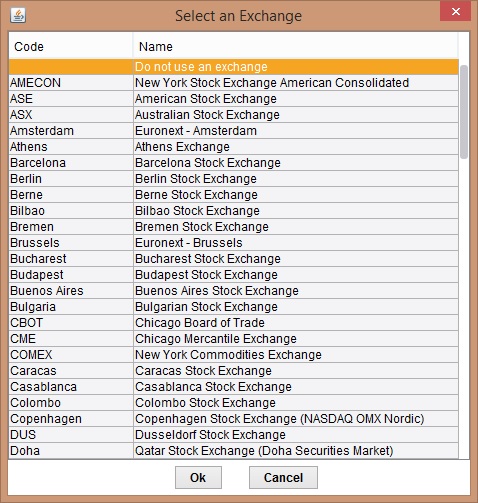
Select the exchange you are interested in and click on OK. You will see the selected Exchange in the Exchange column. You can remove this by double clicking on the Exchange and choosing the top line of the Exchanges table.
You can check what Ticker will be used by right clicking the Exchange field for the row you are interested in. You will see a screen like this:

As you see you can test the ticker. This will send a test to the selected source. You will receive a message saying whether or not the test was successful.
You can also copy the constructed Ticker to the clip board.
You can also set the Exchange on all lines to the selected Exchange.
There are 5 different sources to select from. The are from two web sites: The Financial Times and Yahoo Finance. To select a source click on the Source Column (6) and select the Source you require. These are:
- FT - retrieves the current price from the Financial Times
- FT HD - retrieves the current price and any missing prices since the last run from the Financial Times (note 1)
- Yahoo - retrieves the current price from Yahoo Finance (note 2)
- Yahoo HD - retrieves the current price and any missing prices since the last run from Yahoo Finance (note 1)
- Alpha Vantage
Note 1 - If you have selected 'Retrieved Missed Prices' on the Parameters tab (see) Quote Loader will retrieve all prices available since the Price Date (8).
Note 2 - Alpha Vantage requires you supply an 'API Key'. You can obtain one from Alpha Vantage API Key. This will restrict you to 25 quote retrievals per day. You need to save the API Key on the Parameters Page. More information on Alpha Vantage can be found Here
You can set every line by Right Clicking the Header for the Source column. You will see a menu like this:

You can set all lines to the same source by selecting the appropriate line.
You can also exclude the lines with 'Do not load' in them by selecting the bottom line. You can redisplay them selecting the same entry again. It will have changed to 'Include 'Do not load'.
Once you have set up your settings click on 'Save Changes' (9) to save them to the parameters file. To get the prices click on 'Get Prices' which will execute the quote mechanism (see).