Certificates
For most hosts you never open this page: with Auto SSL on, Caddy obtains and renews a certificate from Let's Encrypt (ZeroSSL as fallback) using the HTTP-01 challenge. Use the Certificates page when you need a wildcard, a host that is not reachable on port 80, a certificate bought or issued by an internal CA, or when another service must reuse the certificate Caddy obtains.
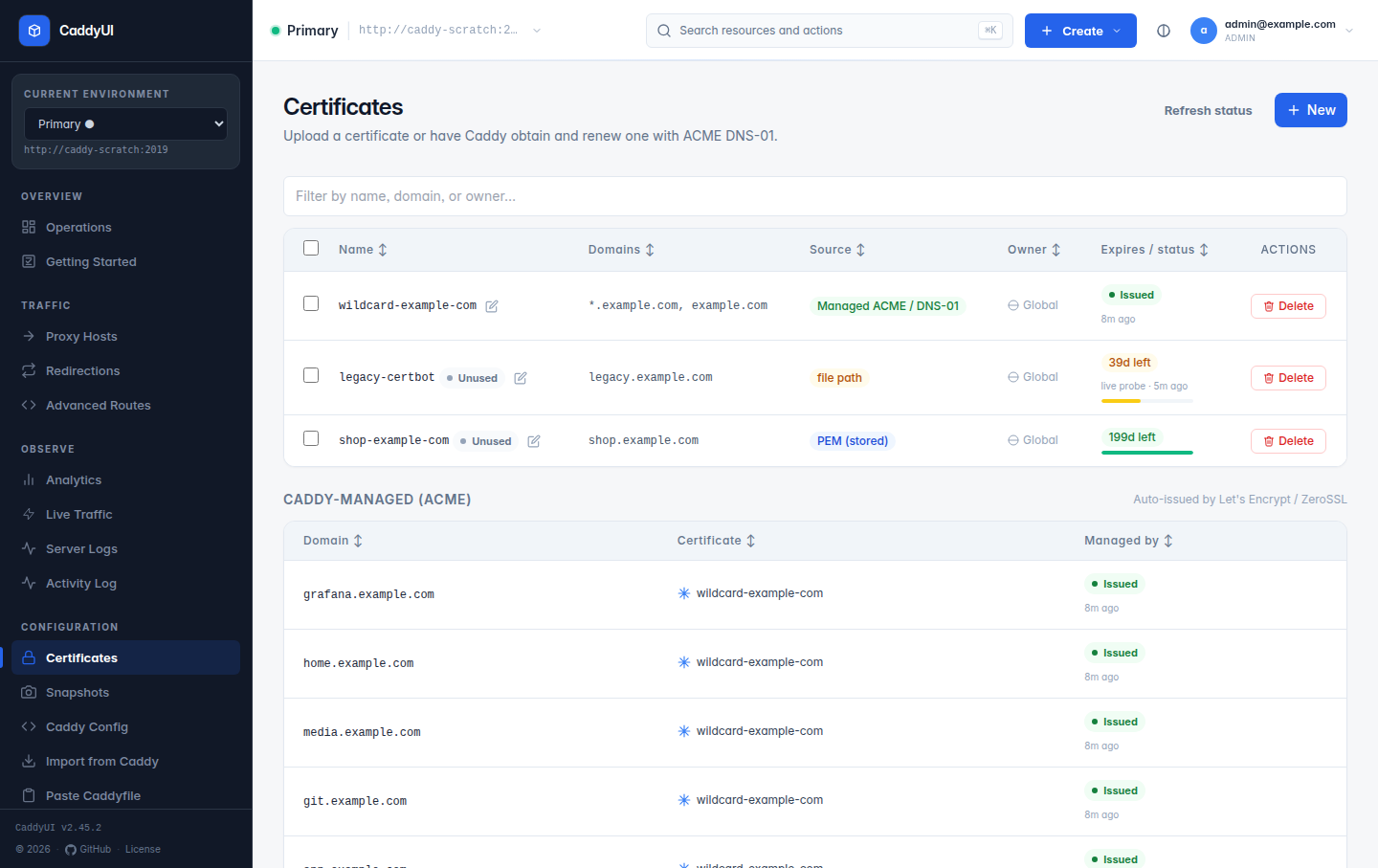
- What the page shows
- Managed ACME (DNS-01) wildcards
- Stored PEM certificates
- File-path certificates and the live TLS probe
- Export a managed certificate to a directory
- Fleet sync and Also configure on
- Unused certificates
- Expiry alerts
- Caddy-managed (ACME) — every domain Caddy issues for automatically: proxy hosts, redirections and enabled Advanced routes. Each row names the managed wildcard reused for it or says Direct certificate, and shows the lifecycle state reported by that node (obtaining, renewing, retry scheduled, issued, revoked, issuance error) with Caddy's latest message. Lifecycle states arrive through the log ingest listener, so each node needs a reachable ingest target (Caddy Fleet).
- Custom certificates — the ones you created here, with source, domains, expiry, days left and where they are used. Inspect shows the parsed certificate, and the Live check card compares it with what the node is serving.
- Save the provider credentials under Settings → DNS (DNS Providers). The connected Caddy must include the matching
caddy-dnsmodule; the repository'sDockerfile.caddyincludes all eight. -
Certificates → New, choose Managed ACME (DNS-01), pick the credential profile and enter
*.example.com(optionally also*.sub.example.com). - If you manage several servers, tick them under Also configure on. Each server performs its own ACME order and keeps its own private key.
- Leave matching proxy hosts on Auto. CaddyUI detects the covering wildcard and suppresses the redundant exact-host order while keeping HTTPS enabled.
- Edit the certificate later to see live expiry, issuer, deployment and renewal health on every configured server.
A managed wildcard is a certificate-only fallback: requests that match no host get a 404. A wildcard covers one label: *.example.com covers app.example.com, not deep.app.example.com or the bare apex. Proxy Also deploy to discovers any managed wildcard covering the hostname and copies its definition to the targets automatically. No fake proxy host, pasted PEM or exported private key is needed.
Route 53 users: the selected hosted-zone ID is passed to Caddy so _acme-challenge records cannot drift into a similarly named split-horizon zone. Turn off Create public A records on a host when the name is internal; DNS-01 keeps working.
For a service on a private network where a publicly trusted certificate isn't wanted or possible, a proxy host can be served from Caddy's built-in internal CA instead of ACME. On the proxy host's TLS section (with the certificate left on Auto), tick Internal CA (self-signed). On the next sync CaddyUI emits a tls.automation policy scoped to that host's domains with the internal issuer, and excludes the host from DNS-01 issuance — the equivalent of a tls internal block in a Caddyfile.
- The
internalissuer is a core Caddy module, so no special Caddy build is required (unlike DNS-01, which needs the matchingcaddy-dnsmodule). - Clients must trust Caddy's root CA, or they will see a certificate warning. Caddy's local root is under its data directory (
pki/authorities/local/root.crt); install it on the machines that reach the service. - Only applies when the TLS certificate is Auto. A custom stored/file-path certificate or a managed DNS-01 certificate still takes precedence, and a host under a covering wildcard managed certificate is left to that certificate.
- Added in v2.46.0 (discussion #91).
Paste the certificate chain and private key. CaddyUI stores them in its database, loads them into Caddy on every sync, and reads expiry and issuer from the PEM. Save again after replacing the PEM to push a renewal. Import SSL from Porkbun on the Certificates page pulls a domain's bundle straight from a Porkbun account when Porkbun credentials are saved.
A file path certificate names files inside the Caddy container, for example a certbot-managed wildcard mounted at /certs. Caddy loads them when its config loads, and CaddyUI writes a real tls /certs/fullchain.pem /certs/privkey.pem line for the host.
Since v2.42.1 a path Caddy cannot open is refused at save time: Caddy cannot open /path for certificate X … the file must exist inside the Caddy container: mount the directory into Caddy or paste the PEM instead. Before that, such a host was saved and every later sync failed silently.
CaddyUI runs in its own container and usually cannot read those files, so since v2.39.0 it fills in expiry, issuer and days left by opening a TLS connection to the Caddy node for the certificate's domain and reading what is served: every 30 minutes, after you save, and on Refresh status. Rows are marked live TLS probe and Inspect shows the served certificate plus a Live check card.
To let CaddyUI read the files too, mount the same directory into the CaddyUI container read-only at the same path (- /certs:/certs:ro). Inspect then reads the file directly and the Live check tells you whether Caddy is serving that exact certificate. After a renewal on disk the two differ until Caddy reloads, and the page says so.
Other services on the host (a mail server is the usual case) need the certificate Caddy obtains, again after every renewal. Since v2.42.0:
- Mount the node's Caddy data volume into the CaddyUI container, read-only is enough:
caddy_data:/caddy-data:ro. - Enter that mount path as the server's Data directory under Caddy Fleet → edit.
- On the managed certificate, set an Export directory and file names (defaults
fullchain.pemandprivkey.pem). The directory is a path inside the CaddyUI container, typically a bind mount the consuming service also sees.
CaddyUI finds the newest certificate Caddy stored for the definition's domains (across issuers, wildcards included) and copies chain and key atomically, key readable by owner only. Exports run when the node reports an issuance or renewal, every 10 minutes as a safety net, after you save, and on Export now; nothing is rewritten while the serial is unchanged. The form shows the last export (serial, expiry, files or the error) and every export lands in the Activity log. A wildcard a certbot job maintained for a mail server can therefore move to Managed ACME.
Since v2.41.0 Caddy Fleet → Sync configuration and the certificate form's Also configure on copy every kind of certificate:
- Managed — the definition is copied; each target performs its own ACME order.
- PEM — certificate and key travel with it. Save again after replacing the PEM to push a renewal.
- File path — copied as stored PEM when CaddyUI can read both files, otherwise by path reference, in which case the sync summary and Activity log say so and the files must exist on the target at the same paths.
Proxy hosts, redirections and Advanced routes that a sync or Also deploy to creates on a target keep referencing the copied certificate instead of falling back to Auto TLS; existing target hosts keep their own choice. Private ACME keys are never transferred.
The Operations dashboard recommends cleaning up PEM and file-path certificates no resource references, names them, and opens a filtered list with an Unused marker per row. Standalone managed wildcards are never counted as unused. The recommendation can be dismissed per environment and returns when the set changes.
Set Settings → Notifications → days before expiry. Warnings go out by email, webhook or ntfy once per 24 hours per domain while inside the window, for custom certificates and for what the live probe sees.