Settings
Since v2.44.0 Settings is a set of pages, each with its own Save that writes only the fields on that page. /settings opens General; each page lives at /settings/<page>, and old links such as /settings#settings-smtp are redirected to the right page. Saving General, DNS, Security, Analytics or Integrations triggers a Caddy sync because those settings shape the generated config. Notifications, AI assistant and Backup never reach Caddy and do not sync.
Only administrators can open Settings.
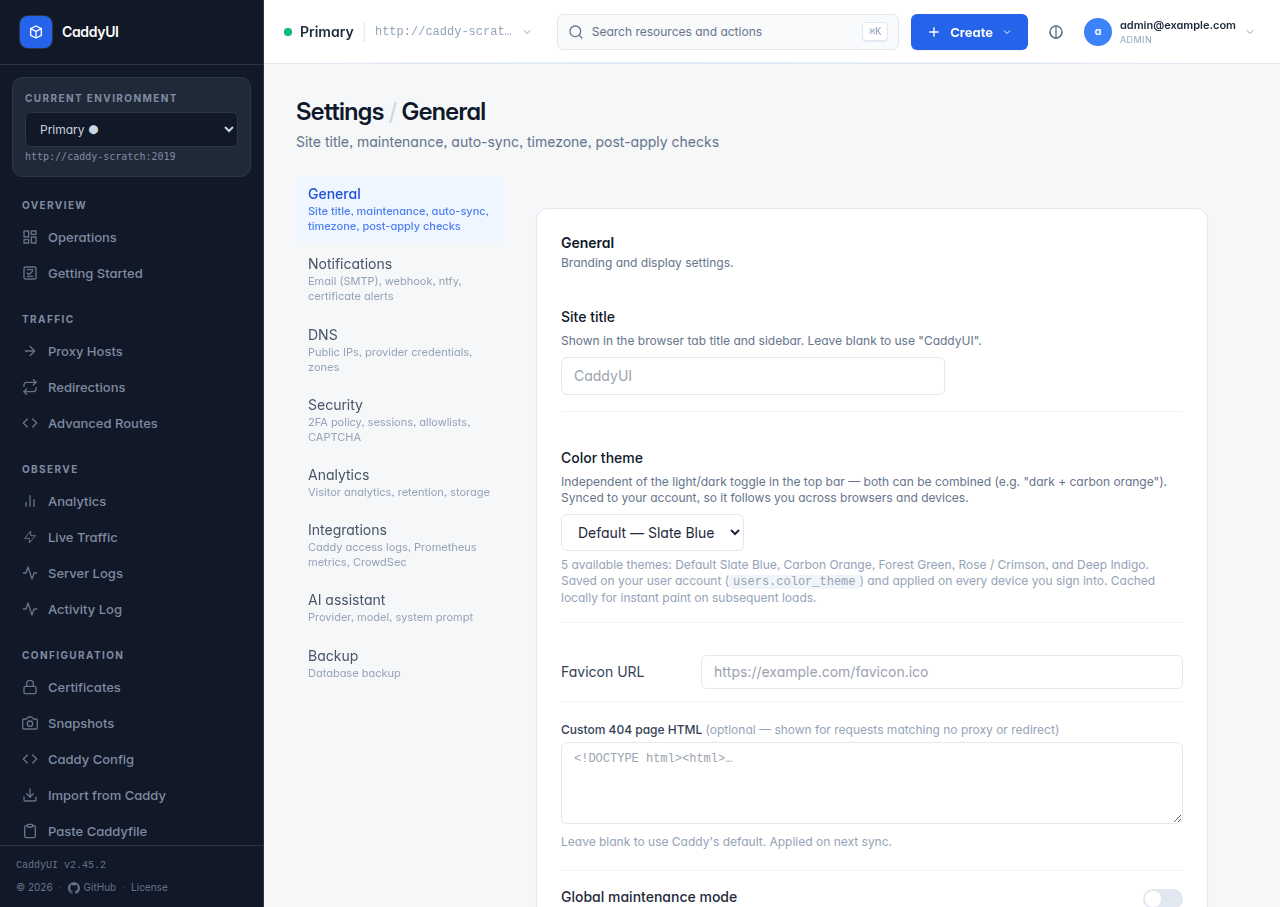
| Field | Meaning |
|---|---|
| Site title, favicon URL | Branding of the UI itself. |
| Custom 404 page HTML | Shown for requests that match no proxy host or redirect on the CaddyUI-generated catch-all. Leave blank for the built-in branded page. |
| Global maintenance | Puts every host on the selected server into maintenance mode at once. |
| Periodic auto-sync interval (hours) | Re-pushes the database state to Caddy on a timer; 0 disables. Useful when something else occasionally edits Caddy. |
| Activity log retention (days) | Auto-deletes Activity log rows older than this; 0 keeps everything. |
| Globally stripped response headers | Header names removed from every response of every host, in addition to each host's own strip list. |
| Timezone | IANA zone for all server-side dates. Overrides the TZ environment variable. |
| Post-apply checks → Roll back automatically | When an expectation fails after a sync, load the previous config back into Caddy and pause automatic syncs for that server. Off means report-only. |
- Email (SMTP) — host, port, username, password, From, To, security (STARTTLS on 587, implicit TLS on 465, plain on 25) and a skip-verify switch for self-signed relays. Send test email checks the whole chain.
- Webhook — a generic JSON POST with an optional signing secret. Send test webhook is available.
- ntfy — a topic URL plus optional access token for push notifications.
- Certificate alerts, days before expiry — how far ahead expiry warnings fire. Expiry emails go out once per 24 h per domain while inside the window; upstream-health emails fire on state changes (healthy → down, down → recovered), checked every five minutes.
Saved passwords and secrets are never rendered back into the form. A •••••••• placeholder means one is stored; leave the field blank to keep it.
- Public IPs — one Server IP per Caddy Fleet entry (the WAN address that server's A records should point at) and a Default Server IP used when a server's row is blank. Changing an IP re-points every record CaddyUI manages across all providers in one background pass; records it did not create are never touched.
- Provider profiles — one card per provider (Cloudflare, Porkbun, Namecheap, GoDaddy, DigitalOcean, Hetzner, Amazon Route 53, Gandi) with the provider's credential fields, a profile name, an optional Allowed zones list to limit which domains the picker offers, Proxied for Cloudflare's orange cloud, and Test to check the credentials. Credentials are only collected on this page and can be cleared per provider.
Details per provider are on DNS Providers.
| Field | Meaning |
|---|---|
| Require TOTP for all users | Every user must enrol two-factor authentication before reaching the dashboard. |
| Require 2FA for all users | Users without TOTP are sent to the setup page before any other page. |
| Session duration (days) | How long a login cookie stays valid. |
| Max login attempts | Lockout threshold for failed logins from one address. |
| Admin IP allowlist | One IP or CIDR per line. When set, only listed addresses can reach CaddyUI at all. Include your own IP before saving. |
| Trusted proxy IPs/CIDRs | Ranges allowed to set X-Forwarded-For; written into both generated Caddy servers so logs, CrowdSec and CaddyUI's own login checks see the real client. |
| Client IP headers | Which headers Caddy should trust for the client address behind Cloudflare or another load balancer (client_ip_headers). |
| Disable HTTP/3 (QUIC) | Turns off the UDP listener on the generated servers. |
| Login CAPTCHA | Off, Cloudflare Turnstile (site key + secret) or reCAPTCHA v3 (site key, secret, minimum score). |
Roles, groups, sessions and the hardening CaddyUI applies by default are described in Security and Users.
| Field | Meaning |
|---|---|
| Visitor analytics | Opt-in. When on, CaddyUI installs a named log stream in Caddy that ships access logs to the ingest listener. |
| Log ingest target | Host and port every managed Caddy node should send logs to, default caddyui:9019 on the repository Docker network. A node on another host cannot resolve that name; give it its own target on its Caddy Fleet entry. The page warns when the fleet-wide default is not enough. |
| Soft start, dial timeout | Caddy's log writer keeps starting even while CaddyUI is offline and gives up on a dial after the timeout, so Caddy never blocks on CaddyUI. |
| Exclude IPs | Addresses (your own, monitoring probes) that should not be counted. |
| Keep raw events for N days | Retention of raw access events, default 30, 0 keeps forever. Per-day totals per host live in a separate rollup, so shortening retention does not blank long-range charts. |
| Storage panel | Database file size, free space inside the file, oldest and newest event, the last prune and the last reclaim, with Prune now and Reclaim space (SQLite VACUUM in the background, refused when the volume lacks room for a full copy; on MariaDB the panel points at OPTIMIZE TABLE). |
The ingest listener also carries certificate lifecycle events and Server Logs, so the target matters even with visitor analytics off. See Observability.
- Caddy file access logs — write native JSON or console access logs to a file inside selected Caddy containers, with scope (HTTP, HTTPS or both generated servers), file path, maximum size, retained files and retention days. Independent of visitor analytics: enabling one never removes the other.
-
Prometheus metrics — enable Caddy's base HTTP metrics on selected servers, add per-host labels, and optionally observe catch-all hosts (Caddy 2.11+, can create unbounded cardinality on public listeners). The card shows each server's scrape target,
http://<admin-url>/metrics, which must stay on a private network. -
CrowdSec — LAPI URL and bouncer key (masked once saved), streaming mode, decision refresh interval, hard-fail when the LAPI is unavailable (off by default to preserve availability), selected servers, exact-host and path-pattern exclusions, module validation before save and Test connection. CaddyUI injects the bouncer handler before every protected proxy, redirect, advanced and plain-HTTP route. Requires a Caddy build with
github.com/hslatman/caddy-crowdsec-bouncer/http, which the repository'sDockerfile.caddyincludes.
Provider (Ollama local, Ollama Cloud, Anthropic Claude, any OpenAI-compatible endpoint), model, API key or base URL, and a custom system prompt. Switching providers keeps the other providers' credentials. See AI Assistant.
On SQLite, a Download database backup button (/backup) returns the full database file. On MariaDB the page explains that backups are handled by the database platform. Configuration snapshots are on their own page: Snapshots and Backup.