msa editors common preview brows
Each editor includes a built-in preview pane for viewing schedules and reports. If you want to use your preferred web browser or compare how the layout is rendered, you can also open the current schedule or report in an external browser.
Select File > Preview in Browser, then choose one of the installed web browsers from the submenu. The current schedule or report opens in the selected browser.
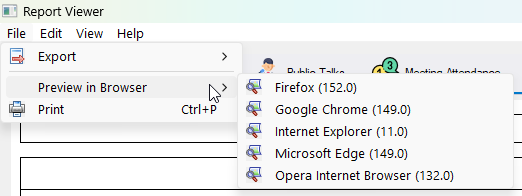
Figure 229. Selecting a web browser from the Preview in Browser submenu.
The Preview in Browser submenu lists any of the following browsers that are installed on your computer:
- Firefox
- Google Chrome
- Microsoft Edge
- Opera
- Parent topic: Common Features
- Previous topic: PDF Settings
- Next topic: Zoom Controls