msa tools report viewer export
- File → Export
- Right-click a schedule and select Export
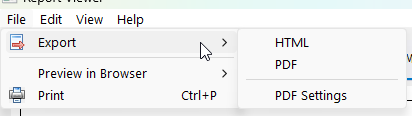
Figure 26. Export menu showing the available export formats.
Reports can be exported in the following formats:
All built-in schedule templates can be exported directly to HTML. If you are using a custom or modified template, additional configuration may be required. See the Exporting to HTML help topic for more information.
Exports the schedule as a PDF file. PDF output is controlled using the PDF Settings in Common Features.
💡 You can also generate a PDF using print preview to visually check the layout before exporting.
- Parent topic: Report Viewer
- Next topic: Menu Bar