srr editor file export
- File → Export
- Right-click a schedule and select Export
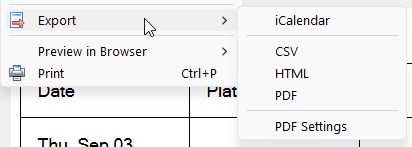
Figure 188. Export menu showing the available export formats.
Assignment schedules can be exported in the following formats:
- Editor tab: CSV and ICS exports
- Preview tab: All export formats (CSV, ICS, HTML, PDF)
Exports the schedule to a CSV (.csv) file.
This format provides a simple, text-based representation of your data.
- Each value is enclosed in quotes and separated by commas.
- CSV files can be opened in Microsoft Excel or used in Microsoft Word for mail merge operations.
Exports selected data to an iCalendar (ICS) file. These files can be imported into many calendar applications (e.g. Thunderbird, Google Calendar, Outlook, or Yahoo) because the format is a universal standard.
All built-in schedule templates can be exported directly to HTML. If you are using a custom or modified template, additional configuration may be required. See the Exporting to HTML help topic for more information.
See also: Report Settings
Exports the schedule as a PDF file. PDF output is controlled using the PDF Settings in Common Features.
💡 You can also generate a PDF using print preview to visually check the layout before exporting.
- Parent topic: Assignments Editor
- Previous topic: Preview Tab