Backup Recovery and Migration
FolderView Plus provides type-specific snapshots, full environment exports, import previews, migration compatibility, comparisons, restore, and undo. Local recovery data lives on the Unraid flash device, so keep an external export for device loss or uninstall.
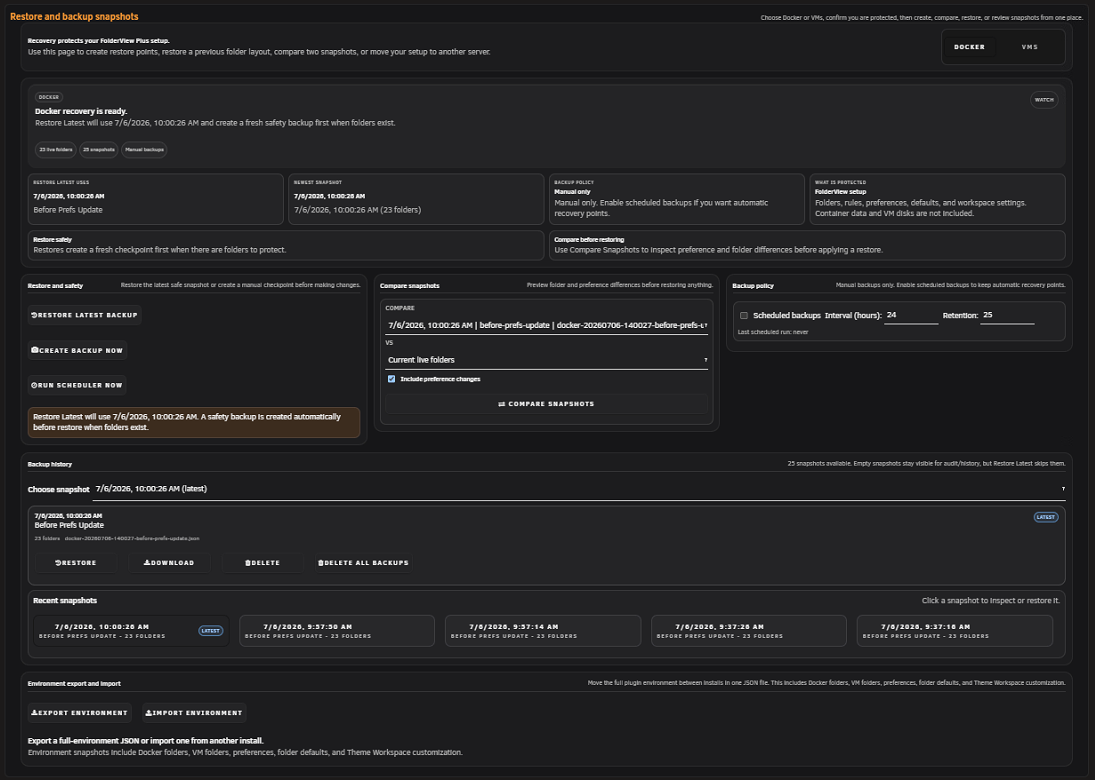
Open Advanced -> Recovery, choose Docker or VM, and create a manual snapshot. Scheduled backups can be enabled with a schedule and retention count; the installer registers the supporting cron entry.
The backup history supports restore, download, compare, and delete. Empty snapshots are skipped by restore workflows so a blank backup does not replace a working layout.
Supported imports, restores, bulk assignments, template applications, deletes, and other destructive operations create a safety snapshot before commit. When an undo-capable snapshot exists, the recent-change workflow can restore it.
Undo is not unlimited history. If the required snapshot has been deleted or the entire plugin directory is lost, use an external export.
Select two snapshots and review folder/pref differences before restore. Comparisons explain creates, updates, deletes, and changed fields without applying them.
| Mode | Behavior | Best use |
|---|---|---|
| Merge safely | Adds missing folders and updates matches; does not delete destination-only folders. | Most migrations and routine imports. |
| Add new only | Creates missing folders and leaves existing folders unchanged. | Preserve the destination as authoritative. |
| Replace exactly | Makes destination match the export and may delete absent folders. | Controlled full replacement with a verified source of truth. |
Changing mode recalculates the preview. Preview only performs no write. A live import creates a transaction backup and attempts automatic rollback if commit fails.
Screenshot placeholder — import preview
Capture mode choices, change totals, and a few fictional create/update/delete rows. Exclude local filenames and real workload names.
The Recovery workspace can move Docker folders, VM folders, preferences, folder defaults, and Theme Workspace customization in one JSON file. Store environment exports securely: unlike sanitized diagnostics, they are intended to preserve real configuration.
FolderView Plus supports eligible exports and installed data from folder.view, folder.view2, and folder.view3, including legacy labels, nested identities, regex values, and custom override roots.
Recommended migration:
- Export Docker and VM data from the old plugin.
- Copy old configuration and overrides off-server.
- Install FolderView Plus without deleting old data.
- Detect or preview migration read-only.
- Use Merge safely unless exact replacement is intentional.
- Review hierarchy/path conflicts instead of guessing.
- Apply and verify Settings, Docker, VMs, and Dashboard.
- Keep old data until the new layout is proven.
Legacy Docker labels supported include folder.view, folder.view2, folder.view3, and folderview.plus.
Current exports carry schema and folder identity metadata. Older exports may rely on names and hierarchy paths. Parents are processed before descendants; ambiguous collisions become conflicts. Avoid manually editing IDs.
If /boot/config/plugins/folderview.plus was restored, reinstall the matching manifest and verify Diagnostics. If it was not restored, install cleanly and import the external environment/file exports. Local backups were inside the lost directory and cannot be recovered from the plugin itself.
- Stop making further destructive changes.
- Record current plugin version and error.
- Export current state if it is still readable.
- Compare snapshots before restore.
- Restore the narrowest correct Docker/VM snapshot.
- Verify runtime pages and diagnostics.
- Keep the pre-restore safety snapshot until satisfied.
See also: Installation and Upgrades · Troubleshooting