Docker Start Order
Advanced -> Start Order previews and manages Unraid's native Docker autostart sequence. It is separate from starting or stopping containers on the current Docker page: saved changes take effect the next time the Docker service starts, such as during a server reboot.
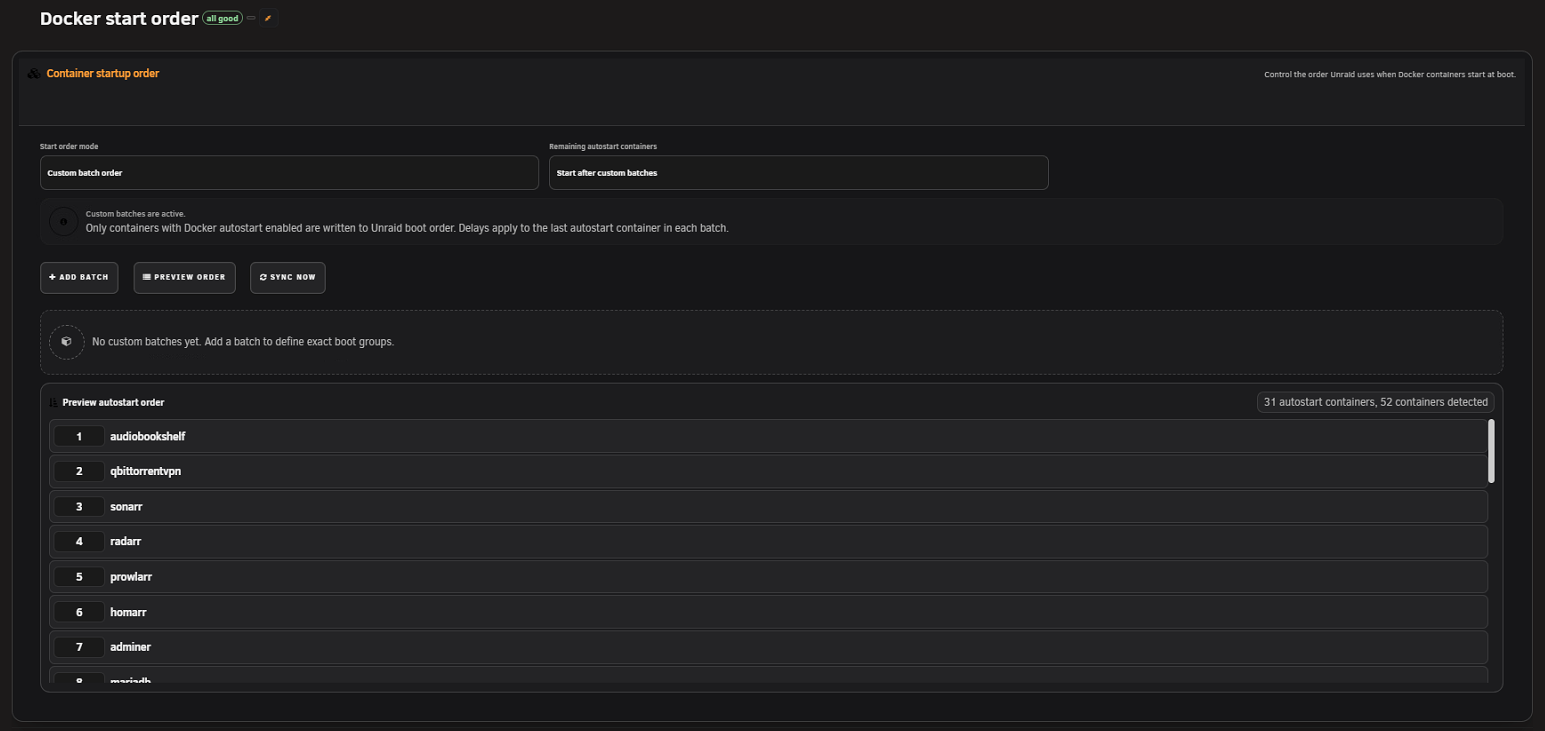
| Mode | Ownership and behavior |
|---|---|
| Leave Unraid order unmanaged | Read-only preview of Unraid's current sequence. FolderView Plus does not rewrite the autostart file, and Sync now is disabled. |
| Follow Docker page order | Flattens the effective Docker page order, including containers inside folders, into Unraid's autostart sequence. |
| Custom batch order | Builds explicit phases from folders and individual containers. Only containers with native Docker autostart enabled are written into the sequence. |
Changing mode edits the plan; use Preview order to inspect the resolved sequence before writing it.
Screenshot placeholder — start-order mode and sequence
Capture the three-mode selector, Remaining autostart containers policy, sequence table, wait controls, and enabled switches with fictional containers.
Custom batches may not mention every autostart-enabled container. Choose how those remaining containers are placed:
- Start after custom batches
- Start before custom batches
- Keep their current relative order
The policy changes placement, not membership. Native autostart still determines whether a container participates.
Each batch can contain folder references and individual containers. You can:
- Name and reorder batches.
- Add, remove, and reorder batch items.
- Use the folder's saved member order or the explicit item order.
- Set a delay after the batch from 0–3600 seconds.
- Mark the batch with the parallel note used by the planner.
Folder references are resolved against the current folder hierarchy and inventory at preview time. Missing, duplicate, or stale identities appear as warnings instead of being guessed.
Screenshot placeholder — custom startup batches
Capture two test batches, one folder item, one individual container, member-order selection, and a short delay. Do not expose production service names.
The preview table exposes a 0–3600 second wait for each participating container. A custom per-container wait is the most direct control. Batch delay is applied to the final autostart container resolved for that batch. Review the displayed sequence after changing either value; it is the authoritative plan that will be synchronized.
Waits are elapsed-time delays. FolderView Plus does not probe HTTP endpoints, Docker health checks, databases, or application readiness.
The sequence table includes an Enabled switch backed by Unraid's native Docker autostart setting. Turning it off removes that container from future autostart sequences. The Autostart disabled disclosure lists disabled containers and lets you enable one so it can enter the plan.
Changing autostart is a real host configuration change, not a display-only filter. Review the container and confirmation carefully.
Screenshot placeholder — autostart disabled disclosure
Capture the collapsed and expanded disclosure using fictional stopped containers. Do not include production names.
- Confirm native autostart for every intended container.
- Select a mode and remaining-container policy.
- Build custom batches when applicable.
- Click Preview order.
- Review every sequence row, wait, enabled switch, warning, disabled item, and stale entry.
- Resolve missing or duplicate identities.
- Click Sync now only in a managed mode.
- Reopen and preview again to confirm the saved host sequence.
- Verify actual startup during a controlled maintenance-window reboot or Docker-service restart.
Stale entries reference containers no longer present in current inventory. Preview identifies them, and a managed synchronization removes them from the saved order.
- Record or export the previous order before a large change.
- Keep critical dependencies in small, understandable phases.
- Do not use long delays to conceal an unresolved dependency problem.
- If FolderView order and host order disagree, confirm the selected mode and rebuild the preview.
- Switch to unmanaged mode when Unraid should remain the sole owner.
- After unexpected behavior, compare the preview with native Docker autostart settings before synchronizing again.
- This controls Docker autostart only, not VM autostart.
- It does not start or stop containers immediately.
- It does not wait for application health or replace Compose dependency management.
- It cannot safely order a container missing from current inventory.
See also: Docker · Backup, Recovery, and Migration · Troubleshooting