Home
A control plane for a whole VPS of Minecraft proxy bots — AquariusProxy and ZenithProxy (and custom forks) — driven from a CLI and a web UI. Spin up a fresh box, install the manager, deploy proxies, then monitor and operate them all from one dashboard.
Pure Python standard library + tmux. No pip installs, no Docker, no database.
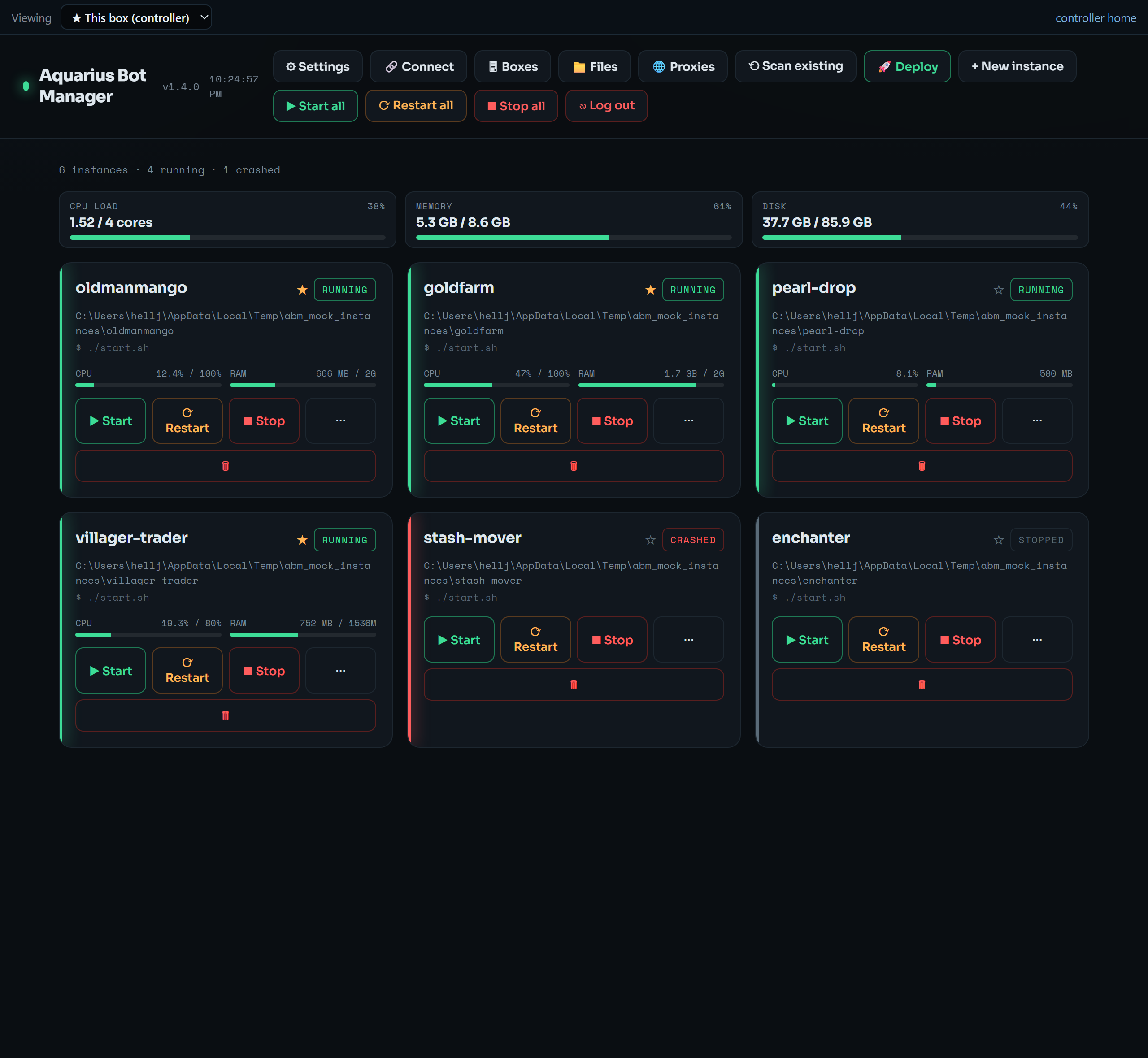 The dashboard: a host gauge strip (CPU / memory / disk) above one card per bot — status, live CPU/RAM, and start/stop/restart.
At its core each manager controls only the bots on the machine it runs on — local tmux sessions, local /proc monitoring, local cgroup limits, local deploy dirs. Its core design is many bots consolidated on one VPS, using proxies for per-bot IP diversity.
As of v1.4.0 a manager can additionally act as a controller that connects to your other boxes over SSH tunnels and drives them all from one dashboard — see the Multi-VPS Controller. The per-box engine is unchanged; the controller is a layer on top. Read Architecture and Limitations before you install.
- Lifecycle — start / stop / restart / view logs for every bot, one or all at once.
- Live Control Surface — a front-facing cockpit per bot: live module toggles, vitals, a command palette, live per-module config + list editors, and an interactive Live Map (click to fly) with a full fullscreen satellite map (2b2t.place tiles, grid/highway overlays, Xaero-scale zoom), in three switchable themes. See Control Surface.
- Live console — attach to each bot's stdin/stdout, with editable quick-command presets.
- Structured config editor — a curated AquariusProxy/ZenithProxy settings editor with a raw-JSON fallback; Save or Save & Restart.
- Proxies — per-bot host/port/username/password editor, bulk round-robin assignment, and one-click import from a Webshare subscription. See Proxies.
- Monitoring — a host gauge strip (CPU / memory / disk) plus per-bot CPU% and RAM, with alert thresholds.
- Resource limits — enforce per-bot memory/CPU caps via systemd user scopes (cgroups).
- One-click deploy — stand up a new AquariusProxy / ZenithProxy / custom-fork bot from scratch; the launcher self-bootstraps Java and the jar.
- Jailed file manager — browse/edit configs within an allowlist of roots.
- Multi-VPS controller — connect your other boxes over SSH tunnels and run them from one dashboard: a Fleet view, an in-page box switcher, and DigitalOcean connect/provision/destroy. See Multi-VPS Controller.
- Multi-user access & sharing — named user accounts with roles (View / Operate / Config / Admin), fine-grained per-module permissions, and one-time invite links; or hand out tiered shareable links scoped to specific bots. Expose the dashboard publicly with one click via a pluggable tunnel menu (Cloudflare / Tailscale Funnel / ngrok / your own domain). See Security.
- Automation — a scheduler (cron / interval / daily) plus an on-crash watchdog, run across one box or the whole fleet, with optional Discord notifications.
- Themes & visual customization — theme presets + accent swatches, 10 selectable fonts, a custom background image, a density control, and selectable sidebar/command-center layouts.
- Self-update & backup — update the manager in place (with an "update available" badge) and download/restore a portable config backup.
- Reconnect-friendly — bots and the dashboard survive your browser closing or your PC rebooting; a Connect panel hands you a one-click reconnect shortcut.
| Page | What's in it |
|---|---|
| Installation | Fresh-VPS install, access modes (tunnel vs HTTPS), first-run setup, cloud-init, manual install |
| Usage | Dashboard tour, full CLI reference, lifecycle, console, monitoring, reconnecting |
| Control Surface | The live Mission Control cockpit: themes, Live Map, command palette, and the 48-module reference with warnings & caveats |
| Configuration |
instances.json, per-bot fields, autostart/boot, resource limits, settings |
| Proxies | Manual + bulk proxy assignment, Webshare import (both auth models) |
| Multi-VPS Controller | Connect other boxes over SSH tunnels: Fleet view, in-page box switcher, DigitalOcean connect/provision/destroy |
| Fleet (DigitalOcean) | (experimental) CLI-only multi-droplet provisioner that predates the controller |
| Security | The full security model, what dashboard access grants, and what's stored on disk — read this |
| Architecture and Limitations | The single-host model, the multi-droplet fleet path, and where the tool does not fit |
curl -fsSL https://raw.githubusercontent.com/aquariusnetwork9/Aquarius-Bot-Manager/main/install.sh | sudo bashIt installs everything, starts the web UI, asks how you want to reach it, and prints the exact next step. Open the dashboard, create your login in the browser, and click 🚀 Deploy. Full detail in Installation.