Proxies
Proxies are how this tool gives each bot its own outbound IP while they all share one VPS. (This is the alternative to running one bot per server — see Architecture and Limitations.) Every proxy edit is written into that bot's client.connection.proxy block in its config.json and takes effect on restart.
Open 🌐 Proxies in the dashboard. Four tools: a per-bot editor, bulk assign/rotate, Webshare import, and a health & auto-fix panel that detects and replaces dead IPs.
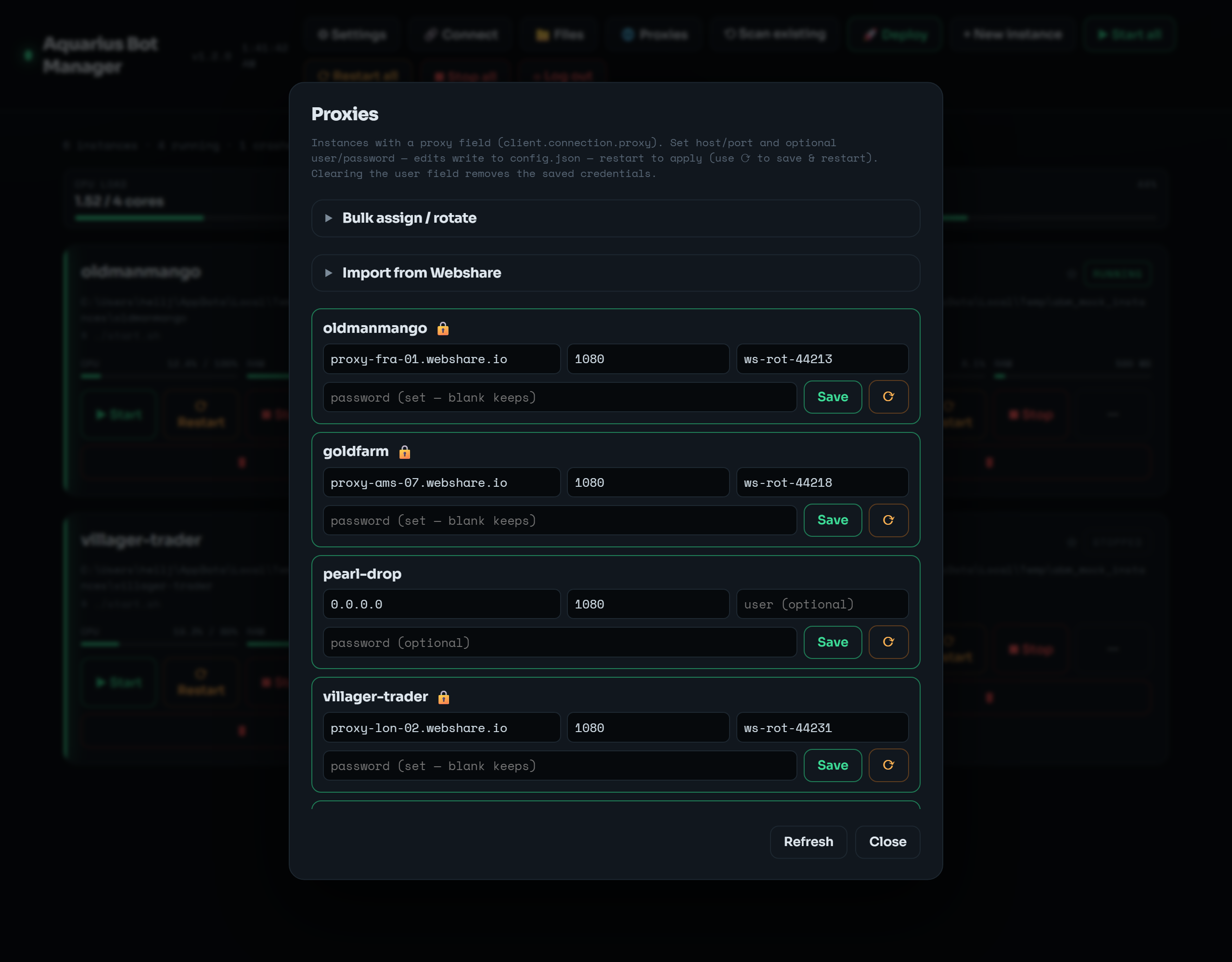 Per-bot host / port / user / password rows, plus the collapsible Bulk assign / rotate and Import from Webshare tools.
Each proxy-capable bot is a row: host · port · user · password, with Save and ⟳ (save & restart).
- Username/password are optional — fill them for authenticated proxies (most paid proxies need them).
- Blank password = keep the existing one (the password is never displayed back, for security, so blank means "leave it").
- Clearing the username removes the saved credentials (drops auth entirely).
- A 🔒 on a row means credentials are set (hover shows the username).
CLI:
abm proxy bot1 --host 1.2.3.4 --port 1080Note: a manual save sets host/port/credentials but does not flip
proxy.enabled. If the bot's proxy was disabled, enable it in the Config editor (client.connection.proxy.enabled). The bulk and Webshare tools enable it for you.
Paste a list of proxies (one per line) and spread them across many bots at once.
- Round-robin — cycle the list across the selected bots (bot1→proxy1, bot2→proxy2, …).
- Random — give each bot a random proxy from the list (unique when the list is at least as long as the target set).
- Same to all — point every selected bot at the first proxy.
- Entries may carry credentials:
host:port,host:port:user:pass, oruser:pass@host:port. - The Errored button selects only the bots whose console currently shows proxy errors (see Proxy health below), so you can reassign just the broken ones from a pasted list.
CLI:
abm proxybulk --list "1.2.3.4:1080,5.6.7.8:1080" --targets all --mode roundrobin --restart
abm proxybulk --list "..." --targets errored --mode random --restart # fix only broken botsIf your proxies come from a Webshare subscription, 🌐 Proxies → Import from Webshare pulls the live list straight from their API and round-robins it across your bots — no copy-paste.
Steps:
- Get your API token from the Webshare dashboard → API.
- Paste it into the token field. Pick the auth model (below). Optionally filter by Countries (e.g.
US,CA) and Valid only. - Count previews how many would import (changes nothing). Import & assign writes them.
| Model | What it writes | When to use |
|---|---|---|
| User / pass | each proxy's host:port and its username + password |
Anywhere. No whitelisting needed. The password lands in config.json. |
| IP-authorized |
host:port only, and wipes any stale credentials |
First add this VPS's public IP to Webshare → IP Authorization. Then the proxies need no credentials. |
Each imported proxy is enabled and set to type HTTP. The target set is shared with the Bulk panel.
CLI:
abm webshare count  --token <KEY>                              # how many would import
abm webshare import --token <KEY> --auth userpass --save-token --restart
abm webshare import --auth ip --countries US,CA                # reuses the saved token
The token can also come from the WEBSHARE_TOKEN environment variable.
Save token stores it under settings.webshare in instances.json, base64-obfuscated so it's not eyeball-plaintext. instances.json can recover it. See Security.
Webshare (and other providers) periodically remove proxy IPs — for performance, abuse, or plan changes. When that happens a bot keeps trying its now-dead IP and spews proxy errors in its console while making no progress. The Proxy health & auto-fix panel (top of 🌐 Proxies) finds and fixes these in one place.
- Scan reads each running bot's console and flags the ones showing proxy errors, with the matching line as evidence so you can confirm it's a real proxy fault (not just a transient hiccup).
-
Re-import & fix (Webshare) pulls a fresh proxy list from your Webshare subscription and reassigns it to the chosen bots, then restarts them so the new IP takes effect. Choose:
- Fix scope — Errored only (default), Selected (the chips below), or All.
- Assign — Random (default) or Round-robin.
It reuses the Webshare token + auth model from the Import from Webshare panel (a saved token is reused when the field is blank). To fix from a pasted list instead of Webshare, click Errored in the Bulk panel and apply with Random + Restart after.
Tuning detection. Errors are matched against a default set of patterns covering the common "proxy refused / timed out / unreachable / failed to connect" wordings. If your proxies word their errors differently, add your own to settings.proxy_health.patterns (a list of regexes) in instances.json — the scan's evidence line tells you the exact text to match.
CLI:
abm proxyhealth                                              # list bots with proxy errors
abm webshare import --targets errored --mode random --restart # re-import + fix the broken onesRunning many bots from a single VPS IP is an easy pattern for a server to detect and ban. Proxies give each bot a distinct exit IP. IP-authorized Webshare mode whitelists your VPS IP, which means any process on that VPS (and anyone who shares that IP) can use your proxy pool — prefer user/pass if that matters to you.
Proxies do not make bot activity undetectable, and they don't change the rules of whatever server you connect to. Make sure your use complies with that server's rules and your proxy provider's terms.