Control Surface
The Control Surface turns the bot manager into a live, front-facing cockpit for
each bot — every module, the world map, vitals, and a command palette on one page.
AquariusProxy bots get this built in; ZenithProxy bots get the same surface by
installing the zenith-abm-bridge
plugin (see Requirements below). The proxy console is still there
as a fallback; the Control Surface is the human-friendly way to drive a bot day to day.
Added in ABM v3.0.0. Served per-bot at
/control?inst=<name>and relayed over the same authenticated tunnel as the live viewer — the bot only binds its viewer to loopback, so nothing is exposed publicly.
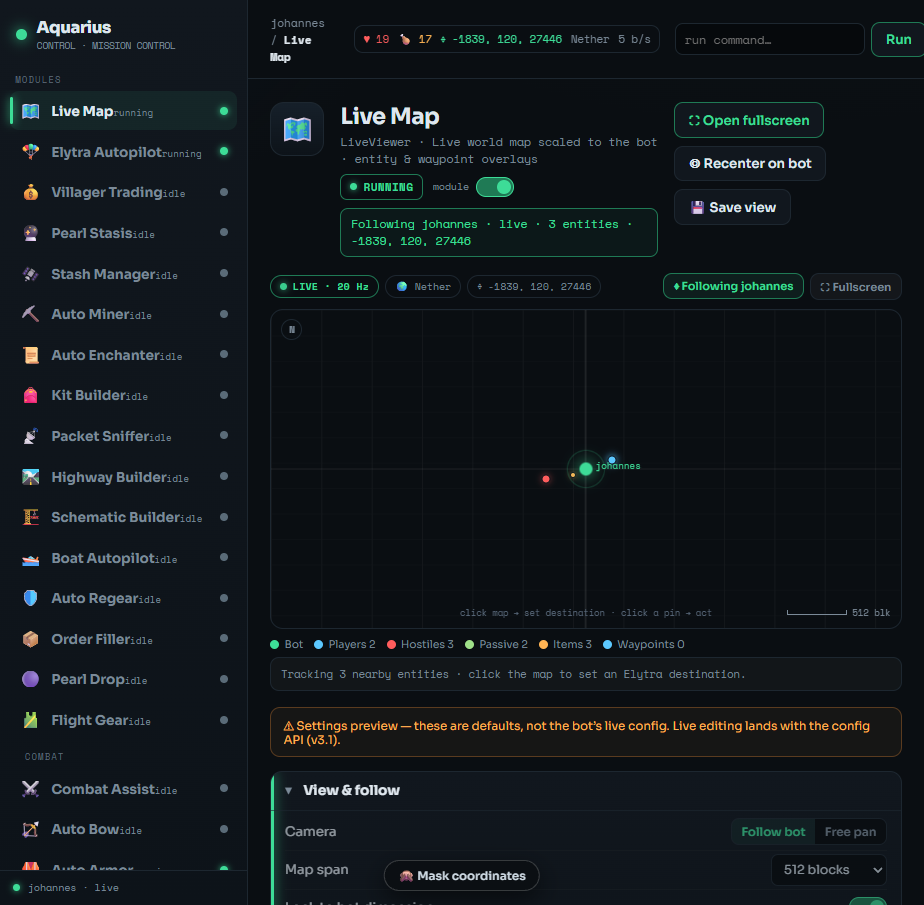
- From a bot's viewer drawer → Control tab, click ⛶ Open full control surface.
- Or go straight to
/control?inst=<bot-name>in the dashboard (same login/session). - Pick the appearance with
&style=v1|v2|v3, or use the appearance dropdown in the top bar (your choice is remembered for next time).
The page boots into the Live Map for the selected bot and starts streaming.
The surface is the same data and the same live wiring rendered three ways. Switch any time from the top-bar dropdown; the Live Map is built into all of them.
| Theme | Style key | Best for |
|---|---|---|
| Mission Control (default) | v1 |
A module rail + one focused workspace. Calm, scales to deep per-module config. |
| Aurora Glass | v2 |
Frosted-glass cards, a pill filter, every module visible at a glance. |
| Console Pro | v3 |
Dense, mono, power-user 3-pane (rail → tables → inspector). Wants ≥ 1080p. |
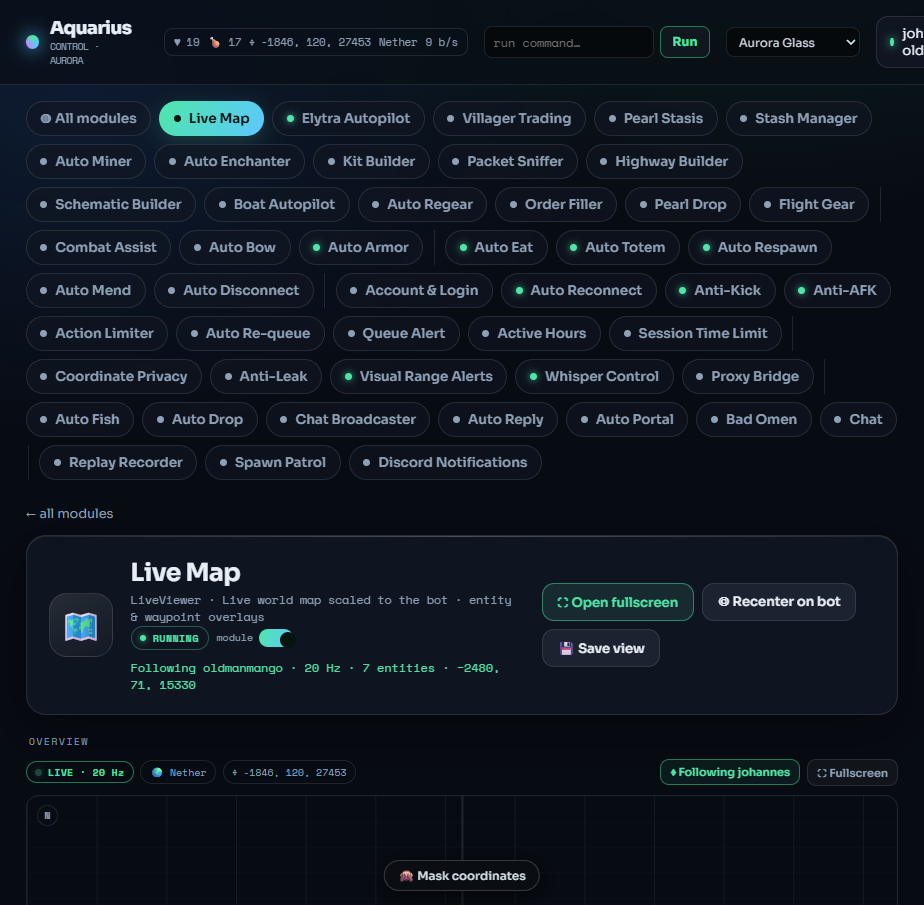 |
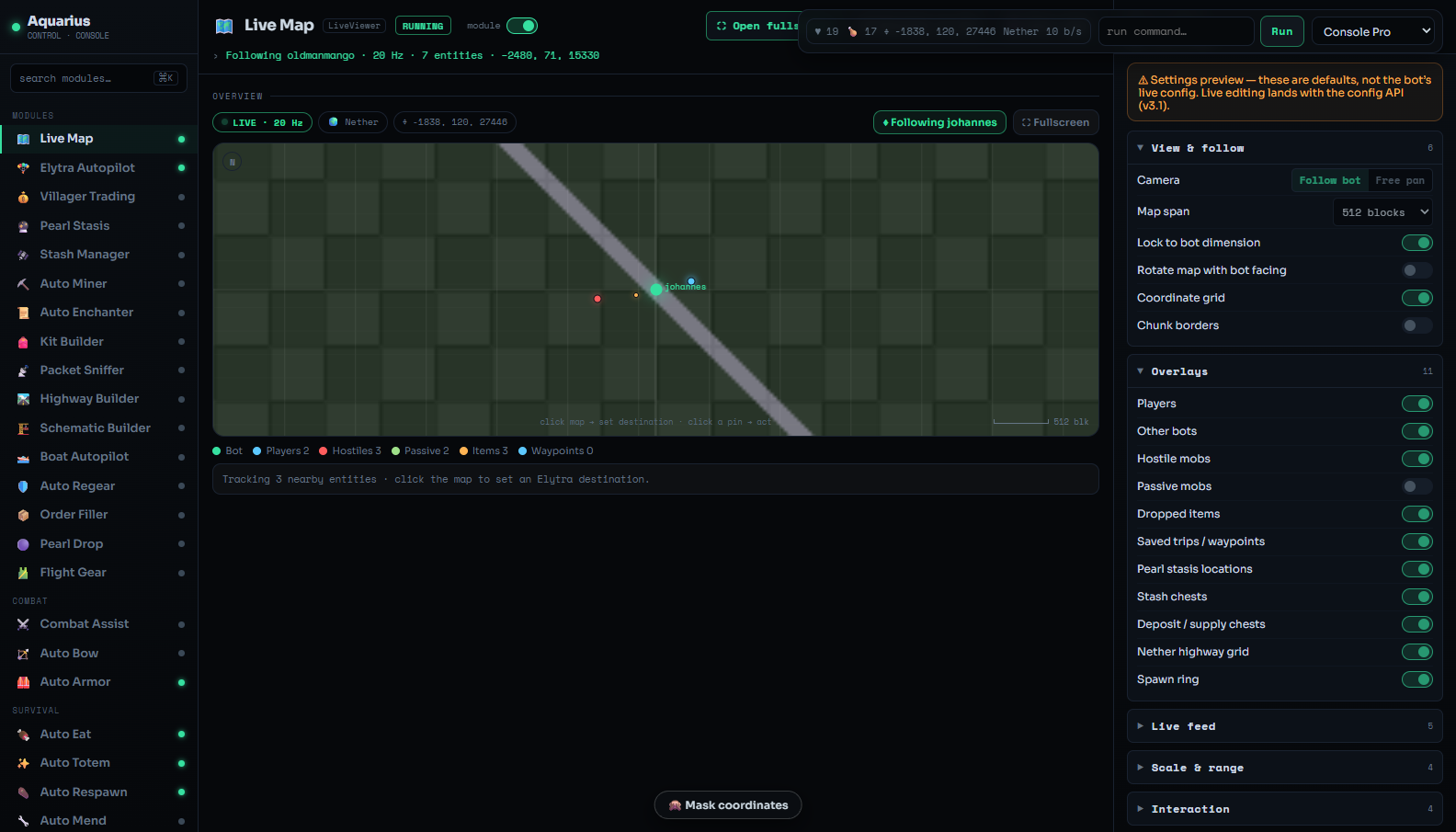 |
| V2 · Aurora Glass | V3 · Console Pro |
| Feature | Status | Notes |
|---|---|---|
| Module states + status dots | ✅ live | From /control/state, refreshed every few seconds. |
| Module enable toggles | ✅ live | Sends <module> on/off; the state poll shows the truth a moment later. |
| Action buttons (▶ run / ■ stop) | ✅ live | Best-effort per module; Elytra's Fly there sends fly trip <dim> <x> <z>. |
| Vitals (health, food, position, dimension, speed) | ✅ live | From the ~20 Hz SSE viewer feed. |
| Live Map | ✅ live | Real bot-centred map tile + SSE entity overlay; click the map to set an Elytra destination. |
| Fullscreen satellite map | ✅ live (v3.19) | Leaflet slippy-map with a 2b2t.place satellite base, grid / highways / obsidian / live-render toggles, bot-follow, and Xaero-scale zoom-out. See below. |
| Command palette / runner | ✅ live | Runs any console command and shows the structured result. |
| Live configuration (per module) | ✅ live (v3.1) | A ⚙ Live configuration panel on each module reads the bot's real config and writes single fields back instantly (GET/POST /control/config); secrets are redacted and never writable. The friendly mockup subcards remain as a read-only overview. |
| List editors — trades · trips · pearls | ✅ live (v3.10–3.11, needs AquariusProxy 5.9.0+ / 5.9.1+ for pearl edit) |
Villager trades, saved Elytra trips, and pearl-stasis locations can be added (+), edited (✎) and deleted (🗑) from the surface. Each shows the bot's real entries; the form validates trades against the real villager catalog and captures chest coordinates. Every coordinate field has a 📍 button that fills x/y/z from the block the bot is looking at (/control/lookingat). Writes straight to the bot's config; gated by the per-module config permission. |
| Item-list pickers | ✅ live (v3.20, needs AquariusProxy 5.12.2+) | The chip + dropdown pickers — Action Limiter illegal items, Auto Eat foods, Auto Miner ore targets, Auto Drop list — show the bot's real list and add/remove persists to it. |
| Villager trade groups | ✅ live (v3.15) | Group trades to share one input-supply profile + self-refill/park behaviour; a Groups manager + a group selector on the trade form. |
| Kit Maker live builder | ✅ live (v3.18) | Build shulker-kit templates on a visual slot grid with per-slot enchant matching, save them to a kit library, and see a green "kits buildable" estimate from stock. |
| Pearl pins on the map | 🧩 planned | A later release; needs new bot-side data exposure. |
Each module's ⚙ Live configuration panel reflects the real, live bot config (since v3.1). The friendly mockup subcards above it are a read-only overview — edit values in the ⚙ panel (or the list editors), which write straight to the running bot.
The map card on the surface is bot-centred and refreshes continuously:
- A real bot-centred map tile, the bot pinned at the centre.
- Entity overlay from the live feed — players (blue), hostiles (red), passives (green), items (amber).
-
Click anywhere → set an Elytra destination. A crosshair drops, the world coordinates
are computed from the bot's position, and ▶ Send to Elytra dispatches
fly trip <dimension> <x> <z>. - ⛶ Fullscreen opens the full satellite map (below); ◎ Recenter re-centres on the bot.
Added in ABM v3.19.0. Open it with the ⛶ Fullscreen button on the map card, or go straight to
/control/control-v4-spatial-map.html?inst=<bot>.
The fullscreen map is a full Leaflet slippy-map with a live "satellite" base layer rendered from the 2b2t.place tile snapshot of the greater-spawn region. Pan it like any web map and zoom out to Xaero World-Map scale (the whole ±500k spawn area) or in to ~1 block per pixel.
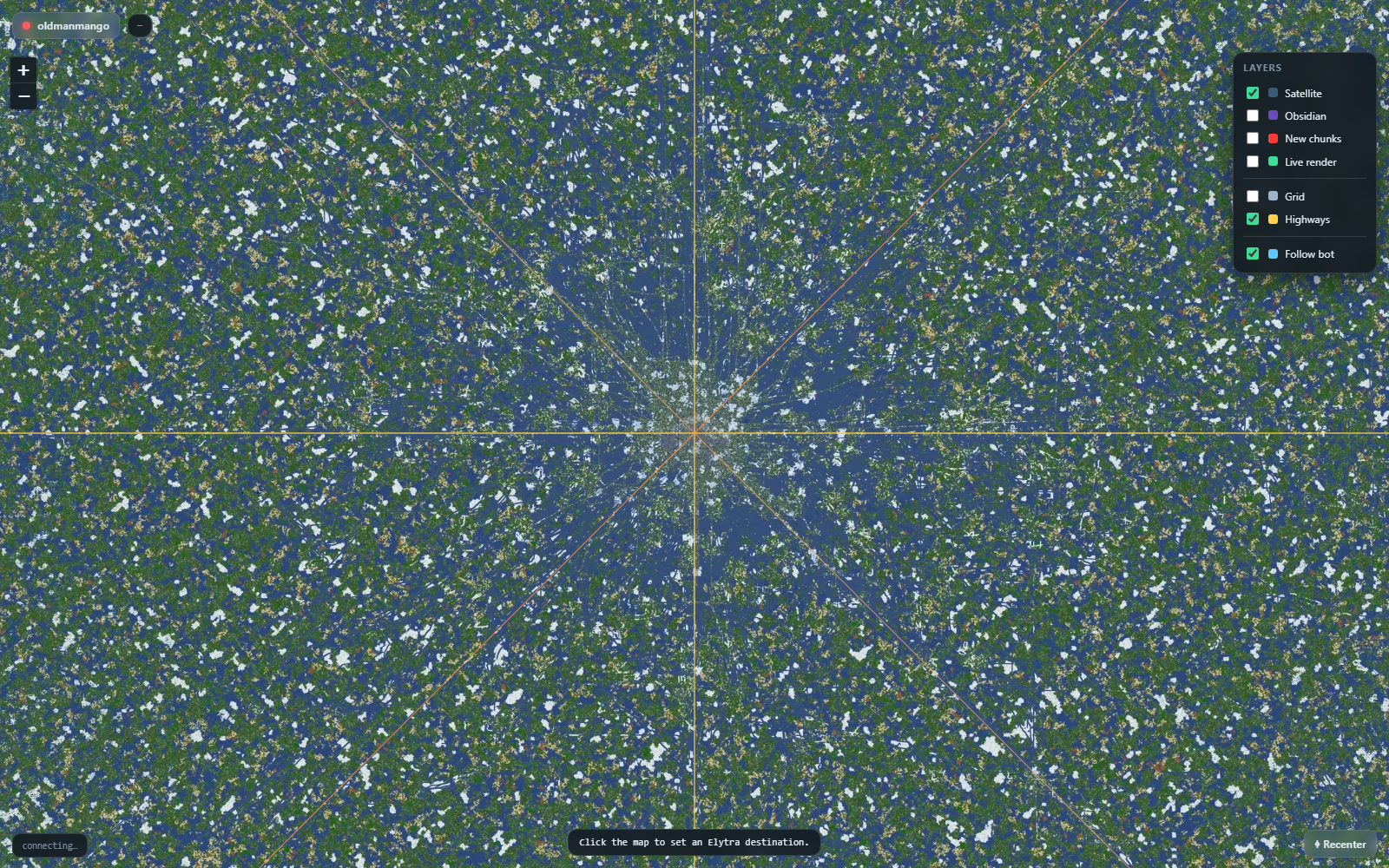
A Layers panel (top-right) toggles each overlay independently:
| Layer | What it shows |
|---|---|
| Satellite | The 2b2t.place rendered-terrain base (the greater-spawn snapshot). |
| Obsidian | An obsidian-only overlay from the same snapshot (roads, builds). |
| New chunks | Newly-generated chunks from the snapshot. |
| Live render | The bot's own freshly-rendered chunks near it (real-time, vs the historical snapshot). |
| Grid | A world-aligned grid (adaptive spacing) with the x=0 / z=0 axes emphasised. |
| Highways | Xaero-style vector lines for the 8 nether highways — the X/Z axes and the x=±z diagonals from spawn. |
- Follows the bot by default (the Follow bot toggle); dragging the map unlocks follow, and ⌖ Recenter re-locks on the bot.
- Keeps the live entity overlay and click-to-set-an-Elytra-destination from the small map, and switches dimension with the bot (Overworld / Nether / End tiles).
The ~24 TB 2b2t.place snapshot is never stored on your VPS. Tiles are fetched on demand the first time they scroll into view and kept in a hard-capped LRU disk cache (default 64 MB via
ABM_TILECACHE_MB; set0for pure pass-through). So a panned-over area is instant, the cache can't grow unbounded, void areas are negative-cached, and the "satellite" simply ends past the snapshotted region (the bot/entity/grid/highway layers still work everywhere).?tilesrc=directbypasses the VPS proxy and pulls tiles straight to the browser.
The click-to-coordinate math uses the map projection directly. For pinpoint long-haul targets, confirm the X/Z in the Elytra module's Destination card.
The surface needs the bot to serve the loopback viewer + control endpoints. How you turn those on depends on the fork.
Set the viewer block in the bot's config.json:
Stock ZenithProxy doesn't ship the viewer/control endpoints — the
zenith-abm-bridge plugin adds
them, so a ZenithProxy bot lights up the Control Surface exactly like an AquariusProxy one.
- Download
ZenithABMBridge-<version>.jarfrom the plugin's Releases and drop it in the bot'splugins/directory. - Start/restart the bot, then in its console:
abmBridge on # serves the live feed (map / vitals / entities) abmBridge control on # ALLOWS the surface to run commands & toggle modules - That's it — ABM auto-detects the bridge (its port lives in
plugins/config/abm-bridge.json, default2998, same as AquariusProxy's viewer).
The module list ABM shows for a ZenithProxy bot reflects that build's own modules — the Module reference below is AquariusProxy's set.
- With control off (
control: falseon AquariusProxy, or never runningabmBridge control on) the surface still works as a read-only viewer — vitals and the map render, but toggles/commands return403and do nothing. - The viewer binds to loopback only; the dashboard fetches it server-side and relays it over the authenticated (and, across boxes, SSH-tunnelled) connection. Nothing the bot serves is reachable directly from the internet.
- Secrets are never shown. The MSA password, SOCKS proxy password, and Discord token render as masked fields with a reveal-eye. Don't paste tokens into chat or screenshots.
- Coordinate masking. The floating 🙈 Mask coordinates button blurs every coordinate field for streaming/screenshots.
- Authorization gates carry over. Whisper Control and Proxy Bridge still honour their allow-lists — the surface doesn't bypass RBAC.
- 2b2t / anti-cheat. Aggressive movement and combat modules (Elytra e-bounce, Combat Assist, Spawn Patrol) carry detection/ban risk on anarchy servers. Test in safe areas.
Friendly name first, with the raw config key in code. ⚠ marks the warnings/caveats worth
knowing before you flip a module on. Modules marked command-driven have no persistent
toggle — run their command instead.
| Module | What it does | ⚠ Warnings & caveats |
|---|---|---|
Live Map · LiveViewer
|
The live world map this page is built around. | Read-only viewer; needs viewer.enabled. Entity/positions are from the SSE feed; map span is approximate. |
Elytra Autopilot · ElytraPilot
|
Trip planner & long-haul flight (cruise / highway / e-bounce). | ⚠ A worn elytra silently breaks e-bounce — carry spare elytras, don't fly in one you also want to bounce with. Pre-flight audit expects ≥ 2 elytras, ≥ 2 totems, fireworks. E-bounce is tuned Grim-accepted (~30–38 b/s) but anarchy anti-cheat is a moving target. Native nether routing needs the correct world seed. "Last elytra" safety can log you out. |
Villager Trading · VillagerTrader
|
Stationary auto trade hall (emerald economy). | Add/edit/delete trades right on the surface (v3.10, AquariusProxy 5.9.0+) — the + New trade builder validates against the real villager catalog and captures the supply/output chest coordinates. Trade groups (v3.15) share one input-supply profile across trades with self-refill/park. ⚠ Stock emerald supply chests with loose emeralds or emerald blocks (both are counted; AquariusProxy 5.12.1+). |
Pearl Stasis · PearlManager
|
Ender-pearl stasis loader. | Add/edit/delete stasis locations on the surface (v3.10, AquariusProxy 5.9.0+) via + Add pearl. ⚠ Map pin-to-add is still planned (Phase C); coordinates are typed today. |
Stash Manager · StashScanner
|
Indexes & sorts an owned stash. | Operates on your own stash; point it at the right chests/region. |
Auto Miner · AquariusMiner
|
Top-down quarry & ore search with auto-deposit. | ⚠ Uses the ender chest as the field buffer — never carry filled shulkers in the mining inventory (it'll mis-deposit). On laggy anarchy, drops can fly up to ~2 blocks, so it settles/chases/confirms each break. Pauses for Auto Eat. Set bounds + deposit chests. |
Auto Enchanter · Enchanter
|
Anvil auto-enchant station. | Needs the anvil/input/output/book station laid out and coordinates set. |
Kit Builder · KitMaker
|
Fills template shulker kits. | Build templates on a visual slot grid with per-slot enchant matching and save them to a kit library (v3.18) — no physical example kit needed; the surface shows a green "kits buildable" estimate from stock. |
Packet Sniffer · AquariusSniffer
|
Live packet inspector (debug). | ⚠ Debug tool — high log/throughput volume; leave off in normal operation. |
Highway Builder · HighwayBuilder
|
Auto nether-highway paver: clears the tunnel + lays an obsidian road. | ⚠ Destructive — it clears blocks along the path. Off by default. Needs obsidian + restock; intended for nether highways. |
Schematic Builder · Litematica
|
Builds .litematic / .nbt schematics via Baritone. |
Needs a real schematic file staged on the bot; build pacing depends on materials + Baritone. |
Boat Autopilot · Boat
|
Open-water boat travel. Command-driven (.boat goto x z). |
⚠ Open water only; rubber-band risk on high latency (not heavily field-tested). |
Auto Regear · Regear
|
One-shot gear restock from an ender-chest kit shulker. | Needs a kit shulker in the ender chest matching the profile. |
Order Filler · OrderFiller
|
Payment-gated order picker. | ⚠ Requires a configured database + stash; advanced setup. |
Pearl Drop · PearlDrop
|
Throws pearls into stasis chambers. | Pairs with Pearl Stasis; aim/chamber setup matters. |
Flight Gear · FlightGear
|
Pre-flight gear-up — runs Regear with an elytra kit. | Depends on a valid elytra kit profile; run before long flights. |
| Module | What it does | ⚠ Warnings & caveats |
|---|---|---|
Combat Assist · KillAura
|
Auto-attacks nearby targets. | ⚠ Aggressive; anti-cheat / ban risk on anarchy. Tune target filters. |
Auto Bow · AutoBow
|
Auto-draws & fires a bow / crossbow at range. | Same anti-cheat caution as melee assist. |
Auto Armor · AutoArmor
|
Equips the best available armor. | ⚠ Can fight the worn elytra during flight — be mindful when combining with Elytra Autopilot. |
| Module | What it does | ⚠ Warnings & caveats |
|---|---|---|
Auto Eat · AutoEat
|
Eats automatically when low on health/hunger. | ⚠ Pauses other tasks (mining/building) while eating; keep food stocked. |
Auto Totem · AutoTotem
|
Keeps a totem in your off-hand. | Competes for the off-hand slot — features that use the off-hand are designed to be AutoTotem-safe, but watch for conflicts. |
Auto Respawn · AutoRespawn
|
Respawns immediately on death. | Will respawn you into danger if your spawn is hot. |
Auto Mend · AutoMend
|
Repairs held gear with XP (Mending). | Needs an XP source; only mends Mending-enchanted gear. |
Auto Disconnect · AutoDisconnect
|
Logs out when things go wrong. | Set thresholds (low totems/health) sensibly so it doesn't bail too early/late. |
| Module | What it does | ⚠ Warnings & caveats |
|---|---|---|
Account & Login · Authentication
|
Microsoft login, target server, optional login proxy. | 🔒 Holds secrets (MSA + proxy passwords) — masked in the UI; never expose. Editing here is preview; change account details carefully. |
Auto Reconnect · AutoReconnect
|
Rejoins after a disconnect. | Pairs with Auto Re-queue on queued servers. |
Anti-Kick · AntiKick
|
Survives the 2b2t inactivity kick. | Tuned for 2b2t timing. |
Anti-AFK · AntiAFK
|
Small actions so you look active. | ⚠ Patterns can still be flagged; vary behaviour. |
Action Limiter · ActionLimiter
|
Locks down what the account may do (movement, interactions, illegal items). | A safety guardrail — over-restricting will block other modules' actions. |
Auto Re-queue · Requeue
|
Rejoins the server queue. | Handled together with Auto Reconnect. |
Queue Alert · QueueWarning
|
Alerts as you near the front of the queue. | Notification only. |
Active Hours · ActiveHours
|
Only stays online during scheduled times. | ⚠ Will disconnect the bot outside its window. |
Session Time Limit · SessionTimeLimit
|
Warns/acts on the 2b2t session time limit. | Configure the action (warn vs disconnect). |
| Module | What it does | ⚠ Warnings & caveats |
|---|---|---|
Coordinate Privacy · CoordObfuscation
|
Feeds the server fake coordinates to hide your base. | ⚠ Can interfere with features that rely on real coordinates — use deliberately. |
Anti-Leak · AntiLeak
|
Blocks chat that leaks numbers near your coordinates. | Heuristic; tune sensitivity. |
Visual Range Alerts · VisualRange
|
Alerts when players enter render distance. | Notification/awareness only. |
Whisper Control · WhisperControl
|
Authorized players drive the bot by whisper (protect / come / goto / patrol / mine). |
🔒 RBAC — keep the allow-list tight; anyone on it can move/command the bot. |
Proxy Bridge · Bridge
|
Links to the ProxyBridge client mod (waypoints + allow-listed commands). | 🔒 Allow-list gated; pairs with the ProxyBridge Fabric mod. |
| Module | What it does | ⚠ Warnings & caveats |
|---|---|---|
Auto Fish · AutoFish
|
Automatic AFK fishing. | Standard AFK caveats. |
Auto Drop · AutoDrop
|
Drops unwanted items as they pile up. | ⚠ Double-check the drop list — it discards items. |
Chat Broadcaster · Spammer
|
Posts chat / whisper messages on a timer. | ⚠ Spam gets you muted/banned — use responsibly and within server rules. |
Auto Reply · AutoReply
|
Auto-replies to incoming whispers. | ⚠ Can loop with other auto-repliers; rate-limit. |
Auto Portal · AutoPortal
|
Builds & lights a nether portal. Command-driven (.portal build). |
Uses the off-hand air-place primitive; needs obsidian + flint & steel. |
Bad Omen · AutoOmen
|
Manages Bad Omen / Ominous bottles for raids. | Niche; raid-specific. |
Chat · Chat
|
Chat display, filtering, prefix/suffix & clickable links. | Cosmetic/utility. |
| Module | What it does | ⚠ Warnings & caveats |
|---|---|---|
Replay Recorder · ReplayMod
|
Records sessions to ReplayMod files. | ⚠ Disk usage grows with session length. |
Spawn Patrol · SpawnPatrol
|
Patrols spawn and engages fresh players. | ⚠ PvP at spawn — risky; combines with combat modules. |
Discord Notifications · Discord
|
Discord bot — status, alerts, chat relay. | 🔒 The Discord token is a secret (masked); never expose it. |
The surface is static assets (control/) served by the manager and made live by
control-live.js, which talks to the bot's loopback endpoints through the dashboard's
authenticated relay:
-
GET /control/state→ module list + enabled flags (the rail status dots + header chips). -
POST /control/command→ runs a console command, returns its structured output. -
GET /control/config→ the live config tree (secrets redacted);POST /control/configsets/edits config and persists.{path,value}(or{op:"set",…}) sets one scalar field by dot-path — powers the ⚙ Live configuration panel.{op:"put",path,key|index,value}/{op:"add",path,value}/{op:"remove",path,key|index}add, edit (overwrite by key, or list set-by-index) or remove whole entries in a config map or list (deserialized into the real config type) — powers the trades / trips / pearls list editors (AquariusProxy 5.9.0+, list-edit 5.9.1+). -
GET /control/lookingat→{hit,x,y,z,block}— the block the bot's crosshair is on (96-block raycast); powers the 📍 fill-from-look-target button (AquariusProxy 5.9.1+). -
GET /viewer/stream(SSE, ~20 Hz) → position, vitals, dimension, nearby entities. -
GET /viewer/map.png→ the bot-centred map tile (Live Map backdrop). -
GET /viewer/inventory→ vitals + armor + inventory (used by the cockpit panels).
All three themes load the same model and the same live brain, so a fix or a new live
binding lands everywhere at once. The relay is fork-agnostic — it talks to the same
endpoints whether they come from AquariusProxy natively or from the
zenith-abm-bridge plugin on a
ZenithProxy bot.
See also: Usage · Security · Architecture & Limitations.