Configuration
All state lives in a single file: instances.json (next to manager.py, or wherever ABM_CONFIG points). It holds the instance roster plus a settings block. The web UI and CLI both edit it; you rarely touch it by hand.
instances.jsoncontains secrets (proxy passwords, the Webshare token, your login hash). Treat it as sensitive — see Security.
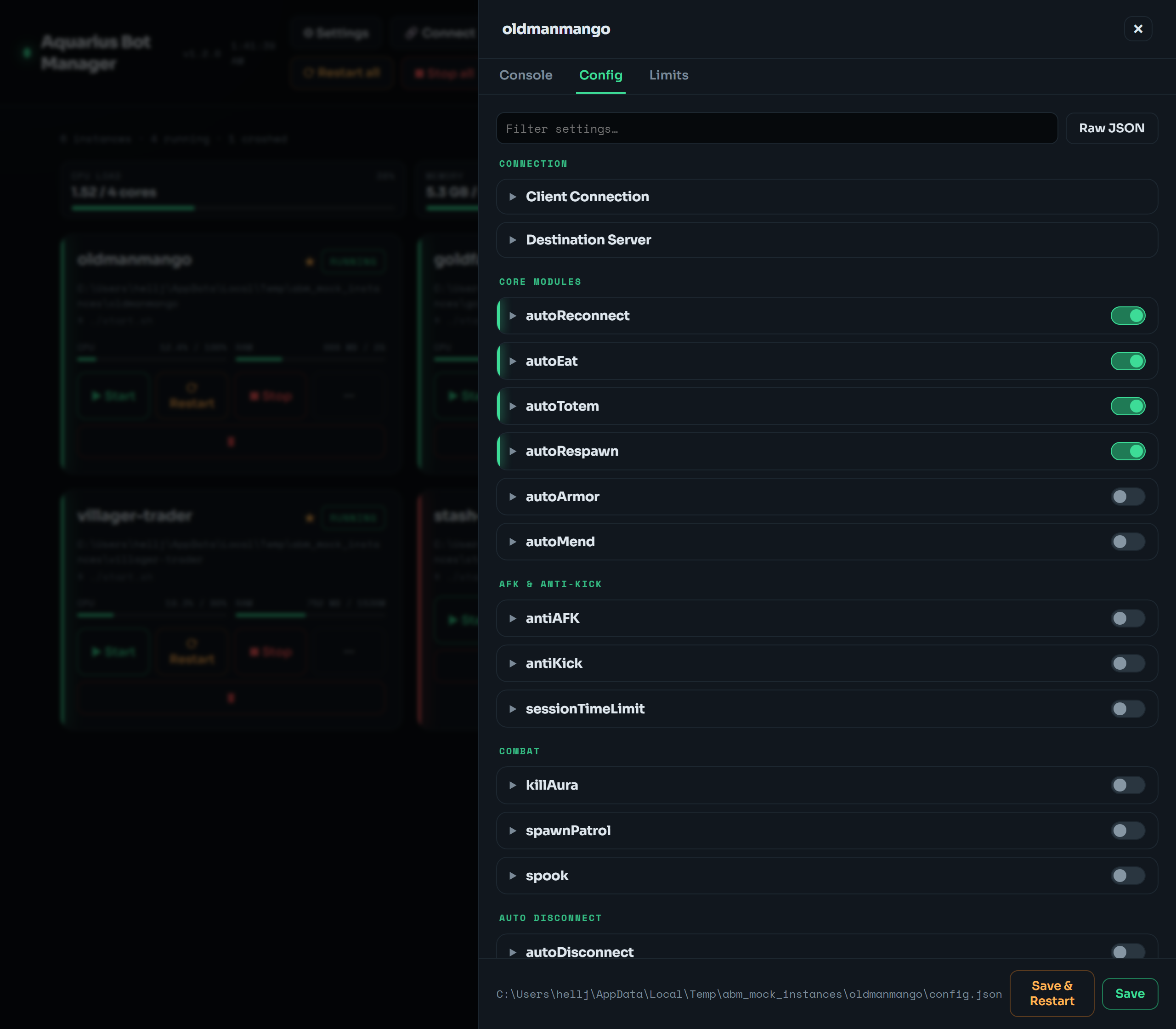 Most edits go through the dashboard's structured Config editor — toggles, numbers, and lists grouped by area, with a Raw JSON fallback — so you rarely touch
 instances.json or a bot's config.json by hand.
{
  "instances": [
    {
      "name": "bot1",
      "dir": "/home/ubuntu/zenith/bot1",
      "launch_cmd": "./launch.sh",
      "config_file": "config.json",
      "stop_keys": ["C-c"],
      "stop_timeout": 15,
      "autostart": true
    }
  ],
  "settings": { "base_dir": "/home/ubuntu/zenith" }
}| Field | Meaning | Default |
|---|---|---|
name |
unique label (letters, digits, . _ -); becomes the tmux session abm_<name>
|
required |
dir |
working directory of the bot | required |
launch_cmd |
start command, e.g. ./launch.sh or java -jar AquariusProxy.jar nogui
|
./launch.sh |
config_file |
the file the UI shows/edits | config.json |
stop_keys |
tmux keys for graceful shutdown, e.g. ["stop","Enter"]
|
["C-c"] |
stop_timeout |
seconds to wait before force-killing | 15 |
autostart |
relaunch on host boot |
false (but true for bots deployed via 🚀 Deploy) |
session |
(adopted instances only) the existing tmux session it's pinned to | — |
-
Deploy a new bot (🚀 Deploy /
abm deploy) — downloads a fork launcher and registers it. -
Discover existing bot directories:
abm discover /home/ubuntu/zenith. -
Adopt a
tmuxsession you started by hand:abm scanthenabm adopt <session>.
This is the AquariusProxy/ZenithProxy config, not ours — we just edit it. The structured editor in the drawer's Config tab is curated from schema.py, but unknown/plugin/version-specific fields still render from the file's real values. Save writes the file; Save & Restart applies it. Proxy fields here (client.connection.proxy) are what the Proxies tools write to.
Give a bot a memory and/or CPU cap (New-instance form, the drawer's Limits tab, or abm limits bot1 --memory 2G --cpu 200). When set, the bot launches inside a transient systemd user scope (systemd-run --user --scope with MemoryMax/MemoryHigh/CPUQuota) so a runaway bot can't OOM the box or hog the cores.
This needs systemd user lingering — the installer runs loginctl enable-linger. If a host can't enforce it, caps are saved but flagged as "not enforced" and the bot still starts normally.
tmux sessions don't survive a reboot, so "auto-restart" means re-launch on boot:
- Mark which bots come back — the ★ on each card,
abm autostart <name> --on, or--autostarton add/adopt. Bots deployed via 🚀 Deploy are starred by default. - The boot unit (
aquarius-bot-manager-boot.service) runsmanager.py bootonce at boot, which starts only the autostart bots (idempotent — skips already-running ones).
If you used the curl installer, both the manager service and this boot unit are already enabled — a VPS reboot brings the dashboard and starred bots back with no SSH.
The curl installer does this for you. For a manual install:
# web UI
sudo cp aquarius-bot-manager.service /etc/systemd/system/
# edit User= and paths inside it first
sudo systemctl daemon-reload
sudo systemctl enable --now aquarius-bot-manager

# autostart bots on boot
sudo cp aquarius-bot-manager-boot.service /etc/systemd/system/
sudo systemctl enable aquarius-bot-manager-bootStored under settings in instances.json, managed via the UI or abm settings:
-
Appearance — theme preset (
midnight/ember/ice/amethyst/paper) + optional accent hex. -
Monitoring —
thresholds(cpu/mem/disk %, default 85/85/90). - Console presets — label + command buttons for the live console.
- System actions — reboot / OS-update toggle (off by default; see Security).
- webshare — the saved Webshare API token (base64-obfuscated). See Proxies.
- file_roots — allowlisted roots for the file manager (defaults to the base dir + manager dir).