Multi VPS Controller
One manager can act as a controller for your other boxes, so you operate a whole fleet from a single dashboard. It complements the experimental Fleet (DigitalOcean) tool: the controller is built into the web UI and works with any provider over SSH (not just DigitalOcean, not just one VPC).
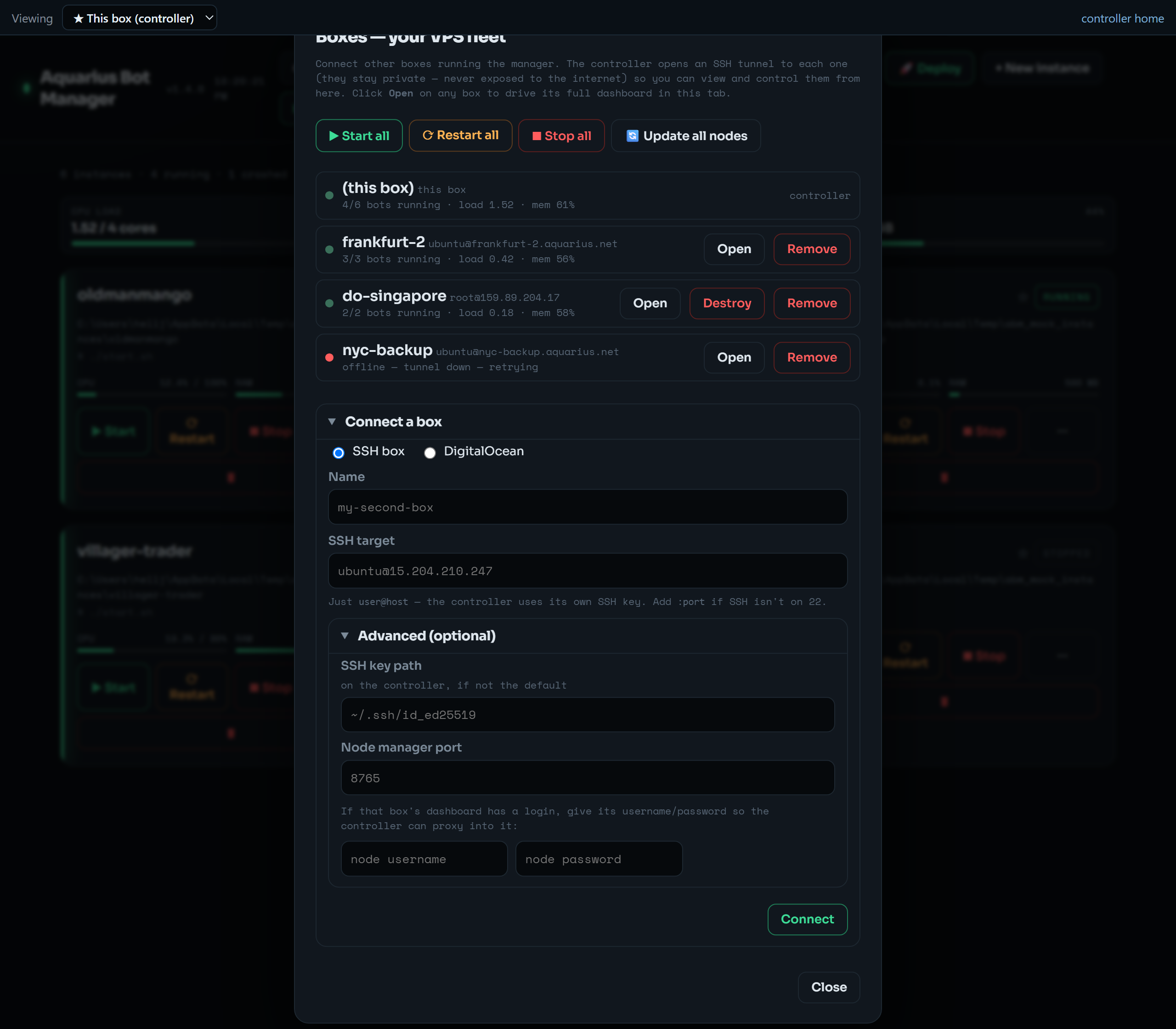 The 🖥 Boxes panel: every box at a glance (this box + each connected node, with bots-running and host load/mem), fleet-wide Start / Restart / Stop all and Update all nodes, and the connect-a-box form. The sticky bar at the very top is the in-page box switcher.
        your laptop ── ssh -L ──▶ Controller VPS  (a normal manager + its own bots)
                                     │  reverse proxy + Fleet view + node registry
                       controller-managed ssh -fNL, one per node
                ┌────────────────────┼────────────────────┐
          node A (127.0.0.1:8765)  node B (…)          node C …
- A node is the same manager binary running in node mode — bound to
127.0.0.1, no public exposure. The controller reaches each node over a self-healingssh -N -L <local>:127.0.0.1:8765tunnel, so the SSH key is the only way in. - The controller's own VPS is just another box in the list ("this box").
Header → 🖥 Boxes → Connect a box:
-
SSH: paste
user@host(add:portif SSH isn't on 22). Advanced (optional): SSH key path on the controller, the node's manager port, and the node's web login — only needed if the node enforces one, and the controller then presents it automatically when proxying. -
DigitalOcean: save a DO API token, then either connect an existing droplet from the list, or provision a new one (region + size picker, default
s-1vcpu-1gb= 1GB). Provisioning auto-uploads the controller's own SSH public key to your DO account, creates a node-mode droplet via cloud-init, waits for its IP, and registers it. DO-backed boxes get a Destroy button (deletes the droplet, with a typed confirmation).
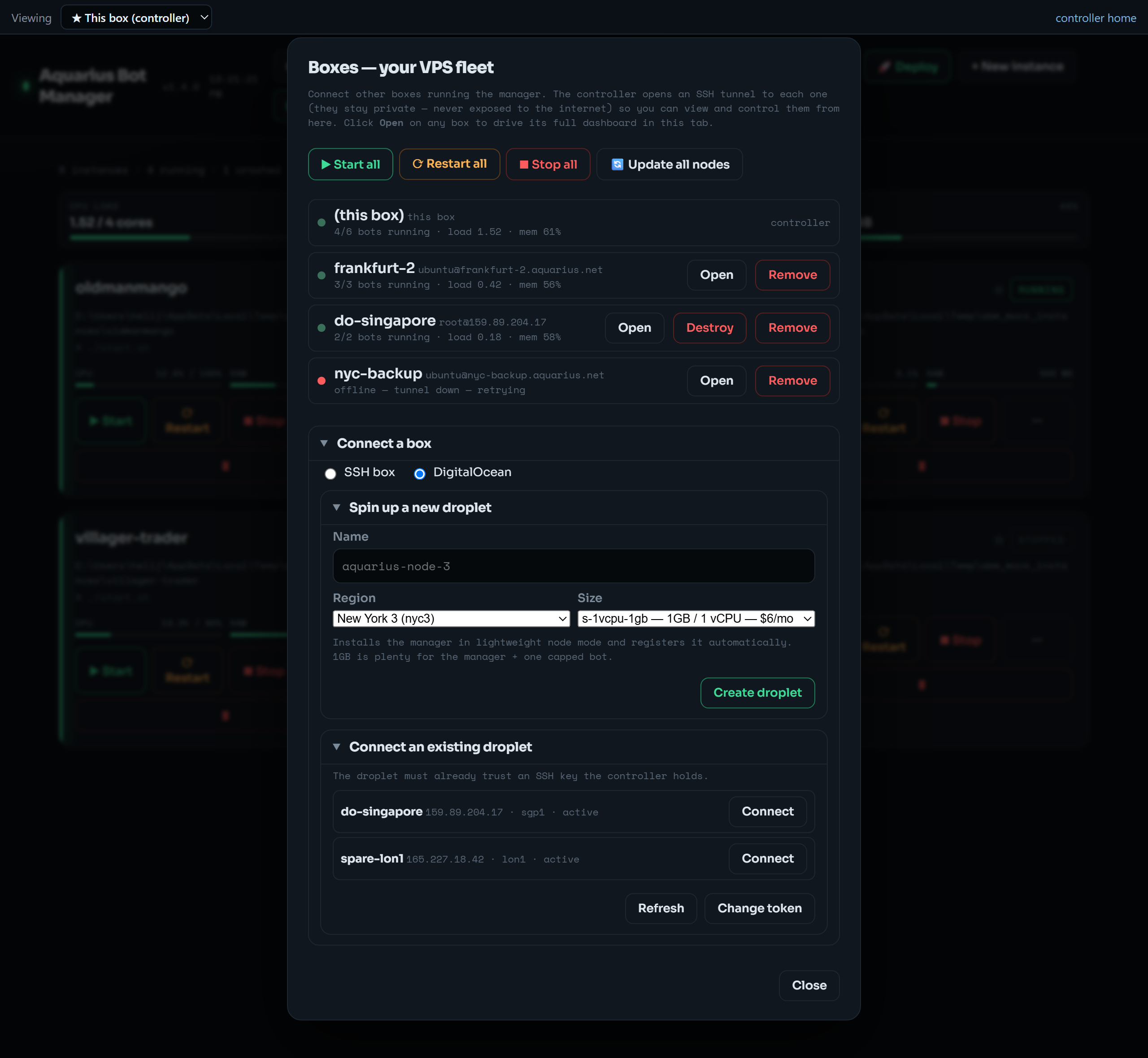 Switch the connect form to DigitalOcean to spin up a fresh 1GB node-mode droplet (region + size picker) or connect a droplet you already run — the controller handles the SSH key, cloud-init install, and registration.
Headless equivalent:
abm node add box2 ubuntu@1.2.3.4         # register + open tunnel + test
abm node list                            # nodes + tunnel status
abm node test box2                       # probe over the tunnel
abm node remove box2 # drop it (bots keep running on that VPS)- In-page box switcher — the sticky bar at the top of the dashboard switches which box you're viewing. Picking a box reverse-proxies its full native dashboard into the same tab (console, config, files, proxies, limits — everything), no extra tunnel or browser tab. "Controller home" / "This box" takes you back.
-
Fleet view (the Boxes panel) — every box at a glance: reachable, bots running, host load/mem. Fleet-wide Start / Restart / Stop all, and Update all nodes (pushes
selfupdateto each node; the controller updates itself with its own button). - All-boxes launcher — under 🔗 Connect, download a one-double-click script that opens an SSH tunnel to every box on distinct local ports (8765, 8766, …) and opens each dashboard. A direct-access fallback for when the controller itself is down.
On the new box:
curl -fsSL https://raw.githubusercontent.com/aquariusnetwork9/Aquarius-Bot-Manager/main/install.sh | ABM_ACCESS=node bashNode mode binds 127.0.0.1, skips Caddy, and (optionally) bakes ABM_USER/ABM_PASS if you set them. Then connect it from the controller with 🖥 Boxes (or abm node add).
The node registry lives in nodes.json (gitignored), alongside the manager:
-
nodes[]— each box's SSH target, the node manager port, the controller-side local port, and any node web creds (base64-obfuscated). -
settings.do_token— the DigitalOcean token (base64-obfuscated).
Tunnels start with the web server and a supervisor re-establishes any that drop. Removing a node tears its tunnel down; the bots on that box keep running.
- The controller can drive every box, so keep its own login on. Nodes stay on
127.0.0.1and are reachable only through SSH-key tunnels. -
nodes.jsonholds secrets (DO token, node creds) — treat the controller host and that file as sensitive, likeinstances.jsonandfleet.json. See Security.