Proxies
Proxies are how this tool gives each bot its own outbound IP while they all share one VPS. (This is the alternative to running one bot per server — see Architecture and Limitations.) Every proxy edit is written into that bot's client.connection.proxy block in its config.json and takes effect on restart.
Open 🌐 Proxies in the dashboard. Three tools, smallest to largest:
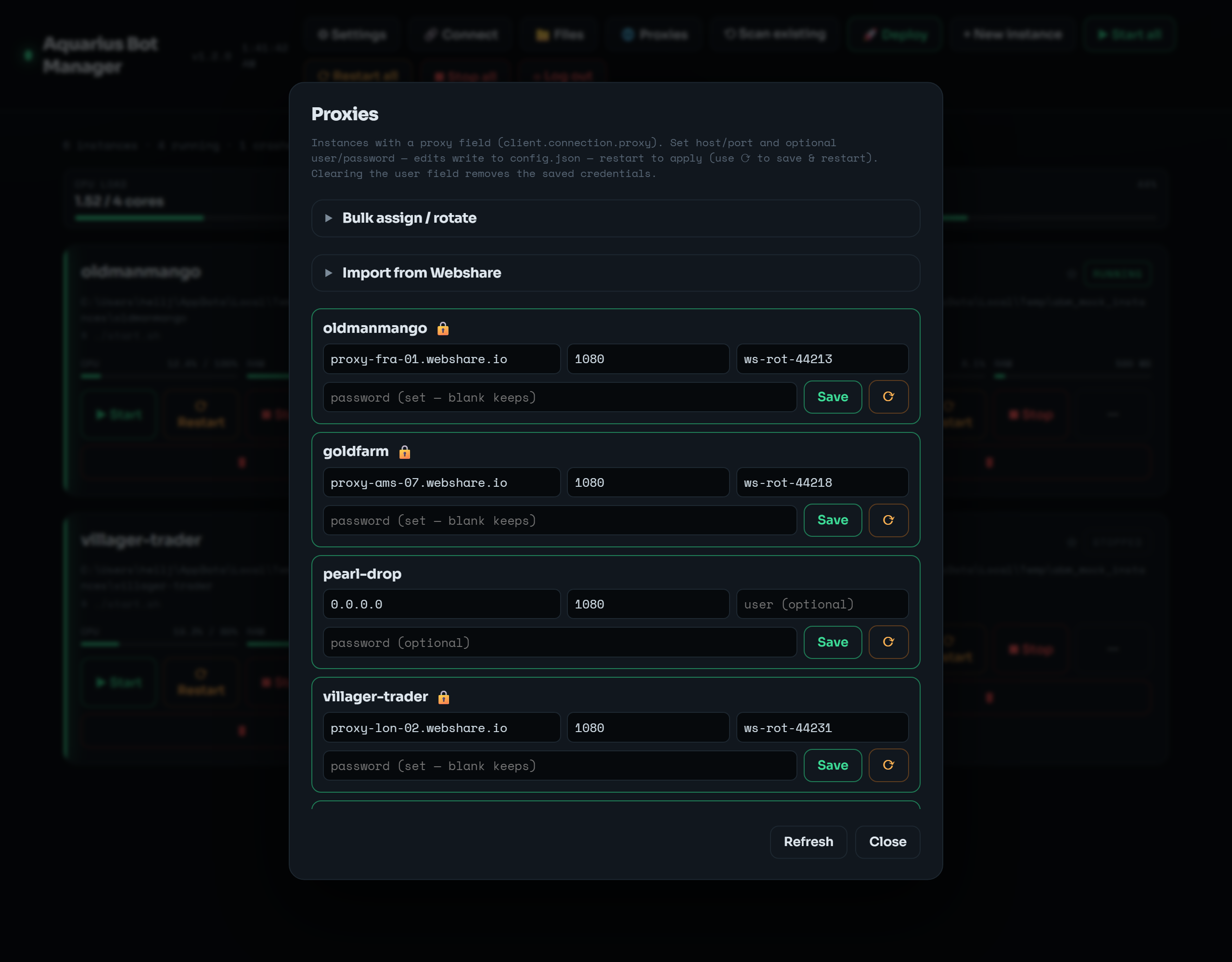 Per-bot host / port / user / password rows, plus the collapsible Bulk assign / rotate and Import from Webshare tools.
Each proxy-capable bot is a row: host · port · user · password, with Save and ⟳ (save & restart).
- Username/password are optional — fill them for authenticated proxies (most paid proxies need them).
- Blank password = keep the existing one (the password is never displayed back, for security, so blank means "leave it").
- Clearing the username removes the saved credentials (drops auth entirely).
- A 🔒 on a row means credentials are set (hover shows the username).
CLI:
abm proxy bot1 --host 1.2.3.4 --port 1080Note: a manual save sets host/port/credentials but does not flip
proxy.enabled. If the bot's proxy was disabled, enable it in the Config editor (client.connection.proxy.enabled). The bulk and Webshare tools enable it for you.
Paste a list of proxies (one per line) and spread them across many bots at once.
- Round-robin — cycle the list across the selected bots (bot1→proxy1, bot2→proxy2, …).
- Same to all — point every selected bot at the first proxy.
- Entries may carry credentials:
host:port,host:port:user:pass, oruser:pass@host:port.
CLI:
abm proxybulk --list "1.2.3.4:1080,5.6.7.8:1080" --targets all --mode roundrobin --restartIf your proxies come from a Webshare subscription, 🌐 Proxies → Import from Webshare pulls the live list straight from their API and round-robins it across your bots — no copy-paste.
Steps:
- Get your API token from the Webshare dashboard → API.
- Paste it into the token field. Pick the auth model (below). Optionally filter by Countries (e.g.
US,CA) and Valid only. - Count previews how many would import (changes nothing). Import & assign writes them.
| Model | What it writes | When to use |
|---|---|---|
| User / pass | each proxy's host:port and its username + password |
Anywhere. No whitelisting needed. The password lands in config.json. |
| IP-authorized |
host:port only, and wipes any stale credentials |
First add this VPS's public IP to Webshare → IP Authorization. Then the proxies need no credentials. |
Each imported proxy is enabled and set to type HTTP. The target set is shared with the Bulk panel.
CLI:
abm webshare count  --token <KEY>                              # how many would import
abm webshare import --token <KEY> --auth userpass --save-token --restart
abm webshare import --auth ip --countries US,CA                # reuses the saved token
The token can also come from the WEBSHARE_TOKEN environment variable.
Save token stores it under settings.webshare in instances.json, base64-obfuscated so it's not eyeball-plaintext. instances.json can recover it. See Security.
Running many bots from a single VPS IP is an easy pattern for a server to detect and ban. Proxies give each bot a distinct exit IP. IP-authorized Webshare mode whitelists your VPS IP, which means any process on that VPS (and anyone who shares that IP) can use your proxy pool — prefer user/pass if that matters to you.
Proxies do not make bot activity undetectable, and they don't change the rules of whatever server you connect to. Make sure your use complies with that server's rules and your proxy provider's terms.