Repository navigation
Operations Manual
Use the documentation index to navigate the six maintained documents. Update this document directly; there is no generated master copy.
- ServiceOps user guide
- ServiceOps complete feature catalogue
- ServiceOps administration information architecture
- ServiceOps iOS application
- AI assistance: administration and operations
Version 2026 edition
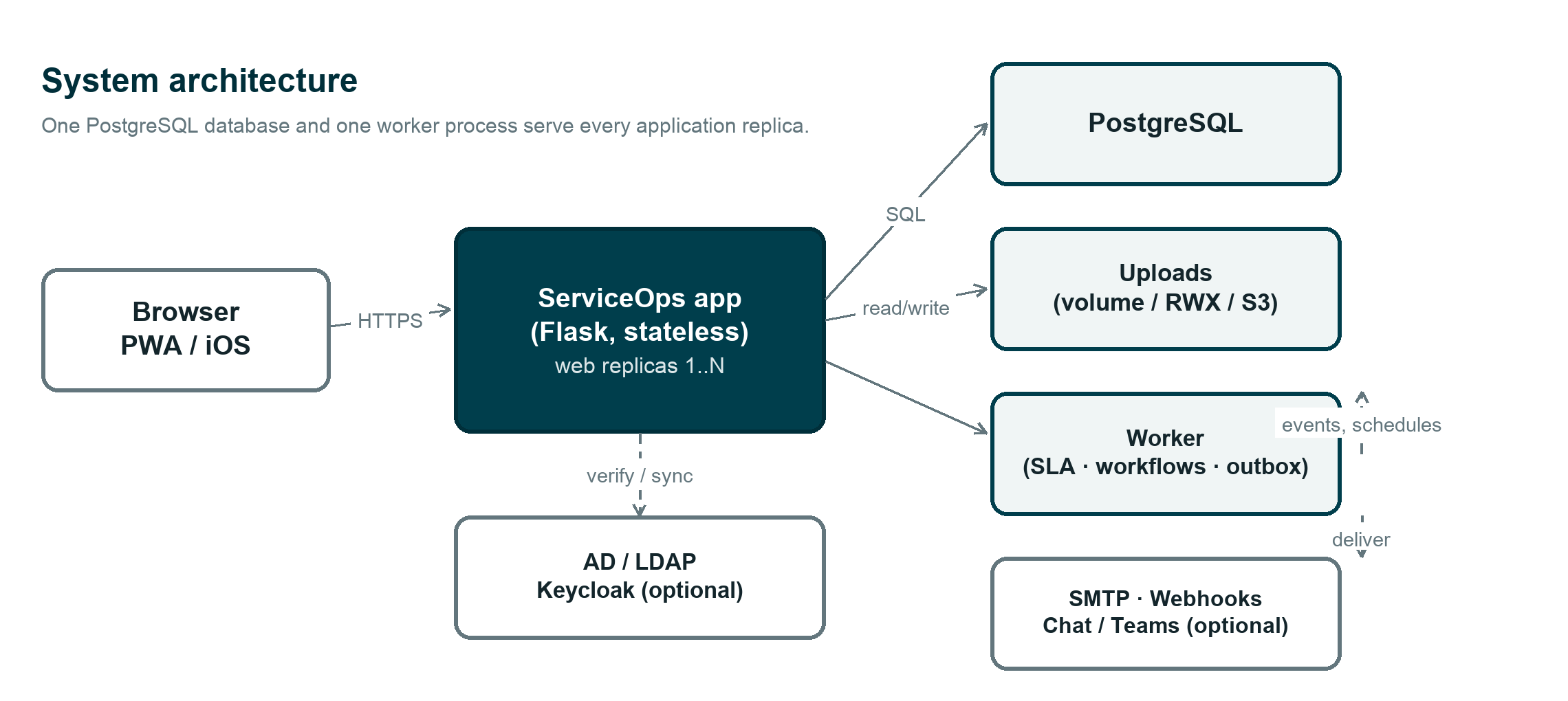
This guide covers everyday use of ServiceOps: signing in, working with tickets, the service catalog, approvals, and every major screen. Deployment, security hardening, and upgrade procedures are covered separately in the deployment guide — this manual is for people using the product, not installing it.
| Role | Can do |
|---|---|
| Requester | Submit and track requests and incidents, search knowledge |
| Agent | Triage, assign, fulfill, and resolve operational work |
| Manager | Everything an agent can, plus team oversight and approvals |
| CCB member | Review and approve planned changes |
| Administrator | Configure identity, teams, catalog, and platform settings |
Every incident, request, and change belongs to one owning team. Only an active member of that team (or their manager, or an administrator) can change it — other teams can view it for awareness, but can't edit it. Someone with more than one role can switch which one is active from the Acting as control under their name in the sidebar.
The sign-in page shows whichever methods your administrator has enabled:
single sign-on (Keycloak), a company directory account (AD/LDAP), or a local
account. If both directory and local sign-in are available, a dropdown lets
you pick. Directory usernames work in any familiar form —
jsmith, jsmith@company.com, or CORP\jsmith.
The left sidebar groups everything into Home, My work, Self-service, Management, Operations, and Administration. Opening one section closes the previous one, and the section containing whatever page you're on opens automatically. Use Find menu at the top of the sidebar to jump straight to a module by typing part of its name.
The search bar in the top bar searches across tickets, requests, knowledge articles, configuration items, and more at once — not just navigation.
Click your name at the bottom of the sidebar to edit your profile, switch role (if you have more than one), or sign out.
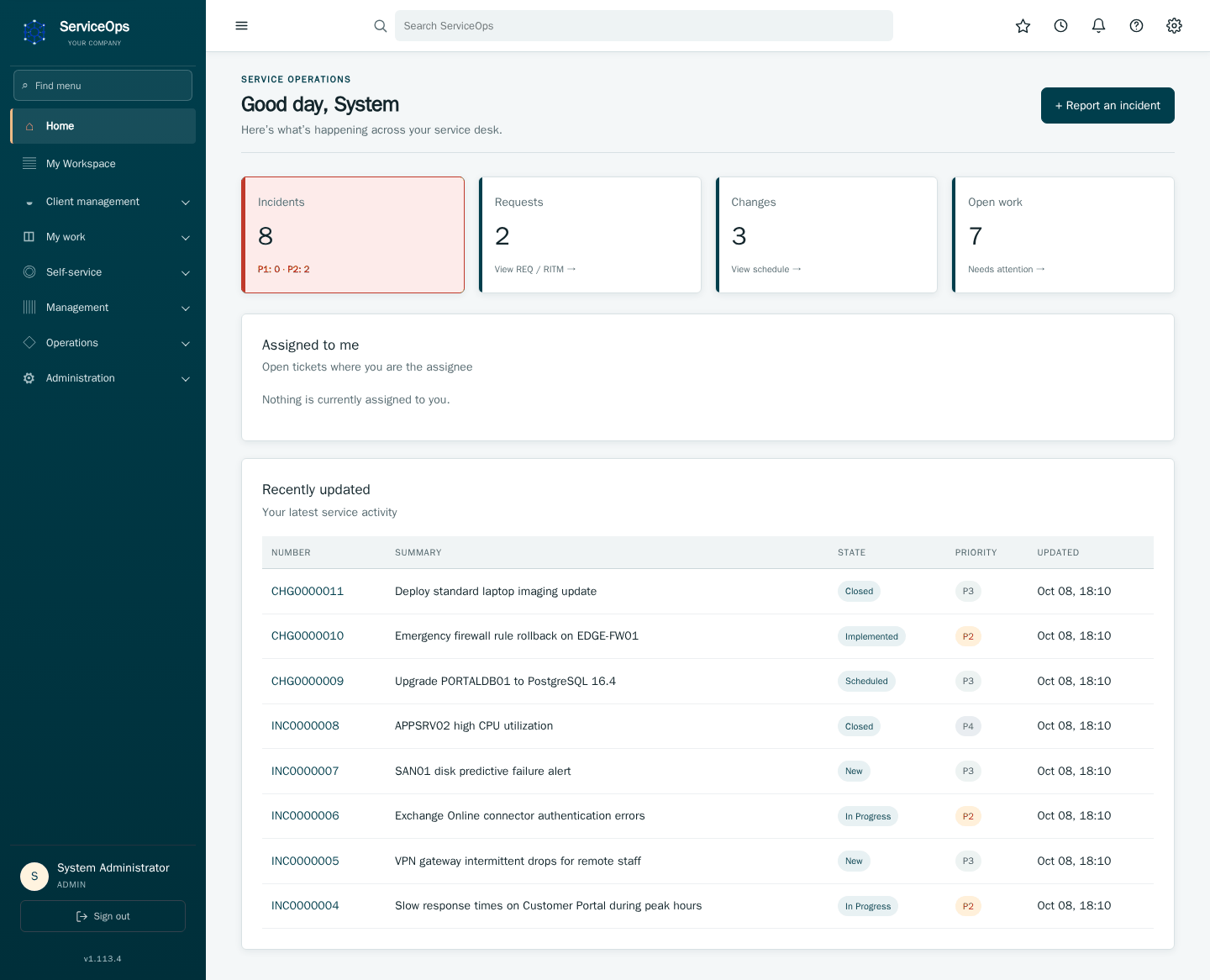
The dashboard is your landing page after sign-in. The stat tiles across the top link straight into the matching filtered list, and the Incidents tile turns red whenever a high-priority incident is open. Below that: Assigned to me lists your own open tickets by priority, SLA breached/SLA at risk only show up when something needs attention, and Recently updated shows the last records touched across everything you can see — handy for picking back up after a context switch.
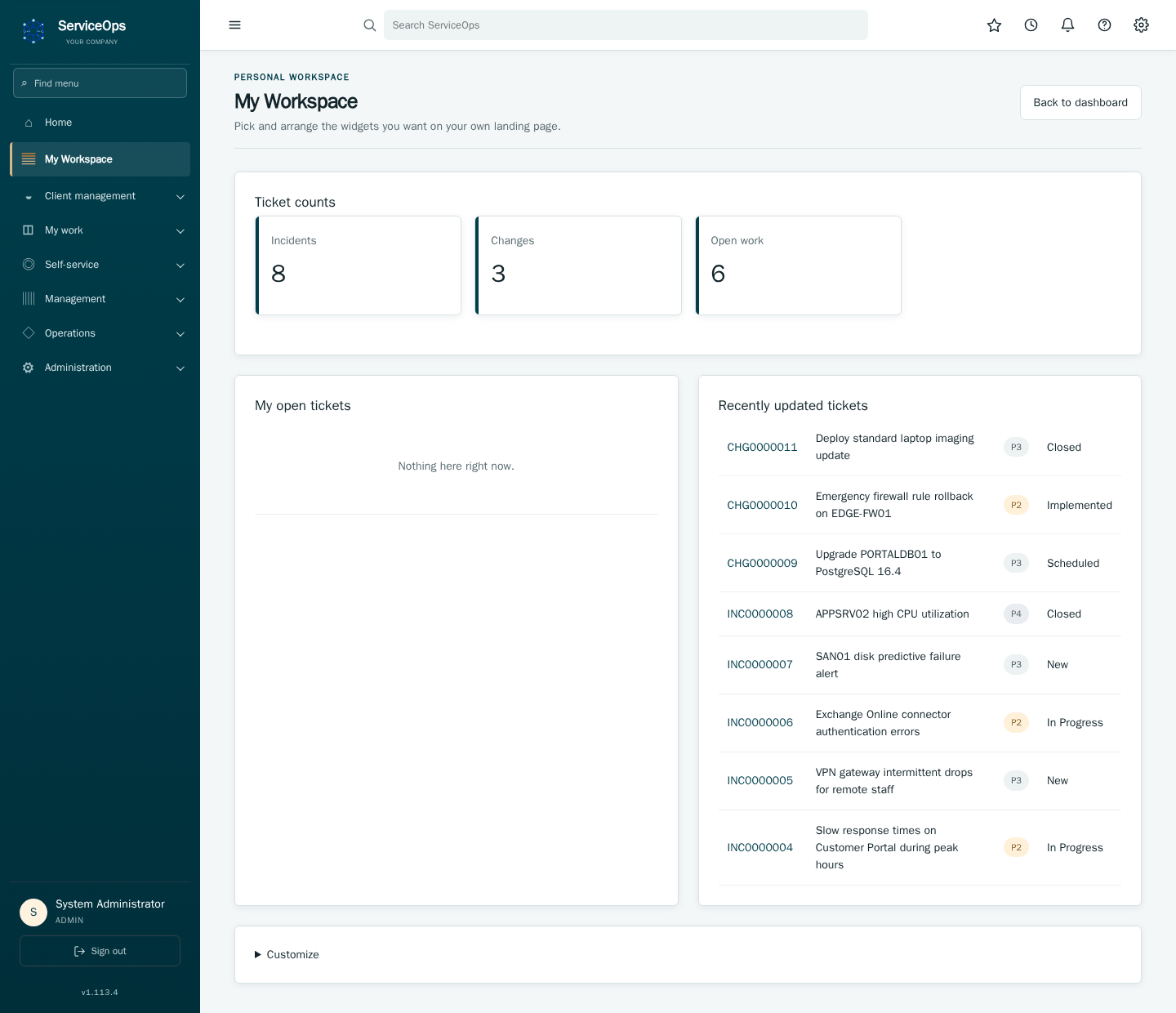
My Workspace (/workspace) is a personal alternative to the shared
dashboard — pick which widgets you want and lay them out however suits you.
- Click + Report an incident on the dashboard, or New from the Incidents list.
- Give it a concise title, describe the symptoms, and set business impact/urgency — ServiceOps calculates priority from those automatically.
- Submit. The incident starts in state
Newand routes to its owning team. - An agent from that team sets it
In Progressand works the issue — comments, attachments, and CI links all land in the Event history as they happen. The configuration item chosen on the form appears first in Affected CIs as the Primary CI. To attach files, drop or paste them anywhere on the ticket, or use Add attachments; review the list, then Upload. A note can carry its own file through Attach file under the note box. - Once service is restored, the agent sets it
Resolved; it moves toClosedonce confirmed with the caller.
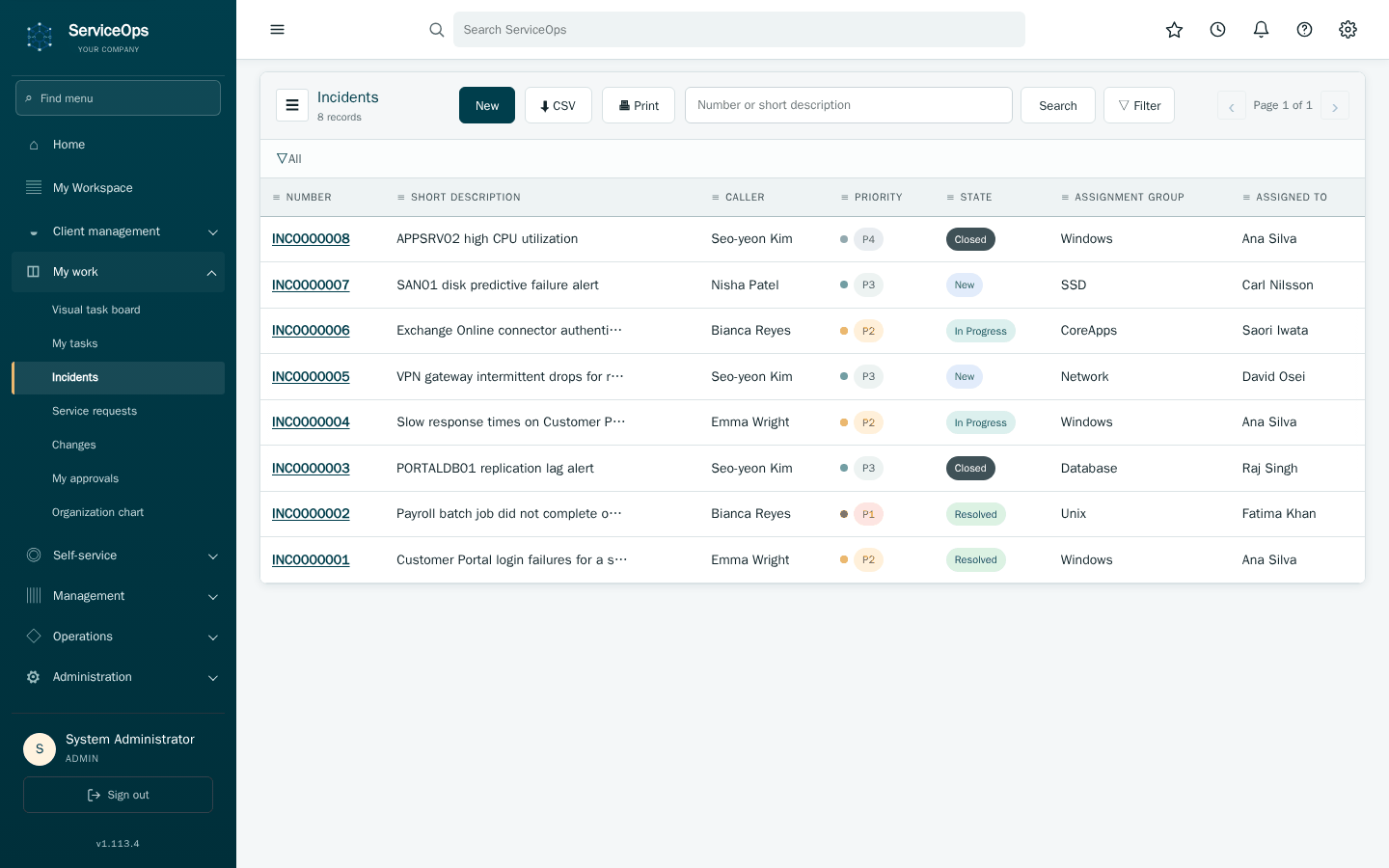
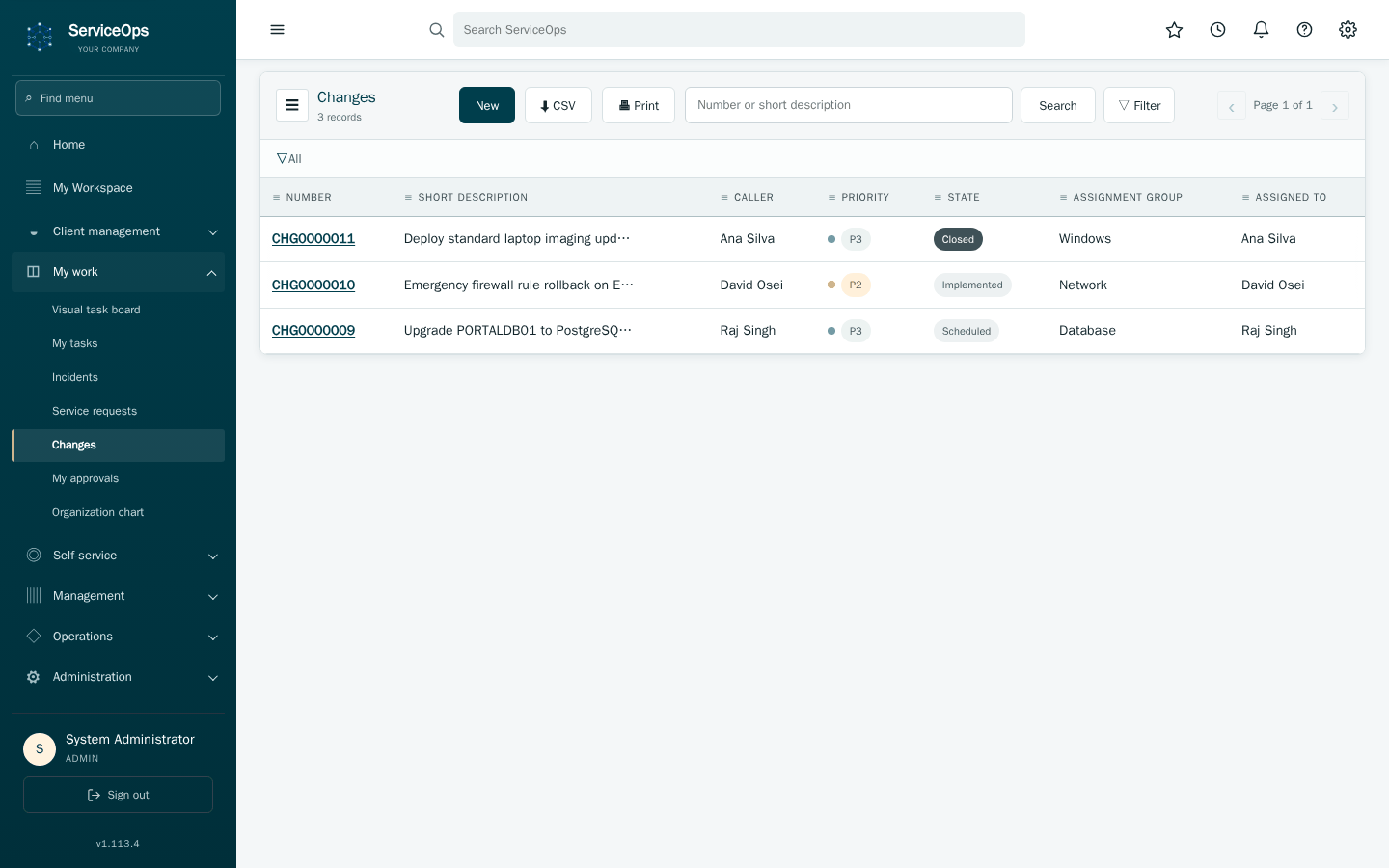
Every ticket list (Incidents, Changes, Requests) works the same way: a New button, a state filter, free-text search, and pagination. Rows are sorted newest-updated first, with a small dot marking priority (red for P1, amber for P2). Click any row to open it.
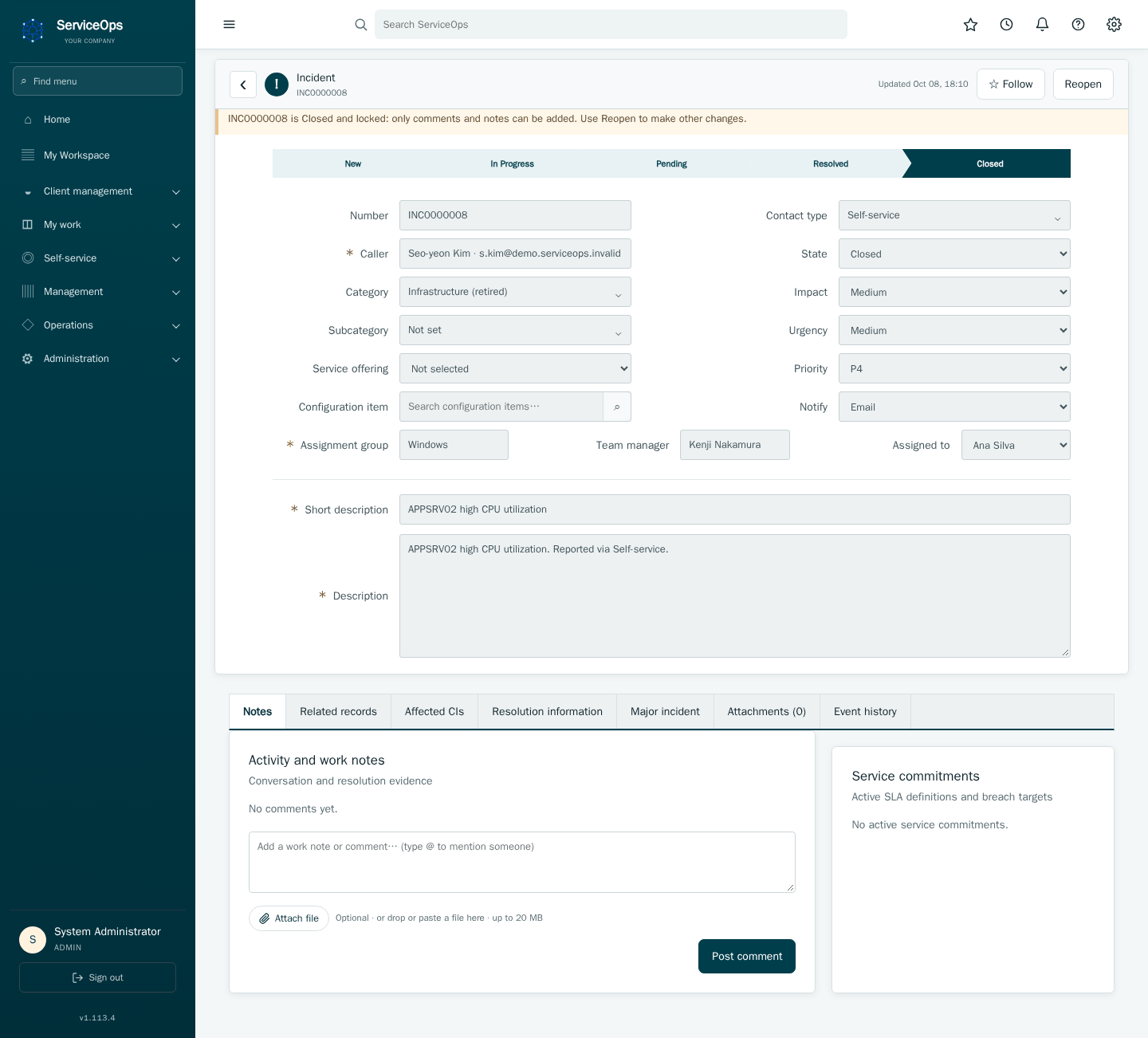
Every record type uses this same layout: a lifecycle stepper showing where it is, a two-column form for its fields, and an Event history below recording every change with who made it and when.
- Open New change, pick the type (Standard/Normal/Emergency), and name the affected configuration item(s).
- Fill in risk/impact, the planned window, and implementation, test, and backout plans.
- Submit — the change enters
Awaiting Approvaland routes to the relevant manager and CCB. - Once every required approval is in, the change moves to
Approvedand can be scheduled and implemented.
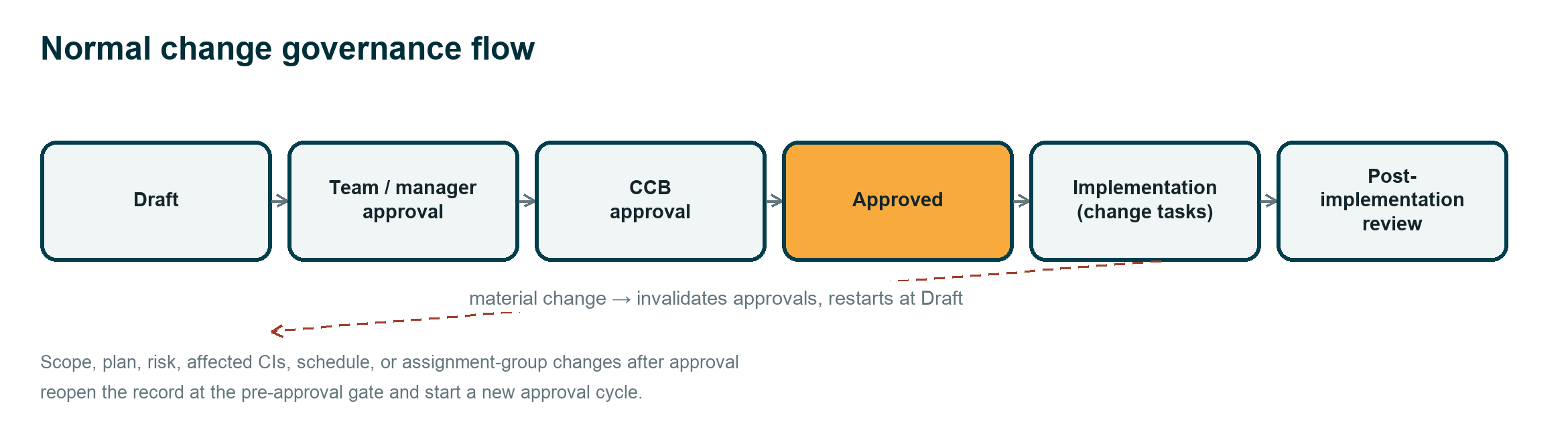
Editing an already-approved change's scope, plan, risk, or affected systems
resets it to Draft and starts a new approval cycle — this keeps the
approved record honest, so approving a change always means approving what
actually gets implemented.
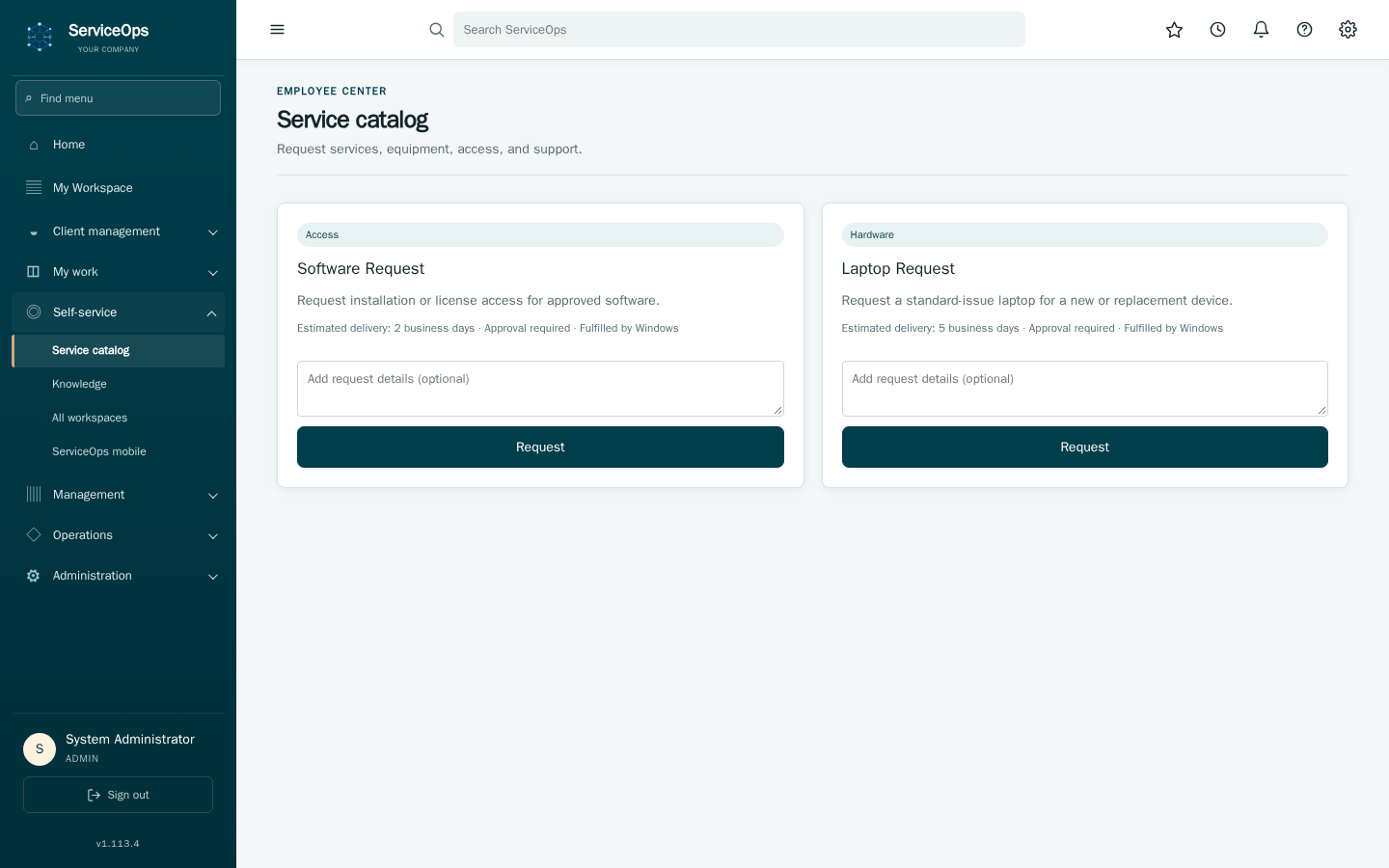
Browse the Service catalog, pick an item — each card shows up front whether it needs approval and who fulfills it — fill in the form, and submit. That creates a REQ (the order) and one RITM per item ordered.
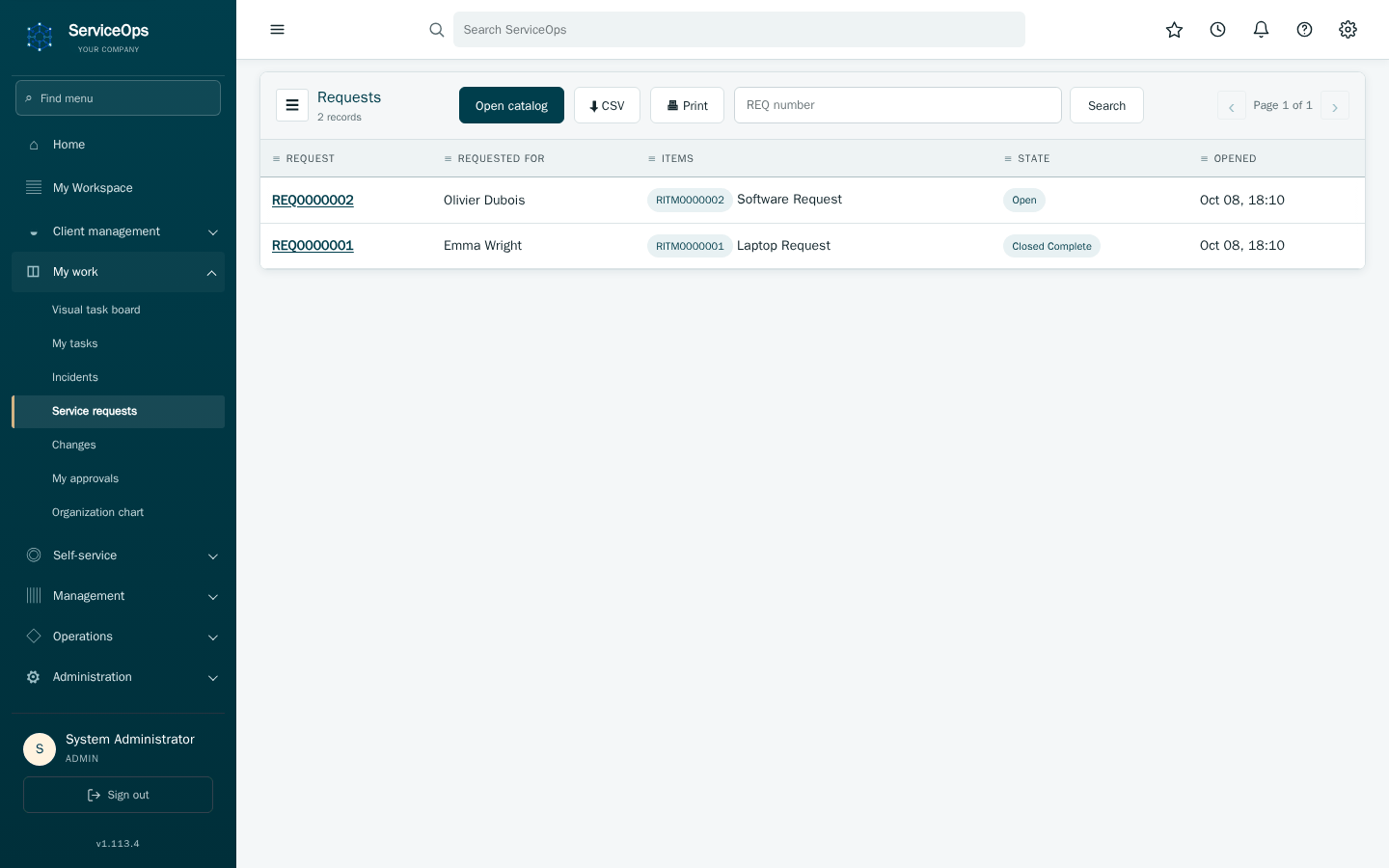
Track your order afterward from Requests & RITMs.
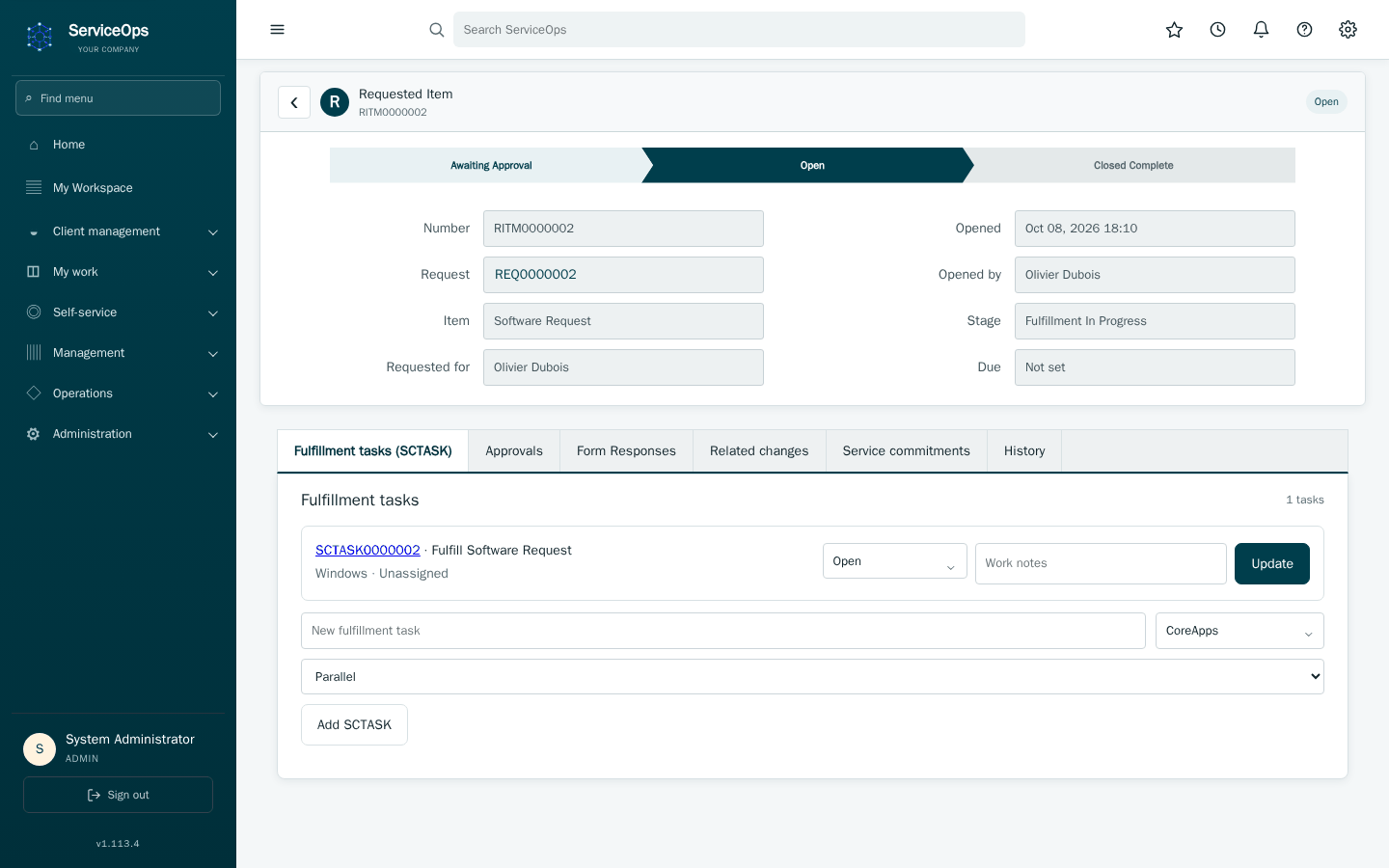
Opening a RITM shows its own approval → fulfillment → completion journey, plus every fulfillment task (SCTASK) needed to actually deliver it — the RITM only completes once all of those do.
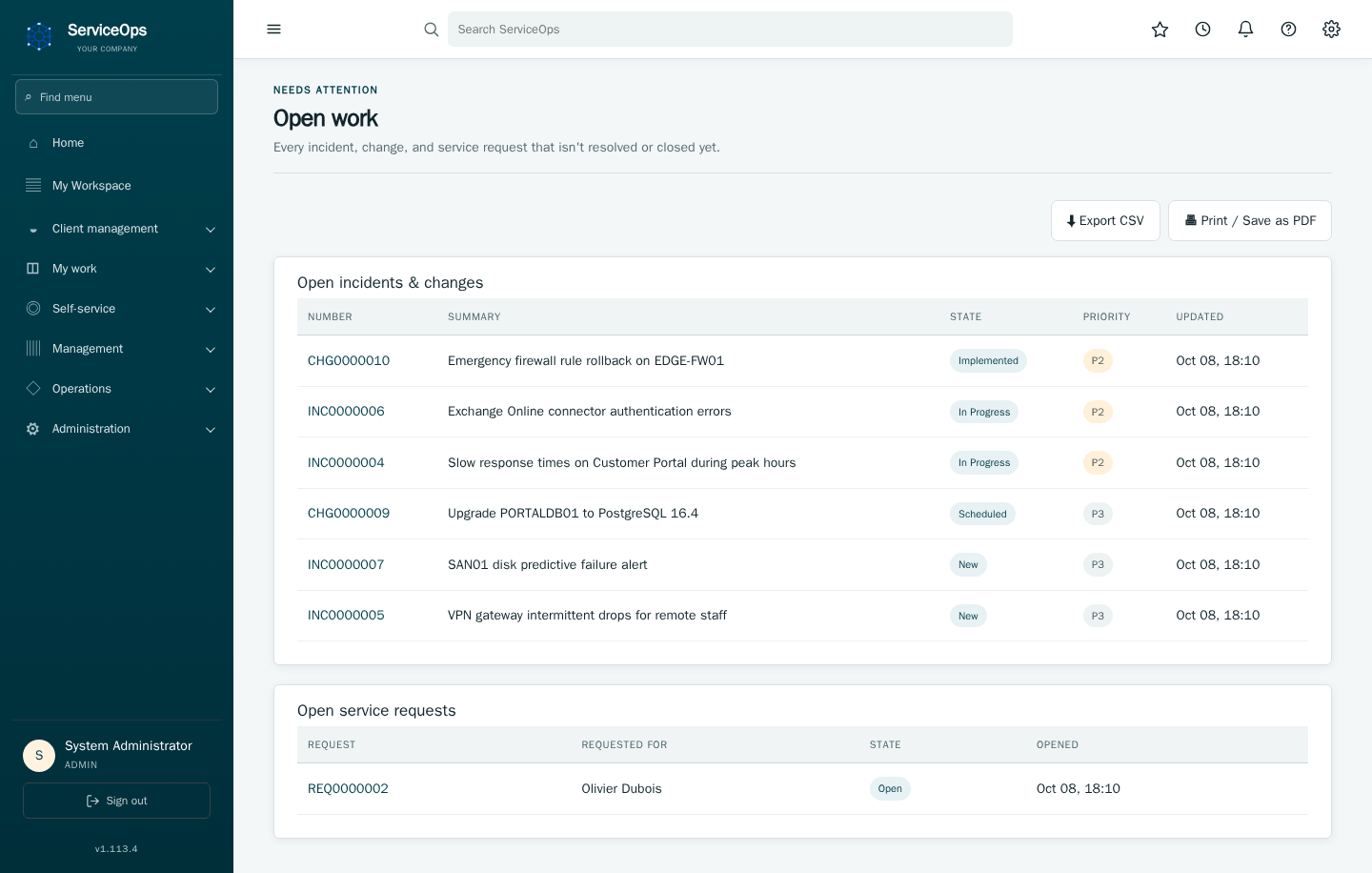
Open work combines every unfinished incident, change, and request into one list instead of three.
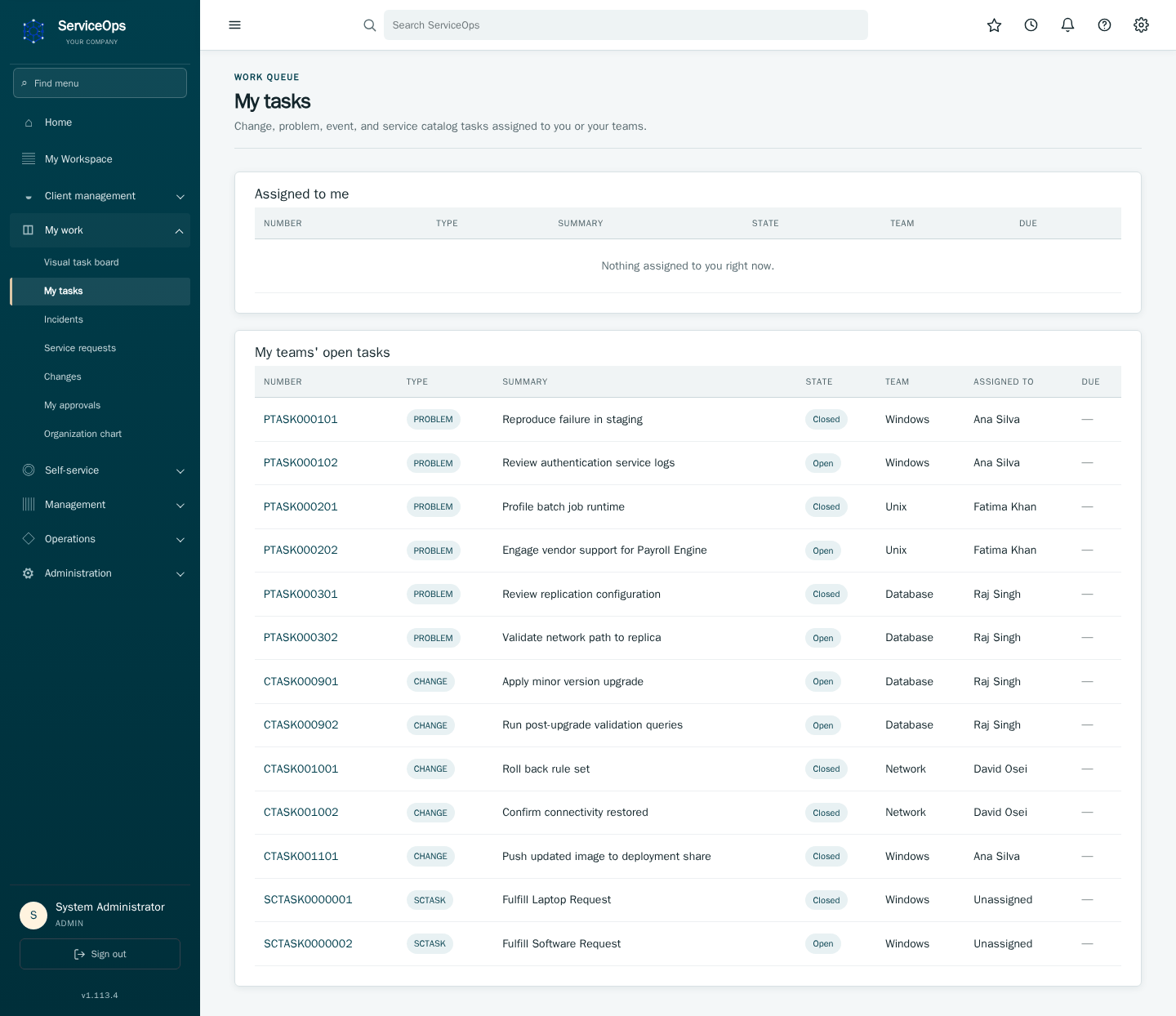
My tasks is your personal queue — everything assigned to you, plus a second list of unclaimed team work you can pick up next. The sidebar link shows a badge whenever something's waiting.
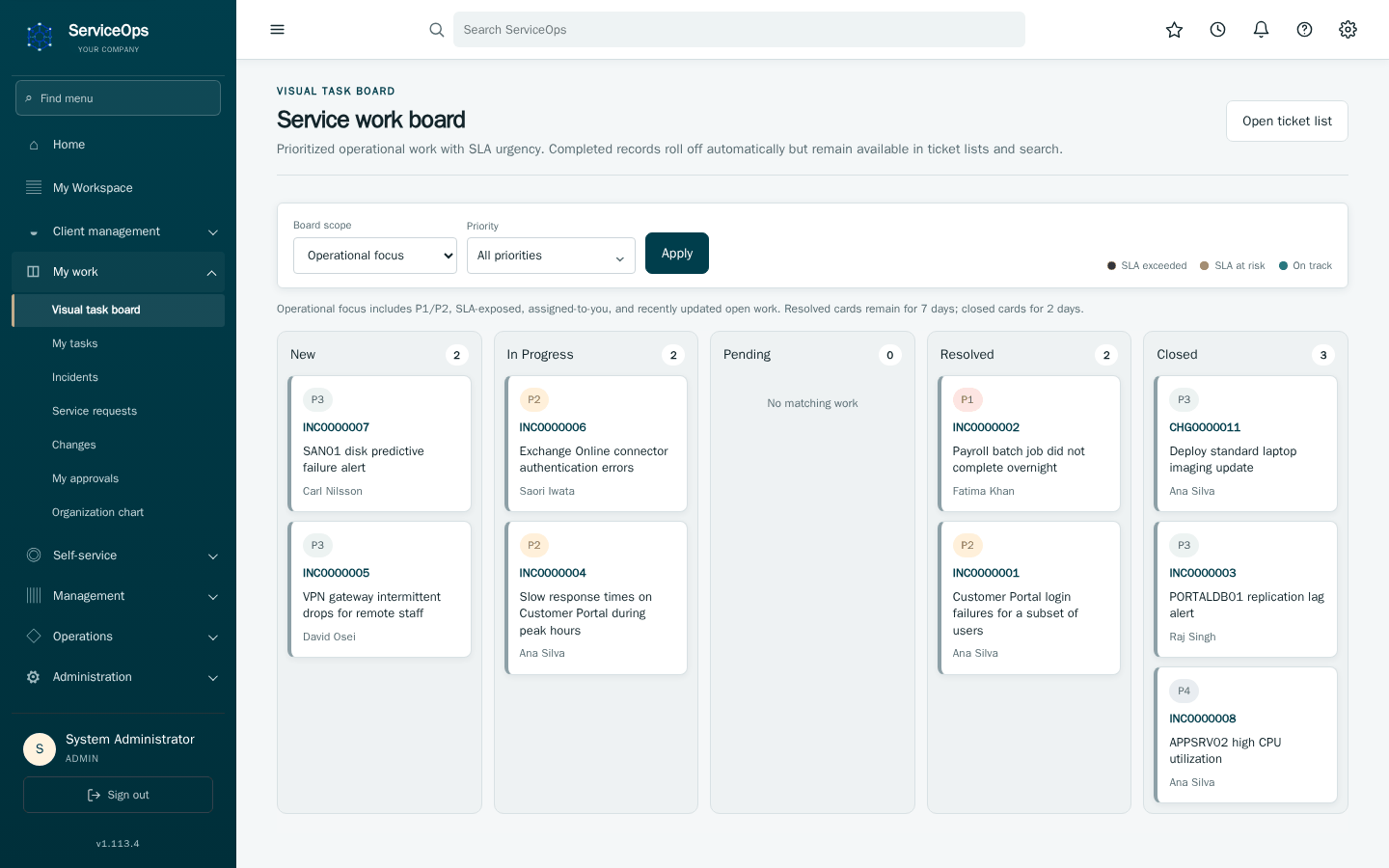
The task board gives the same tickets a Kanban view — dragging a card between lanes changes its state the same way editing the form would, so an invalid move (like skipping a required approval) is rejected the same way.
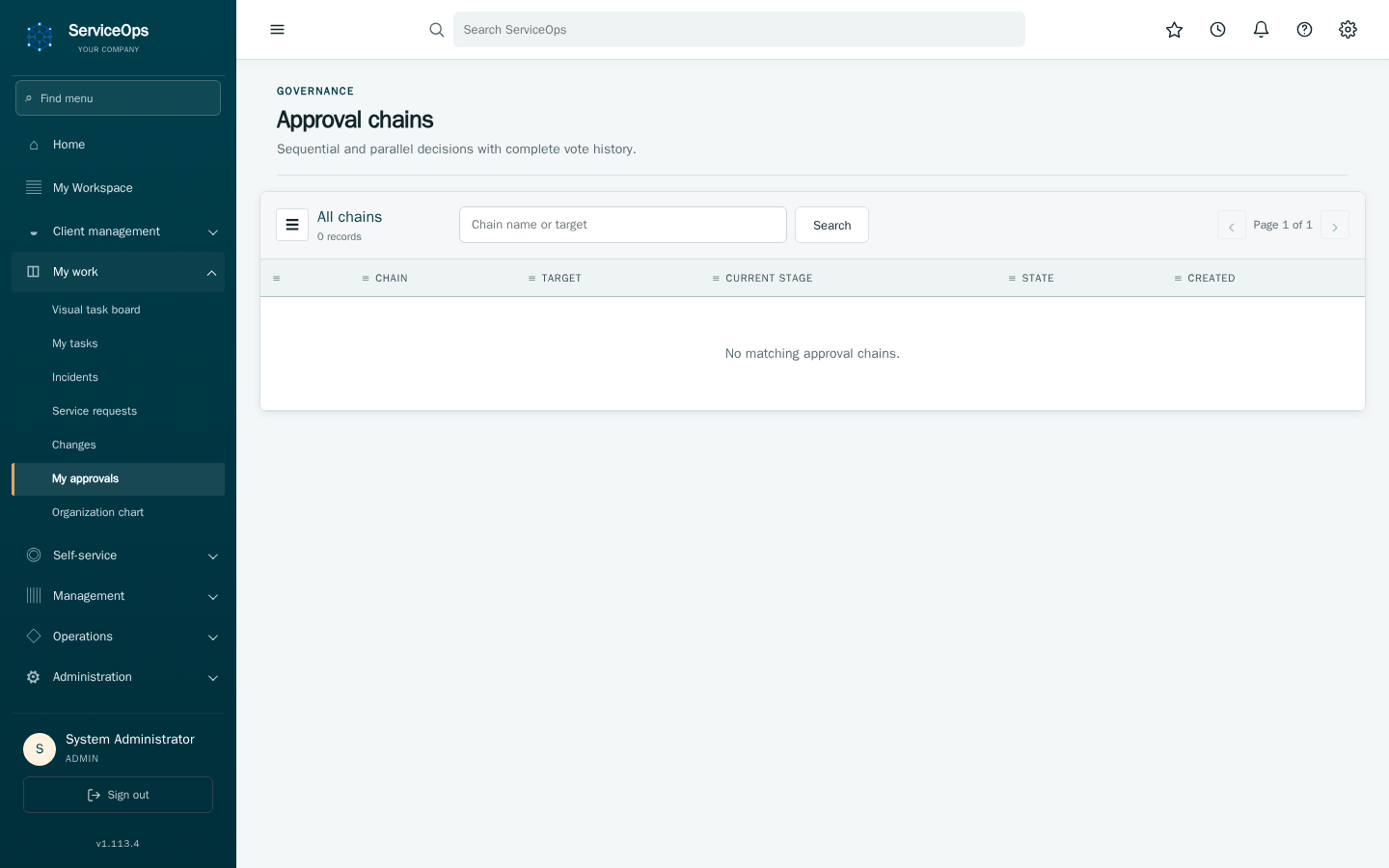
If you're a manager or CCB member, My approvals lists everything waiting on your decision in one place, instead of you having to check every change or request individually. A sidebar badge tells you when something's there.
Approvers can be people or groups. Under Service configuration:
- CCB: grant individual users CCB authority, and add teams under CCB approver groups (choose a team in the dropdown, then Add group; ✕ removes one) so every active member is also a CCB approver. Any one CCB approver authorizes a change.
- Executive approval: choose executive users and add Executive approver groups the same way; the approval rule (every one, or any one) covers everyone selected.
- Team managers: each team's change assessment goes to its manager or, when an Approval group is set, to the manager or any active member of that group. A team needs a manager or an approval group before changes owned by it can be submitted.
- Record approval (on the Executive approval page): problems and other records that need approval go to every active member of the chosen teams except the requester; the first decision settles the record. Without a group, an administrator approves.
Group members are resolved when an approval starts, so later membership changes affect only new approvals, never an open one.
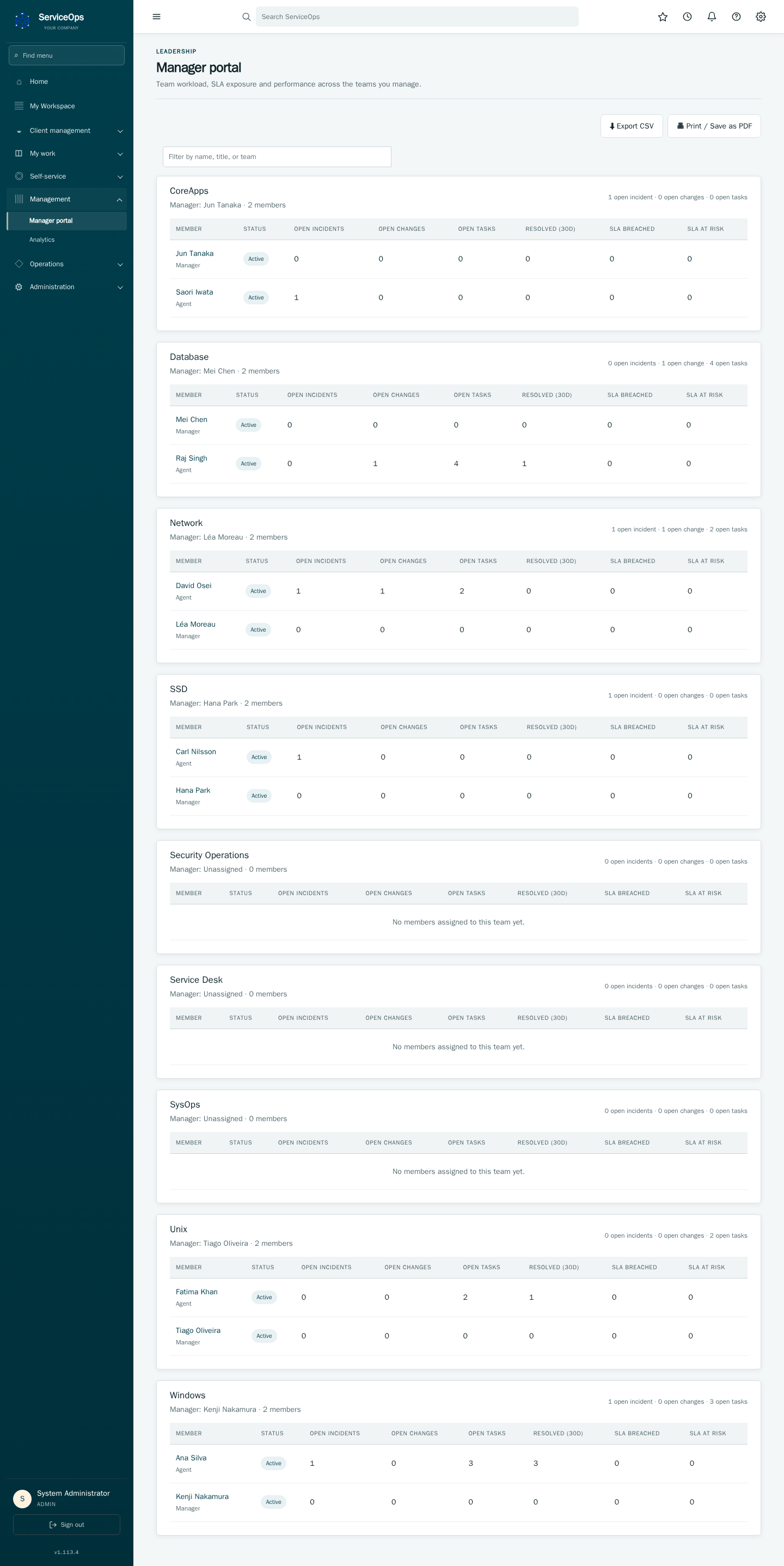
Each team you manage gets its own panel in the manager portal: who's active, how much is open against them, what they've resolved in the last 30 days, and their SLA performance. Export CSV and Print / Save as PDF turn this straight into a report for a status meeting.
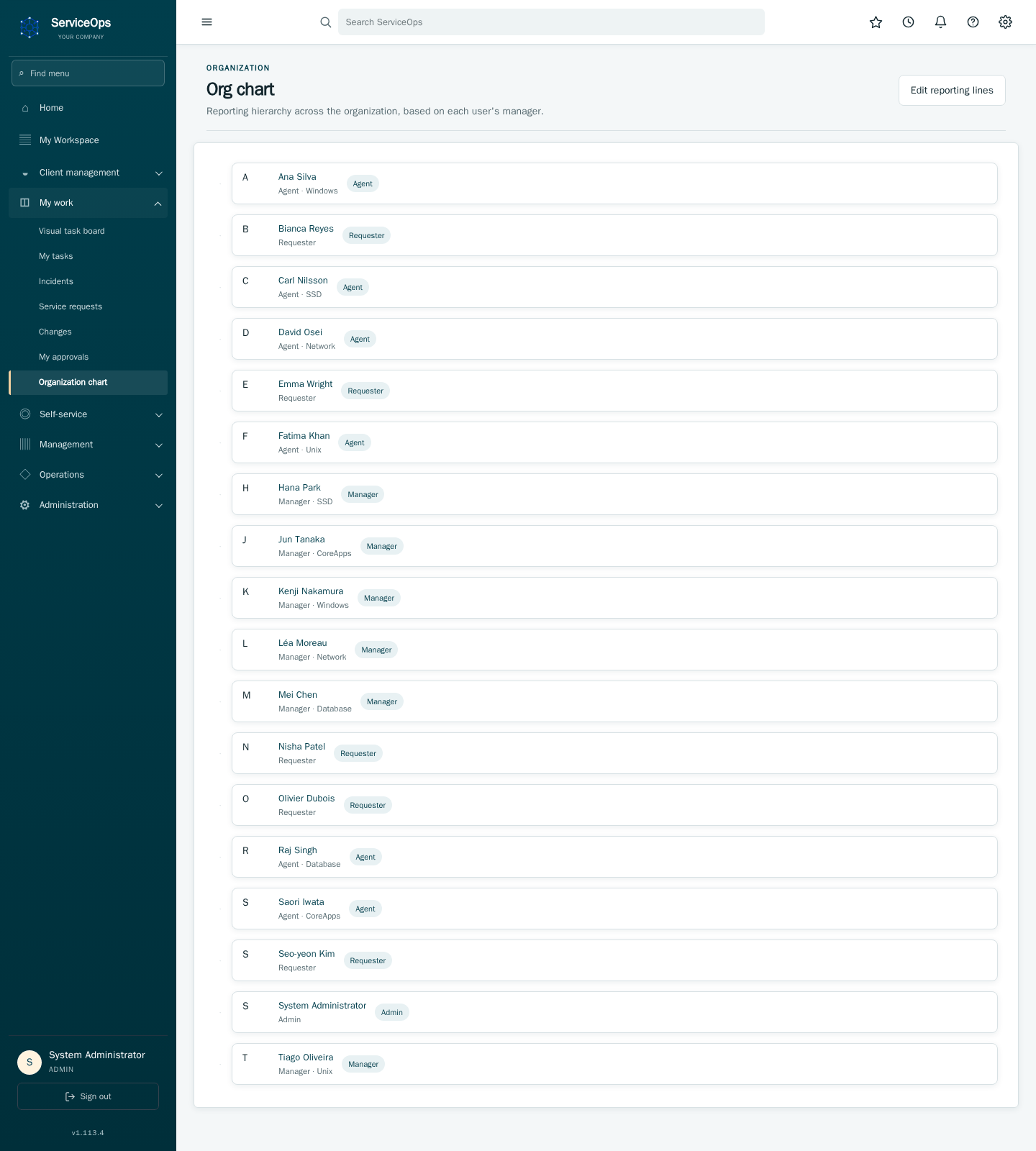
The org chart is generated automatically from everyone's manager field — no separate data entry required.
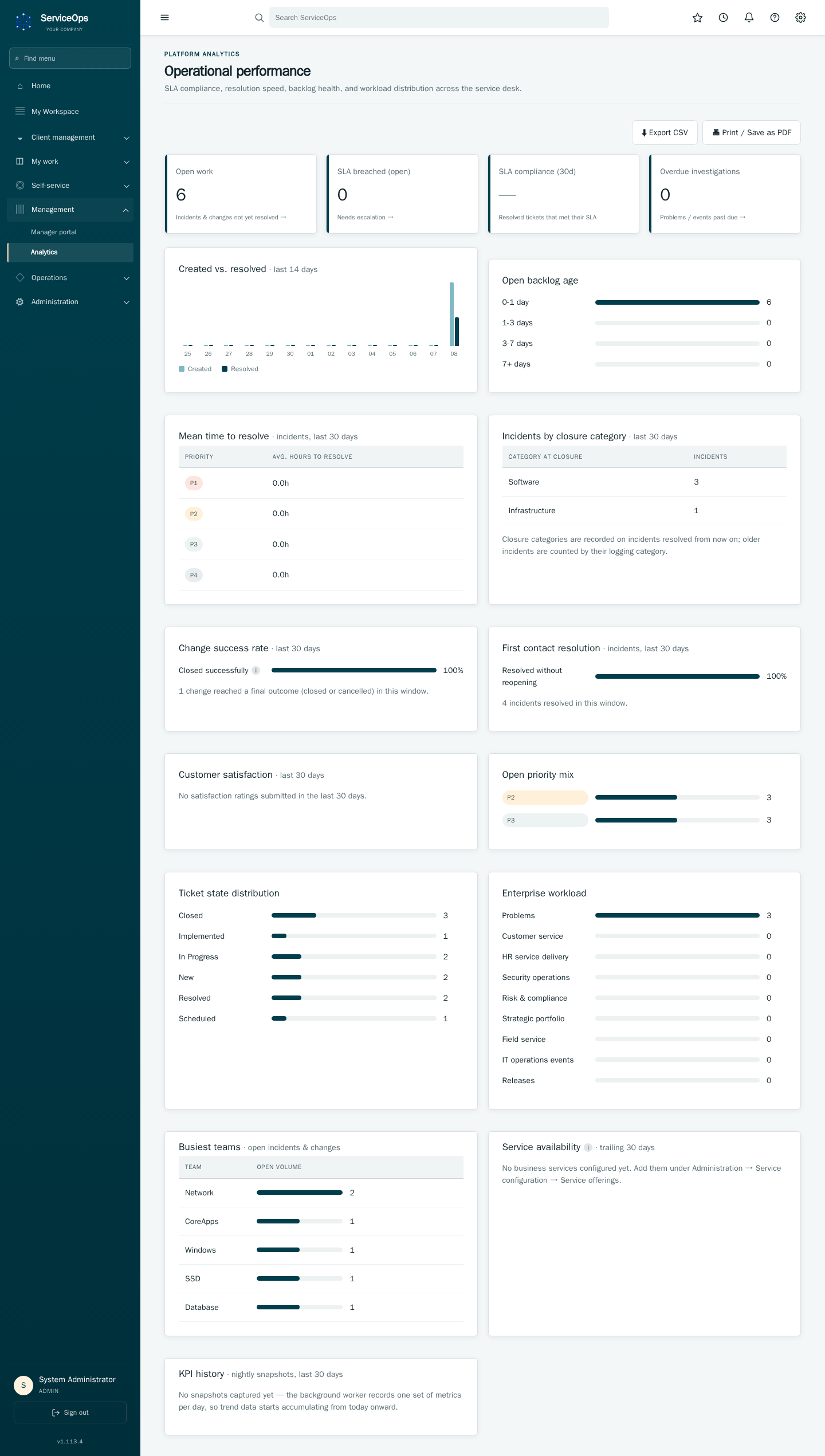
This is the tenant-wide performance view. The trend chart is the fastest way to see if the backlog is growing or shrinking; backlog aging often catches problems earlier than a raw open-ticket count does; and mean-time-to-resolve by priority is the number most worth tracking week over week.
You're notified for things worth reacting to — an SLA breach on your ticket, a new approval request, a comment on something you're following. Unread items stay visually marked until you open the record they refer to.
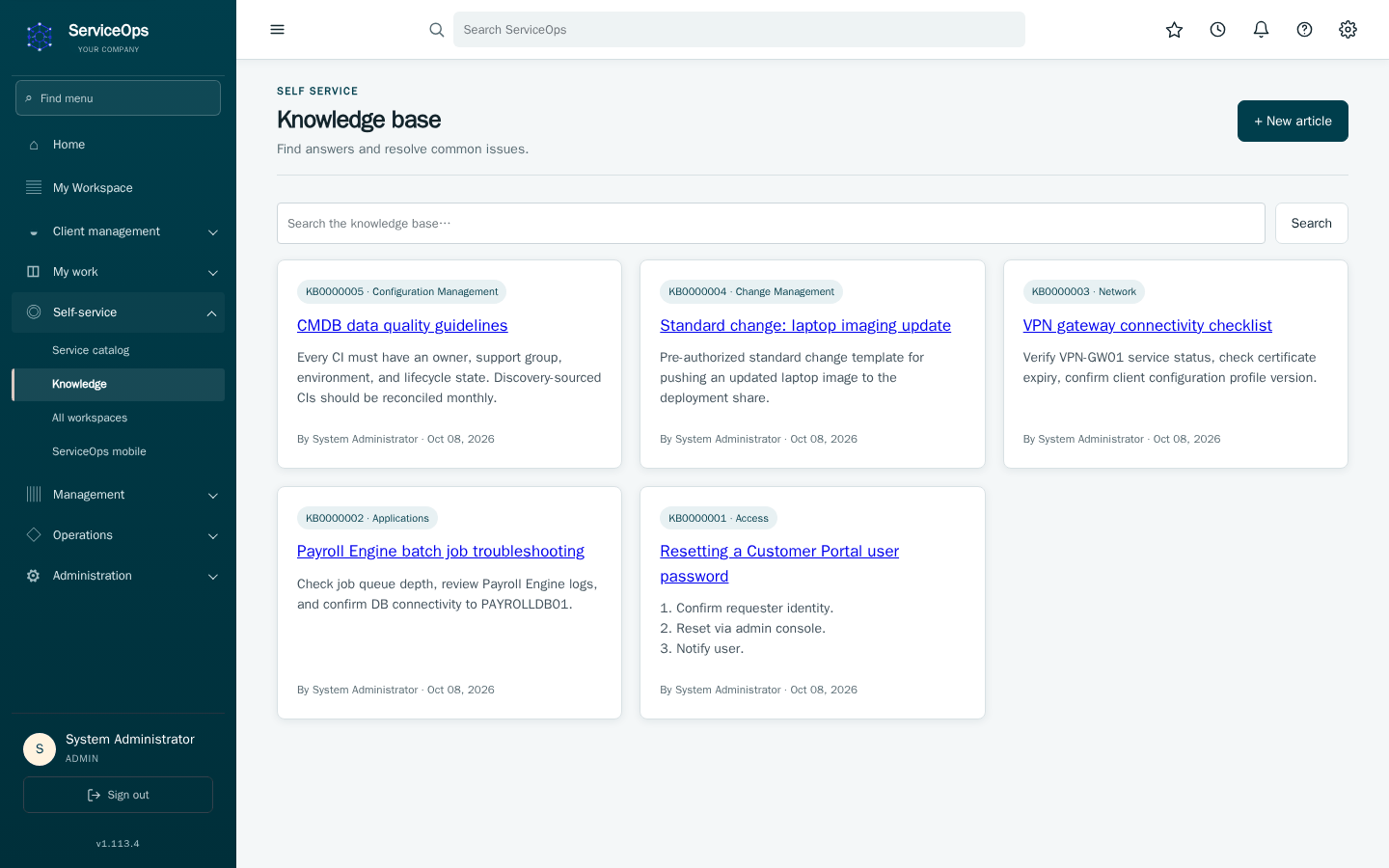
Search here before opening a ticket — a known-error article or workaround can solve the problem immediately.
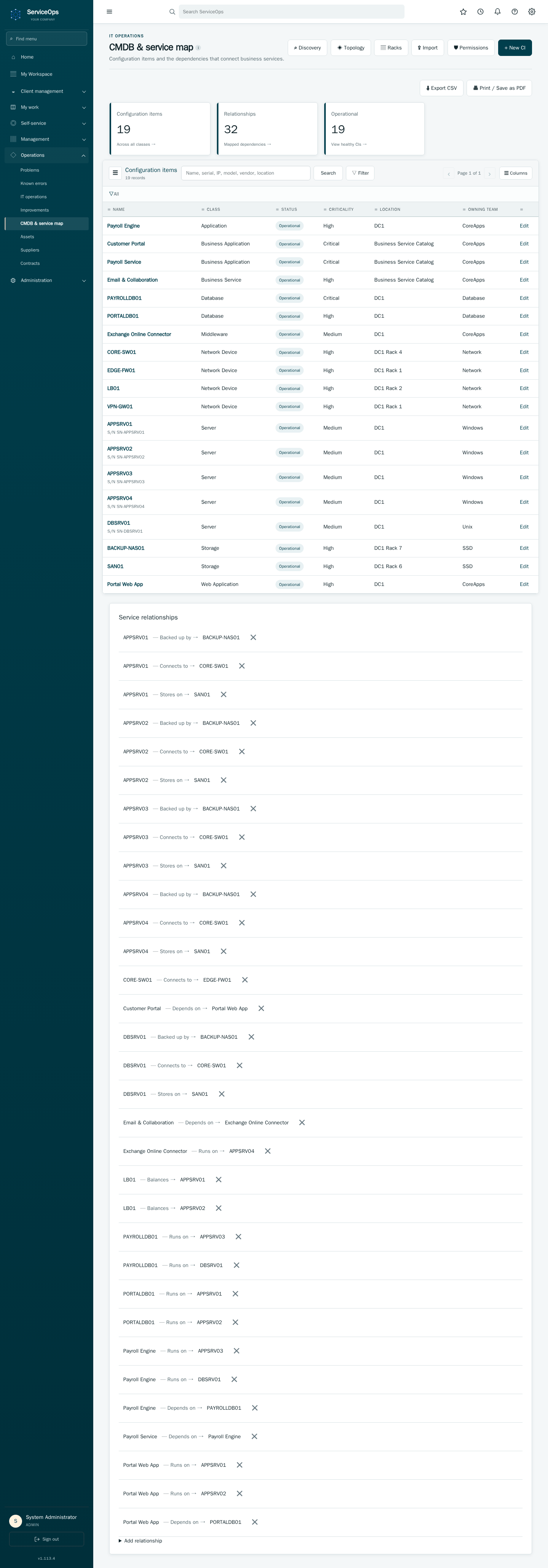
The CMDB tracks every server, application, and service, and how they depend on each other. Every configuration-item picker (on incidents, changes, requests and the CMDB) finds items by name or serial number; type or scan a serial and its device is listed first. The browse button (⌕) also searches serial numbers and shows them in its table. Those relationships power conflict detection: scheduling a change against something another in-flight change already touches surfaces a warning before approval.
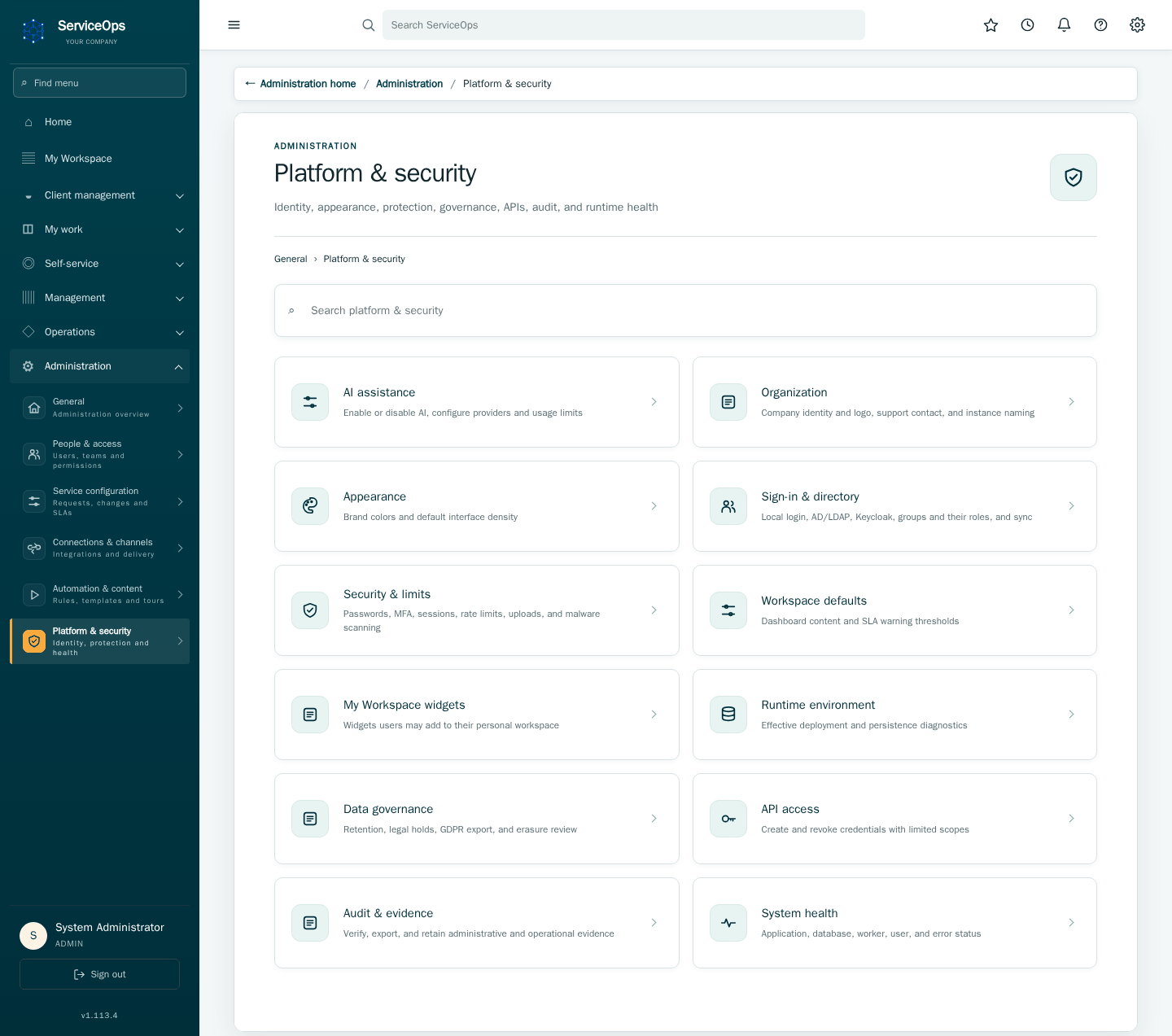
Administration → Platform settings is where tenant-wide configuration lives: branding, security limits, SLA windows, LDAP/Keycloak, and more. Each field shows whether a change applies immediately (Live) or needs a restart to reach every running instance (Restart required).
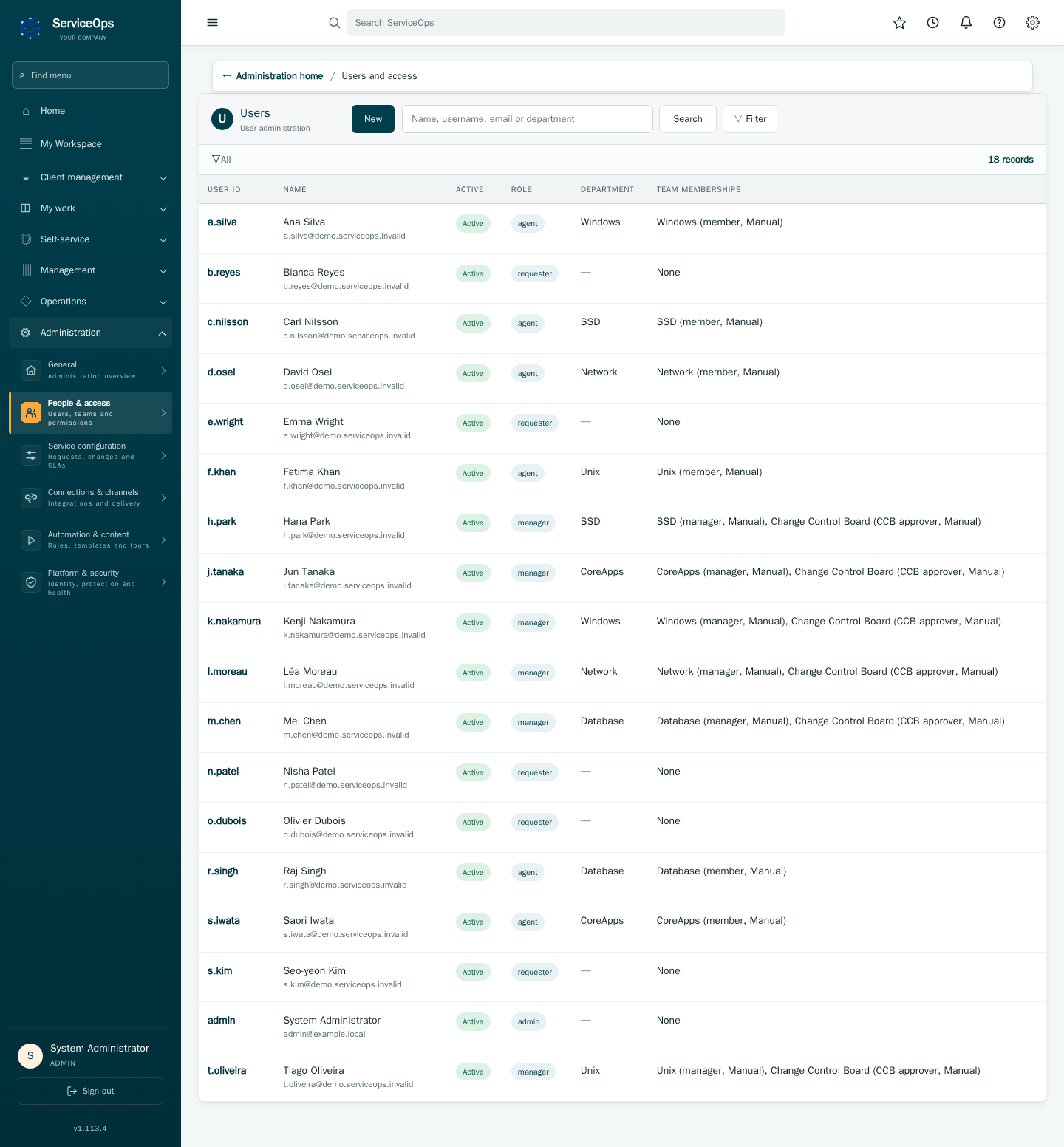
Users & roles manages accounts, roles, and team membership. Directory (AD/LDAP) accounts keep reconciling their team membership automatically on every login — editing membership here only sticks for locally-managed accounts.
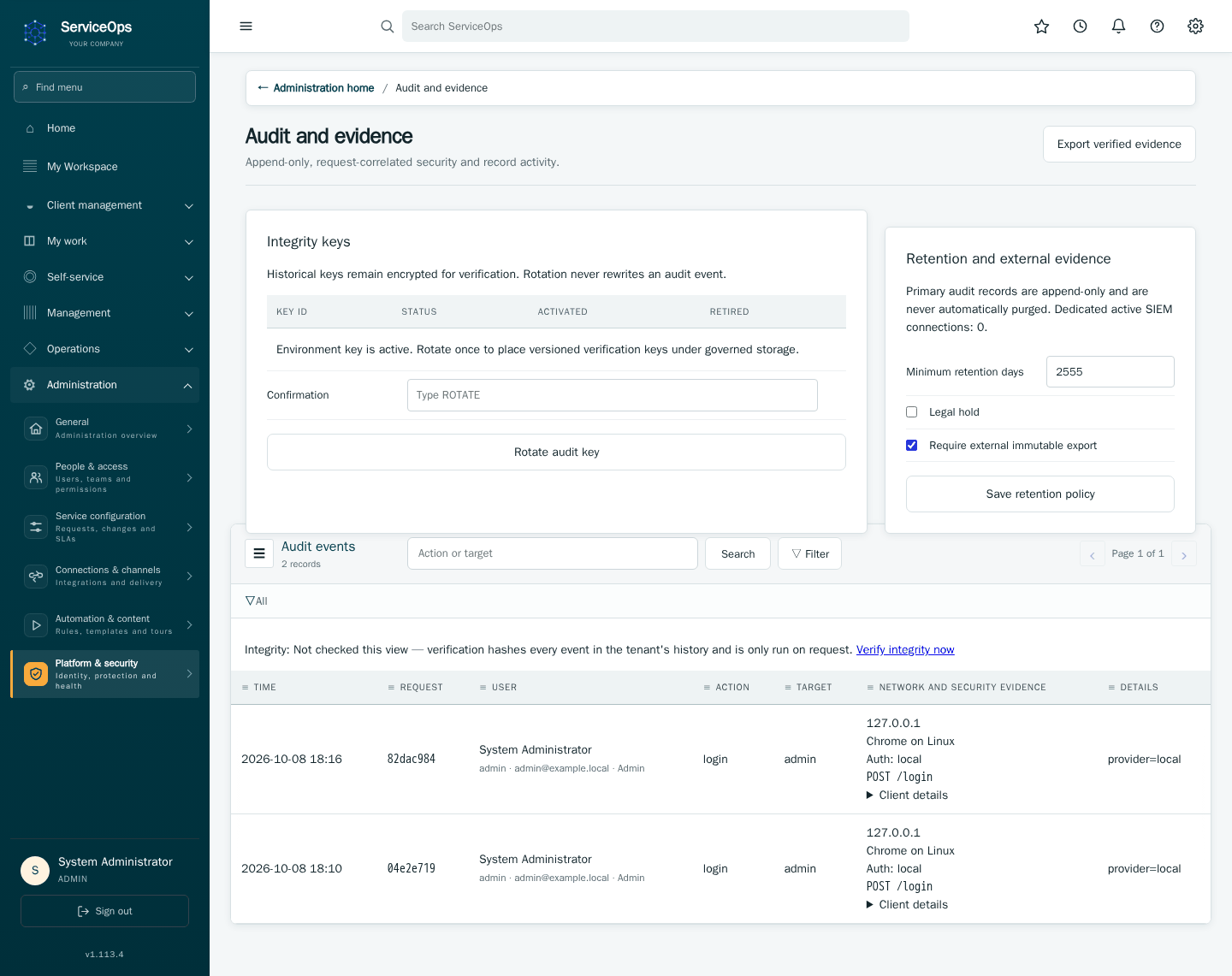
The audit log records every create, update, and approval decision, cryptographically chained so tampering would be detectable — the first thing an auditor or incident responder would ask for.
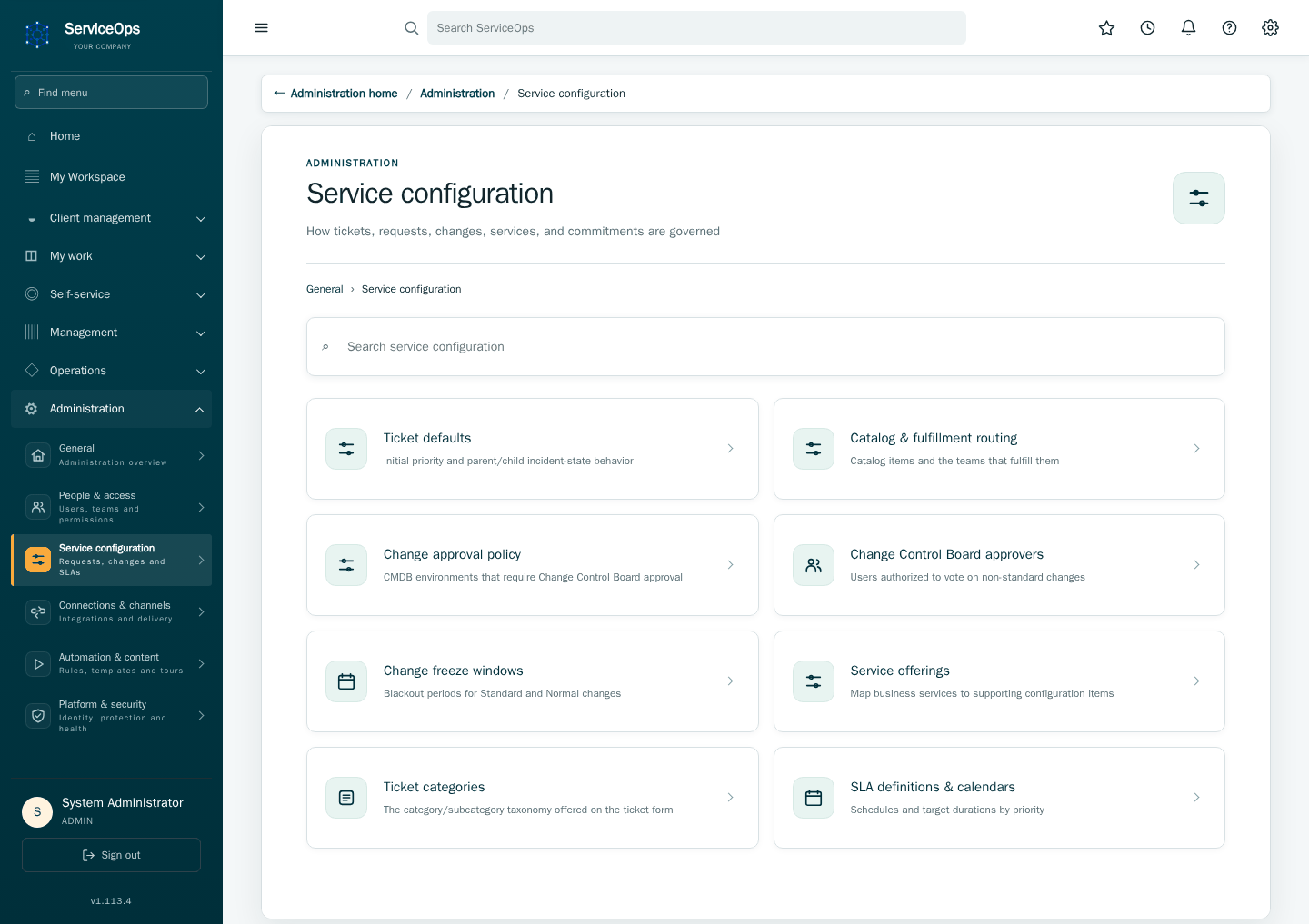
Service delivery and governance is where the process framework itself is configured: default catalog routing, SLA targets, business calendars, and CCB membership. Changes here govern future tickets, not ones already in flight.
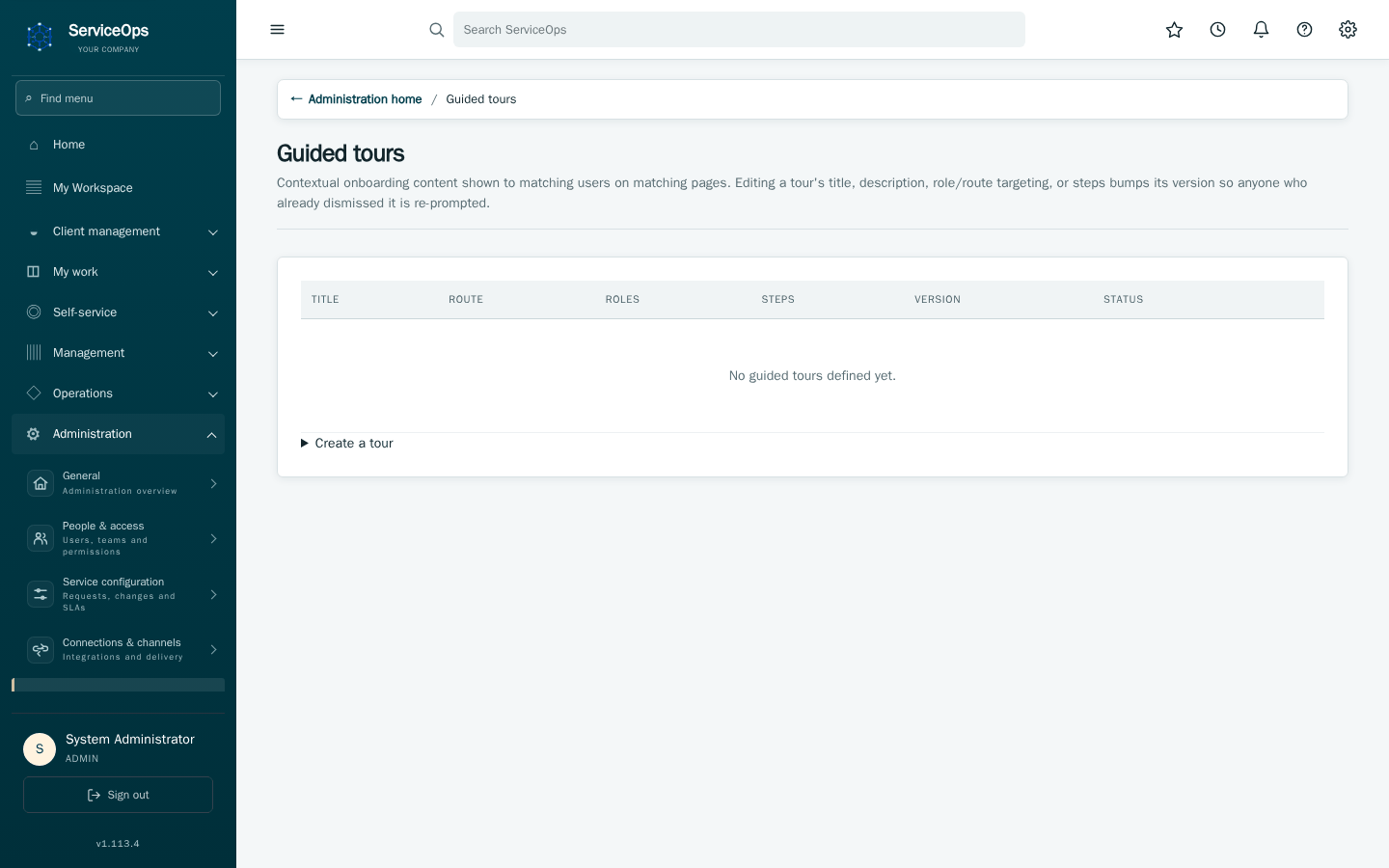
Guided tours lets you author step-by-step onboarding walkthroughs, scoped to specific roles, that new users see as an on-page overlay.
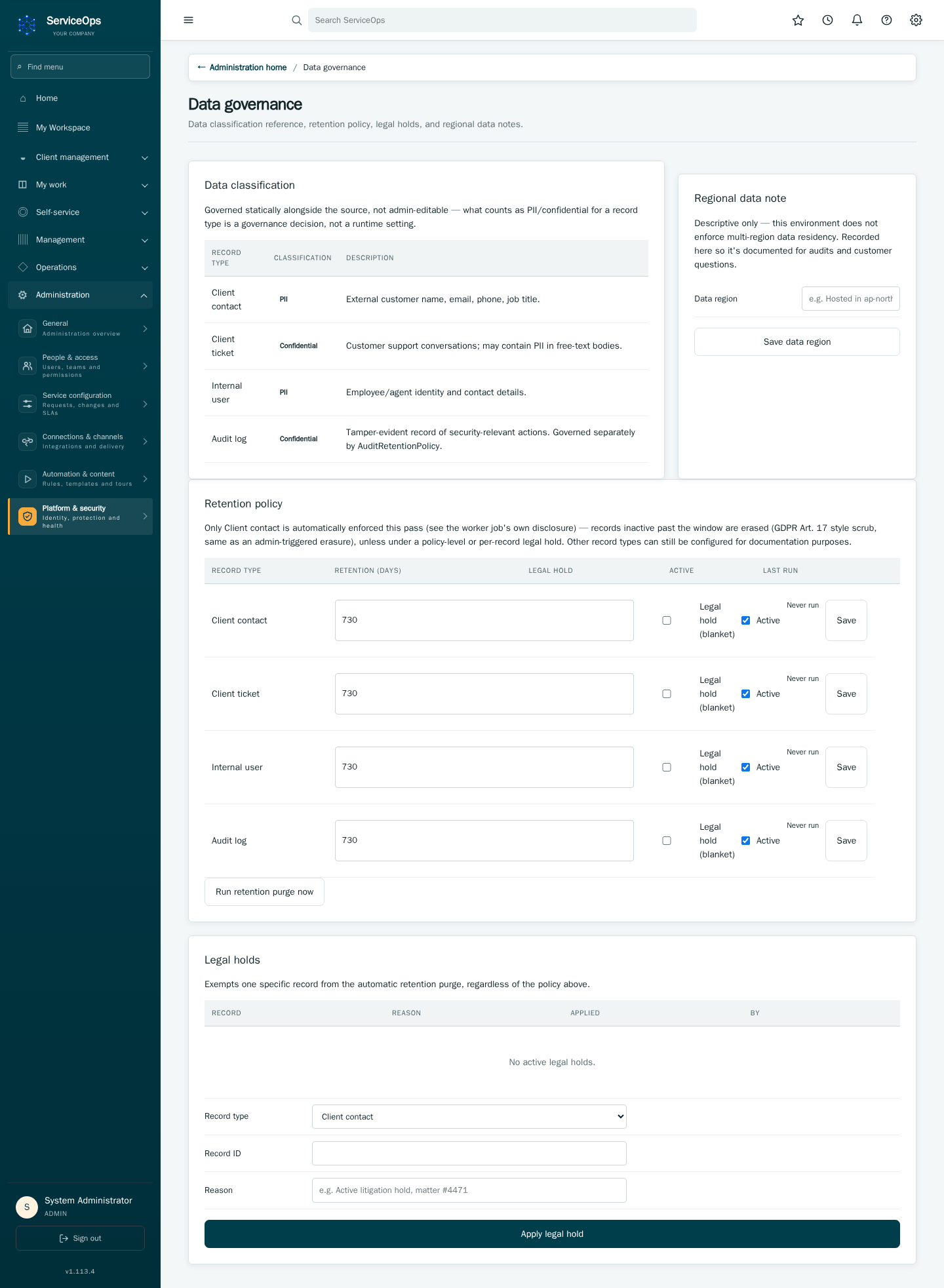
Data governance manages retention policies, legal holds, and export/erasure requests for client contacts.
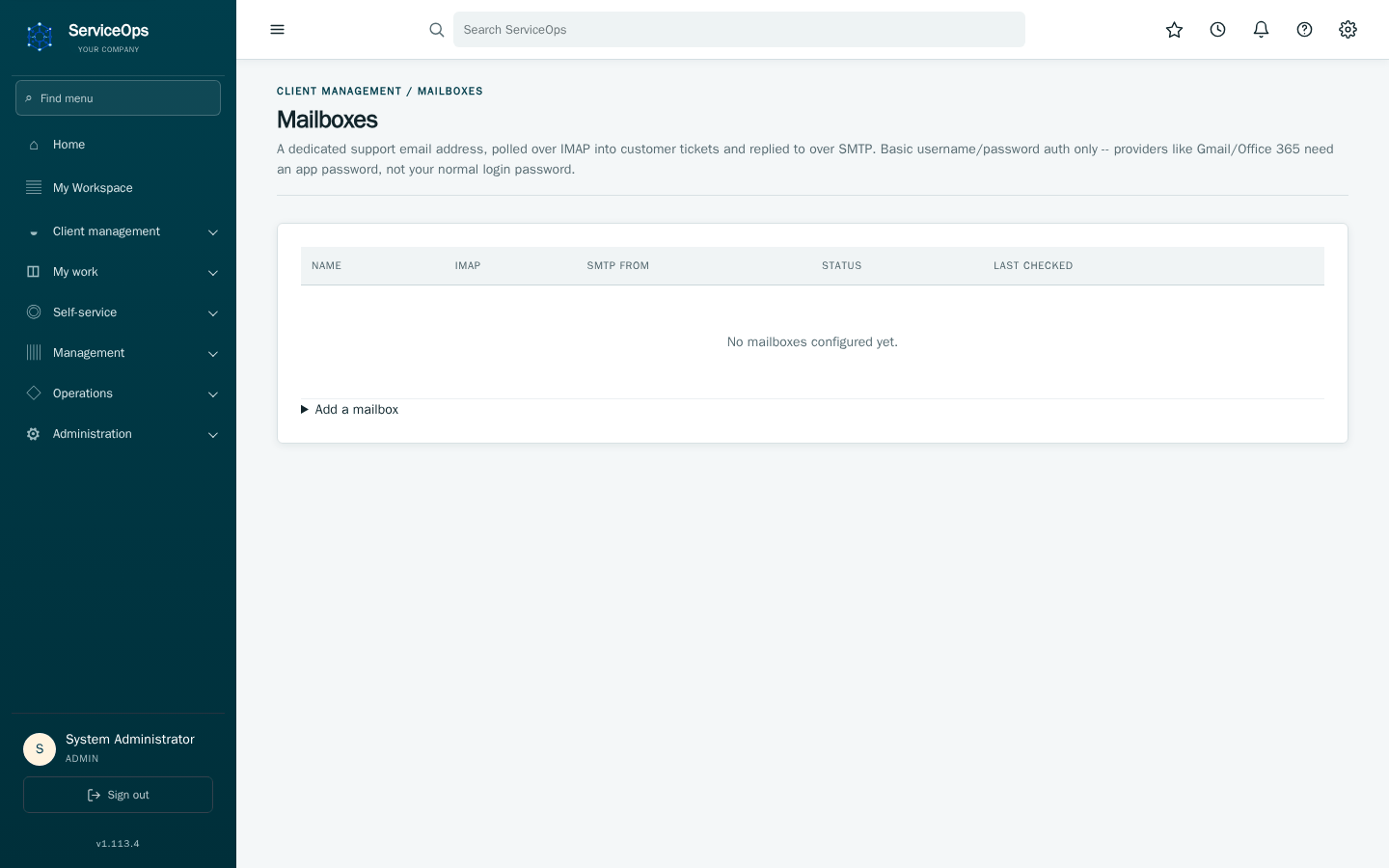
Client support mailboxes turns a real inbox into Client tickets — inbound mail is threaded onto existing tickets or creates a new one; agent replies go back out the same way.
Installation, upgrades, backup/recovery, monitoring, and security hardening are covered in full in the separate deployment guide. In short:
- Install via a signed RPM (
sudo serviceops setup), Docker Compose, or Kubernetes/Helm for production scale. -
sudo serviceops backup/rehearse-recoveryverify backups actually restore, not just that they exist. -
sudo serviceops rehearse-upgradetests a pending upgrade against a disposable copy of production data before you run it for real. - Every release ships as a signed, immutable image with provenance — upgrades are pinned by digest, never a moving tag.
See the deployment guide for the full installation walkthrough, production checklist, and incident-response procedure.
The local 1.92.0 candidate adds tenant-administrator-controlled, disabled-by-default AI incident investigations with self-hosted and external OpenAI provider modes. See AI operations for setup, permissions, job lifecycle and explicit limitations, and AI implementation plan for the timeline and current validation evidence. The initial release produces read-only drafts; approved actions and real-model quality acceptance remain pending.
- Complete feature parity through an encrypted, IPFS-authoritative checkpoint and volatile relational query projection; no PostgreSQL container or persistent embedded database.
- Automatic migration of the former B-335 login-only user/tenant checkpoint.
- Persistent audit chain, session inventory/revocation, restart-surviving rate limits, preferences, notifications, operational records, configuration, workflow jobs, API/mobile sessions, and attachment metadata.
- Encrypted IPFS attachment objects and encrypted full-state checkpoints.
- Coalesced checkpoint creation and retrying asynchronous IPNS publication,
with pending durability visible in
/ready. - Single-process integrated scheduled worker to avoid divergent IPNS writers.
- See IPFS_STORAGE_MODE.md for deployment and the explicit scale/durability boundary.
Catalogue baseline: ServiceOps 1.73.0
Last code audit: 14 August 2026
Evidence base: application routes, models, templates, configuration,
migrations, tools, deployment manifests, and automated tests in ServiceOps.
Note: this pass targeted the specific gaps identified below (new
capabilities added since the 1.46.0 baseline, and the §24 boundary
contradiction); it is not a full section-by-section re-audit of every prior
entry.
This is the canonical inventory of implemented ServiceOps functionality. It describes working product behavior, not roadmap aspirations. Features that depend on external systems are labelled accordingly; incomplete or externally unverified capabilities are listed under “Explicit boundaries.”
- Authenticated shell with a compact persistent accordion navigator and global controls.
- Role-aware menus that hide inaccessible destinations.
- Canonical Home, My work, Self-service, Management, Operations, and Administration applications with one-at-a-time expansion, automatic current section opening, exact module highlighting, and a menu-only filter.
- Nested User management navigation for users, groups/teams/access, roles/permissions, and active sessions.
- Administration home with categorized entry points and consistent return context on child administration pages.
- Global search across authorized records and navigation destinations.
- PostgreSQL trigram-indexed global search with authorization-preserving ID subqueries and a separately tested immutable navigation catalogue.
- Type-ahead lookup and browser for configuration items and record links.
- User favorites and recently viewed page history.
- Application/workspace directory and cross-domain My Tasks/Open Work queues.
- Persisted sidebar scroll state and navigation state.
- Blocking desktop/mobile browser QA for Dashboard, Administration, CMDB, and Client Management, including console-error detection and axe-core WCAG 2.2 AA serious/critical violation checks with failure traces and screenshots.
- Acting-role switcher limited to roles actually granted to the user.
- User preferences for theme (light, dark, or match system), density, font scale, date format, timezone, dashboard widgets, list-page size, high contrast, and reduced motion.
- Company/instance name, logo, primary color, and accent-color branding.
- Responsive layouts, print styles, keyboard skip link, focusable main landmark, labelled dialogs/actions, and reduced-motion support.
- Progressive Web App manifest and versioned service worker.
- Contextual help centre and inline explanatory tooltips.
- Notification inbox with unread state, target click-through, mark-all-read, clear, and navigation badges.
- Self-service profile, contact/location fields, directory-managed field indicators, timezone/date preferences, and validated PNG/JPEG avatar.
- Manager-based organization chart.
-
User-authenticated native mobile sessions for local and LDAP accounts, with MFA, short-lived access tokens, rotating refresh tokens, Keychain storage, revocation, tenant/role/team authorization, and per-user app/device audit attribution. Shared embedded API keys are not used by the iOS client.
-
Optional foreground biometric lock using Face ID, Touch ID, Optic ID, or the device passcode recovery path, backed by device-only Keychain storage.
-
Apple platform-passkey registration and passwordless sign-in using HTTPS-only, tenant/user-bound, expiring single-use WebAuthn challenges, user verification, signature-counter tracking, self-service credential inventory/revocation, request throttling, and audited mobile sessions.
-
Local username/password authentication with Argon2id hashes.
-
Transparent upgrade of legacy PBKDF2 hashes after successful login.
-
Configurable password policy and audited password changes.
-
LDAP/Active Directory authentication when configured.
-
Keycloak OpenID Connect when configured, with optional exact
acrrequirement for identity-provider MFA assurance. A first Keycloak sign-in joins an existing ServiceOps account only when the identity provider marks the email as verified (email_verified); an unverified email that matches an existing account is refused with an auditedlogin_blockedevent, and Keycloak usernames never match existing accounts. Enable email verification (or "Trust Email" on a federated directory) in the realm before relying on account linking. -
Email addresses are stored lowercase and must be unique in any letter case; profile and user-administration forms reject an address another account uses.
-
TOTP MFA enrollment, verification, policy enforcement, one-time recovery codes, and recovery-code regeneration. Each authenticator code signs in once; reusing a code that was just accepted is refused.
-
Per-IP and per-account login throttling, failed-attempt tracking, temporary lockout, and audited blocked attempts. Wrong verification codes count toward the same lockout as wrong passwords (Failed logins before lockout, default 5), on the web and in the mobile app; the count resets after a successful sign-in, not when the password is entered again.
-
Non-enumerating forgot-password response; throttled, time-limited, single-use reset tokens; successful reset unlocks the account and revokes existing sessions.
-
Authenticated synthetic-login monitoring probe.
-
Guarded break-glass administrator recovery: explicit confirmation, pre-mutation recovery set, password rotation, unlock, session revocation, and audit event.
- Requester, agent, manager, administrator, and super-administrator roles.
- Authorization actions resolved from validated governed policy.
- Multi-role grants and user-selected acting role without privilege creation.
- Directory-managed/locked role grants.
- Server-recorded browser session inventory with creation, last seen, source IP, parsed device/browser, browser language, optional forward-confirmed reverse-DNS hostname, and revocation data.
- Self-service and tenant-administrator session revocation.
- Authentication-version invalidation after security-sensitive changes.
- Tenant model and tenant-aware user, operational, CMDB, service, workflow, integration, audit, and configuration data.
- Authenticated tenant resolution fails closed instead of guessing tenant 1.
- Super-administrator tenant administration and tenant-aware root isolation.
- Object authorization on lists, direct IDs, dashboards, boards, analytics, searches, attachments, approvals, links, requests, and tasks.
- Searchable tenant-scoped user administration.
- Local user creation and editing; active status, primary/additional roles, department, manager, and profile fields.
- User self-service profile and personal-data export.
- Governed erasure/anonymization that preserves required record/audit integrity.
- Support groups/teams, membership, and manager designation.
- Administrator UI for creating, renaming, activating/deactivating, assigning managers to, and manually allocating users among tenant-scoped teams.
- Team-scoped assignee selection and explicit team reassignment.
- Team aliases for spelling, historical, and imported names; safe duplicate team merge through alias governance.
- Directory group-to-team mappings.
- Separate tracking of directory-managed and local memberships.
- Just-in-time LDAP user provisioning after successful authentication; no directory-wide provisioning action. Scheduled, scope-filtered and paged reconciliation refreshes known identities and required manager links.
- Directory sync updates linked users’ profile attributes, reporting manager, account state, safe directory metadata, and mapped team memberships; tenant failures are isolated in the worker.
- Bounded directory-profile intelligence: friendly group names, name/UPN, organization, employee, office/contact, account-state/expiry, timestamps and Unix/NIS identity fields are retained; OU/domain context and group-purpose summaries make the directory easier to interpret, while conservative team candidates require administrator review. User profiles connect directory identities to assigned assets and personally owned CIs. Certificate, password, SID and raw security-descriptor material is excluded.
- Optional conservative team discovery from a configured directory team attribute. New teams are tenant-scoped, and their manager is inferred only when all active members resolve to one active line manager.
- Automatic manager capability for users with active direct reports or a managed team, recalculated after the full reporting graph is synchronized.
- Time-bounded upward approval coverage during manager absence, with no initial notification to the backup, unchanged freeze controls, and dual attribution of the acting and accountable approvers.
- Unique record numbers, requester, ownership, assignee, state, source, priority, timestamps, and audit/event history.
- Priority calculated by configurable impact/urgency matrix.
- Permission-controlled priority override with reason.
- Configurable new-record default priority.
- Team assignment/reassignment and team-limited assignee choices.
- Comments/work notes, file attachments, checklist items, linked records, linked configuration items, related tasks, and lifecycle stepper.
- Soft deletion where governed record removal is supported.
- Search, filter, pagination, column preferences, and CSV exports.
- Visual task board protected by the same server lifecycle guards as forms.
- Cross-domain open-work and My Tasks queues.
- Cross-record relationships among supported operational records.
- Satisfaction/CSAT prompt and response for eligible completed work.
- Incident creation/editing with caller, contact type, impact, urgency, calculated priority, admin-configurable category/subcategory (ITIL v4/ ServiceNow-style, each subcategory optionally suggesting a service offering), service/CI context, team, assignee, state, description, notes, and resolution information.
- Incident queues, assigned views, dashboard counts, analytics, and export.
- Central transition enforcement; resolved records lock protected edits while allowing controlled comments and reopen.
- Parent/child incidents and optional parent-state synchronization.
- Major-incident promotion, impact statement, commander, communications, timeline, review fields, and post-incident review.
- Related problems, changes, requests, CIs, tasks, and record links.
- Monitoring-event ingestion with deduplication/correlation into incidents.
- Problem lifecycle, ownership, priority, related incidents/CIs, and tasks.
- Root-cause, workaround, known-error, and permanent-fix analysis.
- Known-error register derived from governed problem analysis.
- Problem task creation and history.
- Continual-improvement register with source record, owner, benefit, priority, status, target date, progress updates, and detail view.
ServiceOps provides a consistent governed record experience for operational domains that do not use the dedicated incident, change, request, or asset data models. Each workspace has a searchable/filterable list, creation form, record detail, lifecycle state, priority and risk, requester, due date, ownership, approval option, related records, linked CIs, work tasks, history, attachments, global-search results, analytics, and overdue reporting where applicable.
- Customer service: Support case, Complaint, Return/RMA, and Onboarding.
- HR service delivery: Benefits, Payroll, Employee relations, HR systems, and Onboarding.
- Security operations: Security incident, Vulnerability, Data loss, and Threat intelligence.
- Risk and compliance: Risk, Control test, Policy exception, and Audit finding.
- Strategic portfolio: Demand, Project, Program, Objective, and Agile epic.
- Field service: Work order, Installation, Repair, and Preventive maintenance.
- IT operations events: Alert, Infrastructure event, Service degradation, and RT Ticket.
- Releases: Release, Deployment, and Readiness review.
- Customer, HR, security, and risk records use involvement and owning-team visibility rules to protect sensitive work; administrators retain governed tenant-scoped access.
- Requesters may create customer-service and HR records; broader operational workspaces require an operational role.
- Optional approval routes a newly created record to an active administrator, notifies the approver, and records the decision and comments in history.
- Work tasks are assigned to active IT fulfillment teams, constrain assignees to team members/managers, and enforce task-state transitions.
- Standard, Normal, and Emergency changes.
- Planned window, implementation/test/backout plans, risk, environment, ownership, configuration items, and business context.
- Risk scoring and configurable governance policy.
- Approval chains, ordered gates, votes, and Change Control Board approval for governed environments, criticality, or explicit CI policy.
- Approval authority through teams and governance groups.
- Material plan changes supersede approval; plan editing is blocked after implementation starts.
- Enforceable change freeze windows with emergency exception behavior.
- Scheduling-conflict detection and evidence.
- Ordered planning, implementation, and review Change Tasks.
- Task unlocking follows approval/execution state; server guards prevent bypass through forms, boards, tasks, or direct requests.
- Post-implementation review with outcome/evidence.
- Change revisions and ownership history.
- Employee-facing active service catalogue.
- Catalogue item administration: name, category, description, delivery target, approval policy, active status, and fulfillment team routing.
- Inactive items fail closed.
- Service Desk fallback routing and seeded Laptop/Software Request items.
- Orders create Request (REQ), Requested Item (RITM), and Catalog Task (SCTASK) hierarchy.
- Request/RITM detail, lifecycle progress, opened/opened-by, approval, task, attachment, and item information.
- Approval prerequisites validated before record creation.
- Approval-required RITMs route first to the requested-for employee's active, same-tenant line manager, including AD/LDAP managers provisioned before first login; the target is an immutable submission-time snapshot and never falls back to an arbitrary administrator.
- Catalogue tasks support assignment, notes, controls, attachments, state, and audit history.
- Production work can require a linked approved change.
- RITM state aggregates from tasks; REQ state aggregates from items.
- Authorized addition of items to an existing request.
- Request queues and CSV export.
- Searchable knowledge base with categories.
- Article create, view, edit, archive, author, active state, and timestamps.
- Article version history.
- Role-aware authoring and administration.
- Knowledge available from self-service and operational contexts.
- Configuration items with class, environment, criticality, lifecycle, addresses, vendor/model, asset identifiers, location, owners/teams, cost context, discovery source, CCB policy, and extensible attributes.
- Authorized CMDB list, create/edit, filtering, column controls, and CSV export.
- Anyone who may read a CI class sees the full CI page; without an update grant it is shown read-only and saving is refused (agents can view CMDB details).
- Saving a CI, rack or group returns to the same record with a confirmation.
-
Source priority and field mapping (CMDB → Import): when the spreadsheet,
Snipe-IT, NetBox or a manual edit disagree about a field, the higher source in
CMDB_SOURCE_PRECEDENCEwins (default Manual, Spreadsheet, Snipe-IT, NetBox). Every import reports each disagreement (value kept, other value, sources) in its results. Remote NetBox and Snipe-IT fields already received can be mapped to Description, Environment, Location, Cost center, Manufacturer, Model, IP address and Serial number (CMDB_FIELD_MAPPINGS); mapped values follow the same priority. The earlier behaviour, where each sync owns what it imports, is the ordermanual,netbox,snipeit,csv. - Parent/child CI relationships and relationship types.
- Service-impact analysis using service-to-CI mapping and dependencies.
- Interactive draggable topology with discovered/manual visual distinction.
- Resolution-responsive authenticated workspace with no fixed desktop width ceiling, verified at mobile, standard desktop, and 2560-pixel-wide desktop viewports.
- When a ticket's configuration item has a rack placement, agents see an amber location bar with a map pin under Configuration item (for example "Rack B4-12 · Tokyo DC1 · U22, front" and View location →); it opens the Affected CIs tab. On an incident, picking a different CI hides the bar until the change is saved, so it never shows the previous CI's rack.
- The CI's owning team is a read-only CI owning team field beside Configuration item on incidents, changes, problems and the new-ticket form. Other CI pickers (change governance, problem analysis, CMDB relationships) show it as a line under the picker.
- Each rack-mounted CI in Affected CIs shows a pin with its rack and U position, and the tab shows the same Rack & network placement card as the CI page: the compact front/rear elevation with the device highlighted, and Open full rack view. Further rack-mounted CIs are listed below the card.
- Set a team's Group type to Data Center (Administration → Groups) to
make its incidents, requests and changes open on the Affected CIs tab.
Data Center teams have the same ticket access as IT Fulfillment teams. Fill
Map to AD/LDAP groups (for example
gg_dcm) so directory users join the team when they sign in. - Requesters never see rack locations, and the location is hidden for roles that cannot read the CI's class.
- Front/rear rack views and the embedded CI preview show equipment images. NetBox model artwork takes precedence, followed by an exact bundled model image and an offline equipment-type illustration when an image is absent.
- Recognizes servers, network switches, routers, firewalls, load balancers, storage, blade chassis, PDUs, UPS/batteries, patch panels, KVM/console equipment, cooling units, and other appliances. Unknown equipment remains visible with an explicit unidentified label and a neutral illustration.
- Identification uses recorded equipment roles, CI class, exact model/model family, then bounded name hints. Vendor aliases and model punctuation are normalized without treating approximate models as exact artwork matches.
- The equipment inventory displays names, vendor/model, status, category and identification basis. 0U, missing-position and out-of-bounds equipment has its own section; rack-mounted horizontal PDUs stay at their recorded U position. Space usage accounts for overlapping front/rear equipment and fractional U positions.
- Existing tenant/class permissions apply to every equipment section; NetBox credentials and private URLs stay server-side. Images are not fetched from public third-party image/AI services. Type illustrations are category representations, not exact photos of every manufacturer/model.
- CSV CMDB import with parse, normalize, validate, dry-run, create/update, and summary behavior.
- Team/owner resolution and protection of NetBox-governed records.
- NetBox synchronization for devices and virtual machines, including physical/virtual interfaces, VLAN/cable context, console/power/cooling components, modules/bays, inventory, virtual disks, rack metadata, location, assigned IPv4/IPv6 with DNS/VRF context, out-of-band IP, owner, coordinates, configuration context, timestamps, vendor, platform, and custom attributes.
- Schema-aware NetBox reconciliation: typed external IDs keep device and VM namespaces separate; server-capped pagination is complete; removed source values are cleared; v1 and v2 API tokens are supported; operational status, lifecycle, environment, role, platform, cluster, and location retain their distinct meanings.
- Controlled role-to-class normalization for common infrastructure roles.
Unrecognized administrator-defined roles remain attributes and use the
neutral
Deviceclass instead of creating arbitrary CMDB classes. - NetBox URL, encrypted token, CA certificate, and explicitly marked last-resort TLS-verification bypass.
- Guided NetBox import (CMDB → Import, and a shortcut on the NetBox
connection settings page): Test connection checks reachability, TLS,
token and NetBox version, then reports what the token can read per data
type (sites, racks, devices, VMs, IPs, interfaces, inventory), device
role → CI class mapping, a device sample rendered as CMDB rows, whether the
environmentcustom field exists, and the current CMDB size; nothing is written. Preview runs the full reconciliation and discards it. Import is only offered after a completed preview from the last 24 hours that found records and hit no record errors, requires an explicit review confirmation, and consumes that preview. A NetBox request that fails outright (refused token, unreachable host, non-API response, untrusted certificate) fails the job with a plain-language reason and writes nothing; every finished job's counts, errors and warnings are shown on the page. The base URL may be given with or without/api; component endpoints a NetBox version does not have are skipped without warnings. - Self-registering CMDB agent and Puppet deployment example.
- Administrator-defined host or bounded CIDR targets with SNMP metadata, encrypted community material, port, optional schedule, and interval.
- Concurrent subnet discovery, SNMP enrichment, TCP-liveness fallback, reverse DNS, vendor inference, and CI-class inference.
- Manual Run now and scheduled worker execution with timestamp/status/summary.
- Candidates are staged; discovery never silently writes directly to CMDB.
- Review search is case/Unicode-normalized and token-aware across name, address, class, vendor, and source, including cross-column multi-word terms.
- Class, vendor, and source filters; shown/selected count; select/deselect filtered or every row; indeterminate master checkbox; clear filters.
- Add selected, add all, discard batch, and delete target.
- Reconciliation protects richer existing SNMP data from later bare liveness results.
- Asset register with tag, name, type, status, assigned user, location, purchase/warranty dates, cost, and notes.
- Asset create and list/search/filter experience.
- Service offerings with description, owner, and active state.
- Ticket category/subcategory taxonomy administration (rename, add, deactivate), with each subcategory optionally suggesting a service offering.
- Service-to-CI mappings and impact context.
- SLA definitions by record type and priority with target minutes, schedule, and active state.
- Business schedules with timezone, weekdays, working hours, and holidays.
- Business-time deadline calculation.
- Task SLA instances with due time, pause/resume, breach state, and events.
- Background breach processing and notifications.
- Dashboard/analytics breached and at-risk indicators with configurable warning window.
- Service outage records and service availability reporting.
- Administration of services, commitments, calendars, and SLAs under Service delivery and governance.
- Ordered approval chains and gates.
- Gate approver source, policy, individual votes, actor, decision, and time.
- My Approvals and chain-status views.
- Catalogue and change approval flows and notifications.
- Approval authority, governance groups, CCB policy, and freeze windows.
- Server lifecycle guards prevent approval bypass.
- Consolidated administration of ticket defaults, catalogue routing, directory mapping, aliases/ownership, services, schedules, SLAs, approval policy, and governance groups.
- Governed declarative workflow package and schema validation.
- Restricted conditions/actions, validated subflows, and subflow materialization.
- Immutable published versions and package digest.
- Event/record context matching.
- Durable PostgreSQL workflow jobs with retries, failure/dead states, correlation, execution evidence, step evidence, and idempotency.
- State-entry notification/history actions and scheduled workflows.
- Administrator validation, safe simulation, publication, and execution view.
- Controlled workflow-state repair utility.
- OpenAPI JSON and interactive API documentation.
- Hashed-secret API clients with tenant, scopes, expiry, revocation, and last-used tracking.
- Ticket list/detail, incident create, ticket patch, CMDB CI upsert, workflow-event, and monitoring-event endpoints.
- JSON errors, request identifiers, rate limits, stored idempotency, and role-aware response field projection.
- SCIM 2.0 Users list/create/get/replace/patch/deactivate using the
tenant-scoped
users:provisionscope. - SCIM external ID/email mapping, audited lifecycle, and immediate session invalidation on deactivation.
- SCIM PATCH accepts explicit paths or pathless attribute objects for
active,displayName, andemails.activerequires a JSON boolean; unsupported operations/paths and malformed payloads return SCIM 400 errors before any account changes. Email conflicts return SCIM 409uniquenesserrors, including database-enforced concurrent conflicts. See SCIM correction evidence.
- Administrator integration connections with encrypted secrets.
- Guided Google Chat, Telegram bot, Slack, Microsoft Teams, Discord, signed webhook, and immutable audit/SIEM connection types, including real test sends.
- Exact/glob event subscriptions, connection pause/resume controls, and domain subtypes for approval notifications and audit actions.
- Provider URL credentials, Telegram bot tokens and destination settings, and signing secrets are encrypted at rest; network exceptions are redacted before delivery evidence is persisted.
- Durable outbox events, delivery evidence, retryable worker processing, and manual processing trigger.
- Tenant-scoped monitoring sources with one-time API tokens and assignment to an active IT fulfillment team.
- Google Workspace SMTP relay, app-password and OAuth 2.0 email delivery, including encrypted credentials, sender identity, Reply-To and TLS policy.
- LDAP/AD authentication and sync; Keycloak OIDC; NetBox sync; RT migration; monitoring ingestion; and configured SMTP email delivery.
- Live updates: new notifications and changes to the open record arrive
through a server-sent event stream (PostgreSQL
LISTEN/NOTIFY), with timed checks as fallback; optional browser desktop notifications (Web Push). See Live updates. - RT change reference (optional,
RT_CHANGE_LINK_ENABLEDunder the RT connection): a new change can name an RT ticket and fetch its subject, description, requestors and queue-mapped team; change managers can link an existing change. The change records the RT link and a work note; RT is only read. - RT import supports URL/token/CA/query/status mapping, dry run, queued job, incident/change/event mapping, priority/state/user/team/time/custom-field/ correspondence/attachment preservation, external IDs, and duplicate prevention.
- Role-aware dashboard with configurable assigned/recent/SLA/operational widgets.
- Manager portal for team workload and service performance plus CSV export.
- Analytics across incidents, requests, changes, problems, SLAs, services, and operational performance.
- Overdue-work detail report.
- KPI snapshots and snapshot-state tracking.
- CSV/data exports for supported ticket/request/CMDB/manager/audit/error/log queues and personal-data export.
- Tenant-aware audit actor/action/target/detail/time/request context.
- Encrypted tenant audit keys and chained tamper-evident signatures.
- Key rotation, historical verification keys, and guarded recovery boundary.
- Audit browser, export, retention policy, and automated route-coverage tests.
- Personal-data export and governed erasure/anonymization.
- ROPA, DPIA, data-subject-rights, retention, breach, and DPA documentation in
docs/gdpr. - Secret redaction in structured application logging.
- Same-origin Content Security Policy, CSRF protection, secure session policy, configurable HSTS, frame/content-type/referrer/permissions headers.
- Validated internal redirects.
- Upload limits/type validation and authorization-aware downloads.
- Optional ClamAV attachment scanning.
- Encryption at rest for platform/integration credentials.
- Validated authorization, priority, projection, and workflow configuration.
- Attachments on supported tickets, enterprise records, catalogue tasks, and comment/work-note contexts. Ticket attachments accept drag and drop, clipboard paste and multiple files, reviewed in one dialog before upload.
- Ticket attachments can be deleted by the uploader, the owning team, managers and executives; resolved/closed tickets keep their files except for administrators. Each deletion is audited.
- Authorized download and governed filename/type/size handling.
- Local persistent-volume storage by default.
- S3-compatible object storage option with readiness check and configured local fallback.
- Optional malware scanning.
- Administration home covering users/access, service governance, settings, integrations, API clients, workflows, audit, tenants, and health.
- Sticky administration breadcrumb/context and clear return path.
- Platform settings for organization/branding, appearance, local/LDAP/OIDC authentication, security/limits/sessions/uploads, workspace/dashboard defaults, email, NetBox, RT, and genuine infrastructure defaults.
- Live-versus-rollout-required setting indication, validation, and audit.
- Service delivery/governance workspace for operational configuration.
- System Health: application/database/worker status, version/migration, readiness, backup age/status, error inventory with clear/export, and application-log browser/export.
Contract costs must be finite, nonnegative amounts that fit twelve whole-number digits and two decimal places after rounding. Leaving the notice period blank uses zero days. Invalid record selections produce a validation error without saving the contract. Covered CI choices and linked names respect CMDB class read permissions; editing a contract preserves associations the editor cannot see. If encryption is unavailable during recovery reporting setup, the existing reporting credential and recovery objective remain unchanged.
-
/health,/live, and deep/readyendpoints. - Readiness verifies PostgreSQL, exact Alembic head, active-tenant audit-key decryptability, worker heartbeat, upload writability, and configured S3.
- Prometheus metrics with optional bearer-token protection: HTTP requests, status/duration, worker, errors, backup age, and version.
- Deployable Prometheus alert rules.
- Structured JSON app/request/Gunicorn/worker logs.
- Response/log request IDs and W3C
traceparentcorrelation. - Database-backed application-error inventory.
- Synthetic login and concurrent stability probes with latency percentile, throughput, and error reporting.
- Worker isolates tenant/job failures so unrelated scheduled work continues.
- PostgreSQL/uploads recovery sets with timestamp and checksummed manifest.
- Non-secret encryption-key fingerprint in recovery manifests.
- Manifest verification, safe extraction, database verification, restore, and post-restore validation tooling.
- PostgreSQL point-in-time recovery rehearsal.
- Blue/green deployment and rollback scripts.
- Pre-mutation backup for guarded administrator/audit-key recovery.
- Encrypted S3-compatible recovery archive with Object Lock/retention support.
- Backup-status recorder feeds metrics and System Health.
- Controlled production cleanup and workflow repair utilities.
- Unprivileged Docker image.
- Docker Compose application, PostgreSQL, and worker; external-DB, blue/green, and web-installer profiles.
- Helm application/worker/migration job, service, ingress, secrets, service account, persistence, optional PostgreSQL, health test, HPA, PodDisruptionBudget, and NetworkPolicy.
- RPM and systemd packaging.
- Nginx and Caddy reverse-proxy examples.
- Alembic baseline/current migrations and startup migration gate.
- Fresh install, upgrade, downgrade/re-upgrade, and PostgreSQL rehearsal tests.
- Canonical semantic version synchronized across runtime, installer, chart, README, service worker, and deployment defaults.
- Governed major/minor/patch workflow refusing stale source.
- Pre-release full tests, Ruff, compilation, shell/JavaScript syntax, migration-head, and Compose validation.
- Python dependency CVE audit, immutable GHCR image, high/critical image scan, CycloneDX SBOM, keyless Cosign signature, SLSA/SBOM attestations, registry digest verification, GitHub release/tag, and generated release notes.
- Kubernetes installer support for image-attestation admission policy.
- Protected, opt-in post-release Kubernetes deployment with provenance verification, exact tag/digest pairing, atomic Helm rollout, migration and schema init gates, digest-pinned and egress-isolated readiness-test evidence, explicit ingress namespace trust, and automatic rollback of failed Kubernetes revisions.
- Explicit disposable test-fixture loader with users, teams, governance roles, and reference records plus visible non-production warning.
- Realistic demo-data loader across CMDB, incidents, problems, changes, requests, catalogue, and knowledge.
- Cleanup procedure for generated data.
- Automated coverage of application behavior, authorization, audit, compliance, CMDB/import/discovery, LDAP, NetBox, RT, workflow, recovery, migrations, installer, release versioning, and security hardening.
23a. Guided tours and contextual help (B-120)
- Admin-authored guided tours (
GuidedTour/GuidedTourStepmodels) with ordered steps, versioning, and role targeting. - CSP-safe overlay player (
static/guided-tour.js) driven by/api/guided-tours/activeand per-step progress recorded via/api/guided-tours/<id>/progress(UserTourProgress). - Admin authoring UI at
/admin/guided-tours.
23b. Configurable personal workspace ("My Workspace", B-121)
- Per-user, drag-configurable landing page (
/workspace) built from a closed, code-defined widget catalog (WORKSPACE_WIDGET_REGISTRY: ticket stats, my open tickets, recent tickets, SLA-at-risk, approvals awaiting me, favorites, recently viewed, notifications). - Layout persisted per user (
UserWorkspaceLayout); individual widgets can be disabled instance-wide via admin settings. - Not a general-purpose page/metadata-runtime designer — see §24.
23c. Data classification, retention, and privacy (B-090)
-
DataRetentionPolicyandRecordLegalHoldmodels governing retention and legal-hold state. -
DATA_CLASSIFICATION_REGISTRYmapping record types to classification. - GDPR Art. 17/20-style erasure and export for
ClientContactrecords, with an admin UI for reviewing/actioning requests.
23d. Client support mailbox (email-to-ticket, B-052 adjacent)
- Client Management support mailbox admin page for configuring an IMAP/SMTP-polled inbox.
- Inbound polling creates/threads
ClientTickets from real email (process_client_email_inbox), with attachment ingestion through the same storage/malware-scan path as other attachments. - Outbound replies sent via the configured mailbox's SMTP
(
deliver_client_email_reply), threaded viaIn-Reply-To/References. - Basic-auth IMAP/SMTP only (no OAuth) — Gmail/O365 app-password or equivalent required; no content-based spam scoring beyond loop/rate-limit defenses.
23e. Native iOS operations workspace and push notifications (B-327)
- User-authenticated iOS 1.3 workspace with local/LDAP, MFA, biometric lock, passkeys, rotating mobile sessions, and authoritative username/app/device audit attribution.
- APNs registration is bound to the authenticated tenant user. Device tokens are encrypted at rest, indexed only by a one-way hash, and disabled when Apple reports them invalid or unregistered.
- Durable push delivery runs through the integration outbox worker, preserving retries and delivery evidence. Notifications carry only display text and opaque record identifiers; protected record data is fetched under current authorization after the app opens.
- Native notification inbox with unread badge and read/read-all actions; mobile bootstrap/profile and assignment teams; ticket list/detail/update, incident creation and activity comments; tenant-scoped attachment listing, authenticated download, and native Quick Look preview; approval decisions; searchable knowledge; and searchable read-only CMDB inventory.
- iOS navigation uses Home, My Work, Create, Inbox, and More. More exposes Approvals, Knowledge, CMDB, and Settings/Security without overloading tabs.
- The installed application version and build are always visible under More > About and repeated in Settings > About. Both values come from the signed app bundle, so the UI cannot drift from Xcode release/build metadata.
- The web Self-service navigation, global search, and Help Center expose a dedicated ServiceOps mobile page with the maintained iOS repository link, supported capabilities, connection steps, and APNs prerequisites.
- Production APNs still requires an Apple push key, matching signed profile, physical device, and HTTPS-reachable ServiceOps deployment.
23f. Project management (B-443)
Off until an administrator turns on Enable project management (Administration → Settings → Workspace defaults). Who can create projects chooses everyone, agents and above, managers and administrators (default), or administrators only. The menu then shows Projects with All projects and My work items. Plan and later phases.
-
Projects have a key (the prefix of every work item number, for example
WEB-12, fixed once created), a name, description, lead, colour and access:- private: members only;
- open: everyone in the organisation can read it.
Archiving makes a project read-only and hides it from the list.
-
Roles:
- project administrators manage settings, members and statuses;
- members create and change work items;
- viewers read and comment;
- organisation administrators can manage every project.
Any active user can be a member, including users whose ServiceOps role is requester.
-
Statuses are the board columns. Each belongs to a category (To do, In progress, Done) and may have a work-in-progress limit; the column turns red when the limit is exceeded. A status can be deleted only after choosing where its work items go.
-
Work items:
- types: epic, story, task, bug and subtask. Stories, tasks and bugs may belong to an epic; a subtask belongs to a story, task or bug;
- fields: summary, description, status, priority (highest to lowest), assignees (up to 10 project members), labels, start and due dates, story points and an estimate in hours;
- every change is kept in the History tab. Comments notify
@mentionedpeople who can see the project, and watchers (the reporter, assignees and commenters, plus anyone who chooses Watch); - attachments use the same file checks, malware scanning and storage as ticket attachments.
-
Links: blocks, relates to and duplicates link work items to each other, and to incidents, changes and problems the user can see. Those records list their Project work items.
-
Board:
- drag cards between columns to change status, or within a column to reorder them; quick-add in each column;
- group rows by assignee or epic, and filter by assignee, type, priority, epic, label or text;
- epics are planned on the list and are not shown as cards.
Keyboard users change status from the work item page or the list.
-
List: the same filters, plus grouping (status, type, assignee, epic), sorting (rank, priority, due date, updated, created, key) and inline status changes, 100 per page.
-
Live updates: boards and work items show a notice when someone else changes them.
-
Search: global search finds work items by key or words. People see only projects they can view.
Phase 2 additions (B-449):
- Resolution: set when a work item reaches a done status (the organisation's default, or the one chosen) and cleared when it is reopened. Administrators manage the list under Projects → Project settings.
-
Components:
- each has an optional lead and a default assignee (component lead, project lead, unassigned, or the project default);
- the project's own default assignee is unassigned or project lead;
- new work with nobody chosen goes to that default.
-
Releases (versions):
- fix and affects versions on work items;
- the Releases tab shows progress per version;
- releasing can move unfinished work to another version;
- versions can be unreleased, archived, merged or deleted (choosing where their work goes);
- each version has a page with its work items and release notes.
-
Time tracking:
- original and remaining estimates, and logged time, written like Jira (
1w 2d 4h 30m); - Log work records time spent and adjusts the remaining estimate automatically, leaves it, sets it, or reduces it;
- the working day and week behind
dandware set under Project settings.
- original and remaining estimates, and logged time, written like Jira (
-
More work item fields and actions:
- environment, flag (blocked), votes (not on work you reported or on resolved work) and stars;
- assign to me, and changing the reporter (project administrators);
- clone, with subtasks, links and attachments; each copied attachment is its own file;
- move to another project: a new key, the old key keeps working, subtasks move with it, and components and versions are removed;
- convert between subtask and standard types;
- share with people, and a printable view.
-
Comments:
- Markdown, as are descriptions;
- restricted to members or administrators when needed;
- editable and deletable by their author or a project administrator;
- emoji reactions.
- Activity: tabs for All, Comments, History and Work log.
- Link types: Jira's set (blocks, clones, duplicates, relates, causes) plus the organisation's own. Renaming a type keeps its links.
- Bulk change: select work items on the list to change status, assignee or priority, add a label, watch or stop watching, or delete (administrators).
- Your work: what you worked on, viewed, are assigned to or starred, with starred and recent projects.
-
Create work item: available from the menu or with the
ckey. -
Keyboard shortcuts: press
?for the list. - Notifications: people can mute work item notifications under Preferences, and administrators can change their wording with notification templates.
ServiceOps does not claim these as complete built-in capabilities:
- General-purpose visual page/metadata-runtime designer (arbitrary new page layouts, custom fields-as-widgets, drag-in third-party components). A closed-catalog personal workspace exists — see §23b — but it is not this.
- Arbitrary low-code flow/action marketplace; workflow actions are restricted.
- Built-in SAML adapter; implemented enterprise identity adapters are LDAP and Keycloak OIDC.
- MID Server equivalent.
- Guaranteed network discovery of devices exposing neither SNMP nor a probed TCP liveness port.
- Completed external penetration test or independent tenant-isolation review.
- Production validation against every customer IdP, SCIM client, SMTP/S3, NetBox/RT, alert receiver, or Kubernetes admission environment.
- Approved organizational RPO/RTO or completed real-cluster disaster and rollback exercises. Rehearsal tooling exists; acceptance evidence is external.
See BACKLOG.md, PRODUCTION_READINESS_PLAN.md, and TRACEABILITY_MATRIX.md for evidence status and open acceptance boundaries.
Every user-visible feature addition, removal, or material behavior change must
update this catalogue in the paired serviceops-notes change. A capability
must not be called implemented without a working route, API, background
process, deployment control, or operator command; persistent state where
required; authorization enforcement; and risk-appropriate automated or
recorded runtime evidence.
The local 1.92.0 candidate adds tenant-administrator-controlled, disabled-by-default AI incident investigations with self-hosted and external OpenAI provider modes. See AI operations for setup, permissions, job lifecycle and explicit limitations, and AI implementation plan for the timeline and current validation evidence. The initial release produces read-only drafts; approved actions and real-model quality acceptance remain pending.
The compact application sidebar is the primary navigator. Release 1.46.0 uses a persistent GLPI-inspired accordion so the hierarchy remains visible while the main content changes. Its top-level applications are Home, My work, Self-service, Management, Operations, and Administration. Only sections the acting role may use are rendered.
Each application expands in place, one at a time. The application containing the current destination opens automatically, and the exact destination keeps a high-contrast active marker. A menu-only filter searches every visible module, opens matching application and nested groups, and reports an empty result without navigating away. The existing global search remains responsible for searching both navigation destinations and application records.
Administration no longer takes over or replaces the left navigator. It expands inside the same persistent application list. User management is a nested group containing Users, Groups/teams/access, Roles/permissions, and Active sessions. The remaining canonical administration destinations sit beside it: Administration home, Service delivery and governance, Platform settings, Integrations and delivery, Automation rules, API access, Audit and evidence, System health, and (for superadministrators) Platform tenants.
Each destination has one canonical menu location. Operational CMDB, asset, and analytics links live under Operations and are not duplicated on Administration home. Main-search navigation aliases make administrative and operational pages discoverable without adding repeated menu entries.
The compact top bar provides the sidebar toggle, global search, saved/recent utility popovers, notifications, help, and preferences. The experimental All/Favorites/History/Workspaces/Admin tab strip and oversized overlay panel remain intentionally removed because they obscured content and reduced navigation scanability. Administration-home capability cards remain useful as an overview, while the sidebar provides direct, persistent navigation.
The administration information architecture follows this order:
- Overview
- Users and access
- ITSM configuration
- CMDB
- Workflow and automation
- Data management
- Integrations
- Security
- User interface
- Development
- Deployment
- System
Groups contain modules that open real ServiceOps pages or a precise section of a settings page. ServiceNow capabilities that ServiceOps does not implement are not presented as non-functional menu items.
| Area | Owns | Does not own |
|---|---|---|
| Platform settings | Organization and appearance defaults, sign-in providers, directory connection, security limits, workspace defaults, email delivery credentials, NetBox/RT credentials, effective deployment values | Ticket defaults, teams, approvers, change-approval scope, freeze windows, service offerings, SLAs, automation definitions |
| Service delivery and governance | Ticket defaults, catalog routing, directory-to-team mapping, team aliases and ownership, change-approval scope, approver authority, enforceable freeze windows, governance groups, service-to-CI mapping, calendars and service commitments | Authentication credentials, UI defaults, generic advisory banners |
| Users and access | User lifecycle, roles, account status, profile attributes | API credentials and directory connection settings |
| API access | Application credentials, acting users, limited permissions, revocation | Human accounts and sign-in providers |
| Audit and evidence | Integrity keys, retention, legal hold, verified export, event review | Operational configuration itself |
| Integrations and delivery | Webhook, SIEM, Teams and monitoring endpoints; delivery/outbox status | SMTP/NetBox/RT credentials, which remain protected platform settings |
| Automation rules | Published event-driven rules, controlled manual runs, schedules, run status, failure replay and execution evidence | Ticket defaults, change approval policy, arbitrary scripts |
An automation rule is a controlled when / if / then instruction:
- When a supported event occurs, such as a ticket state change, SLA breach, manual run, API trigger, or schedule;
- if the rule's declared conditions match the event data;
- then ServiceOps performs only supported actions, such as adding history, waiting, invoking a reusable subflow, or queuing a notification.
Rules are versioned, validated before publication, tenant-scoped, rate-limited, retryable, and recorded for audit. They cannot execute arbitrary shell or Python code. Technical JSON simulation and execution evidence stay collapsed under advanced controls so the default page remains understandable.
The free-text CHANGE_FREEZE_MESSAGE control is removed from the settings UI.
Enforceable change freeze windows are the sole administrative mechanism for
blocking scheduled changes. CCB_REQUIRED_ENVIRONMENTS is managed under
Service delivery and governance → Change approval policy, immediately beside
CCB authority and freeze windows. The policy determines where approval is
required; CCB authority determines who can approve. Platform settings no
longer displays this operational governance control.
The native iPhone application is maintained in
awijesundara/ServiceOps_iOS.
It complements the ServiceOps web workspace; it does not replace the web
administration interface. The current release is iOS 1.3.2 (build 8) and
connects to ServiceOps 1.71.2 through the versioned mobile REST API.
The approved ServiceOps identity has three coordinated source variants. The opaque white rounded-square network icon is used for the iOS launcher, Apple touch icon, and PWA 192/512 icons. The transparent horizontal ServiceOps wordmark is used in the web sidebar and authentication/recovery screens. The transparent standalone network mark is used for compact/favicon placement. The iOS asset catalogue uses the opaque 1024 px launcher artwork for standard, dark, and tinted appearance slots so no alpha reaches an app-icon asset. Customer-uploaded company logos remain separate tenant branding and are not silently overwritten by the product app icon.
The web application exposes ServiceOps mobile in the Self-service menu, global navigation search, and Help Center. That page links to the iOS source and explains connection and APNs prerequisites.
- Every mobile session belongs to a real ServiceOps local or LDAP user.
- Password authentication supports MFA and returns short-lived access plus rotating/revocable refresh tokens.
- Passkeys use the same tenant-bound WebAuthn relying-party policy as the web platform.
- Access and refresh tokens are stored only in the iOS Keychain.
- Face ID, Touch ID, or device-passcode recovery can lock a saved session when the app leaves the foreground.
- Mutations are attributed from the server-authenticated identity. Client headers provide iOS platform, version, build, and device context for audit evidence; they never choose the acting username.
The five primary tabs are Home, My Work, Create, Inbox, and More. They provide:
- operational counts, major-incident visibility, recent work, and shortcuts;
- assigned incident/change lists with type filters and full-text client search;
- incident creation, state/priority updates, record refresh, and work notes;
- tenant-scoped ticket attachment metadata and authenticated PDF/image/file downloads, with native Quick Look preview for supported files;
- notification read/read-all behavior and unread badges;
- approval decisions, knowledge search, CMDB search, connection diagnostics, passkey management, biometric lock controls, sign-out, and the installed app version/build.
The iPhone registers its APNs device token against the authenticated tenant and user. ServiceOps stores the device identifier, token, environment, app version, and last-seen state. Ticket, approval, and security notification events enter the durable integration outbox. The worker signs an APNs JWT, sends the notification using the configured sandbox or production endpoint, records delivery outcomes, retries transient failures, and disables tokens that APNs reports as invalid.
Required encrypted Platform settings are APNS_TEAM_ID, APNS_KEY_ID,
APNS_PRIVATE_KEY, and APNS_BUNDLE_ID. The bundle identifier must be
wijesundara.com.ServiceOps. The signing profile, entitlement, APNs endpoint,
and installed build environment must agree. Simulator inbox behavior can be
tested, but real remote APNs delivery requires a signed physical device build.
The supported Docker development endpoint is http://192.168.68.65:80 on the
192.168.68.0/24 LAN. The app default omits :80 because it is the HTTP
default. 127.0.0.1 works from the simulator for a Mac-hosted service but not
from a physical iPhone. Production and any non-isolated network use require
HTTPS.
No password, APNs key, signing identity, provisioning profile, device token, or CoreDevice inventory belongs in either Git repository.
The iOS repository contains current iPhone 17 Pro simulator captures under
docs/screenshots/ for Home, My Work, Notifications, and More. They were
captured from the real SwiftUI application with non-sensitive fixture records;
the temporary fixture was removed afterward, so no demo-data or
authentication-bypass path ships in source.
- Apple Developer team membership and a matching signed provisioning profile.
- An APNs
.p8key configured outside Git. - A physical-device sandbox delivery test, followed by a production-signed delivery test before distribution.
- Apple distribution/TestFlight or enterprise-distribution decisions and the associated privacy declarations.
Introduced in the local 1.92.0 candidate, migration 20260920_0095. See implementation plan and its validation record for delivery status. No model service or paid account is provisioned automatically.
Open Administration → Platform & security → AI assistance (/admin/ai). Only an active administrator/superadministrator with the administer action can configure AI. Settings and encrypted credentials belong to that administrator's tenant. Existing installations start disabled; there is no environment-variable bypass that enables a tenant.
- Add one or more services: a server on your network, hosted OpenAI-compatible service, OpenAI, or Anthropic. For compatible services, model detection fills the exact model identifier when the provider exposes it. Routing may fail over between eligible services, but never crosses the configured privacy boundary.
- For self-hosted inference, enter the server address. ServiceOps normalizes the compatible API path. The deployment operator must first allowlist the server using
AI_SELF_HOSTED_ENDPOINTS(Compose) orai.selfHostedEndpoints(Helm). Comma-separated server, host-and-port wildcard, or exact URL entries are supported. DNS must resolve exclusively to private addresses; link-local/metadata, multicast, unspecified and reserved destinations are denied. TLS verification remains enabled. Use a trusted certificate or an operator-approved private HTTP connection. Model calls have a wall-clock limit set byAI_PROVIDER_TIMEOUT_SECONDS(Helmai.providerTimeoutSeconds; default 60, range 10-270 seconds). Hosted models answer in seconds; a CPU-only self-hosted model can take minutes (a 3B model measured about 6 tokens/second on 8 CPU cores), so raise it for such models. The ceiling keeps every call inside the AI worker's 5-minute interrupted-run lease. A larger answer cap (max_output_tokens) needs a proportionally larger limit. - Enter the provider key if required. It is encrypted with the existing ServiceOps settings cipher. Blank preserves the existing key; “Remove saved API key” deletes it. Changing provider or endpoint clears the old key, preventing credentials being forwarded to a different destination. All web/AI worker instances must share the same encryption key.
- Hosted modes use their documented fixed API or the administrator-supplied public HTTPS compatible endpoint. Check external-processing authorization before testing or enabling one. Selected operational text leaves the deployment; no attachments are sent. Provider-side retention and account controls must be verified separately.
- Set the daily investigation limit (UTC, 1–1000), maximum output tokens (128–4096), and result retention (1–30 days). Daily counts include failed/cancelled requests. Only one active investigation per user is accepted. The token cap includes provider-specific generation overhead; incomplete results are not published.
- Save, then test the service. The test sends a synthetic prompt only, works while tenant assistance is disabled, may incur a provider charge, and is rate limited. Success verifies transport/authentication, not operational answer quality.
- Enable both the organization master switch and incident investigations, then save. Pilot with selected operators and evaluate output before broader use.
Active agents, managers and administrators open an incident and select Investigate with AI. The confirmation screen identifies the provider mode/model and records that will be considered. Start investigation, refresh status, then review the draft and evidence links. Cancel queued or running work if no longer needed. Only the requesting operator can view that run; the current tenant, role, incident visibility and all source permissions are rechecked. Drafts are escaped plain text.
Retrieval is bounded: current incident and five recent comments, up to three matching published knowledge articles, two title-matching resolved incidents, and three permitted linked CIs. Title keyword matching is intentionally simple; it does not establish semantic similarity or guarantee the best match. Supplied sources are listed separately; [S1] references must name supplied evidence, but citation presence alone cannot prove a claim is supported. Verify all recommendations. Unless the separately controlled approved-action feature is enabled, the assistant cannot change state, priority, assignments, comments, approvals or infrastructure.
Disable all AI now requires no valid provider settings. It blocks new investigations and result access for the tenant, cancels queued/running work, and discards in-flight results. It cannot recall already-transmitted data or reliably cancel a remote provider charge. Re-enabling never revives cancelled jobs. Any configuration save also increments a revision and cancels old active jobs, so work cannot silently cross a provider/model/consent change.
AI failure does not block ordinary ticket work. provider_failed means connection, response format, incomplete response, or evidence citation checks failed; test the connection and start a new run after addressing configuration. worker_interrupted means the five-minute job lease expired; the worker does not automatically repeat uncertain provider calls. A cancelled job may indicate changed access/configuration. Check the dedicated worker readiness/liveness and logs; logs intentionally omit provider bodies and credentials.
The dedicated worker runs python -m tools.ai_worker; the existing SLA/outbox worker remains separate. Helm enables the worker deployment by default (ai.workerEnabled: true), while tenant AI remains off. Compose includes an ai-worker service. AI jobs are unavailable in IPFS mode. RPM installations require a separately supervised AI worker using the same environment and migration readiness gate; automatic RPM service provisioning is not part of this first release.
For private model ports, supply narrow ai.extraEgress destination/port rules: they apply to the AI worker and web connection-test path. Defaults permit DNS, PostgreSQL and HTTPS. Ambient HTTP proxies and redirects are not used by the provider adapter. Keys belong in the encrypted administrator form, never Helm values or source control. The app and AI worker both need the same endpoint allowlist.
Before rollout, restore-test a fresh PostgreSQL backup. Deploy the exact immutable image digest using atomic Helm, preserving PostgreSQL/uploads PVCs. Verify web, existing worker and AI worker rollouts; /health, /ready, current Alembic head, retained Helm test, Cloudflare Access and recent logs. AI-worker heartbeat file readiness is 150 seconds; liveness is 240 seconds. Network read/connect timeouts and a bounded response reader constrain slow responses; interrupted work is not automatically billed again.
Migration rollback removes the new tables only when both are empty. If configuration or run data exists, rollback refuses data deletion: disable AI and roll back the application with the additive schema retained, or prepare a separately reviewed archival migration. Never stamp the revision to bypass that guard.
The AI worker purges expired run payloads; UI access also rejects expired runs. Audit events retain request/configuration/completion/cancellation metadata without prompt bodies. If the worker is stopped, database deletion waits until it resumes. Common secret patterns are redacted before inference, but this is not comprehensive PII/secret discovery.
Privacy: what an external service receives, and how long chats are kept (1.107.0, migration 20260928_0107)
Whoever's API key a hosted service uses, it only ever receives what the person asking may already read: the server retrieves evidence under that person's identity, and conversations and memory notes are private to them.
-
The asker's identity stays inside the organization. Before a request goes
to an external service, the asker's name, first name, username (when it has a
distinctive shape such as
anna.lee) and email are replaced with "the person asking". Their role is still stated so the answer fits their access. The organization's own AI still sees the name. - Contact details are masked in all evidence. Email addresses and phone numbers in tickets and comments are removed before any model sees them, for incident investigations as well as chat, even when "Personal details" detection is off. Published knowledge keeps its public contact numbers.
- Chats expire. Administration > AI > "Delete chats after (days without a message)", default 30, range 1-365. The AI worker deletes idle conversations and their messages; a conversation with an answer in progress is kept. "Keep results for" still governs run records (1-30 days). People are told in the chat panel.
- Choose a provider plan whose terms fit. The consent switch now says so: free tiers (Google AI Studio's, for example) may use what they receive to improve the provider's products. Use a paid or organization-owned key for anything beyond a trial, and keep "What counts as sensitive" switched on.
Not covered: names of other people written in free text (descriptions, comments) cannot be detected reliably. A request that contains them but nothing else sensitive can still go to an external service; use "Only published knowledge" or "Nothing" as the outside-services scope if that matters.
An organization can connect any number of AI services (on its own network or hosted) in /admin/ai. Each service has a name, provider, model, optional key, an order, a weight and how many requests it can take at once. An older single-provider setup is migrated to one service called "Primary".
Sensitive requests never leave. Before a request is sent, the question, the earlier chat turns and the original text of every record (before personal details are masked) are scanned for: personal details (email, phone, ID numbers; not the contact numbers in published knowledge), passwords and keys (assignments, private keys, cloud and API key shapes, JWTs), payment and bank numbers (card numbers that pass the checksum, IBANs), and the administrator's own words. If anything is found, only services on the organization's network are eligible. This is absolute: a busy, failing or missing private service is never replaced by a hosted one; the person is told the request needs the organization's own AI and none is available. Each detector can be switched off. The Try it box in the settings runs the real rules on a sample sentence and shows where it would go; nothing is sent to any AI.
Administrator patterns (migration 20261007_0114). Besides plain words, administrators can enter regular expressions, one per line: Sensitive patterns (text matching any stays private, e.g. EMP-\d{6}) and Not sensitive patterns (text that only looks sensitive, such as the organization's own support address or phone number, is set aside before the checks). A pattern that does not compile, or is longer than 200 characters, is refused when saving and reported in Try it; at most 50 patterns per list are used, and patterns run on at most the first 20,000 characters of a request.
What may go outside (only if the organization has authorized outside AI): nothing; only published knowledge; or anything not sensitive (default).
Sharing methods. Smart (default): own AI first, an outside service only as overflow when own services are at capacity or down; Private first; Spread the load (weighted random among allowed services, busy ones last); In order (by the order number, next only on failure). Load is the number of runs currently being answered by each service; a service with three consecutive failures is skipped for 60 seconds (still tried if everything is failing). If a service fails before it has started answering, the next allowed service is tried (up to three); once an answer has started there is no failover.
Transparency. Every answer shows "Private AI" or "External AI" and, when sensitivity decided the route, why. Audit rows record service name, location and whether the request was sensitive, never the content.
A more capable assistant: organization facts, authority, ticket drafts, follow-ups, memory (1.98.0, migration 20260924_0100)
What it can answer. Beyond the person's own tickets and published knowledge, the assistant now receives server-calculated facts chosen by what the question is about: ticket counts for the asker (open by kind; staff also see assigned-to-me and open-by-priority), change freeze windows (active and upcoming), the service catalog, business service status, service-level targets, IT support team names, and a short "about ServiceOps" note. It understands explicit list and recency questions, knowledge-note and client-organization counts, and CMDB searches by name, serial number, vendor, model, IP address, location or external ID. A CMDB match includes safe operational specifications and only currently visible related tickets. These facts remain within the asker's existing ticket and CI-class permissions. A profile question can include the asker's own name, job title, department, line manager and all active group memberships, including an explicit CCB membership answer; it is marked personal so it stays on the organization's own AI. Governance group manager and member-count facts require manager or administrator access. Credentials, audit contents, unrestricted CI JSON and other users' private profile details are excluded.
Adapting to authority. Every turn the system prompt states what this person may and may not do, derived from the same role policy the application enforces (raise incidents; raise changes only as an administrator or a member of an IT fulfillment team; internal comments; assign and progress; approve; reports; administer). The assistant is told to explain who could help instead of promising something outside that authority, and to use plain language for non-technical people. The current date is included so change dates can be checked against freezes.
Raising tickets. The assistant asks up to two short questions when details are missing, checks freezes for change dates, mentions existing articles and tickets, then may append a machine-readable draft. The server validates and length-limits it (kind incident or change, only if the person may raise changes; impact, urgency and category from fixed lists; secrets redacted) and shows it as a card with Review and create, which opens the normal ticket form pre-filled (/tickets/new/<kind>?ai=1&...). Only the person can submit it, through the unchanged, fully validated form, and a banner says so. The assistant creates nothing.
Follow-up chips. Each answer can offer up to three short next questions; clicking one sends it like typed text.
Memory (ai_memory). People can say "remember that ..." or "from now on ...", or click Remember on a suggestion; "forget everything" clears it. Notes are at most 240 characters, up to 30 per person, private to that person and tenant, listed under the Memory button with a Remove button per note, purged on user erasure, and switched by the administrator ("Let the assistant remember what people ask it to", on by default). Passwords, keys and payment or bank numbers are refused. Relevant notes (standing preferences plus notes sharing words with the question) are given to the model; a note containing personal details keeps that conversation on the organization's own AI. Saving and forgetting need no model call. Audit rows record counts only.
Deliberately not done (design review of the "per-user memory with pgvector and MCP" proposal). Adopted: server-owned memory, strict per-user scoping, provenance, categories, validation before storage. Not adopted now: automatic extraction of memories by the model (privacy risk; only explicit saves or user-confirmed suggestions), embeddings and pgvector (unneeded at this size; keyword relevance is explainable and adds no service), team and organization memory (organizational knowledge already lives in knowledge articles with authorship and review), MCP (the assistant is intentionally tool-less; an MCP server for ServiceOps can be added later, with the same per-request authorization, if external agents need it).
Reliability. A busy provider (HTTP 429/5xx) is retried once before failing over; when an answer cannot be produced the person is told why (busy, key rejected, model unavailable) instead of a generic message. Token budgeting counts about three bytes per token (previously one), which stopped evidence being trimmed away on small-context servers.
Generated drafts (B-378-380). Any staff member (agent, manager, admin) can ask chat to draft a resolution note, a closure note, a suggested reply to the requester, a sentiment assessment, or (for a resolved ticket already in evidence) a knowledge article. The model writes the text from evidence already supplied to it and appends a validated [[DRAFT]] marker naming one of those five types, the target ticket and the text; ServiceOps refuses the marker outright unless the ticket number was part of the evidence the model was actually given, so a model cannot name a ticket it was never shown. The person then sees "Review exact change" showing the literal text, and nothing is written until they approve, same as the existing ticket-action review (B-377). Notes, replies and sentiment post as a labeled ticket comment ("Resolution note (AI-drafted, human-approved): ..."); a knowledge article is created unpublished so it goes through the normal publish decision.
Change-risk explanation (B-383). When a change ticket is cited as evidence, its risk score, CCB requirement, conflict-check status, planned window and implementation/backout plans are included, so chat can explain "why is this risky" in plain language, sourced from the existing ChangeGovernance record rather than a new calculation.
Natural-language ticket search (B-385). Recognized filters -- priority (P1-P4), incident vs change, a state word (New/In Progress/Resolved/...), a support-team name, or a relative time window (today/this week/last N days) -- run through the same visible-ticket query as everything else and return a short matching list. This is deliberately a bounded filter recognizer, not a general natural-language-to-SQL translator; a question with no recognized filter falls through to the existing keyword search unchanged.
A user reported asking chat to add a comment to a real incident; the assistant repeatedly said "I have prepared the exact action... for your review," no review button ever appeared, and approving did nothing. Root cause: the system prompt told the model to always claim an action was prepared whenever a staff member asked for a ticket change, but the actual proposal is created deterministically from the person's own typed words, independently of the model, and here a typo ("adda comment") failed the parser's word-boundary check -- the model had no way to know its claim was false. Fixed: the prompt no longer instructs the model to assert readiness; it now says plainly that ServiceOps decides on its own and shows a "Review exact change" button only when it recognized the request, and tells the person how to re-type it if no button appears. The parser was also widened to tolerate a missing space after the verb (add\w*, post\w*, assign\w*, unassign\w*).
The assistant can retrieve citable detail for exact problem/event/release and other enterprise record numbers, catalog requests and their RITM/SCTASK details, customer tickets, and asset records, in addition to incidents, changes, knowledge and CMDB. Retrieval always starts from the same visibility helper used by the corresponding application page, and every cited source is re-authorized before an old answer is reused. Ticket descriptions and up to 20 recent comments are available to retrieval; small-context models shorten the longest evidence excerpts at request time rather than making the database lookup artificially incomplete.
Customer-ticket descriptions and messages, service-request variables, and HR/security/risk/customer-service operational records are always classified as sensitive for routing. They may be answered only by a configured private AI service even if pattern scanning finds no email, phone, credential or payment data. If no private service is available, the request fails closed. Contact-directory details, audit contents, attachments, settings and secrets remain outside AI retrieval. Invalid legacy request-variable JSON is represented as unreadable instead of crashing the conversation.
Historical evidence (2026-09-23, v1.101.3): release acceptance used the immutable image digest sha256:79cc144b0543e4f7c5b3d97b671ff7ffd965bcd7d233d5eb1ae2fe4ceb83451e at Helm revision 108. The full application suite passed 1008 tests with 115 environment-gated skips, the PostgreSQL-backed Chromium/axe suite passed 13 tests, the production backup serviceops-20260923T010703Z restored successfully, and the image had zero HIGH or CRITICAL findings. The retained Helm health test, migration 20260925_0101, all web and worker replicas, persistent volumes, Cloudflare Access boundary, and recent error logs passed. A deployed, content-free retrieval probe confirmed enterprise, request and customer-ticket sources were returned under an administrator's current access; request and customer content carried their mandatory private-routing flags. The deployed tenant had no asset row available for that final exact-record probe, while asset retrieval remains covered by the focused regression suite.
Administrators can ask chat to change one named INC or CHG ticket they can already manage: state, priority, assignee, or an exact quoted comment ("assign INC0010552 to @jsmith", "set CHG0003623 priority to P1", 'add comment to INC0010552: "network confirmed recovery"'). The proposal is parsed deterministically from the administrator's own typed words, never from the model's answer, so the model cannot invent or hallucinate a change. A "Review exact change" card shows the literal before/after fields; approving re-checks the administrator's access and the ticket's version, then executes through the same domain functions the ticket UI uses (transition_ticket, post_ticket_comment, log_field_changes). A proposal expires after 15 minutes, is void if the ticket changed since it was prepared, and is private to the administrator who typed the command. Off by default under the existing "Allow approved ticket actions" switch. Every write still requires a human click; the assistant never executes anything on its own.
Modules the assistant can now speak about, always under the asker's own visibility (serviceops_core/ai/modules.py, aggregate counts and bounded matching records, chosen by what the question asks about): service requests and requested items; problems, events, risks and other operational records; approvals waiting for the asker; tasks assigned to the asker; service-level breaches and near-breaches across visible tickets; the knowledge base; configuration items and assets; account head-counts for administrators; and customer tickets for people who may open Client Management. Exact record content added in 1.101.3 follows the private-routing rules above. What is never given: the audit log, contact-directory details, settings, secrets or attachments.
"What can't I access?" The assistant answers from the same page catalogue as the search bar and menu, filtered by the person's role, listing what they can open and what their access level does not include.
Pages to open. Answers can carry up to two "Open →" links, chosen from the same catalogue and only for pages the person may open.
Chat interface. The header is one row: title, a short access badge ("Admin access", full description on hover) and icon buttons for new chat, history, memory, full page and close. History and memory open over the conversation area, not over the header. The empty state is simply “How can I help you today?”; the former explanatory paragraph and four canned prompts were removed in 1.99.1. The character counter appears only near the limit, the composer sits on one row and grows with the text, sources are folded under "Sources (n)", and panels and messages fade in (disabled for reduced-motion). On the admin AI page the save bar appears only after something is changed, and the "Use this service" switch is aligned.
Each AI service can carry the allowance of its plan: requests per minute, tokens per minute, requests per day, and the time zone in which the day resets (Google resets at midnight Pacific). Every attempt is logged briefly (ai_call, kept three days), so ServiceOps knows what each service has used. Google does not expose remaining quota through its API, so ServiceOps counts what it sent itself; usage from other tools on the same key is not seen, and an unexpected refusal (HTTP 429) pauses that service for about a minute without counting as a fault.
What ServiceOps does with it, automatically.
- A service that has used its allowance is not called; when every allowed service is spent the person is told the allowance is used up and roughly when it returns, and nothing is sent.
- Work is spread across services in proportion to the share of allowance each has left, so all of them are used and none is drained first.
- Chat goes to lighter, plentiful models first; investigations go to more capable ones first. A model with under 10% of its allowance left steps aside so the scarce ones last the day. Tiers come from the model name (lite, standard, pro).
- Privacy rules are unchanged and come first: a sensitive request only ever considers services on your own network.
Free tier starting points. For Google models the settings page offers the free-tier limits shown in the AI Studio rate-limit dashboard on 2026-09-21 (for example the Flash-Lite models 15 requests a minute and 500 a day, the Flash models 5 a minute and 20 a day, Gemma 4 30 a minute, 16,000 tokens a minute and 14,400 a day, Pro models no free allowance). They are only defaults: check your dashboard and edit them, because Google changes them. A new Google service starts with them automatically.
Adding many models at once. After connecting a Google key the dialog offers the other chat models on the account (up to 12); each becomes its own service with its own allowance, sharing the key. Because every model has a separate daily allowance, several Lite models plus Gemma multiply the requests available per day. The key is stored encrypted once per service, so rotate it by editing each service.
ServiceOps speaks four provider types; choose one in /admin/ai (or pick a Quick setup preset):
| Provider | What it covers | Address | Key | Notes |
|---|---|---|---|---|
| Server on your network | llama.cpp llama-server, Ollama, vLLM, LM Studio, LocalAI, any OpenAI-compatible server |
http://HOST:PORT (the /v1/chat/completions part is added) |
optional | Operator allowlist required; private addresses only; live streaming and reasoning |
| Hosted OpenAI-compatible service | OpenRouter, Groq, Together, Mistral, Google Gemini (OpenAI-compatible endpoint), Azure-style gateways | https://... |
required | HTTPS only; public addresses only; needs the external-processing authorization; streamed |
| OpenAI | api.openai.com Responses API | fixed | required | Needs external-processing authorization; answer delivered in one piece (not streamed) |
| Anthropic (Claude) | api.anthropic.com Messages API | fixed | required | Needs external-processing authorization; streamed; extended thinking is not requested |
Model detection. After the address (and key) are entered, ServiceOps calls the server's model list (GET /v1/models, the same call every OpenAI-compatible server offers) and fills in the model identifier automatically, and shows the server's context window when it reports one (llama.cpp does). Detection runs on the button and shortly after the fields are filled in. It uses the same network guards as a model call (allowlist, address pinning, no redirects, size and time limits), is limited to 10 attempts per tenant per minute, sends the typed key for that one request only, and reuses the saved key only when the provider and address are unchanged. Only well-formed model identifiers are returned to the browser. Because 1.95.0 shortens evidence to fit the detected context, a small window degrades answers rather than failing them; about 8192 tokens is still recommended for incident investigations (llama.cpp -c 8192).
Operator allowlist. AI_SELF_HOSTED_ENDPOINTS / Helm ai.selfHostedEndpoints accepts, comma-separated: a server (http://192.168.68.68:8080, covers every path on it), every port of a host (http://192.168.68.68:*), or one exact URL (the pre-1.94 form, still valid). Hostnames are matched case-insensitively and the scheme must match. If an address is not listed, the error names the exact entry to add. Also open the network path: add the host to ai.extraEgress (omit ports to allow every port on that host).
Live answers. Investigations and chat replies are written progressively. The browser polls GET /ai/runs/<id>/stream?after=<seq> about every 600 ms (short polling, chosen over SSE/WebSocket because it passes the Cloudflare tunnel and gunicorn unchanged and never holds a web worker). The worker streams from the model (OpenAI-compatible SSE from llama.cpp, Ollama, vLLM), writes partial text to the run row at most every 0.4 s, and refreshes a heartbeat; a run with no heartbeat for AI_PROVIDER_TIMEOUT_SECONDS + 60 s is marked interrupted. The hosted OpenAI adapter is not streamed: its answer arrives as one chunk. Investigations still require at least one valid [S#] citation; chat citations are optional.
Thinking display. While a request runs, one small status line changes in place: for example, Checking access, Reviewing evidence, Thinking, then Writing answer. It disappears when the answer is complete. There is no expandable card, activity-step list, or model chain-of-thought in the interface. Reasoning deltas (reasoning_content or inline <think> blocks) are used only to select the transient Thinking label; their text is not persisted or returned by the run and conversation APIs. Administrators can enable Allow deeper reasoning, after which chat users may request Think step by step for a message. That changes model behavior and may be slower; it does not expose private reasoning text.
Chat assistant. Enable Enable the chat assistant in /admin/ai (independent of incident investigations; both need the master switch). Every signed-in user whose acting role is requester, agent, manager, admin or superadmin gets a floating Ask AI button and a full page at /ai/chat. There is no per-user allow list; access is by role, and the assistant states the asker's scope in the panel header.
Privacy model. The model has no tools and no database access. For every message the server decides who is asking from the authenticated session only (request data never widens it), then retrieves evidence deterministically through the same visibility rules the rest of ServiceOps uses (visible_ticket_query, published knowledge, ci_class_read_allowed):
| Role | Sees |
|---|---|
| Requester | own tickets, published knowledge |
| Agent / manager / admin / superadmin | incidents and changes their role and groups already permit, published knowledge, configuration items their role may read |
The 1.97.6 AI-06 update adds server-calculated counts for “how many incidents/changes/tickets can I see?”, expands common support wording such as email/mail/Outlook/SMTP, and resolves bounded follow-ups such as “what is its impact?” to the most recent grounded incident or change in that conversation. Impact, urgency, category and subcategory are included for visible tickets. When a follow-up asks for relationships, ServiceOps considers record links and attached CIs, but re-resolves every candidate through the same current ticket and CI permissions before placing it in the model payload. Knowledge-only questions retrieve only published, non-archived articles from the current tenant and do not add operational tickets or CIs.
Never available to the assistant for anyone: the user directory, audit log, client/customer data, attachments, settings and secrets, other tenants. A message asking for those, for other people's tickets by bulk, for credentials, or attempting to override the rules is answered with a fixed refusal without calling the model (audited as ai chat denied, reason code only). A reference to a ticket the asker cannot read is reported exactly as one that does not exist. Email addresses and phone numbers in ticket, comment and CI text are masked before the model sees them. Earlier answers are replayed to the model only if every source they cited is still readable; otherwise the history shows a withheld notice. Model output is checked: unknown record numbers become "[unverified reference removed]". A conversation is bound to the role it started under; using it as a different role is refused. Audit records carry counts, ids and reason codes, never questions or answers; nothing is logged.
History. Conversations are stored until the user deletes them (History, then Delete, confirm). Administrators cannot read another person's conversation. Deleting removes the messages and clears any run text still held. Erasing a user (GDPR) purges their conversations. Deletion is available even when chat is switched off. Limits: 2000 characters per question, 100 messages per conversation, 20 messages per user per minute, one active answer per user, and the tenant daily AI limit. Provider failures return safe operational guidance without exposing provider response bodies, credentials or internal exception text.
The 1.97.6 deployment can freeze a completed investigation answer as an exact ticket-comment proposal. This first AI-05 action has a separate administrator switch that defaults off, expires after 15 minutes, is bound to the ticket's exact update timestamp, repeats role/source/record authorization under a database lock, uses the existing comment service, and records proposal/rejection/stale/execution audits. Repeated approval cannot add a duplicate comment. State, assignment and priority actions, model-directed tool loops, embedding search and autonomous remediation remain outside the current implementation. Real commercial-model evaluation and production provider connectivity remain required before calling those providers verified.
Self-hosted: select the compatible server preset and enter its base address and API key if needed. The deployment operator must allowlist the destination. OpenAI or Anthropic: select the provider and enter its key; the address is built in. Other hosted compatible services: select a preset or enter the compatible base address and key. Hosted discovery and processing require administrator external-data consent. Custom authentication, Azure deployment/API-version routing and unrelated protocols need dedicated adapters; a key and URL cannot establish arbitrary API compatibility.
Use Connect and detect models. One listed model is selected automatically; choose explicitly when several exist. Save, then use Test saved connection for a synthetic prompt. Listing can succeed while inference permission, quota, loading or streaming fails. Discovery and the synthetic test send no operational records.
Only selected reported limits and capability indicators are stored, not raw templates or filesystem paths. llama.cpp runtime properties supply the active context and thinking-template support where available; router discovery disables autoload. Training context is never substituted for serving capacity. Rediscover after changing server runtime settings.
Requests use conservative UTF-8 byte accounting, not an exact tokenizer. Unknown limits use a 4096-token ceiling for a server on your network and 32,768 tokens for a hosted provider (which does not advertise its limit). Output is bounded by the administrator cap, reported output cap and one quarter of context. Required instructions and the newest question remain intact; older turns and evidence are shortened first. Oversized questions fail with an actionable message. Reasoning allowance is bounded too; unknown thinking controls are omitted. Provider context rejection fails closed without switching to another provider.
Streaming, tools, GPU memory, speed and pricing are not inferred from model names or successful listing. Existing administrator switches, private conversations, permission filtering, encrypted credentials and cancellation remain enforced. Migration does not alter existing enablement.
After an incident investigation completes, choose Review comment draft. The comment editor starts with only the Draft Operator Response, without the investigation summary, diagnostics, missing-information sections or section title. Edit the text and choose Post comment, or Discard it. If a structured answer has no operator response, enter your own comment in the empty editor. The posted comment uses your name and the AI-assisted label; no attribution sentence is added to its body. Posting rechecks access, administrator settings, proposal expiry and whether the ticket changed. Repeated submission does not create another comment.
Administrators can rename operational groups in Team managers or Governance groups. Record links keep the same group ID, old names remain aliases, and recent renames appear in a small audit trail. Client support follows its group type rather than requiring the literal name SysOps.
Executive approval accepts multiple active users. Choose Every selected executive or Any one selected executive. This affects new approval chains; existing approval decisions remain historical.
In Administration → Platform & security → Security and limits, enable syslog forwarding and enter the server, port, transport and minimum severity. The default is disabled, port 514, UDP and WARNING. Restart or roll out web and both workers after saving these settings. TLS uses system certificate trust and hostname verification; a TLS receiver commonly uses port 6514. Forwarding does not replace existing local logs. If forwarding fails, the application records a local warning. No receiver is enabled until an administrator configures it.
Language selection is currently switched off: ServiceOps displays in English and the options below are hidden until full translations are bundled.
Open Preferences, choose Language and save. Choose Automatic (browser language) to follow the language your browser asks for, or pick a language from the list. Each language is listed in its own script with its English name, so you can find it whichever language the page is currently in; a percentage after the name shows how much of the interface that language covers when it is not yet complete.
Sign-in, password reset and other signed-out pages, and the web installer, follow the browser's language. Administrators set the default for new accounts, and for signed-out pages when the browser asks for no available language, in Administration → Platform & security → Appearance → Default interface language. Existing accounts keep the language they chose.
Every part of the interface is translatable: navigation, page text, buttons, forms, confirmation and error messages, text that scripts draw (the AI assistant, lookups, list filters, topology and rack views), and fixed values such as workflow states, priorities, roles and settings labels. Dates use the selected language's month and weekday names. Where a translation is missing or fails the bundled quality checks, that text appears in English.
What stays as written: ticket and record content, comments, names and identifiers; administrator-authored notification templates; answers the AI assistant writes; and API responses to integrations. Right-to-left languages (Arabic, Hebrew, Persian, Urdu, Pashto, Sindhi, Uyghur, Dhivehi, Kurdish (Sorani) and other Arabic- or Hebrew-script languages) use a mirrored layout. Translations are bundled with ServiceOps and work offline; no text is sent to a translation service.
AI investigation drafts and generated notes resolve evidence references to readable application links. Ticket references use their ticket number. Unknown source labels are removed; readable source titles are retained when no link exists. The operator can still edit an investigation comment before posting it. Existing notes whose source mapping is unavailable no longer show opaque S-number badges.