st fetch
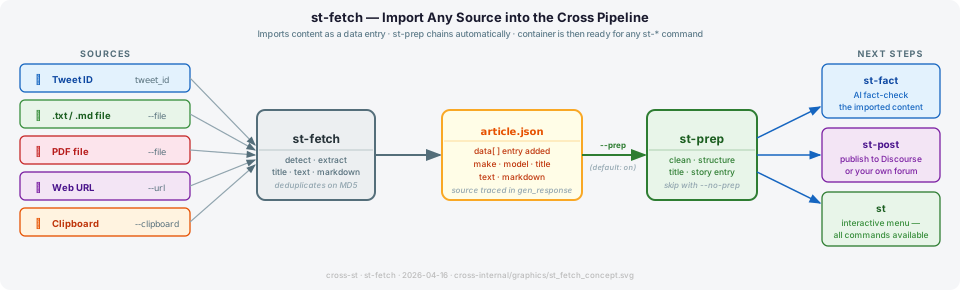
Brings external content into Cross as a data entry and immediately chains to st-prep — so the imported material is cleaned, titled, and ready for fact-checking or publishing without any extra steps.
Five source types are supported: a tweet by ID, a local .txt or .md file, a PDF file (auto-detected by extension or magic bytes), a web page by URL, or text pasted from the clipboard. The source type is recorded in make/model so every entry stays traceable.
| Source | Flag | Notes |
|---|---|---|
| X / Twitter post |
tweet_id (positional) |
Requires X_COM_BEARER_TOKEN in .env
|
| Plain text or Markdown file | --file PATH |
.txt, .md — content imported as-is |
| PDF file | --file PATH |
Auto-detected by .pdf extension or %PDF magic bytes; pymupdf4llm auto-installed on first use |
| Web page | --url URL |
Scrapes visible text; strips nav/script/footer noise |
| Clipboard | --clipboard |
macOS (pbpaste), Linux (xclip/xsel), Windows (PowerShell) |
PDF files are converted to structured Markdown using pymupdf4llm, preserving headings, bold/italic, lists, and tables. The title field is resolved from PDF metadata first, then from the first # heading, then from the first non-empty line of text. If very little text is extracted the tool warns that the file may be scanned and suggests running OCR first.
pymupdf4llm is not included in the base install (it pulls in a 22 MB native library). On your first PDF import, st-fetch installs it automatically:
$ st-fetch --file paper.pdf article.json
  PDF support not installed — installing now (one-time, ~22 MB)…
  PDF support installed. ✓
  Importing file: paper.pdf… ✓
Every subsequent PDF import runs immediately with no delay. Non-PDF users are unaffected.
st-fetch stores the imported content as a data[] entry in the container. By default it immediately runs st-prep, which cleans the text and creates a story[] entry — making the content available to every other st-* command without any further manual steps.
source → st-fetch → article.json → st-prep → st-fact / st-post / st
Use --no-prep to store the raw data entry only and run st-prep yourself later.
st-fetch <tweet_id> article.json              # import an X / Twitter post
st-fetch --file report.txt article.json       # import a plain text file
st-fetch --file report.md article.json        # import a Markdown file
st-fetch --file paper.pdf article.json        # import a PDF
st-fetch --url https://... article.json       # scrape a web page
st-fetch --clipboard article.json             # import from clipboard

st-fetch --file paper.pdf article.json --no-prep     # store raw data only
st-fetch <tweet_id> article.json --no-cache          # bypass cache, fetch live
Full import-and-publish pipeline:
st-fetch --file report.pdf article.json   # import PDF → auto-runs st-prep
st-fact article.json                      # AI fact-check
st-post article.json # publish to Discourse| Option | Description |
|---|---|
tweet_id |
Tweet / X post ID to fetch (numeric ID from post URL) |
file.json |
Path to the .json container |
--file PATH |
Import a .txt, .md, or .pdf file from disk |
--url URL |
Fetch a web page and extract its visible text |
--clipboard |
Import text from the system clipboard |
--cache |
Enable API cache (default: on) |
--no-cache |
Disable API cache — always fetch live |
--prep |
Run st-prep after fetching (default: on) |
--no-prep |
Skip st-prep — store as raw data entry only |
-v, --verbose
|
Verbose output |
-q, --quiet
|
Minimal output |
Related: st-prep st-fact st-post st-gen
AI_MAKE is set to "st-fetch" and model records the source type: "file", "pdf", "clipboard", "x.com", or the URL domain (e.g. "bbc.co.uk"). gen_response includes a format key for PDF entries ("pdf") and a pages count. Twitter/X fetches require X_COM_BEARER_TOKEN in .env. Entries are deduplicated by MD5 hash before writing.