st prep
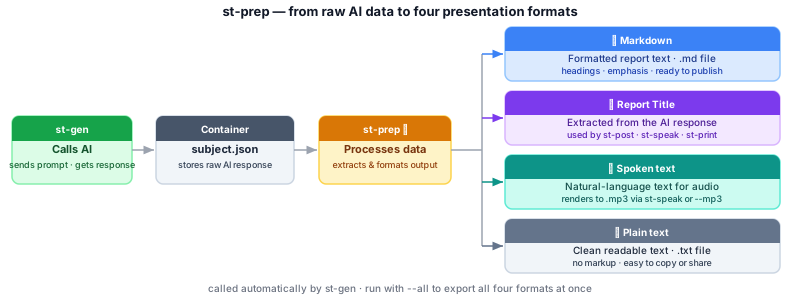
Takes the raw AI response stored in the container by st-gen and processes it into four presentation formats: Markdown (formatted report text ready for publishing), a report Title (extracted from the AI text), spoken-word text (cleaned for text-to-speech, renders to .mp3 via st-speak or --mp3), and plain text (.txt). These outputs feed every downstream command — st-fact, st-post, st-speak, and st-print.
Run after: st-gen · st-fetch · Run before: st-fact · st-post
st-prep subject.json              # process data entry 1, add story to container
st-prep -d 2 subject.json         # process data entry 2
st-prep -d 1 --mp3 subject.json   # also render an MP3 audio file
st-prep -d 1 --all subject.json   # export md, mp3, title, and txt files
Options: -d data -a all --markdown --mp3 --title --txt --bang -v -q
Related: st-gen · st-fact · st-speak
Called automatically by st-gen --prep, st-cross, st-fetch, and st-fix. Writes to story[] in the container. TTS rendering (--mp3) uses mmd_voice.py and requires the TTS extras (pip install 'cross-ai[tts]').