st gen
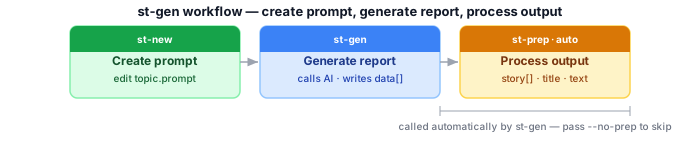
Sends your prompt file to an AI provider and saves the raw response into a .json container. After generating, it automatically calls st-prep, converting the raw AI data into the presentation products — title, clean text, hashtags — needed for further analysis and publication. Pass --no-prep to store raw data only. This is the first step — the container it creates is used by every other command.
Run after: st-new · Calls automatically: st-prep · Run before: st-bang, st-cross, st-fact
st-gen subject.prompt                   # generate with default AI (runs st-prep automatically)
st-gen --agent gemini subject.prompt       # use a specific provider
st-gen --no-cache subject.prompt        # bypass API cache
st-gen --no-prep subject.prompt # store raw data only, skip st-prep| Option | Description |
|---|---|
file.prompt |
Path to the .prompt file |
--agent NAME |
AI provider to use (default: your configured default) |
--cache |
Enable API cache (default: enabled) |
--no-cache |
Bypass API cache — always call the AI live |
--no-prep |
Store raw AI data only; skip the automatic st-prep call |
--ai-title |
Generate a ≤10-word title → stdout |
--ai-short |
Generate a ≤80-word summary → stdout |
--ai-caption |
Generate a 100–160-word caption → stdout |
--ai-summary |
Generate a 120–200-word summary → stdout |
--ai-story |
Generate an 800–1200-word narrative → stdout |
--bang N |
Internal flag used by st-bang — do not call directly |
-v, --verbose
|
Verbose output |
-q, --quiet
|
Minimal output |
Related: st-bang · st-prep · AI Providers
Writes a new entry to data[] in the container. Caching is MD5-keyed on the serialized request payload — two identical prompts to the same model always hit the cache. --bang N is used internally by st-bang (writes to tmp/ and creates a block file); don't call it directly.