st heatmap
Generates a color-coded grid showing how every AI-pair scored in the cross-product fact-check. Rows are evaluator AIs; columns are target story authors. Darker cells = higher veracity scores. The diagonal shows self-evaluation scores.
Run after: st-cross
st-heatmap --display subject.json                        # show chart on screen
st-heatmap --file subject.json                           # save PNG to ./tmp/
st-heatmap --display --ai-caption subject.json           # chart + AI narrative (default AI)
st-heatmap --file --ai-caption --agent openai subject.json  # save PNG + caption via openai
st-heatmap --file --ai-title --agent gemini subject.json    # save PNG + title via gemini
st-heatmap --display --file --ai-summary subject.json    # screen + save PNG + summary
st-heatmap --display --file --ai-story subject.json # screen + save PNG + full story| Flag | Description | Default |
|---|---|---|
--display |
Display heatmap on screen | off |
--file |
Save heatmap as PNG | off |
--path PATH |
Output directory for PNG | ./tmp |
All AI flags print generated text to stdout after the chart is produced.
Combine with --file to save the chart and generate content in one command.
| Flag | Output | Word limit |
|---|---|---|
--ai-title |
Short title for the heatmap | ≤ 10 words |
--ai-short |
Short caption | ≤ 80 words |
--ai-caption |
Detailed caption with patterns and outliers | 100–160 words |
--ai-summary |
Concise summary | 120–200 words |
--ai-story |
Comprehensive narrative | 800–1,200 words |
Use --agent NAME to select the provider (default: your DEFAULT_AGENT setting).
Supported: anthropic, xai, gemini, openai, ollama.
| Flag | Description |
|---|---|
--agent AI |
AI provider for content generation (default: xai) |
--cache |
Enable API response cache (default: on) |
--no-cache |
Disable API cache for this run |
-v, --verbose
|
Verbose output |
-q, --quiet
|
Minimal output |
The heatmap below was generated from a pizza dough fact-checking run across 5 AI
providers using --file --ai-caption:
st-heatmap --agent openai --ai-caption --file pizza_dough.json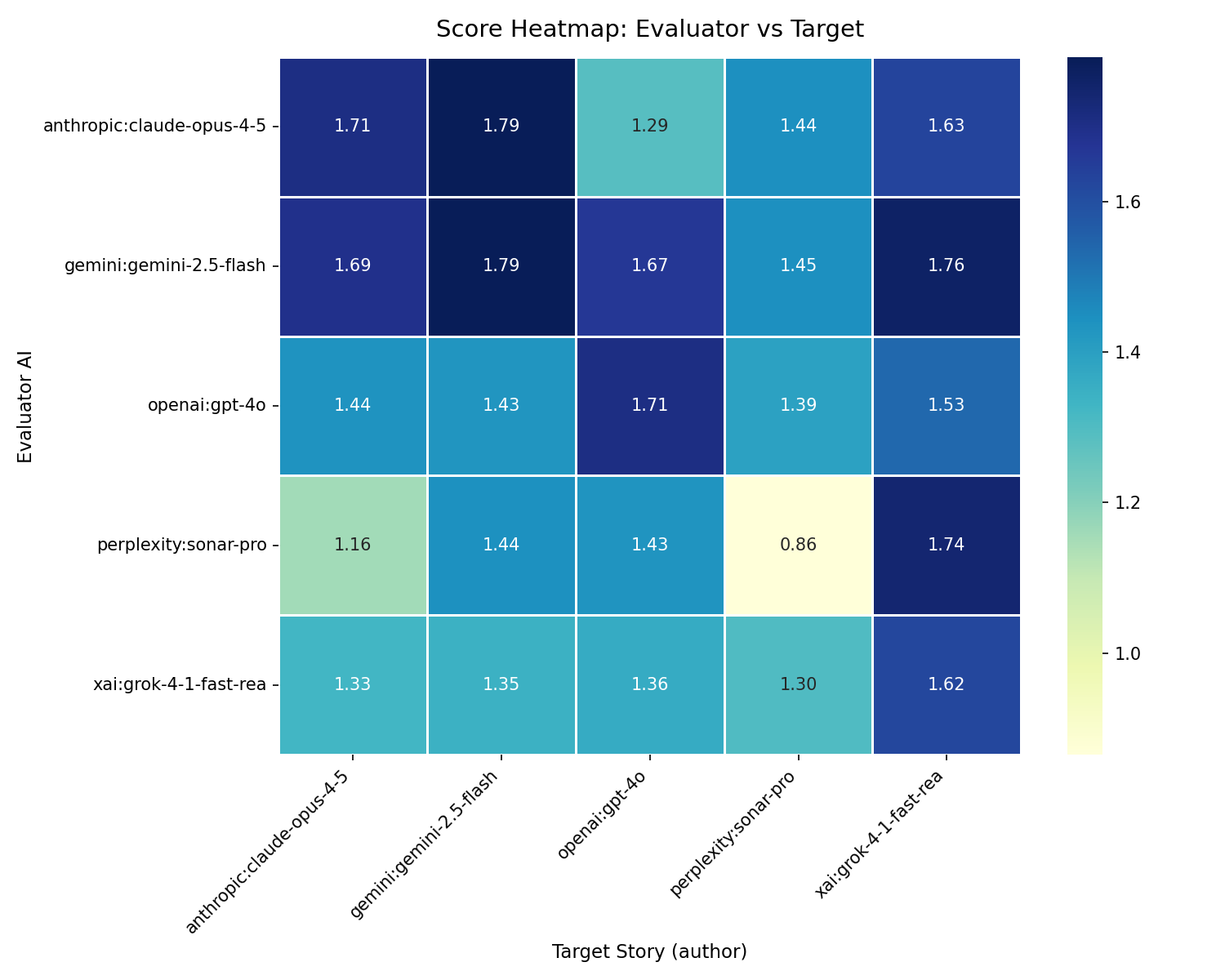
AI-generated caption (--ai-caption, via openai):
This heatmap evaluates the veracity of AI-generated content focused on the domain of crafting homemade pizza dough, with scores ranging from 0.9 to 1.8. In terms of column patterns, the target AI "gemini:gemini-2.5-flash" boasts a consistently dark column, indicating it is highly trusted across all evaluators. Conversely, "perplexity:sonar-pro" shows a lighter column, suggesting that its stories are viewed with more skepticism. Evaluator-wise, "gemini:gemini-2.5-flash" emerges as the most lenient, consistently giving higher scores. In contrast, "perplexity:sonar-pro" appears stricter, as evidenced by its lower scores across the board, reflecting a more conservative assessment of truthfulness.
Examining the diagonal reveals a slightly darker hue compared to the surrounding cells, suggesting a mild self-promotion bias, where AIs rate their own work more favorably. A notable outlier is "perplexity:sonar-pro" evaluating itself with a score of 0.9, the lowest in the matrix. This score is explained by the presence of five partially false and two false counts, indicating a critical self-assessment. For technical readers interested in selecting an AI for pizza dough content, "gemini:gemini-2.5-flash" offers a reliable choice, consistently earning high trust scores from various evaluators.
- Dark column — that AI's reports are consistently trusted by all other evaluators
- Light column — that AI's reports are viewed with more scepticism
- Dark row — that evaluator is lenient (gives high scores to everyone)
- Light row — that evaluator is strict (gives low scores to everyone)
- Diagonal — self-evaluation; a darker diagonal suggests mild self-promotion bias
- Single outlier cell — one AI finds another's work significantly more or less credible
Scores above 1.5 indicate strong factual agreement. Scores below 1.0 suggest frequent disagreement or identified errors.
Related: st-cross · st-verdict · st-speed · st-analyze
Uses mmd_data_analysis.get_flattened_fc_data() to build the score matrix, then
renders with mmd_plot. AI content flags (--ai-caption etc.) call
process_prompt() from ai_handler with the flattened score data as context.
The --path directory is created automatically if it does not exist.