Repository navigation
Categories
Every transaction ends up in exactly one category. A category's kind decides how it's counted.
- Kinds
- All the fields
- Credits and what they offset
- Taxes
- Groups and flexible spending
- Kids-gone and retired changes
- Defaults and automatic categories
- A good starting set
| Kind | Use for | How it's counted |
|---|---|---|
spending (default) |
Regular monthly spending: groceries, dining, utilities… | Averaged; a row in the planner. |
one_time |
Irregular or yearly costs: property tax, income-tax payments, a big purchase | Kept out of averages; an on/off toggle under "Yearly and one-time costs". |
credit |
Money in that offsets spending: work reimbursements, refunds, deposits | An on/off line you can subtract. |
ignore |
Not spending at all: paychecks, card payments, transfers between your accounts, 529 or savings transfers | Never counted (but still visible in Settings › Categorize). |
Refunds of ordinary purchases (e.g. a store return) are best left in the spending category of the purchase; they reduce it.
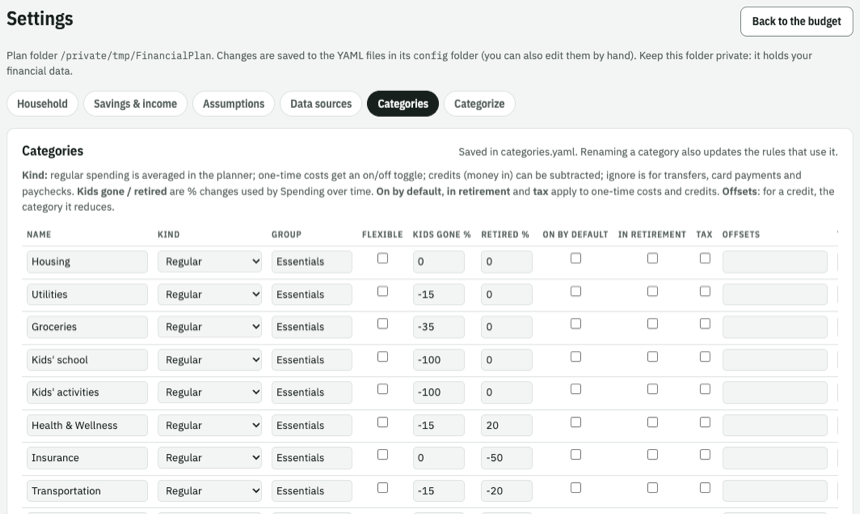
| Field | Default | Applies to | Meaning |
|---|---|---|---|
name |
(required) | all | Unique name. |
kind |
spending |
all | See Kinds. |
group |
Other |
spending | Planner heading (Essentials, Flexible…). Groups appear in the order they first occur. |
flexible |
false |
spending | Trimmed by "Try 10% less on flexible spending". |
kids_gone_pct |
0 |
spending | % change once all children have left home. |
retired_pct |
0 |
spending | % change after retiring (on top of kids-gone). |
default_on |
false |
one_time, credit | Ticked by default. |
in_retirement |
false |
one_time, credit | Continues after retiring. |
tax |
false |
one_time | Counts in "Tax set-aside" instead of spending. |
offsets |
none | credit | The category this credit reduces (see below). |
label |
one_time, credit | Text for the toggle, e.g. "Set aside for property tax". | |
note |
one_time, credit | Small print next to the toggle. |
Where a credit appears depends on offsets:
offsets |
Appears | Example |
|---|---|---|
| a spending category | Indented under it in the planner, with a "net" line | Work reimbursements under Shopping & Household |
| a one_time category | Nested under that toggle, reducing it | Federal tax refund under Income tax |
| nothing | Below the planner total, with "Net spending" | Other credits (mobile deposits, cash-outs) |
- {name: Reimbursements, kind: credit, default_on: true, offsets: Shopping & Household}
- {name: Federal tax refund, kind: credit, default_on: true, offsets: Income tax}
- {name: Other credits, kind: credit}
Credits stop at retirement unless in_retirement: true.
Make tax payments one_time with tax: true so they show in the strip's Tax set-aside:
- {name: Income tax, kind: one_time, tax: true, default_on: true}            # stops at retirement
- {name: Property tax, kind: one_time, tax: true, in_retirement: true} # continuesgroup is just a heading; use any names. Mark discretionary categories flexible: true to include
them in the planner's "Try 10% less" button.
Starting guesses for Spending Over Time, editable there too:
- {name: Kids' school, kids_gone_pct: -100}
- {name: Groceries, kids_gone_pct: -35}
- {name: Travel, retired_pct: 25}
- {name: Transportation, kids_gone_pct: -15, retired_pct: -20}- Money out that no rule matches goes to
default_category(Other); money in goes todefault_credit_category(Other credits, a credit). - A category named in a rule or mapping but not listed is created automatically as regular spending. Add it to the list to set its kind and group.
financial_plan init writes one: Housing, Utilities, Groceries, Kids' school, Kids' activities,
Health & Wellness, Insurance, Transportation (Essentials); Shopping & Household, Dining, Travel,
Entertainment, Subscriptions & Phone (Flexible); Other; Income tax and Property tax (one-time);
Other credits; Paychecks and Transfers & payments (ignore). The demo adds Coffee, Pets, Venmo,
Cash & checks, Furniture and reimbursement examples.