Repository navigation
Settings Editor
The gear (Settings) at the top right edits everything in your plan's config without touching YAML. Each save is checked first; if something's invalid you'll see what and where, and nothing is written.
- How saving works
- Household
- Savings & income
- Assumptions
- Data sources
- Categories
- Categorize
- Share plan
- Going back to the budget
- Each tab saves straight to the YAML file the section lives in (shown on the tab), keeping your comments.
- If the config is broken (e.g. after a hand edit), Settings shows the error at the top and still lets you fix things.
- Settings are the starting values for the page. Numbers you changed on the page itself stay as you set them (see Tour of the App).

Partners: one card per adult with Edit and Remove (click twice). + Add partner opens a form:
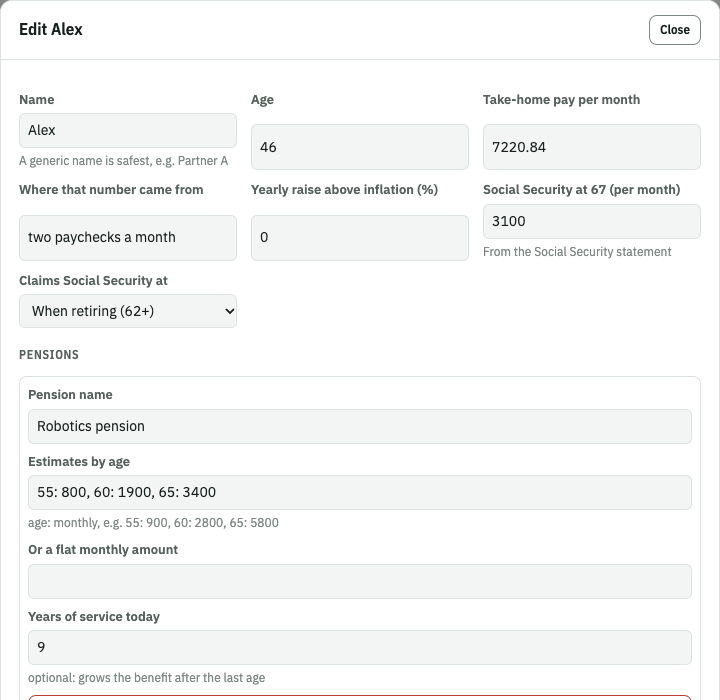
| Field | Notes |
|---|---|
| Name | Use a generic name (Partner A). |
| Age | Today. The first partner's age drives the retirement slider. |
| Take-home pay per month | Net pay. |
| Where that number came from | Optional note shown in the planner (e.g. "pay stub"). |
| Yearly raise above inflation (%) | 0 = keeps pace with inflation. |
| Social Security at 67 | Monthly, from the Social Security statement. |
| Claims Social Security at | "When retiring (62+)" or 62–70. |
| Pensions (+ Add pension) | Name; estimates by age as 55: 900, 60: 2800, 65: 5800; or a flat monthly amount; optional years of service today. |
| Retirement accounts (+ Add account) | Name, balance today, added per month. |
Children: one card per child. + Add child:
| Field | Notes |
|---|---|
| Name | Generic (Child 1). |
| Age | Today. |
| High school graduation (YYYY-MM) | Optional; estimated from age if empty. |
| 529 balance today / per month | |
| Planned school | One of the school types from Assumptions. |
| Note for the card | Optional. |
- Other take-home income per month (rental income, side work…).
- Savings: name, per month, and Stops at retirement.
- Investments: name, balance today, yearly return (0% = off), added per month.
Click Save.
- Plan: title, subtitle, months to average, the last month to average (YYYY-MM; empty = the month of your newest transaction), "today" (YYYY-MM; empty = the month after the averaging window), currency symbol.
- Retirement: starting retirement age, return, inflation, withdrawal %, tax rate in retirement, health insurance after retiring, and the return & inflation presets (key, name, return %, inflation %).
- College: age at high-school graduation, years of college, starting preset key, the schools (key, name, cost per year today) and the return & college-cost presets.
Leave a preset or school list empty to use the built-in defaults. Click Save.
One card per source with Edit / Remove, plus the list of CSV files in data/.
+ Add data source walks through the columns with a live preview. Full walkthrough:
Data Sources.
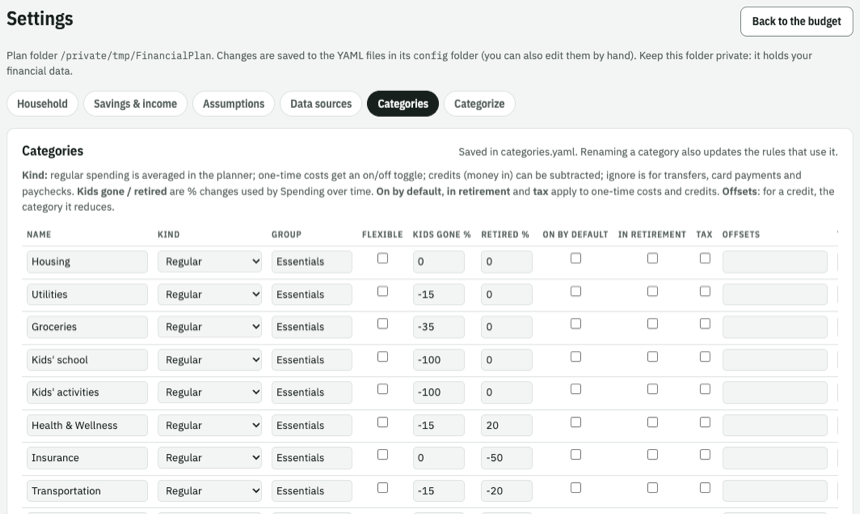
An editable table of every category: name, kind, group, flexible, kids-gone %, retired %, on by default, in retirement, tax, offsets, toggle label and note. ↑ moves a row up (order sets the planner's group order); Remove deletes; + Add category adds a row; Save categories saves.
Renaming a category also updates every rule, bank-category mapping, offsets and default that
used the old name. Details on each column: Categories.
The full transaction table and the rule list. See Categorizing and Rules.
Save the whole plan (settings, data and, optionally, your edits and scenarios) as one .zip to
send to someone, and how to open one you received. See
Share the whole plan.
Click Back to the budget (or any section link). If you saved anything, the page reloads with the new settings.