Repository navigation
getting started first pack
This tutorial creates a loose data-only pack that replaces the three published pieces of the Core starter pistol. It is intentionally small: one manifest, one content document, and three PNG files.
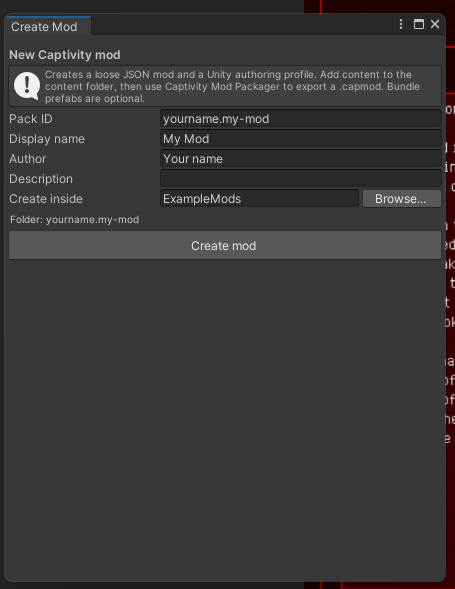
If you are working inside the Unity project, Captivity Reloaded > Modding > Create Mod... creates the initial pack folder and authoring profile. This tutorial shows the same fundamental files manually so their roles remain clear.
Under the game's Mods directory, create:
Mods/
  yourname.first-pack/
    manifest.json
    content/
      pistol-patch.json
    assets/
      pistol.png
      slide.png
      base.png
Use your own lowercase pack ID. Valid pack IDs contain lowercase letters, numbers, ., _, and -.
Create manifest.json:
{
  "schemaVersion": 1,
  "id": "yourname.first-pack",
  "displayName": "My First Pack",
  "version": "1.0.0",
  "modApiVersion": 1,
  "authors": ["Your Name"],
  "description": "Recolors the starter pistol.",
  "dependencies": [
    { "id": "core", "version": ">=0.1.0" }
  ],
  "overrides": [
    "core:weapon/pistol/body",
    "core:weapon/pistol/slide",
    "core:weapon/pistol/base"
  ],
  "contentRoots": ["content"]
}
The manifest ID owns the pack namespace. Its version is the pack's semantic version; modApiVersion selects the game content contract.
Create content/pistol-patch.json:
{
  "schemaVersion": 1,
  "type": "assetPatch",
  "id": "yourname.first-pack:patch/starter-pistol",
  "target": "core:weapon/pistol",
  "replacements": {
    "body": "assets/pistol.png",
    "slide": "assets/slide.png",
    "base": "assets/base.png"
  }
}
The portion before : in the content ID matches the manifest ID. The patch targets a stable Core content ID and names published slots; it does not depend on Unity filenames, GUIDs, or hierarchy paths.
Copy the corresponding PNGs from ExampleMods/simple-nerf-gun as temporary working files, or create replacements with the same intended role. Preserve transparency. Paths and filename case must match the JSON exactly.
Review licensing before publishing copied or derived artwork. A technically valid pack is not automatically redistributable.
From a source checkout:
dotnet run --project Tools/ModSchemaValidator -- . Mods/yourname.first-packThen start the game, open Mods, and select the pack. The runtime pass resolves Core IDs, override authorization, files, and asset compatibility that structural schema validation cannot prove.
Change one thing at a time, validate again, and keep the pack in source control outside the game's recoverable installer directories. Do not rename released IDs just to change their display text.
- Browse the example pack index.
- Learn pack structure and IDs.
- Choose another content type.
- Read Publishing to the community catalog when the pack is tested and licensed.