Skip to content

Codalab AMI

lr292358 edited this page Oct 12, 2017 · 40 revisions

First get familiar with AWS (if you are not familiar):

Tutorial: starting and connecting to a machine on AWS

Run the following AMI: --TODO LINK--

Contents


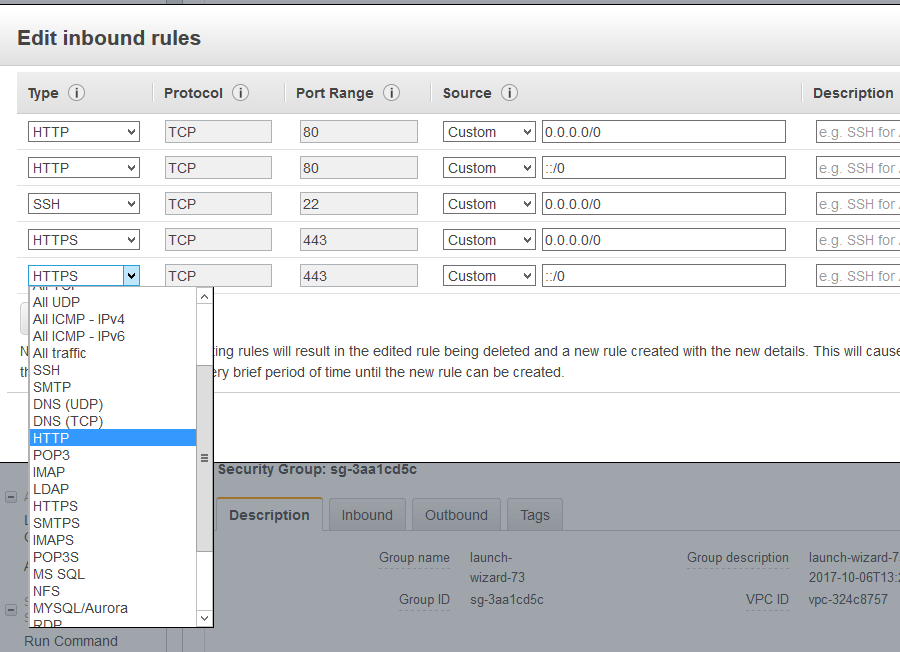
Opening ports 80 and 443 to allow access using browser

Select your machine, and click the security group 'launch-wizard-XX':

Right-click on the rule, and select 'edit inbound rules'

Click 'Add rule' and select HTTP, then add HTTPS rule, and save.

Editing env file

Connect to the server, then:

cd src...
ls

The .env file contains Codalab configuration. You need to edit dns.

Then run

docker-compose up -d

each time you edit .env file to restart the services.

Clone this wiki locally