Repository navigation
EN 06 optional equipment
Version française : Équipements optionnels
These four add-ons are not required to run a network, but they make it safer and easier to manage. Each network takes at most one of each.
| Equipment | Effect | Level |
|---|---|---|
| Breaker panel (wall) | Trips instead of the inverter when the house demand exceeds 1,500 W, so the inverter does not lose 3 condition points. Red lamp when tripped; reset on the breaker itself ("Reset the breaker"), refused while still overloaded. | 3 |
| Low battery alarm (wall) | Below 20 % stock: a message to players within 30 tiles, then a beep every 10 game minutes until "Silence the alarm". The beacon stays lit until the stock is back above 25 %. | 2 |
| Backup generator (vanilla generator) | Started by the mod under 20 % battery, stopped at 90 % (sandbox BackupStartPercent / BackupStopPercent). Supplies 1,200 W, burns 1 L of fuel per 3 kWh (on top of its vanilla consumption). Still noisy and toxic indoors; it must be plugged and fuelled the vanilla way. Never starts without batteries. |
3 |
| Management computer (vanilla desktop computer) | 48 h history, three-day weather forecast, consumer list and event log. Load shedding at level 7: switches the lights off under 15 % to keep the fridge, re-armed above 30 %. | 6 |
The management computer and the backup generator are not crafted: they are vanilla objects found in the world. Link them from their own right-click menu (see Wiring).
Real off-grid systems get more power by adding identical inverters in parallel, not by pushing one beyond its rating. Live Wire does the same:
- Right-click an inverter > Couple to an inverter > a master inverter within cable range. The clicked inverter becomes a slave. Cost: the electric wire for the distance and 1 inverter coupling kit (recipe at Electrical 6).
- The slave must have no equipment of its own; a master takes at most 3 slaves (4 inverters).
- One network, one battery bank, one powered area (the master's). Capacity = 1,500 W × inverters in service; each switched-on inverter uses 20 W idle and wears as usual.
- A slave switched off or broken no longer counts: if the demand then exceeds what is left, the breaker (or the master) trips. Each slave has its own On/Off switch; reset on the master or the breaker.
- Uncouple on the slave makes it independent again (the kit is given back). A master picked up frees its slaves.
- The LCD Status page and the software show "Coupled: n / total in service" and the total capacity.
- Two independent inverters whose areas overlap no longer count the same appliances twice: each appliance is counted by the nearest switched-on inverter.
When the demand of the house appliances exceeds the inverter maximum, 1,500 W (the 20 W idle consumption is not counted). It is checked at each simulation step: every 10 game minutes and right after an action. Examples: a stacked washer + dryer running together (1,800 W with the game values); with the 1993 consumption profiles, an electric cooker or a dryer alone.
Without a breaker, the inverter trips and loses 3 condition points; reset it on the inverter. With a breaker, the breaker trips instead; reset it on the breaker ("Reset the breaker"), which is refused while the load is still too high. Switch off some appliances first.
Open the panel on a connected breaker: LCD wattmeter, paired modular circuit levers and orange main lever. Click the main lever to open/close distribution or reset an overload once the load is safe. Source production and battery charging continue. The lighting circuit turns real mains switches off and restores recorded choices. Battery lamps are excluded; native room switches act on the whole room.
The LCD shows lighting, equipment and total in watts, using the network's latest measurement. Equipment includes Live Wire water pumps. These are current power readings, not cumulative kWh; inverter idle use, losses and battery charging are excluded. An open circuit with no remaining load shows “0 W / OFF”. After returning to an area or reconnecting, “Updating...” and dashes replace unavailable measurements until the inventory is rebuilt and measured at the simulation's normal rate. Coupled inverters share their master's reading. In overlapping networks, loads assigned to another panel but supplied by this anchor remain included in its measured watts.
The equipment lever stops refrigerators/freezers, mains TVs/radios, stoves, microwaves, washers, dryers, combination machines and car battery chargers. Fuel pumps stop dispensing; Live Wire water pumps stop refilling relays (already stored water remains available). Lighting can stay on. Originally OFF appliances stay OFF when restored; native machine cycles restart their duration. Battery devices remain independent. Sources, storage and network controls are excluded.
Both levers provide all four combinations. Choices survive saving and restarting. Correct the load before resetting an overload; resetting never closes a manually opened circuit. Automatic light shedding never closes it either.
Coupled inverters share their master's panel. In overlapping areas, the nearest independent master owns each appliance (ties by id), even while temporarily empty. Room switches share the panel closest to the room's centre. Opening a circuit stops its appliances even if another source could power their sockets. The main lever only opens this network's distribution; other sources can still supply it.
Modded appliances using native classes/container types follow the same rules; custom electrical services need explicit compatibility. Restore circuits before disabling Live Wire so saved inert refrigerators recover their original types.
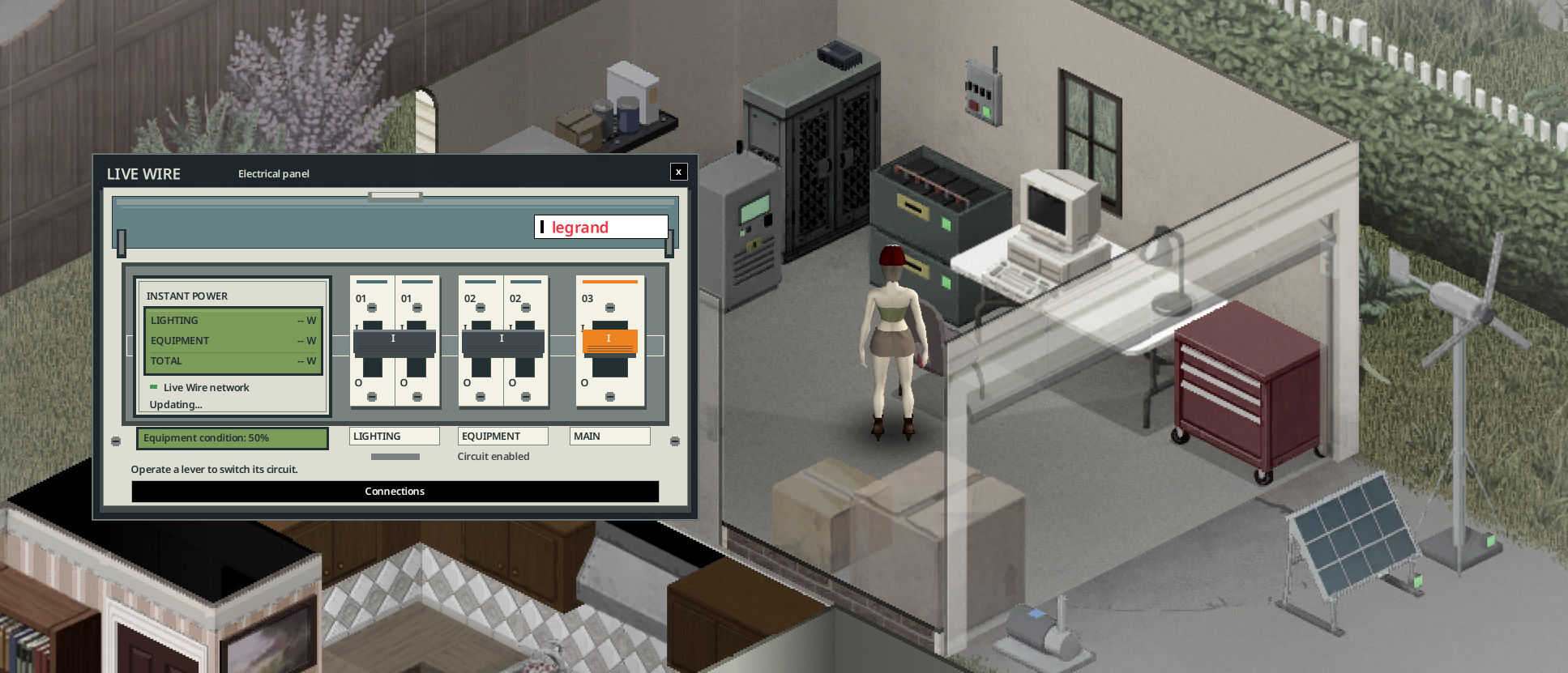
The electrical panel in game, with its lighting/equipment levers and instant wattmeter. “Updating...” is the temporary state before fresh measurements arrive.
The context menu has one opening per panel: electrical board for the breaker, LCD panel for the power bank. Connections is a separate screen, available through a button on each equipment panel.
The panels show Equipment condition: …%: wear of the power bank or electrical board, separate from battery charge and battery condition. Stacked banks each have their own condition. It remains visible without a connection and at 0%. Sources, pumps and alarms also have individual LCDs; the inverter shows its condition on its Status page. “--%” means the condition is unknown.
Click a solar panel, wind turbine or water wheel to open its LCD: condition, measured production and rated power. Solar panels also show dirt/snow, wind turbines show the brake. Disconnected or broken sources show 0 W. The pump shows condition, measured water flow and electrical consumption. The alarm has a status screen. Readings reuse the last simulation measurements, requested every two seconds while the LCD is open.
Each equipment panel has a Connections button to choose an inverter for that device alone. On the inverter, the button keeps the full equipment list for the chosen network. Disconnect before moving equipment to another network; cable costs, tools and skill requirements still apply.
The placed breaker's green indicator shows powered distribution. It stays green when only the lighting/equipment circuits are open; main open or no power: off. Red means tripped protection. This does not prove safe maintenance isolation: switch off the inverter.
Wiring - Inverter Screen and Software - Electrical skill and maintenance - Multiplayer