Firmware
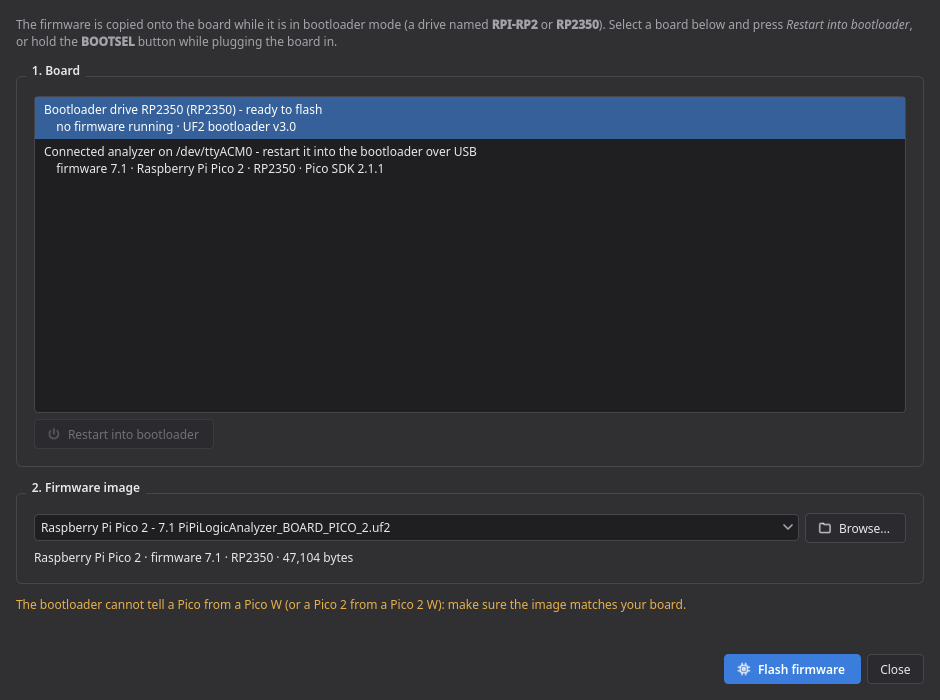
Device → Install or update firmware… does everything in one dialog:
- Select the board. The list shows every connected analyzer with its installed firmware version and Pico model, plus boards that are already in bootloader mode and Raspberry Pi boards running something else (e.g. MicroPython). If the board is not in bootloader mode, press Restart into bootloader; alternatively hold BOOTSEL while plugging it in.
-
Select the image. Every entry names the board and the firmware version it contains, for
example Raspberry Pi Pico 2 - 7.1 PiPiLogicAnalyzer_BOARD_PICO_2.uf2, so you can compare it
with what is installed. Browse… accepts any other
.uf2. Images for the wrong chip (RP2040 vs RP2350) are refused. - Flash firmware copies the image onto the bootloader drive. The board restarts and appears as a serial port again.
| Board | Channels | Buffer | Turbo image |
|---|---|---|---|
| Raspberry Pi Pico | 24 | 128 KB | ✓ |
| Raspberry Pi Pico 2 | 24 | 384 KB | ✓ |
| Pico W (USB or WiFi) | 24 | 128 KB | – |
| Pico 2 W (USB or WiFi) | 24 | 384 KB | – |
| RP2040-Zero | 24 | 128 KB | ✓ |
| LogicAnalyzer Interceptor | 28 | 128 KB | ✓ |
Turbo images overclock the board to 400 MHz with raised core voltage and capture at 200 Msps instead of 100 Msps. Use them deliberately.
A board identifies itself as PIPI_LOGIC_ANALYZER_<BOARD>_V<major>_<minor>. Boards flashed with
an older firmware report LOGIC_ANALYZER_… and keep working — the application accepts both.
For a set of cascaded boards, all of them need the same firmware version.
Requirements: Raspberry Pi Pico SDK 2.1.1, ARM GCC 14.2, CMake and Ninja — the Raspberry Pi
Pico extension for VS Code installs all of it into ~/.pico-sdk.
firmware/build_all.sh                          # all boards and turbo variants
firmware/build_all.sh BOARD_PICO BOARD_PICO_2  # selected boards
The images land in firmware/uf2/ and the application finds them there automatically.
- Device → Board self-test… checks RAM, the trigger link (GPIO 0 → GPIO 1), every channel input and a real capture through PIO and DMA. No signals may be connected during the test.
- Device → Device information… shows chip, unique ID, clock, SDK version and the firmware build — Copy to clipboard puts it into a bug report.