Quick Start
- Install CatX and open it.
- Open Choose your cats. Click a name, then hold Ctrl and click additional names to select up to eight cats.
- Click the dropdown arrow again to close the list.
- Choose an Unlock combination you can comfortably press. Start with Ctrl + Alt + K if your keyboard has an awkward function row.
- Leave Auto-lock after no activity set to Off while getting familiar with the app.
- Select Enable keyboard guard. Your chosen cats appear.
- Immediately test your chosen recovery shortcut to restore typing. Enable the guard again when you need it.
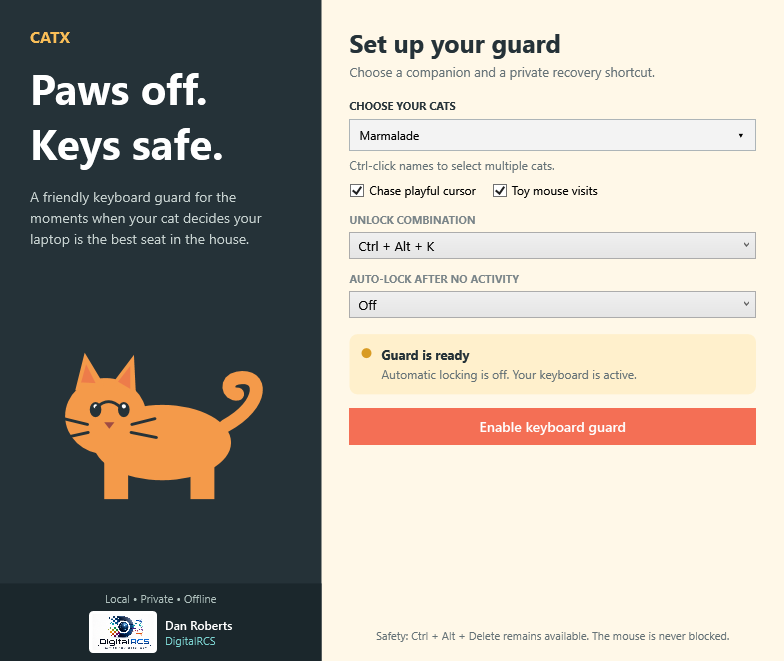
- Turn Chase playful cursor on for reactions to quick changes in cursor direction.
- Turn Toy mouse visits on for a shared mouse that gathers cheese and tries to dodge the cats.
- Use No cats / clear selection for keyboard protection without cats.
- Minimize CatX to keep it in the notification area. Double-click its cat icon to reopen it.
Click a cat to have it lie down, then hold the left button and stroke its body to hear a purr. Clear space around cats stays click-through, and the mouse remains usable while the keyboard is guarded.
Next: Everyday controls · Meet the cats · Recovery help