Repository navigation
On a Remote Display
A Glass remote display is another machine showing a player's meters: a second Raspberry Pi with a screen in another room, a PC by the desk. It comes in two flavours.
- Standalone, from Glass's releases: the player's theme and nothing over it.
- Bundle, from glass-evo's releases: the same display with the Glass interface in it: the clock and the date when the player stands still, and the bar of controls, in the look the player has.
| Standalone | Bundle | |
|---|---|---|
| Linux (x64, armv8, armv7) | yes | yes, from glass-evo 0.1.18 |
| Windows (10 or later, 64 bit) | yes | yes, from glass-evo 0.1.19 |
| Android (7 or later) | yes | yes, from glass-evo 0.1.20 |
For a device with nothing installed, Anymote can show the same face in any browser, served by the player's manager at /anymote: a setting on the player's Screen tab says when (Choosing-the-Glass-interface).
Download glass-evo-<version>-<arch>.tar.gz for the machine (x64 for a PC, armv8 for a 64-bit Raspberry Pi OS, armv7 for a 32-bit one), unpack it and run its installer as the user who will run the display:
tar xzf glass-evo-<version>-<arch>.tar.gz
glass-evo-<version>-<arch>/remote/linux/install.sh
SDL2 is needed (sudo apt install libsdl2-2.0-0). The installer is Glass's own and says which flavour it installed. The bundle takes the standalone's place and the standalone the bundle's when its archive is installed again: the settings, the cache and the menu entries (Glass Remote, Glass Remote Settings) stay. install.sh --service also starts the display with the session, for a screen on the wall. Glass's Remotes page has everything else a remote does.
Download glass-evo-<version>-windows-x64.zip, unpack it whole and run its installer in a PowerShell window, as the user who will run the display:
powershell -ExecutionPolicy Bypass -File glass-evo-<version>-windows-x64\remote\windows\install.ps1The display and the installer scripts are signed, as Glass's are. The installer says which flavour it installed; the bundle takes the standalone's place under the same Start menu entries (Glass Remote, Glass Remote Settings), and the settings stay. install.ps1 -Startup also starts the display with the session. The clock reads Windows' local time.
Download glass-evo-<version>-android.apk to the phone or tablet, open it, and allow the install when Android asks about apps from this source. It is the same app as Glass's standalone remote, Glass Remote, signed with the same key: it installs over the standalone and keeps its players and settings, and the standalone installs over it again. Android itself refuses an app built on an older Glass than the one installed (the app's version, under its name in Android's app information, names the Glass it is built on and, on a bundle, "with glass-evo" and its version): change flavour to one built on the same Glass or a newer one, or uninstall first. The bar comes at a touch. Android 7 or later. From 0.2.32 on Glass 0.9.32 the app asks for access to the device's files the first time a theme from a folder on the device cannot be read, and album art shows on Android, as the Glass wiki's Remotes page says.
The remote's settings page, on port 5583 of the remote, ends the line under its title with "with glass-evo" and the version, and has a panel the standalone has not, The Glass interface, with one choice, "This remote shows":
| Choice | While glass-evo owns the player's screen | While the kiosk owns it |
|---|---|---|
| the Glass interface while glass-evo holds the player's screen (as installed) | the theme with the face over it | the theme alone |
| the Glass interface always | the theme with the face over it | the theme with the face over it |
| the theme alone | the theme alone, as the standalone | the theme alone |
The choice is this remote's own, kept on the remote, and apart from the player's "The Face tab and Anymote show", which is for the browser views. The page's Status panel says how it stands now, Glass interface: shown or not shown, and the remote's log says why: what this remote is set to and whose the player's screen is.
With the face shown, the remote is laid out as the player's screen is:
- While the player stands still: the theme standing still, with the clock and the date over it where the look has them, and the bar of controls under them.
- While it plays: the theme alone, until the screen is touched or clicked; the bar then comes, and leaves again by itself.
- A touch on the picture no longer plays or pauses. It brings the bar or sends it away while music plays, and does nothing while the player stands still; a theme's own controls act as before. On the standalone remote, and on a bundle that shows the theme alone, a touch beside a theme's controls plays or pauses the player.
The look is the player's: the remote brings the look chosen on the player's Screen tab, a face theme of the user's included, with the theme, and follows a change of it. The clock tells the remote's own time.
The controls need a touch screen or a mouse on the remote; the clock needs neither. The player needs Glass 0.8.20 or later: an older one does not say whose its screen is, and the first choice then shows the theme alone. Before Glass 0.8.36 the first choice read "what the player's screen shows".
A bundle brings itself up to date from its own settings page: the Version panel says "glass-evo" with its version and the Glass it is built on, and looks at glass-evo's latest release when asked, a minute after every start and once a day. It follows glass-evo's releases, so it stays the bundle. From 0.2.5 the panel has Offer test releases, the same switch as the player's System tab and the standalone remote's: on, the bundle is offered the newest of glass-evo's last ten releases, a test release among them and said so beside its version, as soon as it is published; off, as it is unless said, the latest release only. The switch is applied with the other settings and kept in the remote's configuration.
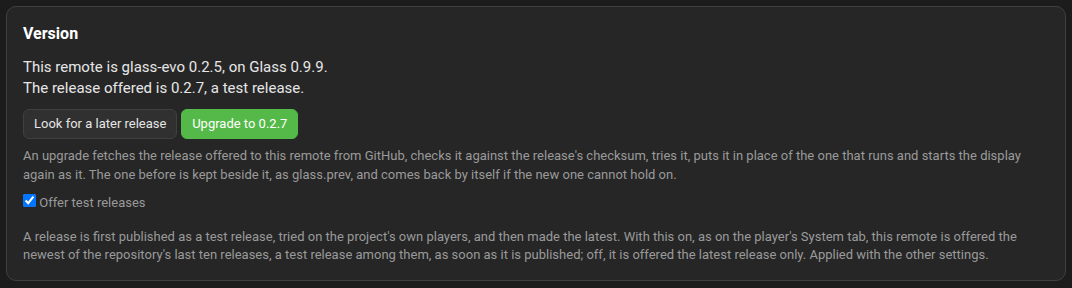
| On | From glass-evo | What "upgrade" does |
|---|---|---|
| Linux | 0.1.28 | Fetches the release's archive, checks it against the release's checksum, tries the new display, puts it in place of the one that runs (kept beside it as glass.prev) and starts again as it. |
| Windows | 0.1.30 | The same from the release's zip; the display before is kept as glass.prev.exe. Tried under Wine, not yet on a Windows machine. |
| Android | 0.1.31 | The panel links the new release's package; Android's own installer asks and installs it over the app, the settings kept. Not yet tried on a device. |
On Linux and Windows a new version that cannot hold on is given up at its third start for the one before. The Glass Manager's Remotes tab marks a remote for which a later release is out (from Glass 0.8.58). From 0.2.30 on Glass 0.9.30 the bundle looks for its release on the player first and on GitHub second: the player's Manager keeps archives for remotes under "Install from a file" on its System tab, glass-evo's among them, and the bundle takes the newer of the two, held to the signature inside the archive, so a bundle that cannot reach GitHub upgrades from its player; the panel says when the release offered is from the player's shelf. The Glass wiki's Remotes page has the whole of it.
The bundle's page has the same Connection panel as the standalone remote's, from glass-evo 0.2.6 on Glass 0.9.10: each path to the player tried from the remote's side, the frames path judged from both ends by a probe the player sends on request, and the firewall rules for this remote printed in the terms a firewall takes. From glass-evo 0.2.7 on Glass 0.9.13 it has the standalone's Assets, Prerequisites and Report panels too, the stickers on the Connection rows with them, and a report from the bundle opens its GitHub issue at glass-evo's repository. From glass-evo 0.2.8 on Glass 0.9.14 the Assets rows carry stickers, missing in red, and a file the display does without is marked optional; from 0.2.16 on Glass 0.9.16 the files brought are behind the Show every file switch and each row names the meters that name the file. From 0.2.19 on Glass 0.9.22 a release of the bundle is signed, and the bundle holds its own upgrade to the signature as the standalone remote does; a release before signing installs as before. From 0.2.21 on Glass 0.9.24 the bundle's Version panel has "Install from a file" as the standalone remote has, for a remote that cannot reach GitHub: the bundle's own archive for this machine, verified by the signature inside it, with no network; the Glass wiki's Remotes page has the steps. The Glass wiki's Remotes page has the rows and their words; they are the same here.
Installing the standalone over the bundle puts the standalone back, with the settings kept. To remove the display altogether: remote/linux/uninstall.sh on Linux and remote\windows\uninstall.ps1 on Windows, each from the unpacked archive (--purge and -Purge remove the settings and the cache as well); on Android, uninstall Glass Remote.