Repository navigation
Manager
The Manager is a web application the plugin serves on its own port, 5582 unless the settings page says otherwise. It holds everything that manages the display rather than operates it. The settings page opens it in the same window (inside Volumio's iframe page, with its title bar and way back, which is how it is used on the player's own display) or in a tab of its own, and any browser on the network reaches it at http://<player>.local:5582/. Like Volumio's own interface it has no login: it is for the network the player is on.
A tab can be named in the address, http://<player>.local:5582/#catalog; otherwise the page opens on the tab last looked at in this browser.
Volumio's interface opens every openUrl button in a new tab; the "open here" button therefore uses the interface's oauth button type, the one it navigates in place, with the iframe page as its performer URL (the two query parameters it appends are ignored). Inside Volumio's page the Manager's inputs take the kiosk's on-screen keyboard through the volumio-input-focus and volumio-keystroke messages.
The port and the address are set on the settings page (managerPort, managerHost in the plugin's configuration). A new port is taken at once and the buttons follow; a port something else holds is refused and the old one stays. The address is the name the buttons and the status page use: empty is the player's name with .local, or an IP address or host name where .local names do not resolve.
The page is plugin/manager/manage.html, with no framework; it brings two scripts of the Manager's own, face-page.js (the Face tab, shared with Anymote) and lookmodel.js (the Screen tab's look panel). It reads the plugin's strings in the interface language through the API, so the Manager speaks the languages the plugin does.
| Tab | What it is for | More |
|---|---|---|
| Themes | The themes on the player: put one on show, choose its meters, cut it to another size, package it, remove it; the edition tag rules; Car Dash. | Themes, Tailor |
| Face | The player's meters live in the browser. | Anymote |
| Catalog | Themes from the community collection, installed at a press. | Catalog |
| Appearance | Where the theme sits on the screen, artist fanart, fonts. | Artwork |
| Backups | Named snapshots of the settings. | Backups |
| Screen | Whose the screen is, how it looks under glass-evo, what the browser views show, rotation, pointer, touch. | Screen |
| System | Releases of Glass and of glass-evo, the performance profile, interactive controls, the network share, logging. | Performance, Logging |
| Remotes | Serving remote displays, and the remotes connected. | Remotes |
| Status | Find a problem, make a report, and the system sheet. | Troubleshooting |
Installs, uploads, removals and upgrades run one at a time. Jobs are followed on the page while they download, check and unpack, and a failure says why: a checksum that does not match, a zip that is not a theme, a download that did not complete.
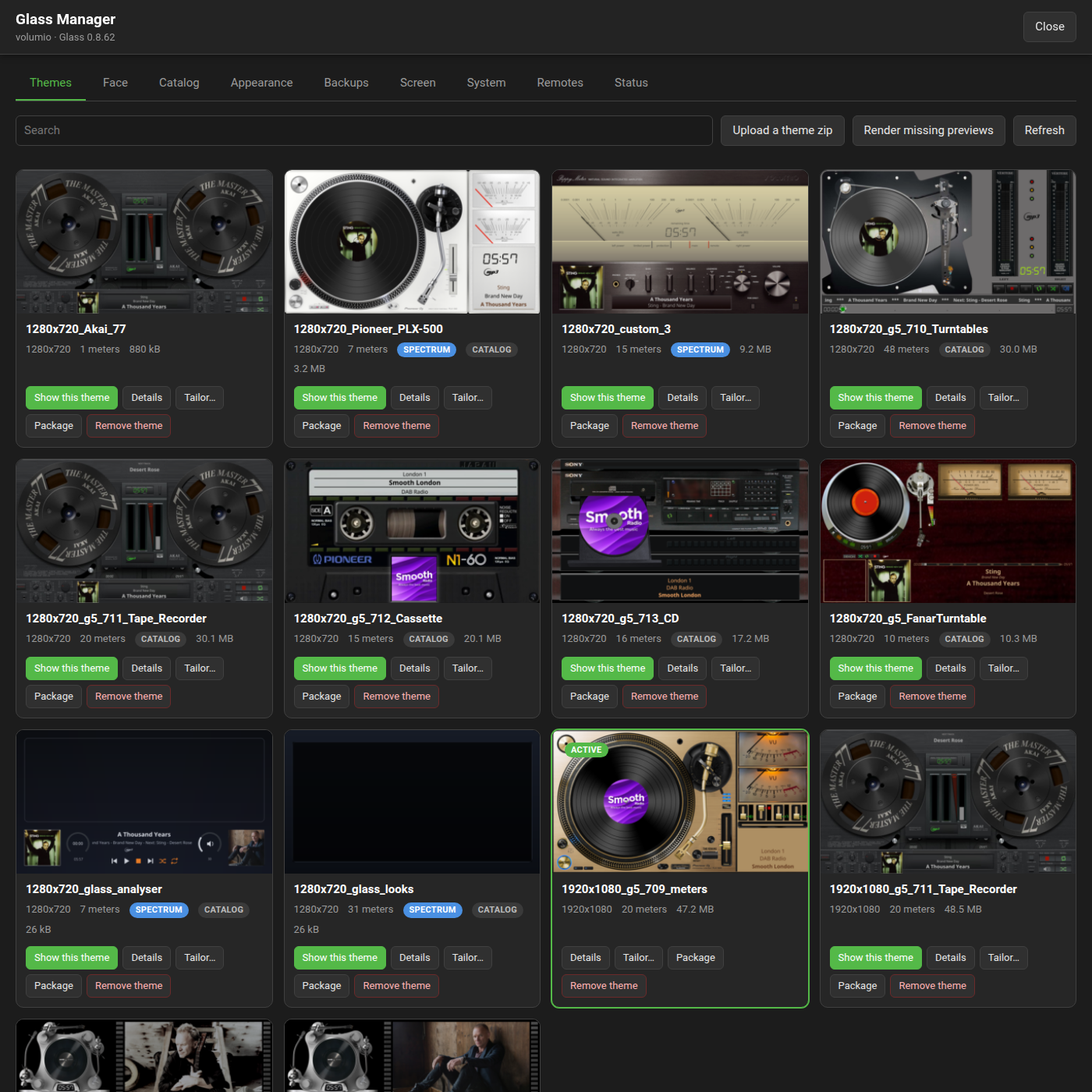
Every folder under the meter templates, with the meters it holds and whether a spectrum twin stands beside it. The toolbar has a search over folder and meter names, Upload a theme zip, Render missing previews and Refresh.
Each theme's card offers:
- Show this theme: puts it on show.
- Details: its meters with their previews, the meter rotation (all meters at random, a list, or one, moving on a timer or with the title), and Render previews again.
- Tailor: a copy of the theme cut to another screen size and installed beside it, the size of the theme on show offered first, with a switch to stretch to the screen's shape instead of keeping the theme's. The Tailor page has what the cutter does, with pictures.
- Package: the theme's zip for the collection, with a preview of its meters tiled in one picture (the first nine where it has more), handed to the browser when the job is done and kept behind a Download link in the job's row.
- Remove theme: the last theme stays, and removing the one on show moves the display to another first.
Tailor and Package run as jobs the tab follows, the package counting the meters shown with the seconds to go, and the theme's card says which job runs on it.
A theme's previews are drawn by Glass's own display, the theme alone, with no face over it: glass --headless --snapshot renders every meter of the theme and --thumb a thumbnail of each, one theme at a time, and the pictures are kept under /data/INTERNAL/glass/previews/<theme>/. When the theme's meters file or the plugin's version changes they are out of date: the pictures stay as they are until Render missing previews, or the theme's Details, renders them again.
Under the themes, Theme settings has the edition tag rules and "Do not delete themes", the same two settings as the settings page (Settings has both), and Car Dash puts a day theme and a night theme on show, at two times by the player's own clock or at sunrise and sunset (the Themes page has it).
A theme zip sent from the browser installs the way a catalog theme does, in any of the layouts the catalog holds: one folder, files at the zip root, a templates/ prefix, a bundle of folders, or meter and spectrum twins.
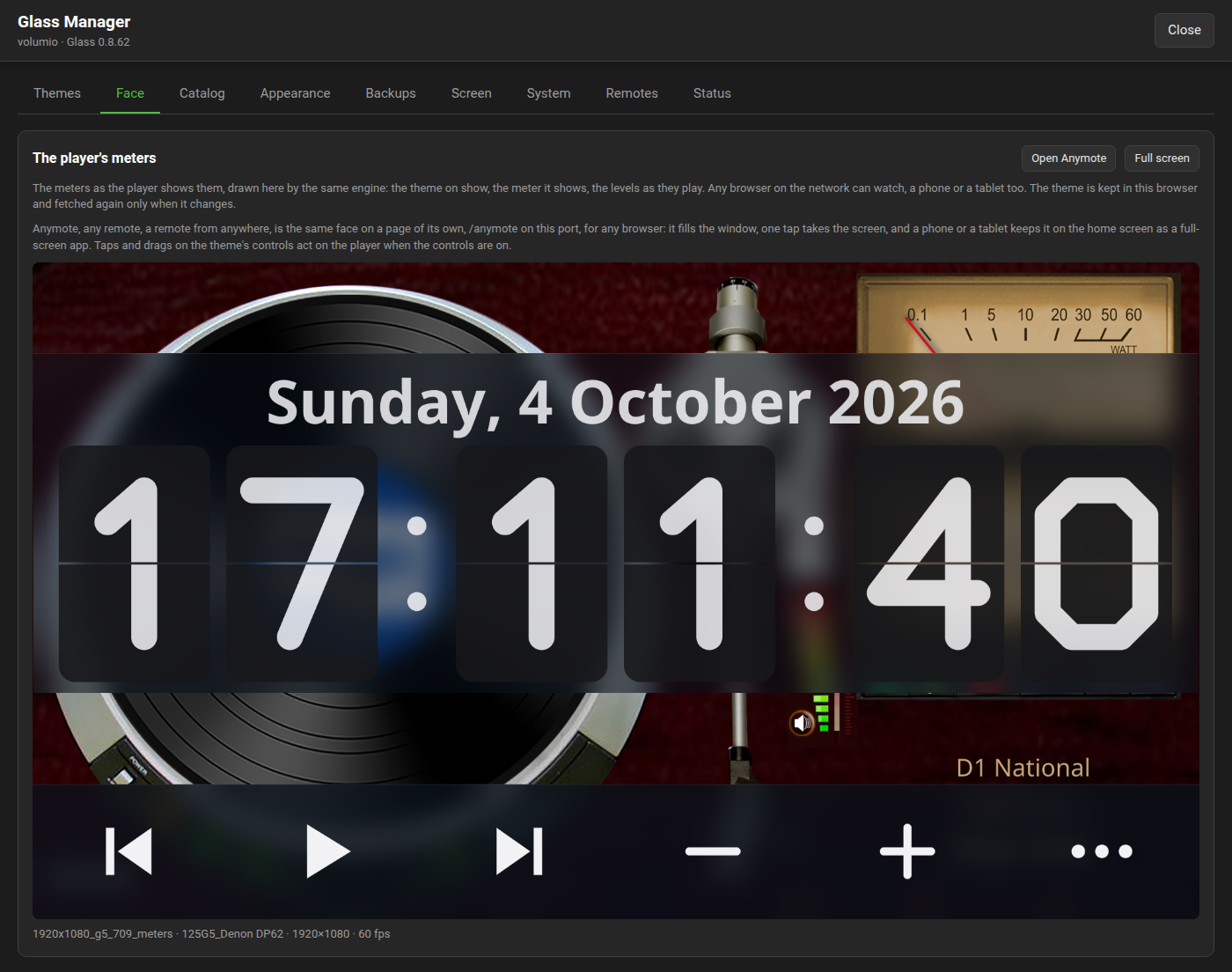
The player's meters live in the browser: the theme on show and the meter the player shows, drawn by the display's own engine compiled for the browser, with the levels as they play. It follows the player's screen when the music stops: the persist countdown, then a banner that says the player is stopped or paused and the display has left, until it plays again.
With glass-evo 0.1.14 or later, from Glass 0.8.10, the tab can show glass-evo's face over the theme, the clock, the date and the controls as on the player's screen, and the banner is then left out. Whether it does is the Screen tab's choice, "The Face tab and Anymote show" (below, and on the Screen page).
The tab brings the configuration, the theme, the fonts and the icons as a remote display does, keeps them in the browser by checksum so a second visit fetches only what changed, and takes the frames and the player's state from the Manager as one event stream; it follows the player's theme and meter as they change, and a button puts it full screen. A tap or a drag on the theme's controls acts on the player as on its own screen, through the Manager, when the controls are on (the Meters-Reference has the keys; the setting is the System tab's).
Open Anymote opens the same face on a page of its own, /anymote on the Manager's port, for any browser: it fills the window, one tap takes the screen, and a phone or a tablet keeps it on its home screen as a full-screen app. The Anymote page has the ways to full screen and the kiosk lines; the Contracts page has the module's contract under "The browser face".
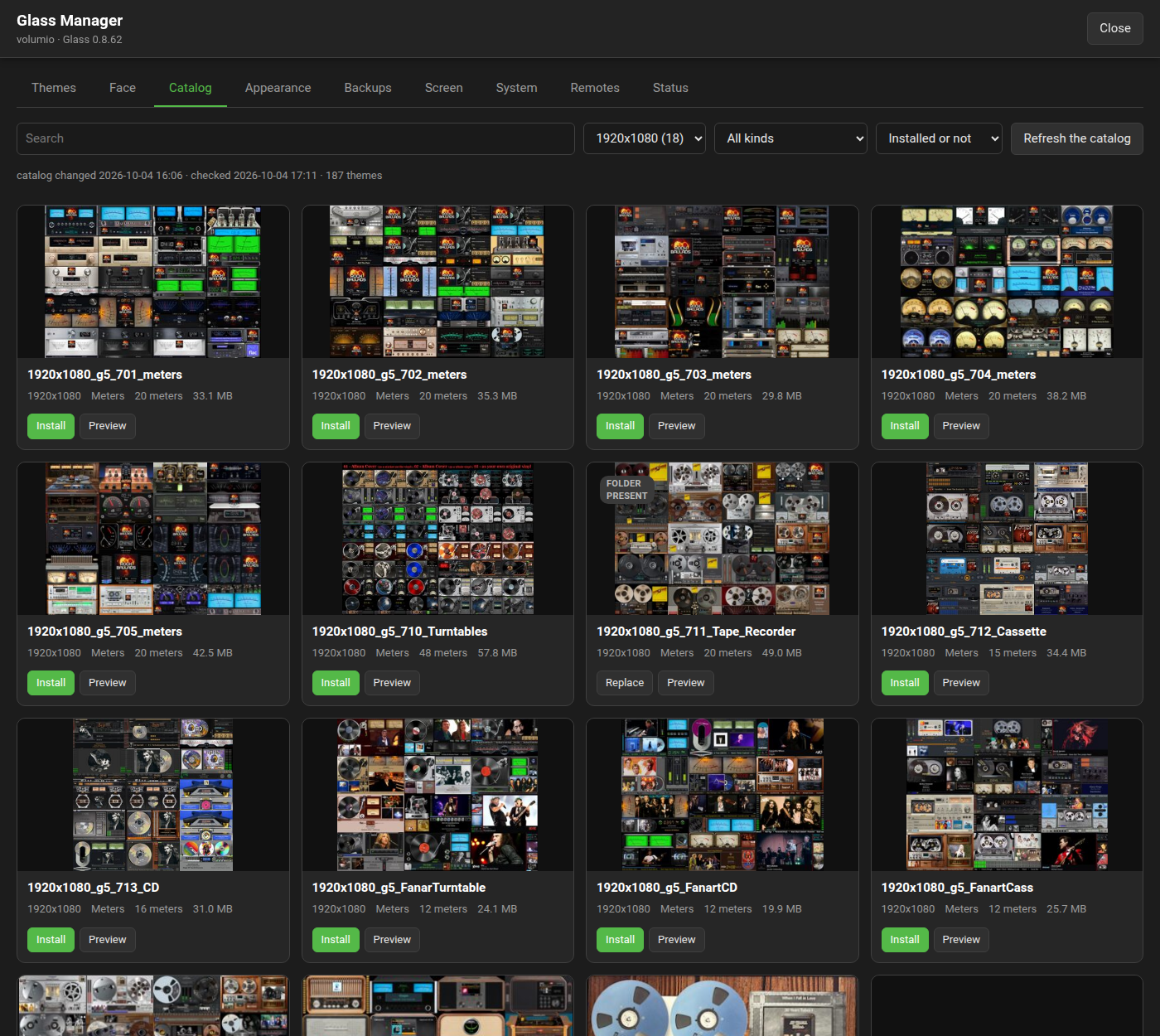
The index that glass_templates publishes (catalog/index.json), fetched with its ETag and kept on the player. Entries are browsed by size, kind and state; the size filter starts at the size last chosen in this browser, else at the size of the theme on show. An install downloads the zip, checks its size and SHA-256 against the index while it arrives, opens it, checks that the folders it holds are the ones the index names, unpacks each into the meter or spectrum tree through a staging directory that replaces the folder in one rename, records the checksum in catalog/installed.json, and draws the previews. A changed zip shows as an update; a folder that exists without a record shows as present. The Catalog page has the tab, its filters and what an install checks.
A Display section first: whether the theme is fitted to the screen, and whether it sits centred or at a position of your own (which may be negative, from 0.8.11), the same choices as the plugin's settings page, the display starting again with the change. Then the artist fanart settings and the clearing of the fanart cache, and the fonts: the face each text style is set in, built in, uploaded here or one of the player's own, and the upload of fonts of your own. The Artwork page has where the pictures come from, how to bring your own, and the fonts.
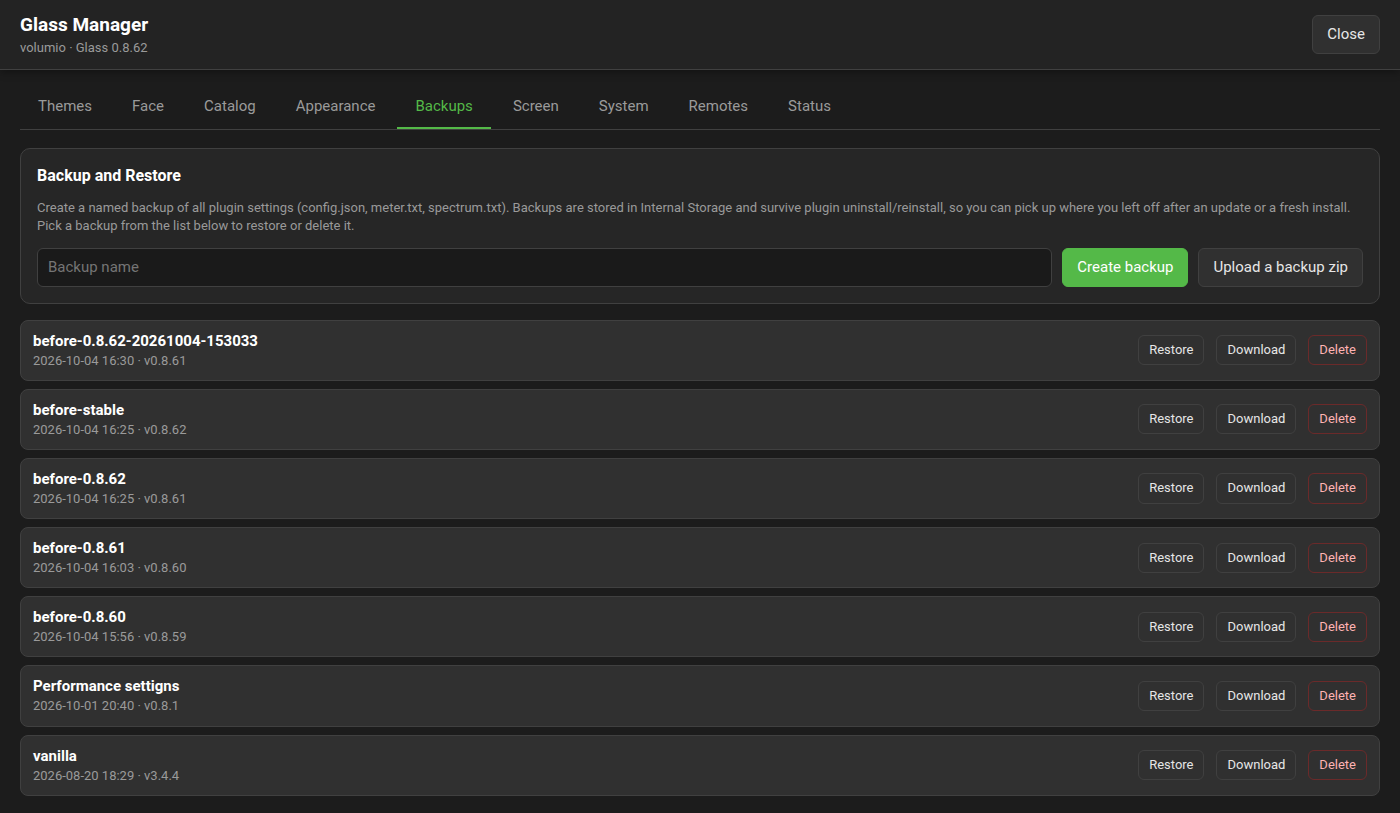
The settings backups: create, restore, delete, download as a zip, and upload a zip as a backup (checked the way a restore checks it, and named by the file, without glass-backup- and .zip, with a number when the name is taken). Settings move from one player to another this way. The Backups page has the detail.
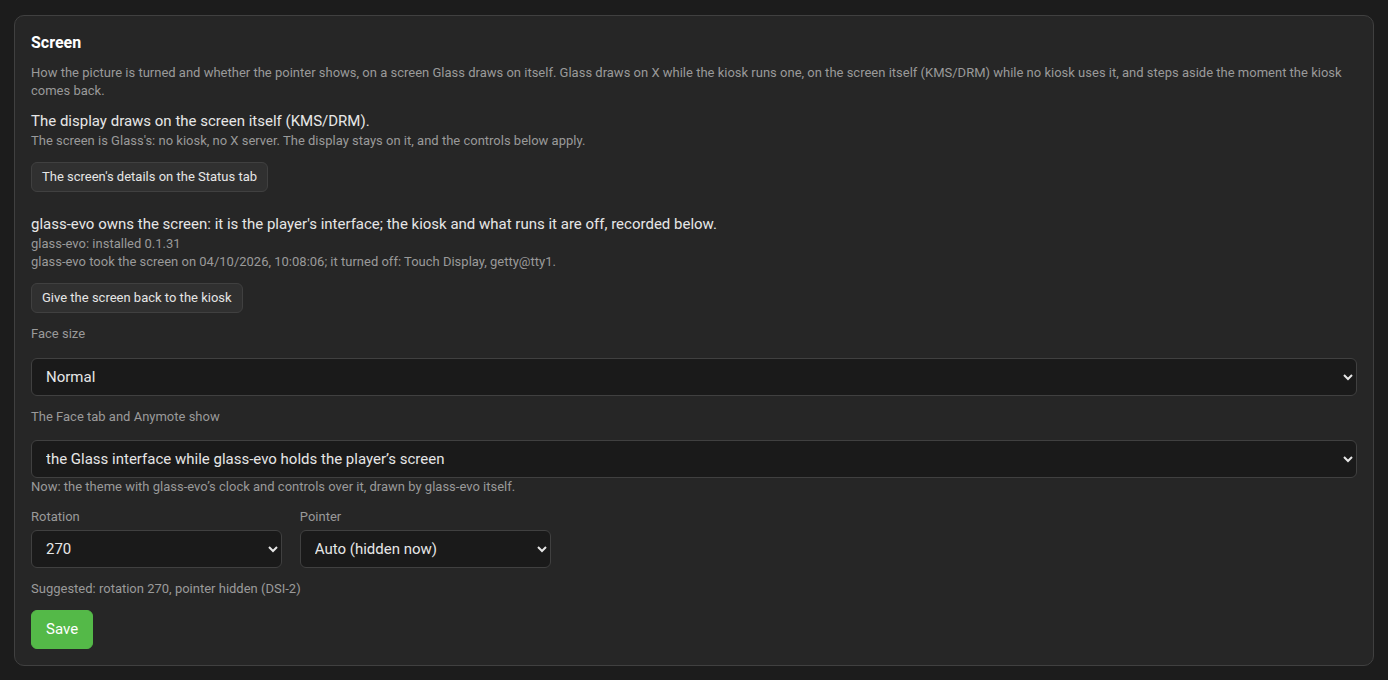
What the display draws on now and whose the screen is, with a button to the screen's facts on the Status tab.
With glass-evo installed (the System tab gets it):
- Who owns the screen, the kiosk or glass-evo, with the button that hands it over, Use glass-evo on the screen, or back, Give the screen back to the kiosk; each asks first.
- Face size: Normal, Large (for a hand at arm's length) or Car (for a glance while driving), kept as chosen.
- The Face tab and Anymote show: whether the browser views carry glass-evo's clock and controls over the theme, kept as chosen, and followed at once by a page that is open. The line under it says what the pages carry now. The views are Glass's picture, never a copy of the player's screen: a kiosk's own pages do not appear in them.
| Choice | While glass-evo owns the player's screen | While the kiosk owns it |
|---|---|---|
| the Glass interface while glass-evo holds the player's screen (as a player starts) | the theme with glass-evo's clock and controls over it | the theme alone |
| the Glass interface, always | the theme with the clock and controls | the theme with the clock and controls |
| the theme alone | the theme alone | the theme alone |
Before 0.8.36 the first choice read "what the player's screen shows". Under a kiosk the first and the third choice show the same; they differ once the screen is handed to glass-evo. The choice is there from Glass 0.8.10 with a glass-evo that carries its face for a browser, 0.1.14 or later; without one the pages show the theme alone. The Screen page has it in full.
- How the screen looks: a row of looks to choose from, a likeness of the player's screen, and a section each for Colours, Backgrounds, Clock, Date and Buttons, with Save and Put everything back. The glass-evo wiki's Face-Themes page has it.
On a screen that is Glass's own, with no kiosk on it: the rotation and the pointer, with what the player's hardware suggests beside them, and Touch, the mapping from the panel to the picture (as the panel reports, swapped or mirrored, or calibrated) with Calibrate on the screen.
The Screen page has the detail.
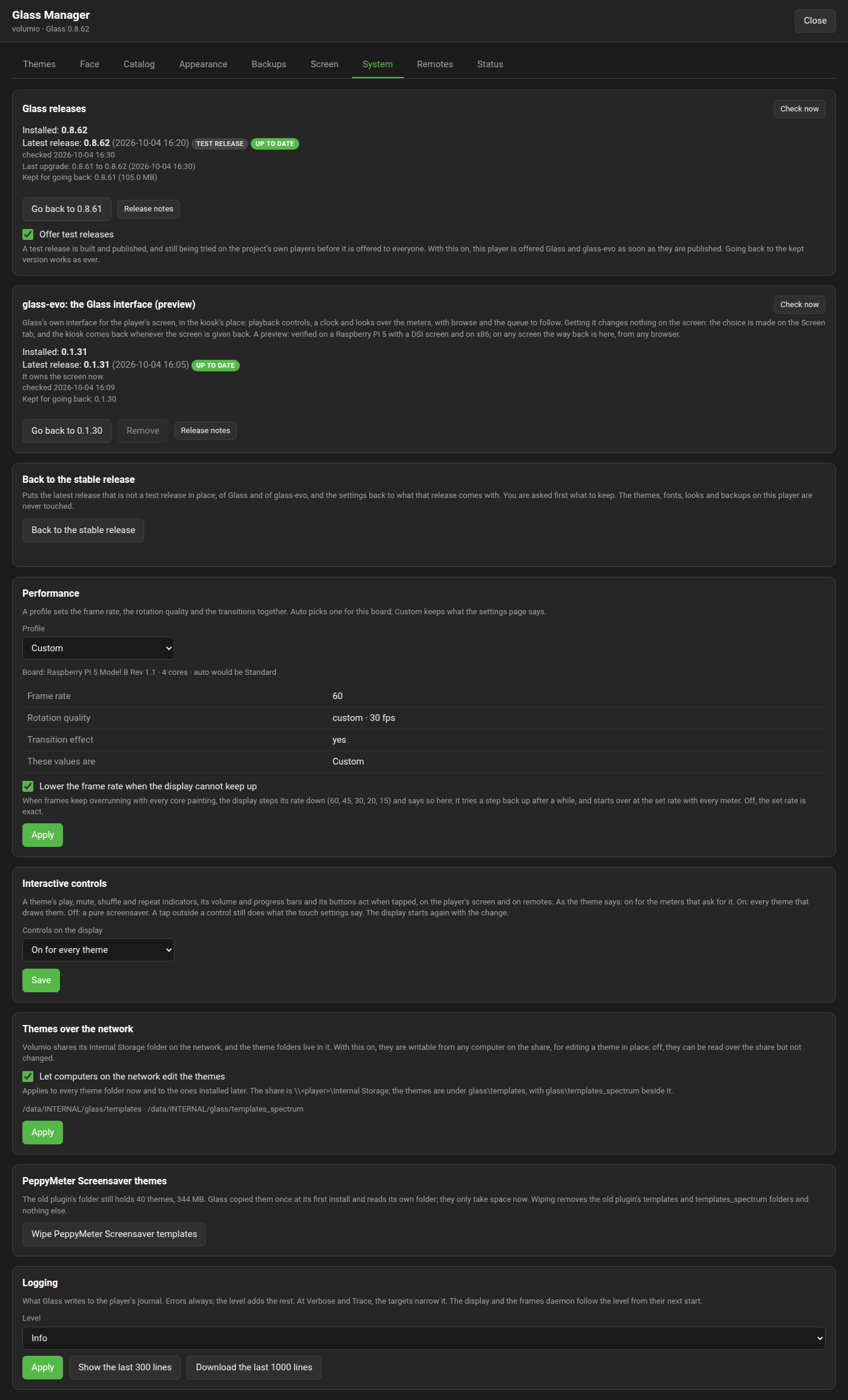
What acts on the player:
- Glass releases and glass-evo, each with its installed version, the latest release, and the way back; "Offer test releases" (all three below).
- Back to the stable release: the latest release that is not a test release in place, of both, and the settings back to its defaults, after asking what is kept (below).
- Performance: the profile that sets the frame rate, the rotation quality and the transitions together (Full, Standard, Light, Minimal, Auto for the board, or Custom, which keeps what the settings page says; the Performance page has the rows), and the governor's switch: the display lowers its rate when it cannot keep up with a theme, and the panel and the Status tab say "lowered to" while it does.
- Interactive controls: whether a theme's indicators and buttons act when tapped, as the theme says, on for every theme, or off for every theme (the Meters-Reference has the theme keys).
- Themes over the network: whether computers on the network may edit the theme folders through Volumio's Internal Storage share (the Skin-Creation-Guide has the workflow).
- Logging: the level of what Glass writes to the player's journal, errors only to trace, the targets at the fine levels, the last three hundred lines on the tab and the last thousand as a file (the Logging page has the levels and targets).
While PeppyMeter Screensaver's own folder still holds themes, a panel says how many and how much space, and wipes its two theme trees behind a confirmation; Glass copied them once at its first install and reads its own folder, so they only take space, and nothing else of that folder is touched.
Whether this player serves remote displays (off until turned on here), the three ports, pre-filled and applied at once with a port something else holds reported, the frames daemon's state, and the remotes connected: name, address, release, screen, since when, whether frames reach them, and a link to each remote's own settings page, opened in this window. The Remotes page has the wire, the client and its two flavours.
Find a problem, a guided diagnosis: pick what is wrong from nine symptoms and the Manager runs the checks it can run itself over what it knows, the sheet, the screen's facts, the release state and Glass's lines in the journal, and lists likely causes first, with a button to the tab where each is set; the Troubleshooting page has the checks in words.
Under the findings, Make a report: Glass logs in full while the problem is reproduced, the player's system log goes to Volumio's log server through Volumio's own submitter, and the report, your words, the log's link, the findings and the sheet, is opened as a GitHub issue or copied for the forum; the log level goes back by itself.
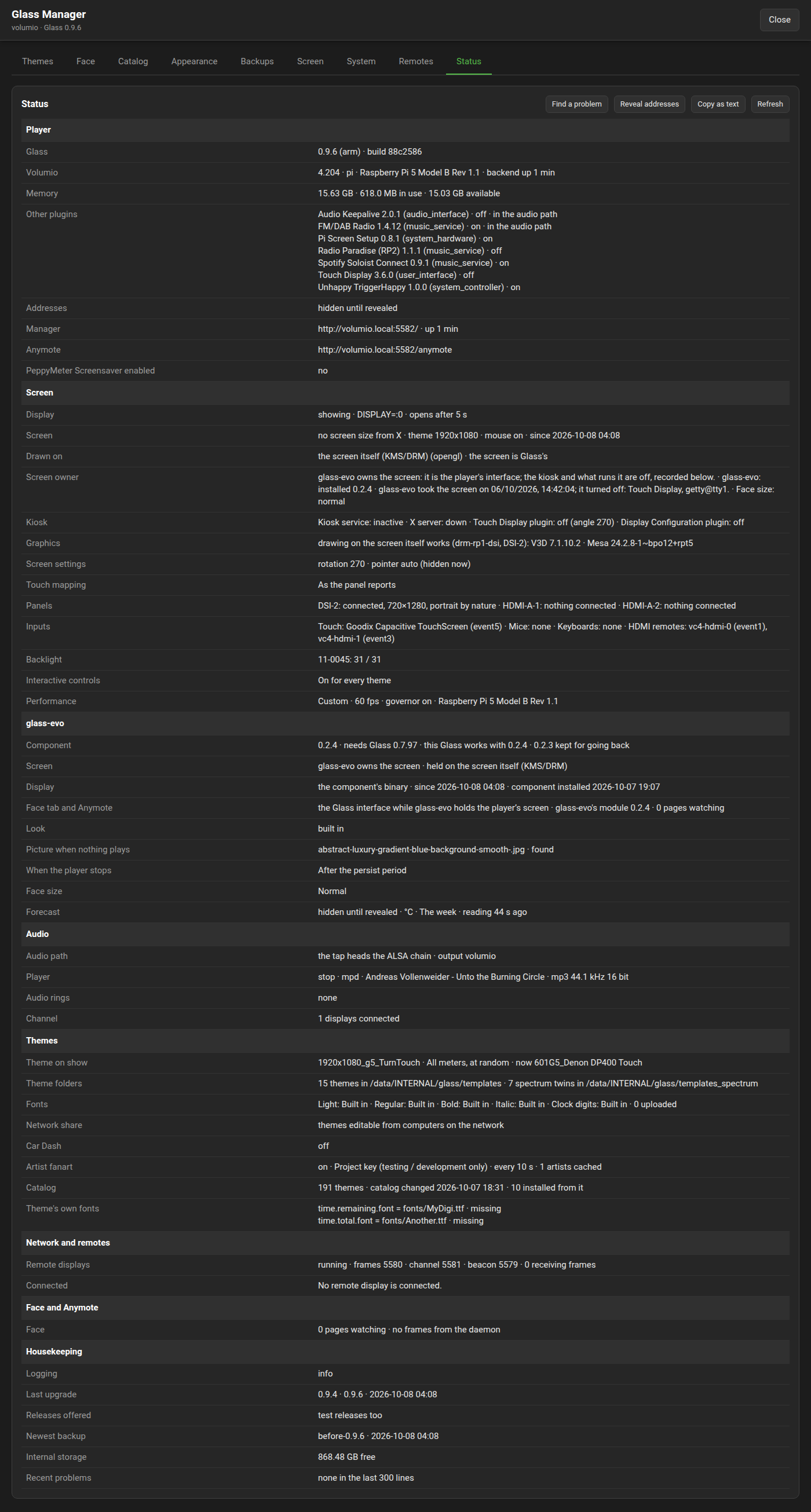
Then the system sheet: a picture of the player in sections, Player, Screen, Audio, Themes, Network and remotes, Face and Anymote, Housekeeping, laid out so a screenshot or its text answers a support question in one go. Copy as text puts the whole sheet on the clipboard for a forum post, with a diagnosis's findings when one was run. The player's addresses, and the Manager's and Anymote's links in their address form, stay hidden until Reveal addresses is pressed, so a screenshot carries none unless the poster chose to; the copied text follows the same switch.
The rows: the plugin's version and binary, whether the display is up, the theme on show, its rotation and the meter on show at the moment, Volumio's version, the board and the backend's uptime, the player's memory (all of it, in use, available, and swap in use) and the other plugins installed, each with its version, whether it is on and whether it puts itself in the audio path (both from 0.8.2), the build the plugin zip carries, the addresses when revealed with the manager's and Anymote's links, the screen's size beside the theme's with the mouse setting and since when the display has been up, what the display draws on and through which renderer and whose the screen is, the kiosk service, the X server and the kiosk's plugins, the screen's rotation and pointer, the touch mapping and its calibration, the panels with their native sizes, the touch panels, mice and keyboards with their event nodes, the backlights, whether the tap heads the ALSA chain and what the player is set to play through, the format of what plays, the theme folders with how many themes and spectrum twins each holds, the face each text style is set in and how many fonts were uploaded, whether the themes are editable over the network share, Car Dash's period and next switch, the interactive controls setting, the Face tab's pages and whether frames flow to them, the artist fanart settings with the artists cached, the performance profile with its rate, the governor and the board, the player's state as the channel saw it last and whether what plays is measured (a live ring under /dev/shm while the player reports play; none means the source plays below the tap and is heard but not measured), the displays connected to the channel, whether remote displays are served and on which ports and how many receive frames, each ring with its stream and whether it is live, the catalog, the free space in the player's internal storage, the manager's own address, the logging level, the last upgrade, the newest backup, and the last three warnings or errors Glass wrote to the journal. Where glass-evo is on the player the Screen section also says who owns the screen, the component's version, what the last take changed and the face size; Housekeeping says which releases the player is offered; and a row says whether PeppyMeter Screensaver is still enabled.
The System tab shows the installed version and the latest release on GitHub (checked a minute after the Manager starts, once a day after, and on demand; a newer release is announced in the page's header on every tab). When the release is newer, a press and a confirmation upgrade:
- The plugin zip is downloaded and checked against the digest the release carries. A download whose connection breaks is made again from its first byte, after 2, 4 and 8 seconds, before a failure is reported; the same holds for the glass-evo component and for a theme from the catalog.
- A settings backup is written, named
before-<version>after the version being installed, with the date and time behind it when that name is taken. These automatic backups are kept to the newest five; backups with a name of your own are never touched, unless the name has that form. - The meter and spectrum configurations are snapshotted, and the installed plugin is kept as a zip under
/data/INTERNAL/glass/upgrade/. - The player's own plugin manager replaces the plugin and runs its install script (the settings in
/data/configurationstay), the configurations go back, and the player's backend restarts so the new code loads.
The page follows the job, waits for the new version to answer, and reloads. The kept version can be put back the same way, from the same tab.

Under Glass's own release, from 0.8.0, the System tab has glass-evo, the Glass interface for the player's own screen (its first full release 0.2.0 with Glass 0.9.0): Get it, Update it, Go back to the version before, Remove it. The release is read from GitHub, its zip checked against the release's checksum, this player's binary and the module for a browser checked against the component's own list, and the version in place kept for going back. Getting it changes nothing on the screen: the screen is handed over on the Screen tab. Glass and glass-evo each name the least of the other they work with; a version outside that is not installed, and an upgrade of Glass that needs a newer glass-evo installs that first and puts it back when the upgrade does not go in. It is removed only while the kiosk owns the screen.
A release of Glass or of glass-evo is first published as a pre-release, tried on the project's own players, and then made the latest; until then no player is offered it. "Offer test releases" on the System tab, from 0.8.5, is for a player that wants a release as soon as it is published: with it on, the Manager offers the newest of the repository's last ten releases, a pre-release among them, marked "test release" beside its version; with it off, as every player has it until someone turns it on, it asks for the latest as before. It holds for Glass and glass-evo alike, the choice is looked up the moment it is made, and going back to the kept version works as ever. The status sheet says which releases a player is offered.
From 0.8.52 the System tab has one act that brings a player back to a known state: the latest release that is not a test release, of Glass and of glass-evo where it is installed, and the settings as that release comes with them. It is the way out for a player that took a test release, and the state to bring a player to before asking for help.
It asks first, part by part, what is kept. Each question is answered yes or no, and each comes with a suggested answer; a question is asked only where it means something on the player.
| Question | What it covers | Suggested |
|---|---|---|
| Keep the screen's set-up? | Rotation, touch mapping and calibration, the pointer, the picture's position, the display's output. | yes |
| Keep the network set-up? | Remote displays served or not and their ports, the Manager's address and port, the themes on the network share. | yes |
| Keep glass-evo on the player's screen? | Asked where glass-evo holds the screen. No gives the screen back to the kiosk. | no |
| Keep the theme on show? | The theme and meter on show, the random choice, the rules by tag, the fonts, the fanart show. | no |
| Keep glass-evo's look? | Asked where glass-evo is installed: the look, the adjustments, the size, what the Face tab and Anymote show. | no |
| Keep when the display shows and what a touch does? | The delay, the persist time, what a touch does, the interactive controls, Car Dash. | no |
| Keep the performance and logging settings? | The profile, the frame rate and governor, rotation, spools and scrolling, the start animation, the log level. | no |
| Keep taking test releases? | Asked where the player takes them. No turns that off. | no |
Never touched, whatever is answered: the installed themes, fonts, looks and backups, the fanart key, and whether an uninstall leaves the themes.
After the last question the whole is said once: the versions each of the two goes from and to (a player already on the stable release keeps it), what is kept and what goes back to the defaults. Nothing has happened until Go back to the stable release is pressed. Then, in this order:
- The stable Glass is downloaded and checked against its release's digest. Nothing is changed before it is there.
- A settings backup named
before-stableis written (with the date and time behind it when that name is taken). Without it nothing is changed. - glass-evo, where installed, is stepped to its stable release, the version in place kept for going back.
- The screen is given back to the kiosk, unless glass-evo was kept on it.
- The settings are written: the defaults of the stable release itself, read from its zip, with the kept parts laid over them. A setting a later release wrote and the stable one does not know goes.
- Glass is replaced through the player's plugin manager, as an upgrade is, and the backend restarts. On a player that already runs the stable release only the backend restarts, on the new settings.
A step that fails puts the settings back from the backup and glass-evo back to the version before, and the job says what failed. To undo the act afterwards, restore before-stable on the Backups tab, and upgrade again from the System tab with "Offer test releases" on if a test release is wanted back.
Where the Manager itself does not come up, the same act is run from a shell, from 0.8.62, as the volumio user on the player:
curl -fsSL https://raw.githubusercontent.com/foonerd/glass/main/get-glass.sh | sh -s -- --stableIt asks nothing and takes the suggested answers: the latest stable Glass in place, the settings as that release's own plan makes them with the screen's and the network's set-up kept and test releases off, after a backup named before-stable. It leaves glass-evo and whose the screen is as they are; the Manager, once it is back, has both.
/data/INTERNAL/glass/
  templates/              the meter themes
  templates_spectrum/     the spectrum themes
  backups/<name>/         the settings backups
  fonts/                  fonts uploaded to the player
  faces/                  face themes of the user's own
  catalog/index.json      the index as last fetched, with its ETag
  catalog/installed.json  what was installed from the catalog, by name and checksum
  catalog/thumbs/         catalog thumbnails as they were looked at
  catalog/downloads/      zips and staging folders while a theme installs, uploads, is cut or
                          packaged; a packaged theme's zip stays for its Download link
  previews/<theme>/       <meter>.png and <meter>.thumb.png, with a stamp
  upgrade/latest.json     the latest release as last checked
  upgrade/state.json      the kept version and the last upgrade's outcome
  upgrade/previous-<v>.zip  the plugin as it was before the last upgrade
  upgrade/config/         the meter and spectrum configurations across an upgrade
  evo/                    glass-evo, when got: manifest.json, bin/<arch>/glass-evo,
                          face/glass-evo-face.wasm, themes/, face.txt
  evo.prev/               the glass-evo before the last update, for going back
  evo-state/latest.json   the latest glass-evo release as last checked
  screen-owner.json       who owns the screen, and what the last take changed
  .preserve               there while "Do not delete themes" is on
Themes land in the trees the display reads, base.folder of the meter and spectrum configurations, /data/INTERNAL/glass/templates and templates_spectrum by default. Folders and files unpacked by the Manager belong to the player's user.
An uninstall of the plugin removes /data/INTERNAL/glass unless "Do not delete themes" is on, all but the settings backups in backups/, which stay through an uninstall always (from 0.8.39; before, they went with the rest).
Every tab works through routes under /api, and so can anything else on the network. The Manager-API page has each route with its parameters, its answer and its errors.
A zip holds one or more units: a directory with meters.txt (installed under templates/) or spectrum.txt (under templates_spectrum/). The unit's folder is the directory's name, or the zip's name when the directory is the zip root or a plain templates/ or templates_spectrum/ container. Everything under the unit's directory lands under its folder with paths kept. From an uploaded zip, entries that leave their directory, symbolic links, directories and .DS_Store files are left out; a catalog zip with such an entry is refused whole. An encrypted or damaged zip is refused. The same rule generates the catalog's index, so the two always agree.