Repository navigation
Remotes
A remote display is Glass on another machine, showing a player's meters with the player's theme, or a theme of the remote's own, and the player's fonts and icons, drawn by the same pipeline the player draws with. The player provides five things; the remote brings the rest into a home directory of its own and reads it as it would read the player's. For a device with nothing installed, a phone, a tablet or any browser, Anymote, any remote, a remote from anywhere, is the same face on a page the player's manager serves.
- Frames: the tap's measurements, one datagram per hop over UDP.
- The channel: the player's state and commands, over TCP, as the local socket carries them.
- Configuration and assets: the meter and spectrum configurations, the theme on show, the fonts (the multi-script set among them), the player's web fonts, the fonts uploaded to the player and every format icon the player has, over HTTP from the manager.
- Artwork: album art by the player's own URL; artist fanart through the player's endpoint.
- A beacon: how a remote finds a player on the network.
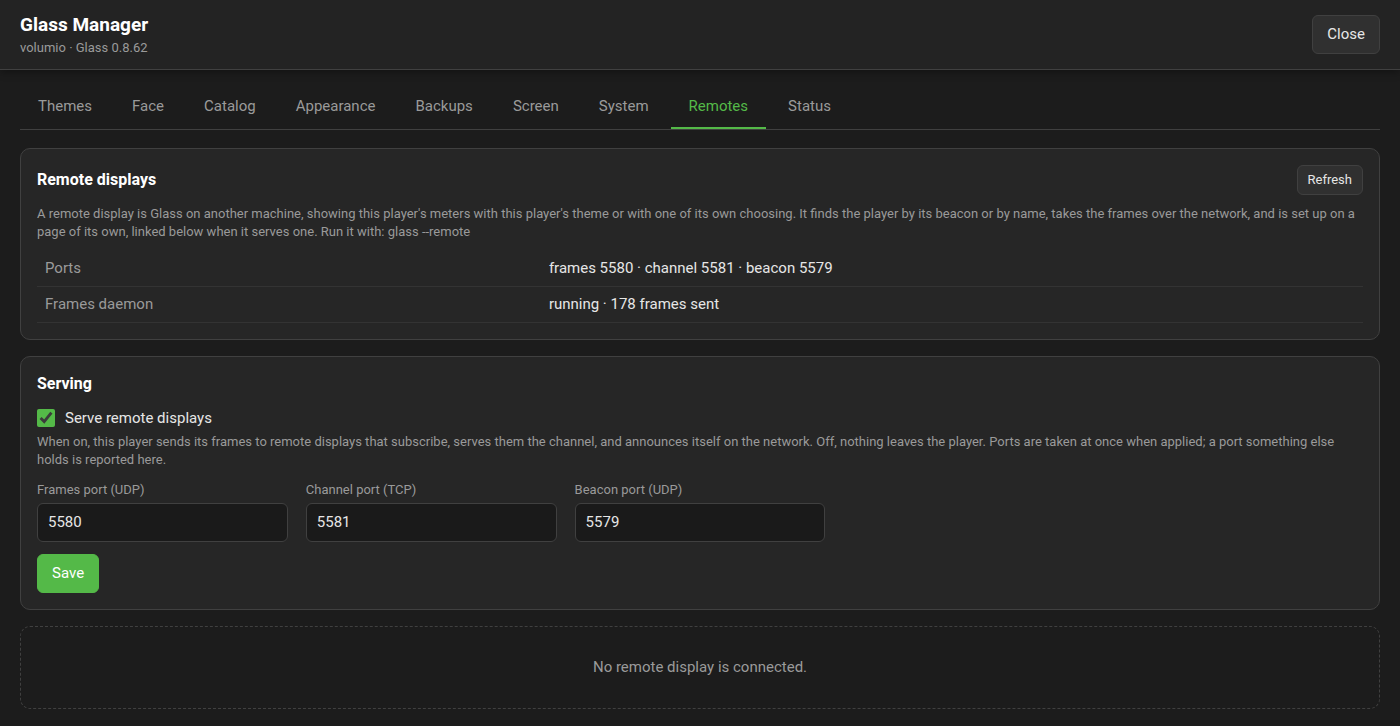
Serving remotes is off until the manager's Remotes tab turns it on; the tab also sets the three ports, pre-filled with 5580 (frames, UDP), 5581 (channel, TCP) and 5579 (beacon, UDP), which must differ from each other and from the manager's port. A change applies at once: the daemon, the channel and the beacon start again on the new ports, and a port something else holds is reported on the tab. In the plugin's configuration these are remotesEnabled, remoteFramesPort, remoteChannelPort and remoteBeaconPort. A LAN with no remote carries no frames: frames go only to remotes that subscribed.
A player with no screen of its own, a headless box in a rack, sets its display to "no screen of its own, remote displays only" on the settings page: it opens no window, the tap measures as ever, and the remotes are served. That is PeppyMeter's server mode.
A remote comes in two flavours. Both are the same display with the same settings page, configuration and menu entries, and one is installed in the other's place whenever wanted: the settings stay.
- Standalone, from Glass's releases: the player's theme and nothing over it.
- Bundle, from glass-evo's releases: the same display with the Glass interface in it, a clock and the date when the player stands still and a bar of controls (previous, play or pause, next, volume, and more), in the player's look. It shows them where the player's own screen shows them, which is when glass-evo holds that screen; the remote's settings page can have them always, or never. The controls need a touch screen or a mouse on the remote; the clock needs neither. The player needs Glass 0.8.20 or later. The glass-evo wiki's On a remote display page has the bundle in full.
| Standalone | Bundle | |
|---|---|---|
| Linux (x64, armv8, armv7) | yes | yes, from glass-evo 0.1.18 |
| Windows (10 or later, 64 bit) | yes | yes, from glass-evo 0.1.19 |
| Android (7 or later) | yes | yes, from glass-evo 0.1.20 |
On Android both flavours are the one app, Glass Remote, under the one key: one installs over the other and the settings stay. Android itself refuses an app built on an older Glass than the one installed, so change flavour to one built on the same Glass or a newer one, or uninstall first.
For a device with nothing installed, Anymote can show the Glass interface in any browser: the player's Screen tab says when (Screen, "The Face tab and Anymote show").
glass --remote                         # as the remote's settings say; a first start shows where the settings page is
glass --remote living-room.local       # add this player and show it
glass --remote discover                # listen ten seconds for players' beacons and add the first
glass --remote --settings              # the settings page in a browser, of the remote already running or of this one
glass --remote --dev                   # a movable window at the theme's exact size, titled with the meter on show; the window's mode is not kept
glass --remote 192.168.1.20 --manager-port 5590 --name Kitchen --cache /var/lib/glass-remote --config /etc/glass-remote.json
A remote is set up on a page of its own, served by the same glass process on port 5583 (page_port in its configuration) at http://<remote>:5583/, and reachable from any browser on the network; the manager's Remotes tab links to it.
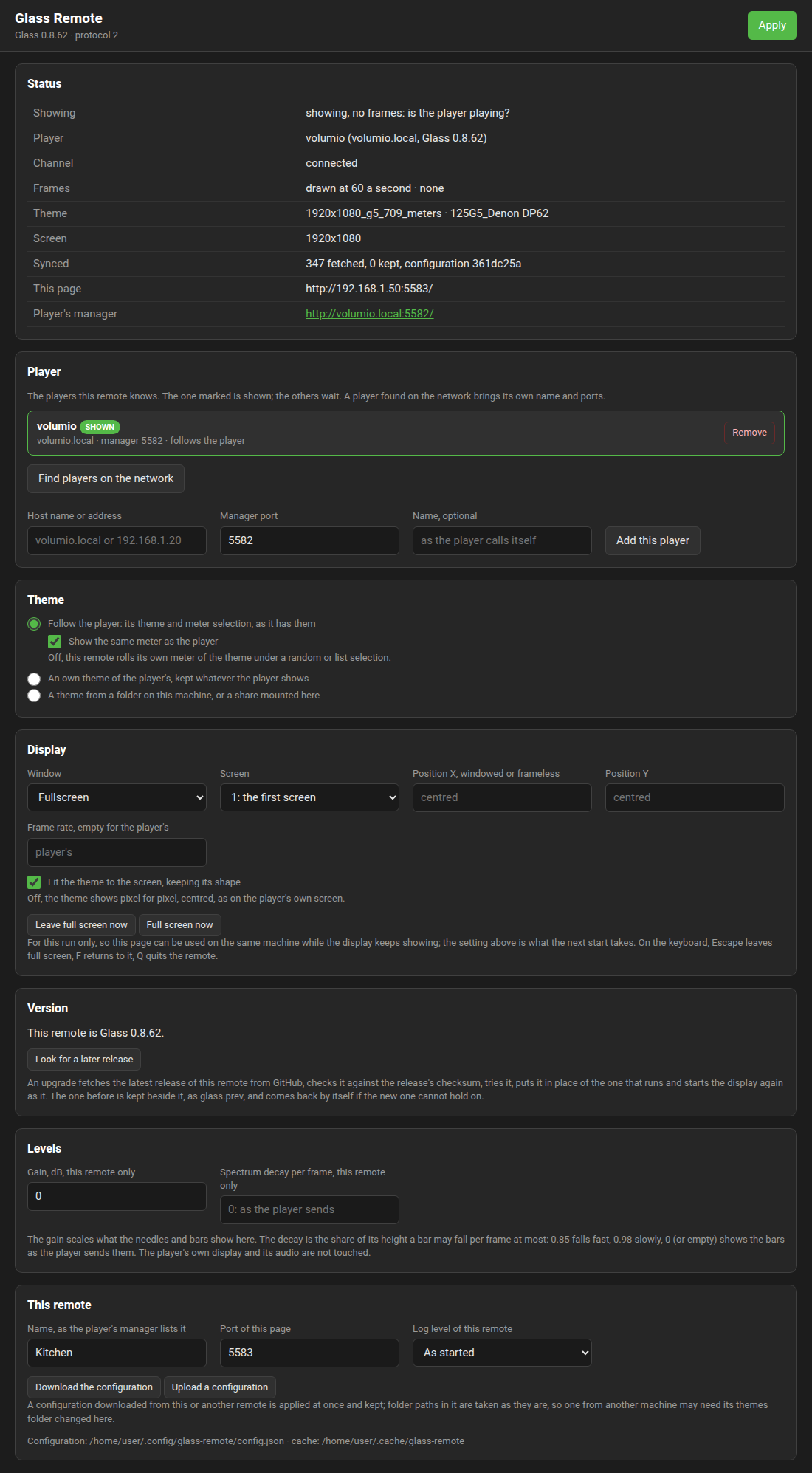
The page holds:
- Players. The players this remote knows, by name and address, with one on show; a player is found on the network (its beacon, six seconds of listening) or typed as a host name or address with its manager port. A player named by hand is asked, through its manager, which ports it uses, so ports moved on the Remotes tab are found.
-
Theme. Follow the player: its theme, its meter selection and the rest of its meter configuration, as the player has them; when any of it changes the remote starts its session again with it, and the player sends its configuration to every display that connects to the channel, so a change made while the remote was away is taken up when it returns. With "Show the same meter as the player" on, as it is by default, the remote shows the meter the player's own display shows and moves when it moves; off, the remote rolls its own meter of the theme under a random or list selection. Or an own theme: one of the player's installed themes, kept whatever the player shows, with this remote's own meter rotation (all at random, a list, or one meter, on a timer of 15 to 1000 seconds or with the title); the theme's files come from the player. Or a theme from a folder on the remote's own machine: name the folder on the page (a disk of that machine's, or a network share mounted there; on Windows a UNC path such as
\\player\Internal Storage\glassserves), press "Read the folder", and choose one of the themes it holds, with the same meter rotation. The folder holds theme folders, or atemplatesfolder withtemplates_spectrumbeside it, as the player's own data folder under Internal Storage is laid out; naming thattemplatesfolder itself finds the twins beside it. Such a theme is read where it is, so a skin edited in that folder shows on the remote when it starts its session again; the fonts and icons still come from the player. - Display. Full screen (the theme fitted to the screen, keeping its shape, or pixel for pixel, centred), a window, or a frameless window at a fixed position; a frame rate of the remote's own, else the player's. On the keyboard, Escape leaves full screen and keeps the display showing in a window, so this page can be used in a browser on the same machine; F takes the screen again; Q quits the remote. "Leave full screen now" and "Full screen now" on the page do the same for a touch screen. These are for the run; the Display setting is what the next start takes. The remote governs its rate as the player does (the Performance page has the governor), and its page's Status shows the rate it draws at. On a machine with more than one screen, "Screen" picks the one the window opens on, by the system's count; the list fills once the window has opened.
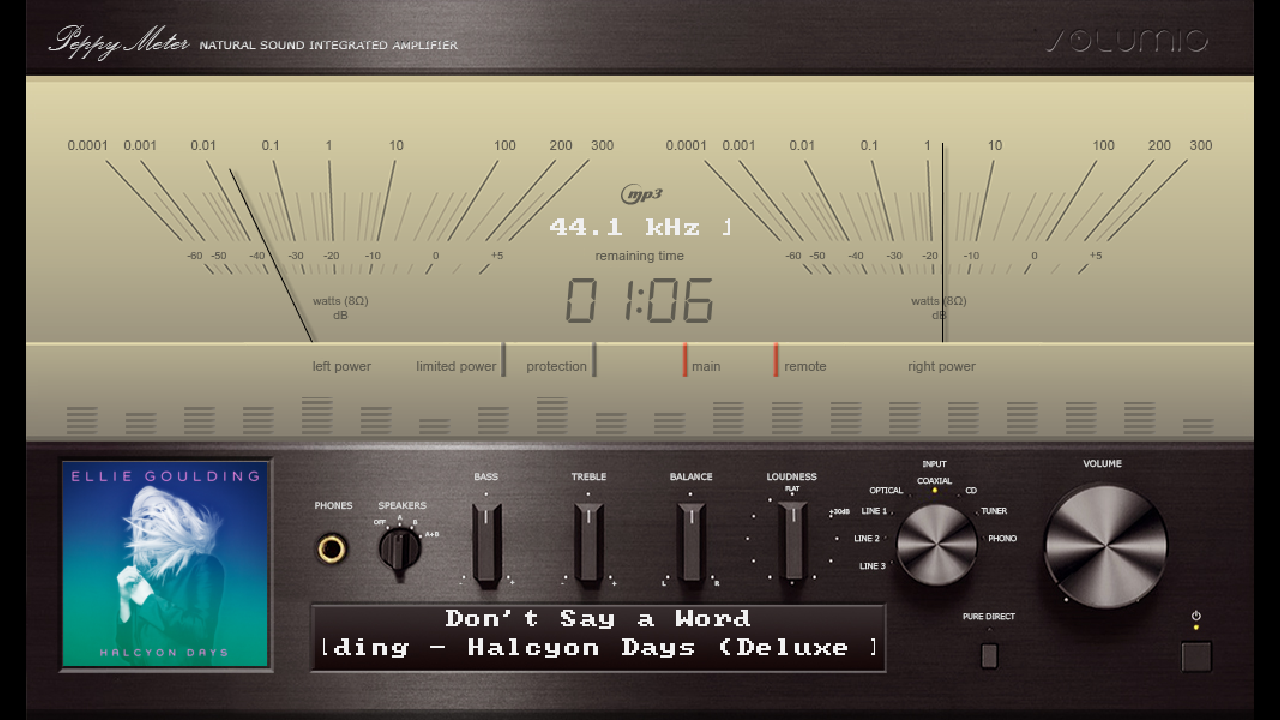
- Levels. A gain from minus twelve to plus twelve decibels for this remote's needles and bars; the player's display and its audio are not touched. A spectrum decay of this remote's own, 0.5 to 0.99, lets a bar fall by at most that share of its height per frame (0.85 fast, 0.98 slowly); empty or 0 shows the bars as the player sends them.
-
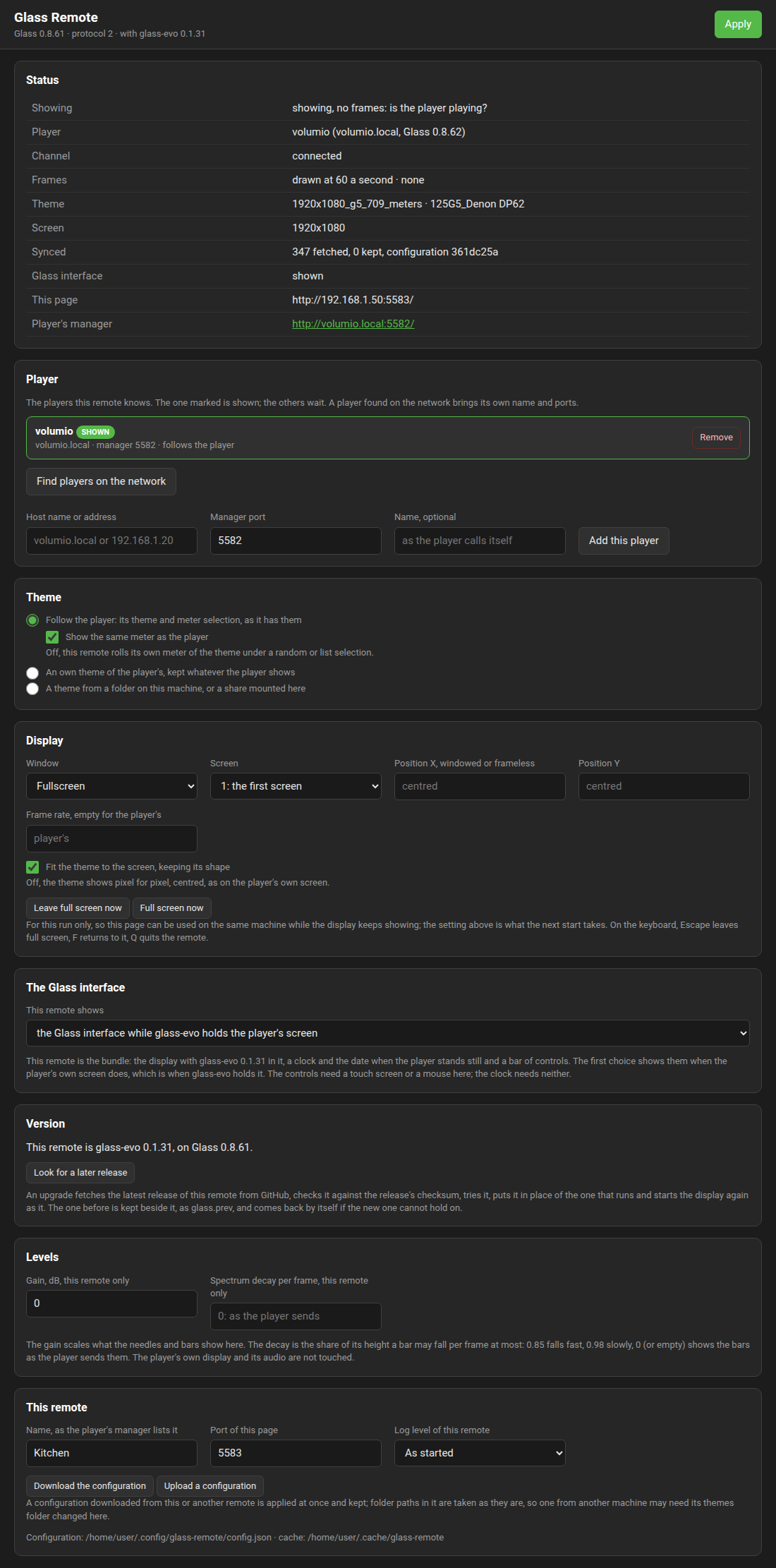
The Glass interface, on a bundle only (the line under the page's title then ends "with glass-evo" and its version). "This remote shows": the Glass interface while glass-evo holds the player's screen (the theme alone when the kiosk does; as installed; before 0.8.36 it read "what the player's screen shows"), the Glass interface always (the face whoever holds the player's screen), or the theme alone (
facein the configuration:follow,always,off). The Status panel says whether it is shown now, "Glass interface: shown" or "not shown", and the remote's log says why.
-
This remote. Its name, as the player's manager lists it, and the page's port. The log level of this remote (error, warn, info, verbose, trace) applies at once, over the environment's
GLASS_LOG. "Download the configuration" saves it as a file and "Upload a configuration" applies one from this or another remote at once; folder paths in it are kept as they are.
A change applies while the display runs: the session starts again in the same process with the new settings, and the window stays up when its mode has not changed. The configuration is $XDG_CONFIG_HOME/glass-remote/config.json (~/.config/glass-remote/config.json; %APPDATA%\glass-remote\config.json on Windows), or the file --config names; --remote HOST and --remote discover add to it and --name sets the name in it. When no player is set, or the player cannot be reached, or its theme cannot be brought, the window says so and where the page is, and tries again every five seconds.
On start the remote reads the player's configuration and theme from the manager into <cache>/<player>/ (config/meter.txt and config/spectrum.txt pointed into that home, with the theme, meter and rotation as the page says, templates/<theme>/, templates_spectrum/<theme>/, fonts/, format-icons/, webfonts/, customfonts/, and on a bundle faces/<name>/face.txt, the player's look where it is a face theme; a style set in an uploaded font is pointed at the copy under customfonts/), each file kept with its checksum so a later start brings only what changed. It then subscribes to the frames, connects to the channel, says who it is and where its page is, and draws. A tap on one of the theme's controls acts on the player through the channel, when the controls are on (the player's "Interactive controls" setting, which the remote follows); any other touch on a standalone remote plays or pauses the player. On a bundle showing the Glass interface a touch on the picture brings its bar or sends it away and does not play or pause, as on the player's own screen. --cache defaults to $XDG_CACHE_HOME/glass-remote or ~/.cache/glass-remote. Starting a second remote on a machine where one runs opens nothing: it says where the running one's page is, and with --settings opens it.
Every other switch of glass applies: --headless, --output, --fps, --meter, --theme (a theme the remote has in its home).
The standalone remote is installed from Glass's releases as below. The bundle is installed the same way from glass-evo's releases, with glass-evo-<version> in the place of glass-<version> in every file name: the installers are the same ones.
The release carries one archive per processor, glass-<version>-<arch>.tar.gz: x64 for a PC, armv8 for a 64-bit Raspberry Pi OS, armv7 for a 32-bit one (arm holds the same 32-bit build under the name Volumio gives that architecture; there is no build for an ARMv6 board). Each holds remote/linux/install.sh: run from the unpacked archive as the user who will run the display, it puts glass in ~/.local/bin and two entries in the applications menu, Glass Remote (the display) and Glass Remote Settings (the page in a browser, starting the display when it is not running), with an icon; --service adds a user service that starts the display with the session and keeps it running (sudo loginctl enable-linger $USER for a screen that must come up before anyone logs in). SDL2 is the one library needed (libsdl2-2.0-0). uninstall.sh removes it all; --purge also the configuration and the cache. remote/README.md in the repository says the same. The installer installs whichever flavour its archive holds, Glass's or glass-evo's, and says which.
The release carries glass-<version>-windows-x64.zip with glass.exe, the SDL2.dll it loads and remote\windows\install.ps1. Unpack it and run the installer in a PowerShell window as the user who will run the display:
powershell -ExecutionPolicy Bypass -File glass-<version>-windows-x64\remote\windows\install.ps1It puts glass.exe and SDL2.dll under the user's programs folder (%LOCALAPPDATA%\Programs\Glass Remote) and two entries in the Start menu, Glass Remote and Glass Remote Settings; -Startup also starts the display with the session, and -Check only says where the files would come from and which flavour they are. The installer installs whichever flavour its archive holds, Glass's or glass-evo's, and says which. Nothing needs administrator rights and nothing else needs installing; Windows 10 or later, 64 bit, is what the binary runs on. uninstall.ps1 takes it out again, -Purge also the configuration (%APPDATA%\glass-remote) and the cache (%LOCALAPPDATA%\glass-remote). The binary also runs straight from the unpacked folder, glass.exe --remote, with every switch of the Linux one.
The Windows binary is the same display, cross-compiled with MinGW-w64 against the SDL project's MinGW package (scripts/ship-windows.sh; the builder image of scripts/builder/Dockerfile for a machine without MinGW). It is a remote only: the tap, the ring and the player's side are not in it. It is a windowed program: no console opens behind the meters when a Start menu entry starts it; started from a PowerShell or cmd window, it writes its lines to that window (the prompt comes back at once, since Windows does not wait for a windowed program), and glass.exe --help answers there. The executable carries the remote's icon and a version block, so Explorer, the taskbar and the file's Properties show what it is.
Two things Windows itself does on a first start:
-
Windows Defender Firewall asks whether
glassmay accept connections on private networks. Allow it: players announce themselves with a broadcast to port 5579, and a remote that may not listen finds no player on the network (it can still be added by name or address); and the frames come in over UDP to the remote's own port, 5585 from 0.9.10, which a firewall that was not allowed drops without a word. The channel needs no rule of its own; the remote opens it. The page's Connection panel says what is blocked, and prints the rules to enter. - The signature. From 0.7.22 the binary and the installer scripts are signed through Azure Artifact Signing, under Microsoft's public root and timestamped, so SmartScreen does not ask and Smart App Control lets the program run; the file's Properties show the signature on the Digital Signatures tab. A build made by hand from the source is not signed: SmartScreen then warns about a program it has not seen, "More info" and "Run anyway" let it run, and Smart App Control, where it is on, refuses it.
The release carries glass-<version>-android.apk. Download it on the phone or tablet, open it, and allow the install when Android asks about apps from this source; the app is not in the Play Store. Open Glass Remote. The first start shows the settings page's address on the screen, the device's own address on its network; open that page in the phone's own browser at http://127.0.0.1:5583/, or from any machine on the network at the address shown, and add the player. The app runs landscape with the theme fitted to the screen, keeps the screen on while it shows, and holds a Wi-Fi multicast lock so the players' announcements reach it; it asks for no permission beyond the network. Its configuration and what it brings from players live in the app's own storage, removed with the app. Its lines go to the system log under the tag glass, read with adb logcat -s glass. Android 7 or later; 64 bit arm, 32 bit arm and x86_64 devices.
The app is SDL's Android activity around the same display: the display is built as a library, libmain.so, that the activity loads and enters, and it runs as a remote with the settings above. scripts/ship-android.sh builds it, scripts/android/Dockerfile is the image with the Android SDK, NDK and emulator for a machine without them, and the release workflow builds and signs it. Every version carries the project's signing key, so an update installs over the previous one.
A remote on Linux (from 0.8.54) and on Windows (from 0.8.59) brings itself up to date from its own settings page. The Version panel says what the remote is, Glass or the display built with the Glass interface and the Glass it is built on, and looks at the latest release of exactly that on GitHub: when Look for a later release is pressed, a minute after every start, and once a day. Where a later release is there, Upgrade to it:
- fetches the archive for the machine and checks it against the size and the checksum the release states;
- takes the display's binary out of it and tries it: it must start on this machine and say the release's version;
- puts it in place of the one that runs, the one before kept beside it as
glass.prev; - starts the display again as the new version: the user service starts it where
install.sh --serviceset that up, and a display started any other way replaces itself.
The settings, the players and the cache stay as they are. A remote is offered the latest release, never a test release, unless Offer test releases on its Version panel is on (from 0.9.9; on the bundle from glass-evo 0.2.5): then, as on the player's System tab, it is offered the newest of the repository's last ten releases, a test release among them and said so, as soon as it is published; the switch is applied with the other settings.

The standalone and the bundle each follow their own releases: an upgrade never changes the flavour.
A new version that cannot hold on does not stay. Until a start has lived a minute the upgrade is on trial, and the third start that finds it so puts the version before back and runs it; the one given up is kept as glass.failed. To go back by hand: stop the display, mv ~/.local/bin/glass.prev ~/.local/bin/glass, start it.
What the page can ask for is narrow on purpose. Its two routes take nothing from the request: the repository, the archive's name and the file inside it are fixed by what the display is, and the address must be the release's own on GitHub. Anyone who reaches the page on the network can start an upgrade, to the latest release and to nothing else.
On Windows the release's zip takes the archive's place, the display that runs is renamed to glass.prev.exe (a running program can be renamed there, not written over), the new one takes its name and is started while the old one leaves; glass.failed.exe is the one given up; SDL2.dll stays as installed. Tried under Wine, not yet on a Windows machine.
A remote and its player still read one protocol: after a player's upgrade that changes it, upgrade the remotes too. On Android (from 0.8.61) the panel says when a later release is out and links its package: opening it hands it to Android's own installer, which asks, checks the package's signature against the installed app's, and installs it over the app with the settings kept. The app installs nothing by itself. Not yet tried on a device.
From 0.9.21 a release carries signed sums, see the Manager page's "Signed releases", and a remote holds its upgrade to them: the archive's digest as the release states it, then the signature over the sums with the project's public key the remote carries, then the archive's digest against the signed line for it. An archive that fails any of the three is not installed and the page says which. A release published before signing installs as before. The bundle does the same from glass-evo 0.2.18, with the same key.
An extra, from 0.9.24, for a remote that cannot reach GitHub: "Install from a file" on the Version panel, off until turned on and applied with the other settings; off, the remote refuses such uploads. On, the panel takes this machine's archive from the release, downloaded on another machine: on Linux glass-<version>-<arch>.tar.gz (the bundle's glass-evo-<version>-<arch>.tar.gz), on Windows the windows-x64 zip. The archive is held to the signature it carries inside, with no network, the binary for this machine is taken out of it, tried and put in place as an upgrade from GitHub is, the one before kept beside it, and the remote starts again as the new version. An archive of the other kind, Glass's on a bundle remote or glass-evo's on a Glass one, replaces this remote with that kind, settings kept, once the page has asked and you have said so. An archive published before signing carries no signature and is refused. On Android the app is installed by hand, as before.
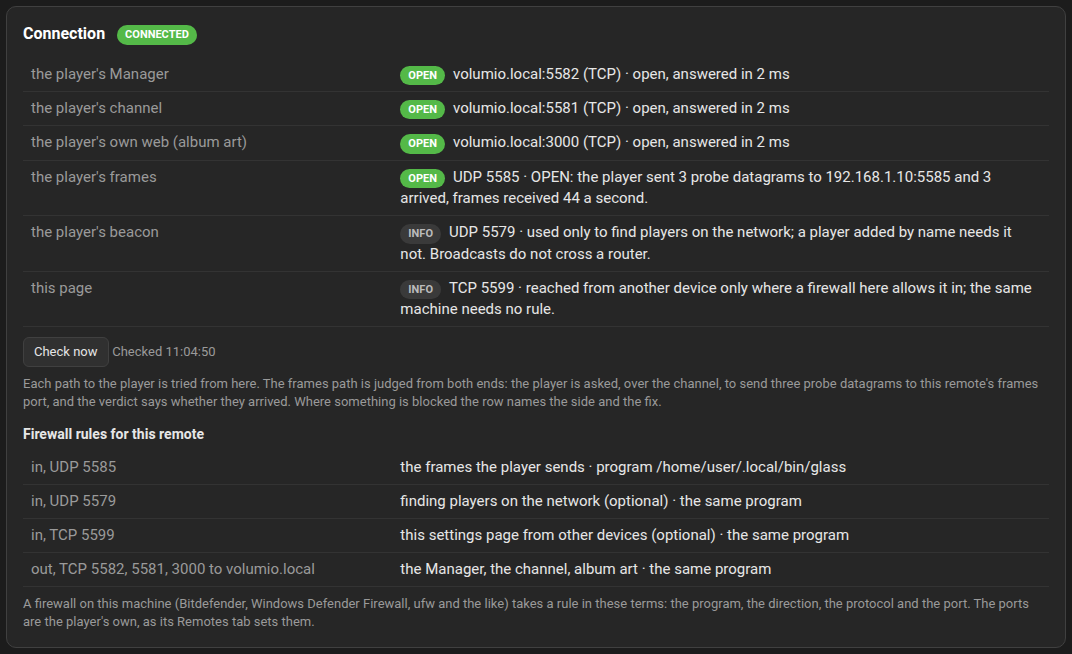
From 0.9.10 the remote's page has a Connection panel, so a remote that shows nothing can say why without guessing. Check now tries each path to the player from the remote's side and judges the frames path from both ends:
| Path | How it is tried | What the row says |
|---|---|---|
| The player's Manager, TCP 5582 | a connect with a three second limit | open, with the time it took; refused (the player is not listening there: serving is off, or the ports on its Remotes tab are others); timed out (dropped on the way: a firewall on the player, or a router between networks); unreachable (no route, or a name that does not resolve) |
| The player's channel, TCP 5581 | the same | the same |
| The player's own web, TCP 3000 | the same | the same; album art comes this way |
| The player's frames, UDP to this remote's port | the player is asked, over the channel, to send three probe datagrams to this remote's frames port | OPEN: they arrived; BLOCKED: the player sent them and none arrived, so a firewall on this machine drops UDP in on that port (or a router between networks does); NOT TESTED: the player's Glass is older than 0.9.10 and could not send, or the channel is down |
| The player's beacon, UDP 5579 | not tried | used only to find players on the network; a player added by name needs it not |
| This page, TCP 5583 | not tried | reached from another device only where a firewall here allows it in |
From 0.9.13 each row carries a sticker, green for a part that works, orange for a part that fails, grey for one not tested or only informative, and the panel's own sticker says connected, problem, or no connection in red when nothing answers.
The frames come in on one fixed port from 0.9.10, 5585 unless the remote's configuration says another (frames_port; 0 lets the system choose, as before), so a firewall rule can name it; a port in use falls back to one the system chooses, and the panel shows the one in use. Under the rows the panel prints the firewall rules for this remote in the terms every firewall takes, Bitdefender, Windows Defender Firewall, ufw and the rest: the program's full path, the direction, the protocol and the port, for the frames in, the beacon in (optional), this page in (optional), and the Manager, the channel and the web out. The ports are the player's own as its Remotes tab sets them, read from the player, never assumed.
From 0.9.11 the page has an Assets panel: every file the theme on show names, each brought here as the player offered it, failed (offered, and the fetch failed, with the reason), missing (the theme names it and the player does not have it, so the player's own screen lacks it too), or elsewhere (a path on the player, not a theme file); with the count of files the player offered and how many are here. A file that cannot be brought no longer stops the sync: the display shows with what came, the Status row says how many failed, and the file is tried again at the next sync. The theme's own text is the one file without which nothing is shown. From 0.9.14 each row carries a sticker, green brought, orange failed, red missing, grey for optional and elsewhere, the missing first; a file the display does without, a field's own font or a knob's picture, is optional rather than missing; and the theme row's own sticker is red with a file missing, orange with one failed, green with the theme whole. From 0.9.16 each row names the meters whose lines name the file, and the files brought are listed only with Show every file on, a switch this browser remembers: what failed, is missing, optional or elsewhere always shows, and a whole theme is two lines. A report carries what is not fine; the downloaded one carries every file. The player's Manager lists the same files under a theme's Details, see Themes. The Prerequisites panel says what this machine has for the display to run: the program and how it was started (by hand or under the user service, with the version before kept beside it, or an upgrade on trial), what draws the frames and whether in software, the screens, the fonts brought, and the folders the remote keeps things in, with the free space.
From 0.9.13 the page has a Report panel, the remote's side of Troubleshooting's "Reporting a problem". Say in a line what you did and what you saw and press Make a report: the report holds this remote's Status, Connection with the firewall rules, Assets, Prerequisites and Version panels as text, the player's side as far as the remote can read it from the player's Manager (Glass and glass-evo versions, who owns the screen, the theme on show, remote displays served and on which ports, the player's state, its recent problems), and this remote's last log lines. Copy for the forum puts it on the clipboard, cut to a post's size with a word on the file when it is longer; Open a GitHub issue opens one at the repository of what the remote is, Glass for the standalone and glass-evo for the bundle, with the report in it and on the clipboard; Download the report saves the whole as a text file, named by the remote and the minute, with the player's sheet under it as its Manager answered it. Addresses and host names stay hidden in all three unless Reveal addresses is pressed. The player's own report, made on its Status tab, is the other half: a problem seen from a remote is best posted with both.
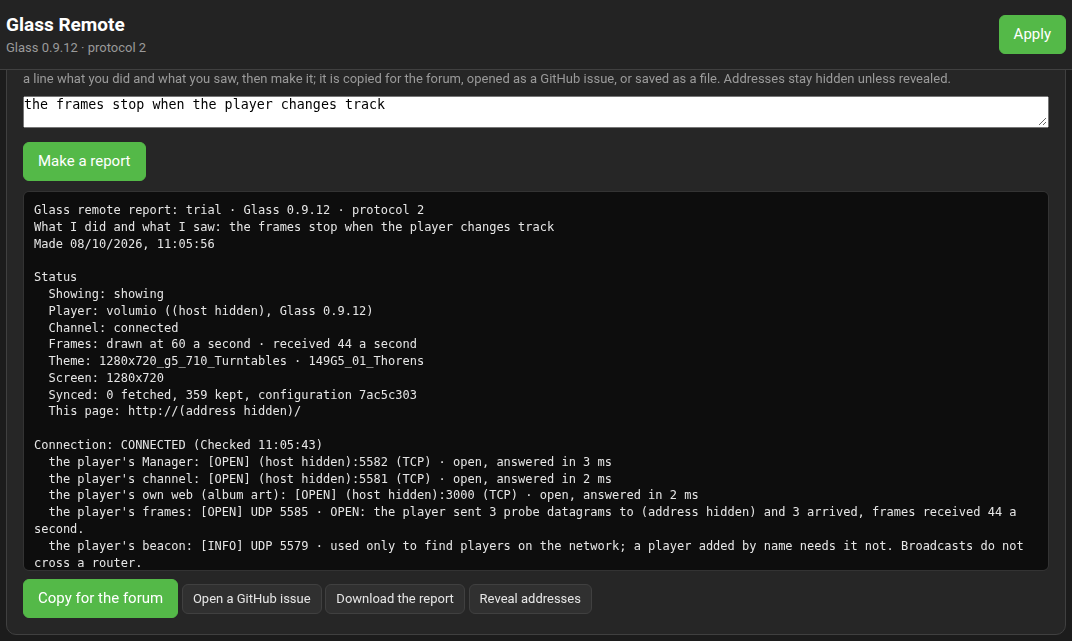
The bundle behind it is GET /api/support on the remote's port, JSON: the remote (name, release, protocol, face, product, page), the player (name, host, address, release, its Manager's status sheet whole, or the reason it did not answer), the configuration, the status, the connection, the assets, the prerequisites, the upgrade state, and the last log lines with their times.
Turns the serving of remotes on, sets the three ports, and lists the remotes connected to the channel (name, address, what the remote is, the standalone at its Glass or the bundle by its face's name and version, its screen, since when, and a link to each one's settings page; from 0.8.58 a remote for which a later release of what it is has come out is marked, with how it is brought up to date: the Manager only says so, a remote upgrades itself) and those receiving frames (with the count sent), and whether the frames daemon runs.
sequenceDiagram
    participant R as Remote (glass --remote)
    participant M as Manager (port 5582)
    participant D as Frames daemon (UDP 5580)
    participant C as Channel (TCP 5581)
    R->>M: GET /api/remote/status (ports, name)
    R->>M: GET /api/remote/config, theme files, fonts, icons
    M-->>R: what changed since last time, by checksum
    R->>D: subscribe, every 5 s
    D-->>R: one datagram per hop, at most 60 a second
    R->>C: hello (name, screen, settings page)
    C-->>R: state, config, showing
    Note over R: draws. A config line with another version starts the session again, a showing line switches the meter
The configuration's version covers the theme, the meter configuration, whose the player's screen is and the look chosen for glass-evo, so a remote starts its session again when any of them changes: a bundle following the player's screen puts its face on, or takes it off, within a few seconds of the screen changing hands.
All integers little-endian. Protocol 2 carries the bank per channel with its peak hold; protocol 1 carried the raw spectrum of the channels' average. A remote reads one protocol only, so a remote and its player upgrade together: a remote of an earlier release ignores the player's frames and its beacon until it is upgraded.
One per tick of the daemon's rate (--rate, 60 by default, 1 to 200), carrying the hops since the last merged by maximum, as the display merges the hops between two of its frames.
| Offset | Type | Field |
|---|---|---|
| 0 | u32 | magic GLSF
|
| 4 | u8 | protocol, 2 |
| 5 | u8 | flags: bit 0, one-bit audio (the peaks are density levels and the bands empty); bits 4 to 7, the onsets of the sub-bass, bass, mid and high groups |
| 6 | u16 | N, the bands per channel |
| 8 | u32 | seq: the daemon's own count of datagrams, wrapping; not the ring's, which starts again with every stream |
| 12 | u64 | the player's monotonic time, ns |
| 20 | u32 | rate, Hz |
| 24 | u8 | channels of the stream |
| 25 | u8 | L, the channels of the bank: 1 when the two read alike, else 2 |
| 26 | u16 | frames in the hop (the ring's count since the last datagram, not its running total) |
| 28 | f32 x2 | peak left, right (1.0 full scale) |
| 36 | f32 x2 | RMS left, right |
| 44 | u8 | the scale: 0 log, 1 mel, 2 linear |
| 45 | u8 | the FFT window as a power of two |
| 46 | u8 xNxL | the bank, channel by channel: 255 full scale, one step a quarter decibel down, 0 quieter than 63.75 dB down |
| 46+NxL | u8 xNxL | the peak hold, the same way |
At most 256 bands of two channels: 1070 bytes, one datagram inside an Ethernet frame. The peaks and RMS, which the needles follow, travel exact; the bands' quarter-decibel steps are finer than a pixel on any bar under 240 pixels per 60 dB. A remote takes a packet as the frame the player's own display reads, a one-channel bank standing for both; peaks and RMS are clamped to 0 to 4 on the way in and a value that is not a number reads as 0. A player whose audio process still runs the previous tap's ring has its raw spectrum projected onto the default bank (128 log bands, two channels) before it is sent.
When the player's ring goes quiet the daemon sends one frame of silence, which a remote takes as a stop; a remote that hears nothing for half a second shows silence anyway. A remote times its meter decay by the players' stamps on the packets, the time between two at the stream's rate, so a dropped datagram lengthens the decay of the next rather than losing it; the frames field stands in for the first packet and when the stamps are out of order. A remote orders packets by those stamps too, the count breaking a tie, so a daemon that numbered by the ring still feeds it across a track change.
JSON, every five seconds: {"glass":"subscribe","protocol":2,"id":"<stable id>","name":"<shown name>","release":"0.7.0"}. Frames go to the datagram's source address until fifteen seconds pass without one; a subscribe of another protocol is dropped. A datagram from any other address than the player's is ignored by the remote.
JSON, every five seconds and when the configuration changes, to the network broadcast address and to each interface's own:
{"glass":"player","protocol":2,"name":"living-room","host":"living-room.local",
 "frames_port":5580,"channel_port":5581,"manager_port":5582,"player_port":3000,
 "release":"0.7.0","config":"9746a5ec","theme":"1280x720_custom_3","meter":"random"}
A remote talks to the address the beacon came from. A beacon with another protocol is not a player of this build.
The Contracts page's channel, line for line, on the channel port; that page lists every line. The ones a remote adds or leans on are these. Up, once after connecting, from a remote:
{"kind":"hello","remote":{"id":"kitchen-pi","name":"Kitchen","page":"http://192.168.1.31:5583/","release":"0.7.3","screen":[1280,720]}}page is the remote's settings page, left out when it serves none. A bundle adds "face":"glass-evo 0.1.18", the face it was built with (from 0.8.22); the standalone remote leaves it out.
Down, when the configuration changes:
{"kind":"config","version":"9746a5ec","theme":"1280x720_custom_3","meter":"random"}The player's own display tells the plugin which meter it moves to, on its own channel:
{"kind":"showing","theme":"1280x720_custom_3","meter":"gold"}and the plugin passes that line down to every remote, and to a remote that connects, so a following remote shows the same meter.
| Route | What it gives |
|---|---|
GET /api/remote/status |
The ports, the beacon as it is sent, the frames daemon's subscribers, the remotes on the channel, any problem the daemon or the channel reported, whether the player is headless. |
GET /api/remote/settings, POST /api/remote/settings
|
enabled, framesPort, channelPort, beaconPort (and the manager's port, read-only). A post applies at once; GLASS.MANAGER_RM_PORTS_INVALID or GLASS.MANAGER_RM_PORTS_CLASH when refused. |
GET /api/remote/config |
version, release, theme, meter, files.meter and files.spectrum (the configuration texts), face (from 0.8.20, for a display built with a face: owner, glass-evo where its face holds the player's screen, and theme, the face theme the settings name as name and text, or null), assets.fonts, assets.icons, assets.webfonts and assets.custom (name, sha256, bytes): the plugin's fonts, the format icons (the plugin's own, then Volumio's), the player's web fonts, the font files in the directory the meter configuration's font.path names, and the fonts uploaded to the player. |
GET /api/remote/asset/font/:name, GET /api/remote/asset/icon/:name, GET /api/remote/asset/webfont/:name, GET /api/remote/asset/custom/:name
|
One of the plugin's fonts, format icons, the player's web fonts or the uploaded fonts. |
GET /api/remote/track-file?uri=...&name=... |
One picture from the playing track's folder, by the track's location as the player reports it and a plain picture name; what a remote's folder layers, album records and reels are brought from. 404 otherwise, and for any folder but the playing track's. |
GET /api/themes/:folder/files |
The theme's files with checksums, and its spectrum twin's under spectrum. |
GET /api/themes/:folder/file?tree=templates|templates_spectrum&path=... |
One file of the theme, only from inside it. |
glass-serve is the frames daemon, started by the plugin as the player's user: glass-serve --rate 60 --status /tmp/glass_serve.json --face /tmp/glass_face.sock with --port 5580 while remote displays are served, or --local when only the browser face is. It reads the live ring the way the display does, keeps the subscriber table, sends the frames, serves the same datagrams to browser pages on the face socket, and writes its state to the status file every two seconds: port, rate, protocol, the subscribers (address, id, name, release, seen, since, sent), the ring (path, rate, channels, bins, seq, live), sent, pages and at. The plugin starts it again after it leaves: five seconds the first time, doubling to a minute while it keeps leaving, back to five once a run lasts half a minute.
The page's routes, on the remote's own port, answer JSON: GET /api/state (config, the configuration; status: phase, player, channel, frames a second, theme, meter, screen, what the last sync brought, the rate in force, the page's address, and face_shown; release and protocol; face, the face a bundle was built with, null on the standalone; from 0.8.53 product (name, repository, asset, binary, version: what the remote is a release of, null where it is offered no upgrade) and upgrade (phase: idle, checking, downloading, installing or restarting; latest, the release last seen with its version, bytes and sha256; available; checked_at; done, the bytes fetched; error); configPath and cache), POST /api/config (the whole configuration, checked and kept, applied at once), POST /api/player (host, manager_port, name: added and put on show, the manager asked for its name and ports), POST /api/active (id), POST /api/upgrade/check and POST /api/upgrade/install (from 0.8.53; neither takes a body, both answer 202 at once and upgrade in the state says how it goes; 400 no-upgrade on a display offered none, 400 up-to-date where no later release is known, 409 busy), DELETE /api/player/:id, GET /api/config/export (the configuration as a file), POST /api/config/import (a configuration, checked and applied at once), POST /api/window (mode: fullscreen, windowed or frameless, applied to the open window at once, for the run), GET /api/discover?seconds= (the beacons heard), GET /api/player/themes (the installed themes of the player on show with their meters, from its manager; ?id= for another of the remote's players), GET /api/local/themes?dir= (the themes under a folder on the remote's machine, the configuration's folder when dir is left out: folder, meters, spectrum, width, height, with the templates and spectrum folders resolved; not-a-folder when it cannot be read). The status carries monitors, the screens the window's system reports, once the window has opened.
Album art comes from the player as it does on the player's own screen, and so does the artist fanart slideshow. Pictures a theme takes from the playing track's folder, folder layers and a record or reel picture from the album, are brought from the player's manager into the remote's cache home, under track/, once per track folder and off the frame loop, so they appear a moment after the track starts and a track change costs no frame. From 0.8.87 with glass-evo 0.1.52 a bundle also brings the picture when nothing plays, where the player's look names one, to backgrounds/ under its home beside the faces, and shows it behind the clock as the player's screen does; a change of picture on the player reaches the remote with the configuration.
The Play Store: the app is installed from the release page.