Repository navigation
Screen
The Screen tab of the Manager is where the player's screen is set: what the display draws on, whose the screen is, and the settings the display reads, with what Glass suggests for them. Where glass-evo is installed, the Glass interface, the same tab hands the screen to it and back, sets how it looks, and says what the Face tab and Anymote show. What the player has for a screen is described on the Status tab, in its Screen section, a button away from here.
| On this page | |
|---|---|
| What the player has | What the Manager reads of the screen, and what it suggests. |
| Whose the screen is | The kiosk's or Glass's, by fact. |
| The settings | Rotation and pointer, on a screen that is Glass's. |
| Touch | The mapping from the panel to the picture, and calibration. |
| A screen with no kiosk | What the display does when the screen is its own. |
| With glass-evo | The screen's owner, the face size, the look. |
| The Face tab and Anymote show | What each of the three choices means. |
When the Status tab opens the Manager reads the kernel and the system and says what it found in the sheet's Screen section, in plain words:
- Drawn on: what the display draws on now and through which renderer, or what it will draw on when it starts, and whose the screen is, Glass's or the kiosk's.
- Kiosk: the kiosk service as systemd states it and whether it is enabled at boot, whether an X server is up, and whether the Touch Display plugin (with the angle it has on file) and the Display Configuration plugin are on.
- Screen settings and Touch mapping: the rotation, the pointer as set and as resolved, the mapping in use, and the calibration as it stands.
- Panels: every connector the kernel knows, connected or not, with its native size; a panel taller than wide is named portrait by nature, which many small DSI and DPI panels are.
- Inputs: the touch panels, mice and keyboards by what they are, each with its event node. An HDMI remote arrives as a pointing device and is named as a remote, not a mouse.
- Backlight: each backlight with its brightness and its greatest.
Refresh on the Status tab reads it all afresh, after a mouse is plugged in or a plugin turned off, and Copy as text carries it into a report.
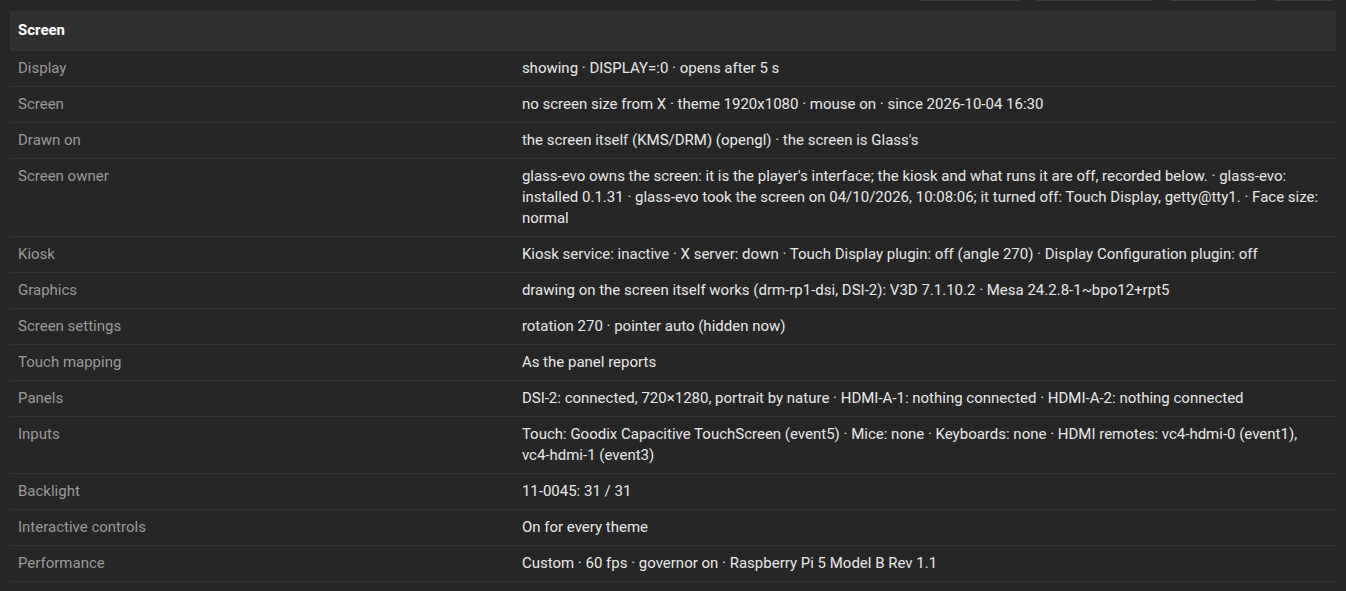
From what it found the Manager suggests a rotation and a pointer, beside the controls on the Screen tab: a portrait panel suggests the angle the Touch Display plugin has on file, or 270 when it has none, the way the common panels are mounted; a mouse suggests the pointer shown, a touch panel alone suggests it hidden.
The screen is drawn by fact, never by choice. The kiosk, the Touch Display plugin's browser or the one an image ships, is the player's interface on the screen, at times the only way into the player, and Glass never takes it away by itself. The plugin reads the fact at every start and then every two seconds while the display draws on the screen itself, every five otherwise: an X server up, the kiosk unit running, starting or enabled at boot, the Touch Display or the Display Configuration plugin running or starting (its enabled flag alone counts only in the first two minutes after Glass starts, when plugins come up one after another at boot), a panel connected.
| The fact | The screen is | The display |
|---|---|---|
| A kiosk runs, is on its way, or is enabled | the kiosk's | draws on the kiosk's X server as a screensaver over it, and leaves once the music has stopped and the persist time has passed. The tab shows no screen controls. |
| No kiosk at all, no X server, a panel connected | Glass's | draws on the screen itself through the kernel's KMS/DRM, stays on it, and turns the picture itself. The controls below apply. |
| The screen was handed to glass-evo on an x86 player | Glass's, through an X server brought up for it | draws on that X server, alone on it, stays on it and turns the picture itself. The controls below apply. |
The moment a kiosk comes back, the display steps aside, and starts the kiosk again if it failed against the display in between.
The tab says it in plain words at the top: what the display draws on now, as it reported when it opened the screen, or what it will draw on when it starts; and whether the screen is Glass's or the kiosk's. The facts behind that, the kiosk service, the X server, the two plugins, are on the Status sheet.
| Setting | Values | What it does |
|---|---|---|
| Rotation | 0, 90, 180, 270 | The picture and touch turned clockwise on a screen no kiosk turns; the same angle the Touch Display plugin uses. Shown when the screen is Glass's. |
| Pointer | Auto, Shown, Hidden | Whether the pointer is drawn on the player's window. Auto shows it with a mouse and hides it with a touch panel alone, resolved from what the player has at every save and at every start. Shown when the screen is Glass's. |
The display starts again with a change.
Rotation, pointer and touch are not on the tab while the kiosk is the player's interface: the Touch Display plugin or the Display Configuration plugin running or starting, the kiosk unit running or enabled at boot, an X server of the kiosk's up, or no panel connected. The kiosk's own settings turn its screen there.
The keys, in the display's configuration: screen.driver, screen.rotation, screen.pointer (the choice) and screen.pointer.shown (what the plugin resolved); with glass-evo, face.size and the face.<name> keys the look panel writes. The Manager-API page has the routes.
How a finger's place on the panel becomes a place on the picture, set on the same tab:
- As the panel reports: right for most panels, and the default.
- Swap or mirror: for a panel whose touch frame is swapped or mirrored against the picture, three switches, applied in that order: swap the axes, mirror left and right, mirror top and bottom.
- Calibrated: for a panel that reports something else. Calibrate on the screen puts five targets on the player's screen, one after another, the four corners and the centre; touch the centre of each once. The display reads where the finger really was, computes the map that puts each touch on its target with the least error, keeps it, and uses it from that moment. The tab says when it is done and the worst error left in pixels, or why it could not fit: touches that do not fit one map, or none arriving within a minute and a half. Only touches made while the targets are on the screen count, and a map whose worst miss is more than a twentieth of the screen's diagonal is refused, the error shown and the mapping in force kept: calibrate again, touching the centre of each target.
Behind all three is one matrix of six numbers in the display's configuration, touch.matrix (a,b,c,d,e,f, the two rows of an affine map), applied to a finger's share of the panel before the rotation of the screen, so calibrate in the orientation you use. touch.mapping names which of the three is in force, touch.swap, touch.flip.x and touch.flip.y the switches, and touch.calibrated the matrix the wizard found, kept even while another mapping is chosen.
On a player with a panel and no kiosk at all, no Touch Display plugin, no kiosk unit from the image, the screen is Glass's: the display draws on it through KMS/DRM, no X server involved, which on a Raspberry Pi 5 with the same theme and music means about 300 MB less in use than the same player with the kiosk, and the display's own cost unchanged. The picture is drawn in the panel's own orientation and turned by the rotation; touch is turned the same way.
When the screen is Glass's, the display never leaves it:
- After a stop or a pause it stays: the persist time passes as it is set on the settings page, with its countdown where that is chosen, and then the theme stands still on the screen, its meters at rest, until the player plays again. The console never shows.
- A touch outside a control does nothing, where under a kiosk it would end the screensaver.
- A player standing still is drawn fifteen times a second (from 0.8.2): three seconds after the player last played or the screen was last touched the display slows down, and it is back at its full rate with the next touch or the next note.
- The display is started with the plugin and started again whenever it is found gone. A display that dies as it starts is tried again after a wait that doubles each time, from a second up to a minute (from 0.8.17; counted from a second on a screen of its own from 0.8.27), so a screen it cannot open does not fill the player's log. From 0.8.28 the tries after the first ask the graphics libraries for their own words, and the log names what would not load.
- It steps aside the moment a kiosk wants the screen.
The card the screen is on is told to SDL by the display (from 0.8.46): the card of the connected connector, the first by name where two screens are connected, the same at every start. Left to itself SDL found the card or not by the order the system listed its cards in, which changes from one boot to the next, and a Raspberry Pi with its panel on DSI ended with "kmsdrm not available" after one boot and drew after another. SDL_KMSDRM_DEVICE_INDEX in the display's environment names another card.
Drawing on the screen itself needs three libraries: SDL2, EGL and OpenGL. A player with a kiosk has them through its X server; a player without one may not. The plugin's installer brings what is missing (from 0.8.16), which needs the player on the internet when Glass is installed, and says so when it could not.
Whether those libraries work on this player's screen is said on the status sheet, in the Screen section's Graphics row (from 0.8.37): whether drawing on the screen itself works and who renders, the GPU or the processor in software, the screen's kernel driver and connector, what the kiosk's X server says of itself, and Mesa's version. glass --probe-graphics on the player prints the same as one line, step by step. A screen with a KMS driver of any kind is drawn on, DSI, HDMI, DPI, an SPI panel or a USB display, by the GPU where Mesa pairs the screen's driver with it and in software where it does not; a screen with a framebuffer driver only is not, and stays the kiosk's.
GLASS_GRAB=/path.png in the display's environment writes the picture as shown, after the first frames, so a screen can be checked from a terminal.
glass-evo is the Glass interface for the player's own screen: Glass's display with a face over it, a bar of controls, a clock, a date and a forecast, in the kiosk's place. It is got on the Manager's System tab (from 0.8.0; its first full release 0.2.0 with Glass 0.9.0), and nothing changes on the screen until the screen is handed to it here. On a player without it nothing of this section shows, and the kiosk stays the interface.
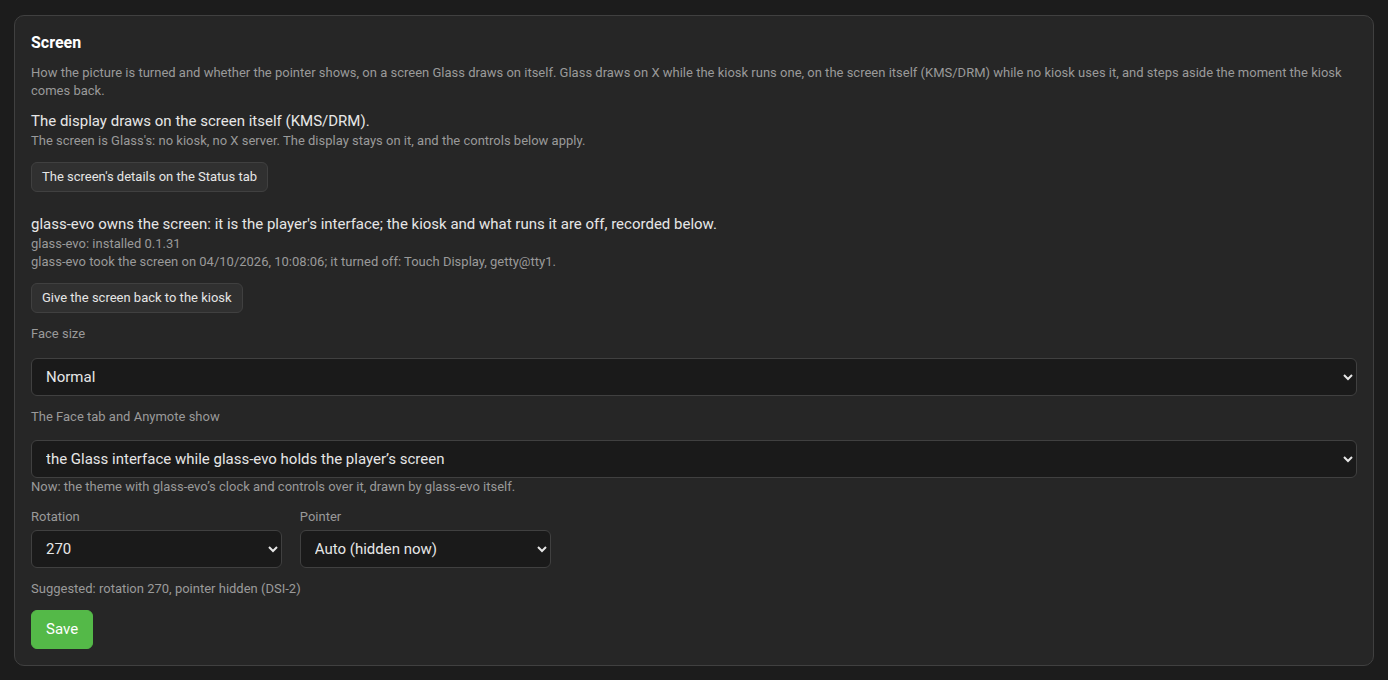
With glass-evo installed the tab shows four more things:
- The screen's owner: the kiosk, or glass-evo. Use glass-evo on the screen hands the screen over; Give the screen back to the kiosk restores exactly what the take changed. Each asks once before it goes.
- Face size: Normal, Large (for a hand at arm's length) or Car (for a glance while driving). It scales every piece of the face together.
- The Face tab and Anymote show: whether the browser views carry glass-evo's face. It has a section of its own below.
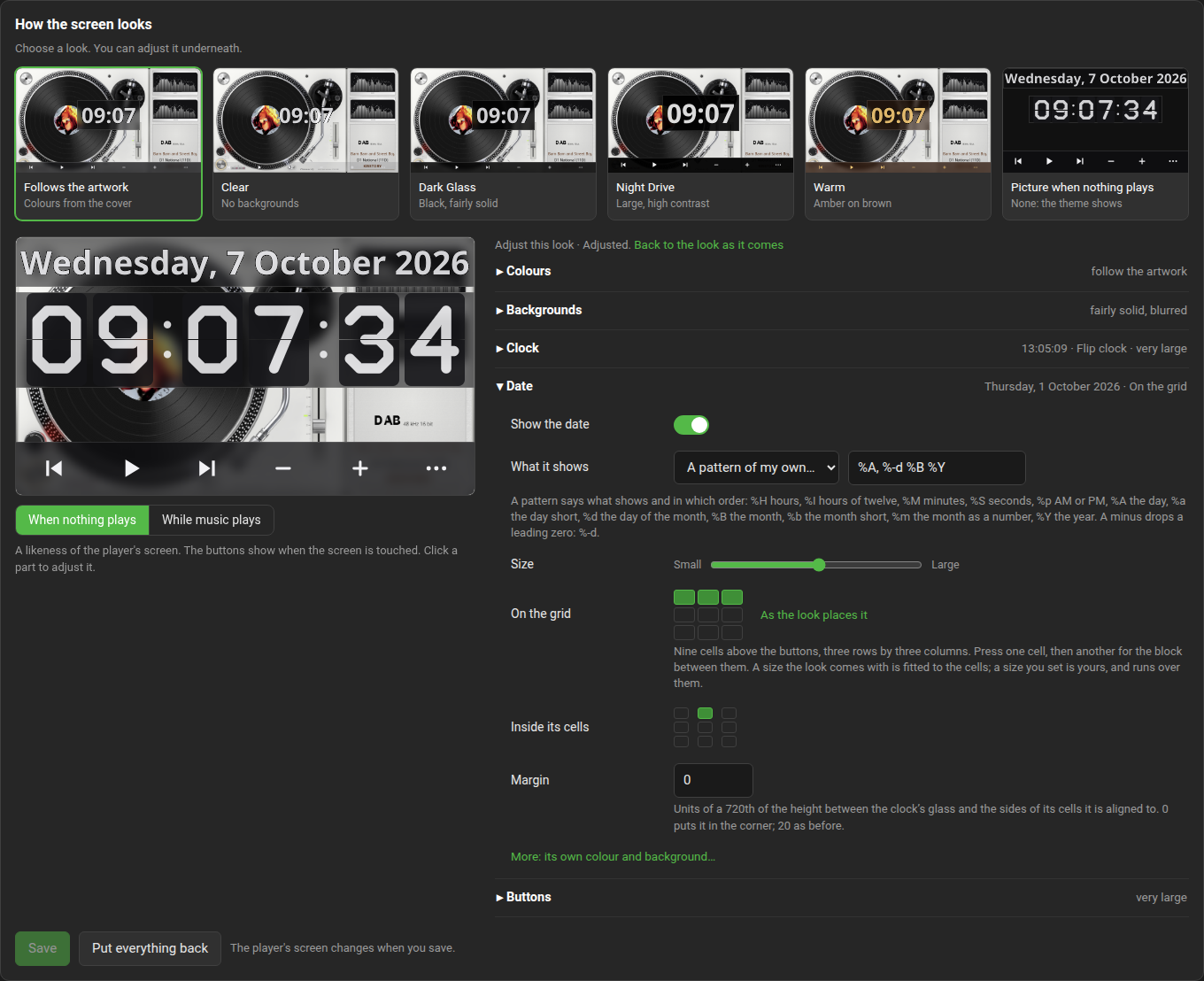
- How the screen looks: a row of looks to choose from, a likeness of the screen, and a section each for Colours, Backgrounds, Clock, Date and Buttons. The clock has a face (from 0.8.12 with glass-evo 0.1.15): in type, in 7 or 16 segments, a flip clock, or a dial with hands (Station, Numbers, Roman numerals, Marks only), each with its own colours behind "More"; the likeness shows it drawn by glass-evo itself. A size set here for the clock or the date is drawn as set (from glass-evo 0.1.13), from half to four times the look's own: a clock can fill the screen and run over its edges. The buttons go from half to two and a half times, and their bar never takes more than a third of the screen. From 0.9.11 the likeness is the player's screen with the theme's frame on it as the display places it: the frame is the theme on show's size, the one every view lays the face out on, fitted to the screen with its shape kept or pixel for pixel, centred or at the position set on the Appearance tab, and cropped where it runs past the screen. The screen's edge and the frame's edge are green hairlines, the safe margins, laid over everything the likeness draws; what lies between them is what the screen shows, so a clock that runs over the frame's edge on the screen runs over it here too, and a 16:10 theme on a 16:9 screen shows its cut or its bars as they are. The Safe margins switch under the likeness (from 0.9.12) hides them; it is on unless turned off, and the browser remembers the choice. In the Backgrounds section, Screen off after (minutes, from 0.8.67 with glass-evo 0.1.35) turns the screen black after that long with nothing playing and no touch, for a screen that must not show the same picture for hours; a tap or music wakes it; 0, the default, never; Over, milliseconds (from 0.8.68) is the fade it goes and comes back with, 500 unless said; When the player stops (from 0.8.88 with glass-evo 0.1.53) is whether the idle screen comes at once or after the plugin's persist period.
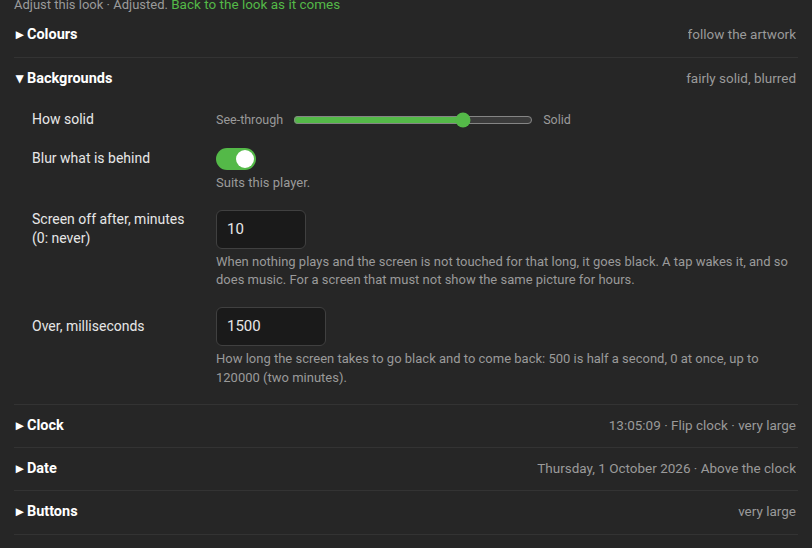
From 0.8.75 with glass-evo 0.1.40 the clock can stand on a grid: nine cells above the buttons, three rows by three columns in equal thirds. In the Clock section, "On the grid" is nine cells to press, one for a cell and then another for the block between them (the middle row for a flip clock, the lower right four for a dial); "As the look places it" takes the clock off the grid again. "Inside its cells" is where the clock stands in what it occupies, and "Margin" the room between its glass and the sides of its cells it is aligned to, in units of a 720th of the height: 20 as before, 0 for the corner. A size the look comes with is fitted to the cells; a size you set is yours and runs over them: from 0.8.76 with glass-evo 0.1.41, over the side it is aligned to, so that "top" always moves a large clock up and "left" always left. The likeness draws the clock in its cells as the screen does. The glass-evo wiki's Face themes page has the keys.
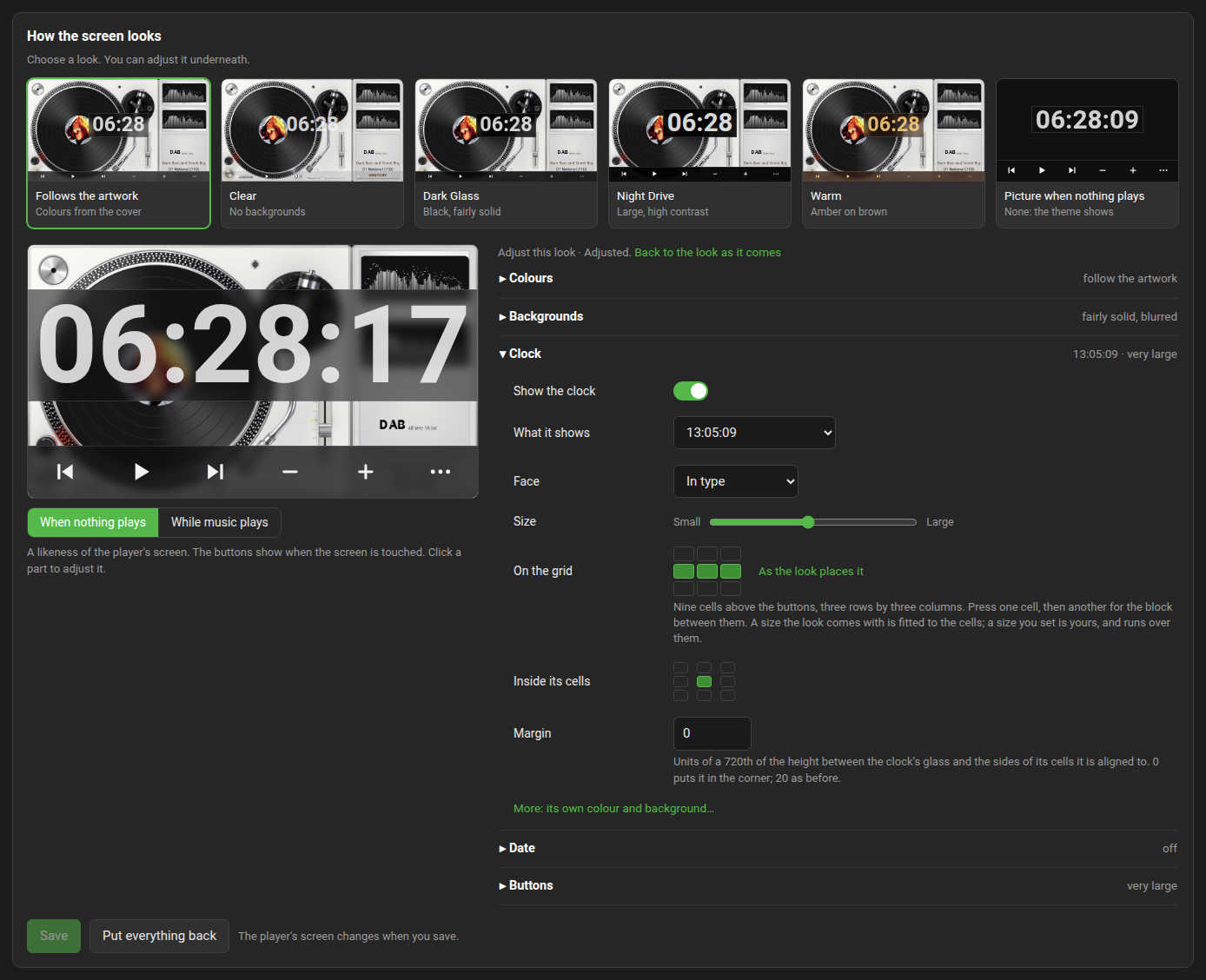
From 0.8.77 with glass-evo 0.1.42 the date stands on the grid the same way: the Date section has its own "On the grid", "Inside its cells" and "Margin", and "As the look places it" takes the date off the grid again, back to the look's own place; "Where" (top of the screen, above or below the clock) shows while the date is off the grid. The clock and the date on the same cells with the same alignment share one glass, the clock above the date. From 0.8.78 with glass-evo 0.1.43 the likeness is drawn by glass-evo itself in every piece: the date and a clock in type are set in the look's own font, as the screen sets them, so what the likeness shows is what the screen shows.
From 0.8.80 with glass-evo 0.1.44 the screen can show today's forecast for a place of your choosing. The Forecast section has the switch, a place found by name (type a town or a city, press Search, pick it from the list; "Turn off" clears it), the degrees in °C or °F, and the reading as the player holds it, with the "Weather data by Open-Meteo" credit. The Manager asks Open-Meteo every half hour once a place is set, keeps the reading across restarts and drops one older than three hours; nothing is asked before a place is set. On the face the forecast is a sky, the temperature now, a sky, and today's low and high, drawn by glass-evo. It stands on the grid as the clock and the date do, with its own "On the grid" (the bottom row across the three columns unless you move it), "Inside its cells", "Margin" and size, and behind More its own colour, strength and background, from the look's Colours as every piece's (from 0.8.84; 0.8.80 to 0.8.83 had them follow the date's). On the same cells as the clock or the date it shares their glass. The likeness draws it from the player's own reading, so it shows nothing until a place is chosen, on the likeness as on the screen. The glass-evo wiki's Face themes page has the keys.

From 0.8.81 with glass-evo 0.1.45 the Forecast section has What it shows: today as a line, the next 24 hours every 2, 3, 4 or 6 hours, or the week. Today (glass-evo 0.1.49) shows the weather now with NOW under its temperature and the day's lowest and highest with MIN and MAX under them; the hours and the week stand as columns in the forecast's cells, each its time, its sky and its temperature, the week each day's low and high. The Manager asks for the hourly forecast beside the daily one in the same half-hourly request. The forecast's size sets the numbers of today's line and the skies of the columns; a size you set is yours and runs over the cells and the screen, as every piece's does.
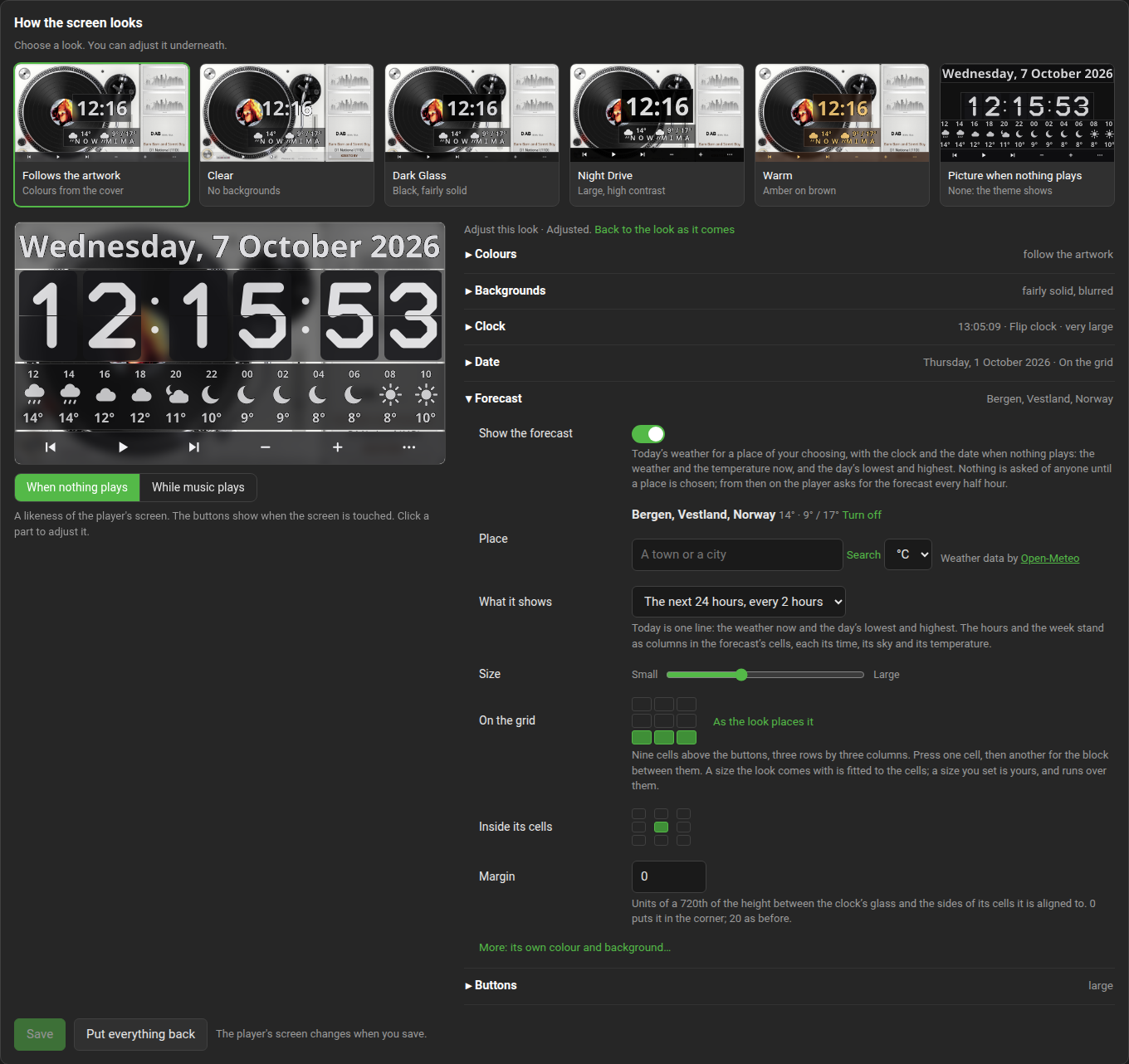
From 0.8.85 with glass-evo 0.1.50 the Forecast section has a Heatmap: every temperature the forecast shows in the colour of its degree, numbers only, from "Cold" at −10 °C, through the forecast's own colour at 12 °C, to "Warm" at 30 °C, each a colour of your own, blue and red unless said. "Also the week's days" colours the week's lows and highs too; "Also the date" sets the date in the colour of the temperature now, with the date's own colour in the middle of the scale. Every switch is off unless the look says. The glass-evo wiki's Face themes page has the keys.

From 0.8.86 with glass-evo 0.1.51 the Forecast section has three more switches. Skies in colour (on unless the look says): a yellow sun, red when scorching, a pale moon, clouds and fog in greys, drizzle and rain in blues, white snow, the storm dark with a yellow bolt, heavy weather murkier; off, every sky is in the forecast's colour. Skies move (on unless the look says): each sky keeps its shape and gains one small motion at its own pace, and the likeness moves with the screen while the panel is on show; off, every sky stands still and nothing about the screen's refresh changes. Thunder flashes (off unless the look says) lights the bolt and the cloud for a tenth of a second every eight to twenty seconds. The glass-evo wiki's Face themes page has the keys.

From 0.8.87 with glass-evo 0.1.52 the picture when nothing plays reaches the Face tab, Anymote and the Remotes, behind the clock as on the player's screen; before that they showed the theme.
From 0.8.88 with glass-evo 0.1.53 the Backgrounds section has When the player stops: "The clock at once" (as before, unless the look says) or "After the persist period", with which the screen glass-evo holds keeps the theme, with its countdown where the plugin's Keep Display Active After Pause/Stop says so, and shows the clock, the date, the forecast and the picture when that period ends. Kept with the look as every setting is.

From 0.8.90 with glass-evo 0.1.54 the Buttons section has, behind More, Background and Background colour as the other pieces have theirs: how solid the bar's glass is, as the Backgrounds section's How solid unless moved, and the bar's and the More sheet's colour, the look's unless said. How solid moves the forecast's background with the rest from 0.8.90; it had left it where it was.

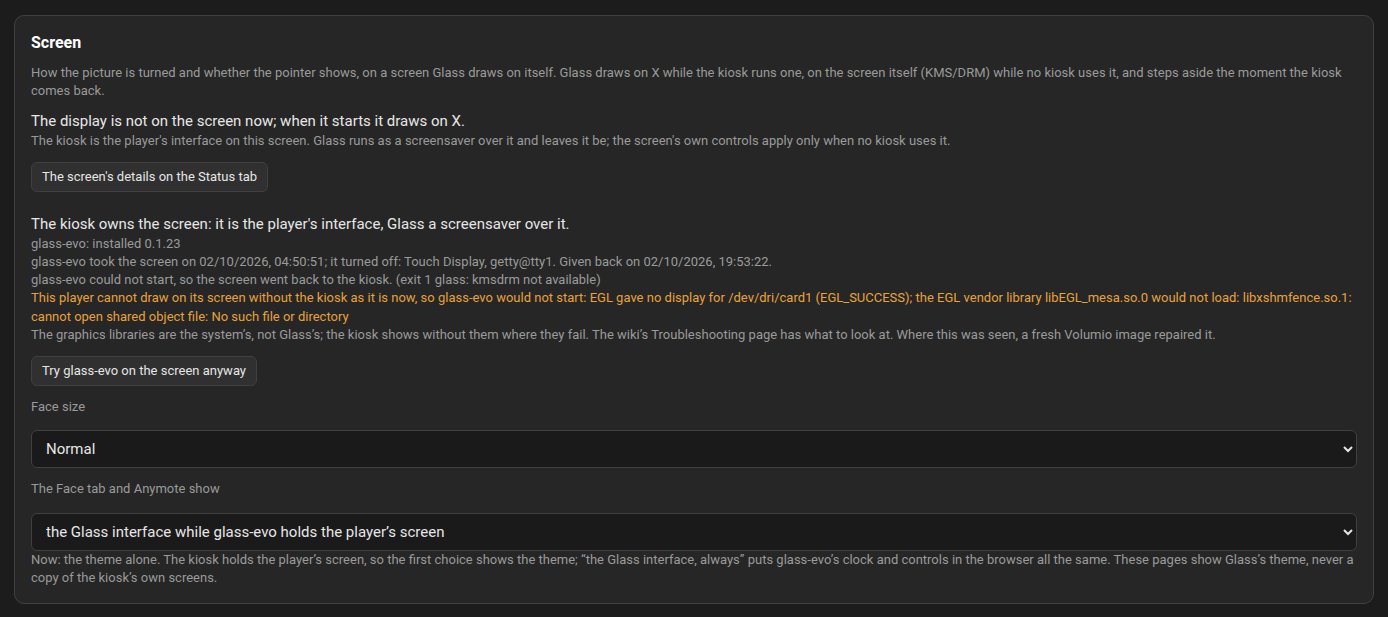
The owner's lines and "The Face tab and Anymote show" are there wherever the component is. Face size and the look are shown where glass-evo has a binary for this player and the screen is its own or one it could hold. Where it could hold none, the tab says "This player has no screen glass-evo can draw on by itself" and offers no take.
-
What is turned off, and recorded. The plugins that bring a kiosk, where they are installed and on: Now Playing, Touch Display and Display Configuration, each through the player's own plugin manager. Then the units behind the kiosk:
volumio-kioskandgetty@tty1, the console that would show through an empty screen. Every change is recorded with what it was before, the tab lists what the take turned off, and giving the screen back restores each, in reverse order, where it is still as the take left it. - How the screen is held. On a Raspberry Pi glass-evo draws on the screen itself, with no X server at all. On x86 the picture may reach the screen through X alone, the graphics card having no kernel driver, so there the kiosk and its browser are stopped and a plain X server is brought up in their place, with glass-evo as its only client; the way back stops it before the kiosk starts its own. The Screen tab says which it is.
- No take where there is nothing to draw on. A player with neither a screen the kernel drives nor an X server is told so, and nothing is turned off.
- No take where the graphics do not work (from 0.8.37). Where glass-evo would draw on the screen itself, the Manager asks first whether the player's graphics can: the display tries the steps without drawing, while the kiosk still has the screen. When they cannot, nothing is turned off and the tab says what was found, in the system's own words; Try glass-evo on the screen anyway is there for a check that should ever be wrong, and a failed try gives the screen back as below.
- The screen goes back by itself. While glass-evo owns the screen the kiosk is off, so the screen returns to the kiosk without being asked where glass-evo cannot hold it: it failed to start three times in a row (about ten seconds from 0.8.27; before, three times the screensaver's delay), its component is gone, or Glass was turned off or removed. An upgrade of Glass keeps the screen. The Screen tab says why it went back.
- glass-evo is not removed while it owns the screen. The System tab's Remove says so: give the screen back first.
While glass-evo holds the screen the display behaves as on a screen with no kiosk: it never leaves, and when the player stands still the theme stands with glass-evo's clock, date and bar over it. A clock that says the same and a bar nobody touches are not sent to the screen again at all.
Glass and glass-evo each name the least of the other they work with: Glass 0.8.24 works with glass-evo 0.1.13 or later, and the Manager keeps to it on every install and upgrade. The status sheet's Screen section names the owner and what the last take changed.
glass-evo's first full release is 0.2.0, with Glass 0.9.0: verified on a Raspberry Pi 5 with a DSI screen and the Touch Display plugin, and on an x86 player; other screens are untried. The way back is on this tab, from any browser.
The Manager's Face tab and Anymote are Glass's picture in a browser: the theme the player has on show, with its meters, drawn in the page by Glass's own engine. They are not a copy of the player's screen. What a kiosk shows on that screen, Volumio's interface or the Now Playing plugin's screen, never appears in them, whatever this setting says.
The setting decides one thing: whether glass-evo's face, its clock, its date and its bar of controls, is drawn over the theme in those pages.
| Choice | While glass-evo owns the player's screen | While the kiosk owns it |
|---|---|---|
| the Glass interface while glass-evo holds the player's screen (as it comes) | the theme with the face over it | the theme alone |
| the Glass interface, always | the theme with the face over it | the theme with the face over it |
| the theme alone | the theme alone | the theme alone |
- the Glass interface while glass-evo holds the player's screen (before 0.8.36 it read "what the player's screen shows") follows the owner of the player's screen, as the tab names it above. Once the screen is handed to glass-evo, the pages carry the face as the screen does. While the kiosk owns the screen, Glass's display there is the theme with no face, so the pages show the theme alone. On a player whose screen stays with the kiosk, this choice and "the theme alone" therefore show the same thing; they differ from the moment the screen is handed to glass-evo.
- the Glass interface, always puts the face in the browser whoever owns the player's screen. A phone or a tablet on Anymote is then a Glass interface by itself, with the player's own screen left to the kiosk.
- the theme alone keeps the face out of the browser, also while glass-evo owns the player's screen.
The line under the choice says which of the two the pages carry now. The choice is saved as it is made; an open page follows a change of it at once, and a change of the screen's owner within a few seconds.

With the face, a page shows what glass-evo shows on a screen: while the player stands still, the clock and the date with the bar of controls under them; while it plays, the theme alone until a touch or a click brings the bar, which leaves again by itself. The look and the sizes are the ones chosen for the player, a touch on a button acts on the player, and the clock tells the time of the device the browser runs on. It is drawn by glass-evo's own code, compiled for the browser.
The row is on the tab from Glass 0.8.10, where a glass-evo that carries its face for a browser is installed, 0.1.14 or later. Without one the row is not shown and the pages show the theme alone. It does not depend on the player's own screen: a player whose screen glass-evo cannot hold still has the choice.
The Troubleshooting page has the cases: a portrait, cropped picture; no rotation, pointer or touch controls on the tab; nothing shown on a screen with no kiosk; touches landing in the wrong place; and glass-evo's.