Alerting
Model Hotel can push outbound notifications for noteworthy operational events (a provider going down, a circuit breaker tripping, a failover group failing to sync) to wherever you want them: Telegram, email, Discord, Slack, Matrix, a raw webhook, and ~80 other destinations.
It does this through Apprise: you run a small, stateless apprise-api container, Model Hotel POSTs a short event summary to it, and Apprise fans the notification out to your chosen service. Model Hotel writes no per-service integration code, ships no Python in its image, and (consistent with its Privacy stance) never sends request or response content, only the event summary (e.g. "Provider openai circuit breaker: open").
 events bus  ──►  internal/alert dispatcher  ──►  POST  ──►  apprise-api  ──►  your service
 (circuit breaker,     (filter ∩ your picker,                 (you run it)      (Telegram, …)
  failover, discovery)  debounce, single POST)
The dispatcher is a single consumer of Model Hotel's internal event bus. For each event it checks: is this event in the catalog, is alerting enabled and configured, did you select this event, and has an identical alert not just fired (debounce). If all pass, it sends one POST to {apprise_api_url}/notify with a title, body, and severity. Everything else (the 80+ service integrations) lives in the Apprise container, maintained upstream.
-
Run an
apprise-apicontainer. The bundleddocker-compose.ymlships a commentedappriseservice; uncomment it:apprise: image: caronc/apprise:latest restart: unless-stopped expose: - "8000"
It is not exposed to the host; only Model Hotel needs to reach it on the internal network.
-
Configure it in the dashboard. Open Settings → Alerts:
- Toggle Enable alerting on.
- Set Apprise API URL to
http://apprise:8000(the service name from compose). - Paste your Notification target: your Apprise URL, e.g.
tgram://<bot_token>/<chat_id>. Stored encrypted (see Security). - Click Send test notification to verify the whole chain end to end.
A live reachability indicator next to the URL shows whether Model Hotel can reach the apprise-api container: green (reachable), amber (reachable but the container reports an issue), or red (unreachable, e.g. wrong URL or the container isn't running), so a misconfiguration is visible immediately rather than only when an event later fails to send. Use Re-check to re-probe.
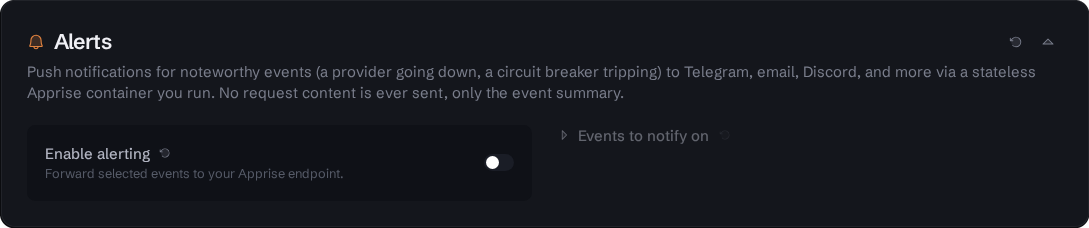 Settings page - Alerts section. With alerting off, the "Events to notify on" column stays visible but disabled; enabling the toggle activates the target field, reachability indicator, and the event picker.
The Events to notify on picker (expand it under the target field) lists every event you can subscribe to, grouped by category, each with a severity dot. Toggle individual events or whole categories. The list is served by the backend catalog (GET /api/alert/events), so it always reflects exactly what the running version can emit.
Current events:
| Event | Category | Default | Fires when |
|---|---|---|---|
| Provider down (circuit breaker opened) | Failover | ✅ on | a provider's breaker trips |
| Provider recovered (circuit breaker closed) | Failover | ✅ on | the breaker recovers |
| Provider being probed (half-open) | Failover | ⬜ off | the breaker enters its probe state (noisy) |
| Failover group sync failed | Failover | ✅ on | a failover group fails to sync |
| Provider failed during discovery | Discovery | ⬜ off | a provider errors during model discovery |
On first run the default-on events are pre-selected. Deselecting everything means nothing fires.
The target is any Apprise URL. The Alerts section shows copyable examples for popular services; a few:
| Service | URL shape |
|---|---|
| Telegram | tgram://{bot_token}/{chat_id} |
| Discord | discord://{webhook_id}/{webhook_token} |
| Slack | slack://{tokenA}/{tokenB}/{tokenC} |
mailto://{user}:{password}@gmail.com |
|
| Webhook (JSON) | json://{host}/{path} |
Send to multiple destinations at once by separating Apprise URLs with ;.
The notification target typically contains a credential (a bot token, an SMTP password). Model Hotel encrypts it at rest with the same MASTER_KEY-derived scheme used for provider API keys, and the dashboard only ever shows a masked placeholder; the stored value is never returned to the browser. To change it, type a new value; to keep it, leave the field untouched.
Alerting is strictly best-effort and non-blocking. A missing, misconfigured, or failing apprise-api never affects request serving and never fails a proxied request; failures are logged and dropped. A per-event, per-provider debounce window suppresses repeat alerts so a flapping circuit breaker cannot spam you; recovery ("all clear") notifications are always delivered.
See also: Failover and Hotel Routing · Request Logging · Privacy