Configuration
Model Hotel is configured through environment variables (startup-only) and runtime database settings (changeable without restart).
Environment variables are read once at server startup and cannot be changed at runtime. The application loads them from a .env file (via godotenv) or from the process environment.
| Variable | Type | Default | Description |
|---|---|---|---|
MASTER_KEY |
string | - | Master encryption key for provider API keys. Used as input to Argon2id key derivation before AES-256-GCM encryption. Must be strong and kept secret. Rotating this key invalidates ALL encrypted provider API keys - they must be re-encrypted after rotation. Generate with openssl rand -base64 32. |
POSTGRES_PASSWORD |
string | - | PostgreSQL password. Required if DATABASE_URL is not set. Used to construct the connection string from POSTGRES_USER, POSTGRES_HOST, and POSTGRES_DB. Generate with openssl rand -hex 16. |
Note
DATABASE_URL takes precedence over the POSTGRES_* components. If DATABASE_URL is set, the other PostgreSQL variables are ignored.
| Variable | Type | Default | Description |
|---|---|---|---|
DATABASE_URL |
string | (constructed) | PostgreSQL connection string. If not set, constructed from POSTGRES_USER:POSTGRES_PASSWORD@POSTGRES_HOST:5432/POSTGRES_DB. E.g. postgres://user:pass@localhost:5432/modelhotel
|
POSTGRES_USER |
string | modelhotel |
PostgreSQL username (used if DATABASE_URL not set). |
POSTGRES_HOST |
string | db |
PostgreSQL host (used if DATABASE_URL not set). In Docker Compose, this is the db service name; use localhost for local dev. |
POSTGRES_DB |
string | modelhotel |
PostgreSQL database name (used if DATABASE_URL not set). |
PORT |
string | :8080 |
Server listen address inside the container. E.g. :8080
|
HOST_PORT |
string | 8081 |
Docker Compose deployment only. Port exposed on the host machine. Maps to container port 8080. Not read by the Go application - used exclusively by docker-compose.yml for port mapping. |
DATA_DIR |
string | ./data |
Directory for persistent data (admin token file, etc.). In Docker, mounted to /data. |
ADMIN_TOKEN |
string | (auto-generated) | Fixed admin token for API authentication. Auto-generated on first run if empty, displayed once in logs, then stored as SHA-256 hash in <DATA_DIR>/admin-token. Regenerate by deleting that file and restarting. Generate with openssl rand -hex 16. |
ALLOW_HTTP_PROVIDERS |
bool | false |
Allow HTTP (non-HTTPS) provider base URLs. Useful for local Ollama instances or testing with mock servers. |
ALLOW_EMBED |
bool | false |
Allow the UI to be embedded in iframes (e.g. workspace embedded browsers, Home Assistant). Removes X-Frame-Options: DENY and CSP frame-ancestors 'none' headers. Enabled by default in compose.dev.yml. Warning: enabling this allows any origin to embed the page. |
RATE_LIMIT_ENABLED |
bool | true |
Hard kill-switch for rate limiting. When false, the rate-limiting middleware is always mounted but becomes a complete pass-through (no buckets allocated, no headers, no 429 responses). Cannot be overridden at runtime. |
RATE_LIMIT_IP_RPS |
float | 30 |
Per-IP requests per second for the token bucket rate limiter. Clamped to 0–10000. |
RATE_LIMIT_IP_BURST |
int | 60 |
Per-IP maximum burst size for the token bucket. Clamped to 1–10000. |
MAX_REQUEST_SIZE |
int | 52428800 |
Maximum request body size in bytes. Clamped to 1KB–100MB. Default is 50 MB, sized for multipart audio uploads to /v1/audio/transcriptions (OpenAI's audio file limit is 25 MB). |
CORS_ORIGINS |
string (comma-separated) | http://localhost:5173,http://localhost:8081 |
Comma-separated list of allowed CORS origins. Must include the scheme (e.g. http://). Wildcard * is explicitly rejected (incompatible with credentials=true). |
ALLOWED_PROVIDER_HOSTS |
string (comma-separated) | (empty) | Comma-separated list of additional allowed provider hosts. Built-in provider hosts are always allowed regardless of this setting. Hosts listed here bypass loopback blocking, so localhost can be added for local Ollama. E.g. localhost,api.example.com
|
TRUSTED_PROXIES |
string (comma-separated CIDR) | (none) | Comma-separated CIDR ranges for trusted reverse proxies (e.g. 10.0.0.0/8,172.16.0.0/12). When set, X-Forwarded-For headers from these IPs are trusted for rate limiting and request logging. This controls inbound trust only; it is unrelated to outbound SSRF protection (see KNOWN_PROXIES). |
KNOWN_PROXIES |
string (comma-separated CIDR) | (none) | Comma-separated CIDR ranges for internal LLM servers on private networks (e.g. 10.0.0.0/8,192.168.1.0/24). IPs within these CIDRs bypass the SSRF protection (SafeDialer private-IP blocking) so the proxy can reach self-hosted providers like Ollama or KoboldCPP running on private subnets, while still blocking all other private/loopback addresses. Unlike ALLOWED_PROVIDER_HOSTS (which allows by hostname and bypasses all SSRF checks), this operates at the network/CIDR level and only bypasses the private-IP block. |
WEBAUTHN_RP_ID |
string | (empty) | Relying Party ID for WebAuthn/FIDO2 passkey authentication (typically your domain, e.g. example.com). When empty, passkey login is disabled. When set, users can register and log in with passkeys (Touch ID, Windows Hello, YubiKey, etc.) alongside the admin token. |
WEBAUTHN_RP_DISPLAY_NAME |
string | Model Hotel |
Display name for the WebAuthn relying party, shown in the browser's passkey dialog. |
WEBAUTHN_RP_ORIGINS |
string (comma-separated) | (falls back to CORS_ORIGINS) |
Comma-separated list of allowed origins for WebAuthn registration/authentication (e.g. https://example.com). Falls back to CORS_ORIGINS if empty, then to http://localhost:<port>. |
DATABASE_MAX_CONNS |
int | 25 |
Maximum database connection pool size. Clamped to 1–1000. |
DATABASE_MIN_CONNS |
int | 5 |
Minimum database connection pool size. Clamped to 1–1000. Cannot exceed DATABASE_MAX_CONNS. |
MODELSDEV_ENABLED |
bool | true |
Enable loading models.dev catalogue at startup for model enrichment data. |
DEMO_READONLY |
bool | false |
Demo-hardening switch. When true, every state-changing request to the admin API (POST/PUT/PATCH/DELETE on /api/* — creating, editing, or deleting providers, virtual keys, settings, backups, etc.) is refused with 403. Read endpoints (the whole dashboard), the admin chat/arena (/api/chat), and the public proxy (/v1) are unaffected, so visitors can browse and chat against the pre-seeded providers but cannot change anything. Intended for public demos where the admin token is shared. |
DEBUG_LOG |
bool | false |
Enable Debug-level structured logging for all scopes. Accepts true/1/yes. (Does not change the output format - see LOG_FORMAT.) |
DEBUG_LOG_SCOPES |
string (comma-separated) | (empty) | Enable Debug logging for only the named scopes, when DEBUG_LOG is off - e.g. failover,ratelimit. The scope is the prefix before the first : in a log message (case-insensitive), matching the canonical sources in Request Logging. Lets you debug one noisy area without flooding everything at high RPS. Ignored when DEBUG_LOG=true. The parsed scopes are echoed once at startup (debuglog: per-scope debug enabled). |
LOG_FORMAT |
string | text |
Output format for the docker-logs (stdout) surface. text (default): human-readable TIME level=LEVEL source: message k=v …. json: one JSON object per line (time, level, source, msg, plus each attr) for log collectors (Fluent Bit, Vector, Promtail, Datadog). The App Logs page (ring buffer + DB) is unaffected. No prompt content appears in either format. |
The following provider hosts are always allowed as provider base_url values, regardless of ALLOWED_PROVIDER_HOSTS:
api.openai.comapi.nano-gpt.comapi.z.aiapi.deepseek.comapi.anthropic.comollama.comopencode.aiapi.x.aigenerativelanguage.googleapis.comapi.cohere.comapi.cohere.aiopenrouter.aiapi.neuralwatt.comneuralwatt.com
These correspond to the providers detected by DetectProviderType in internal/provider/discovery.go.
-
MASTER_KEYis never used directly as an AES key. It is fed through Argon2id key derivation (per-provider random salt in v2) to produce the 256-bit AES key. See Security for details. -
ADMIN_TOKENis stored as a SHA-256 hash. Legacy plaintext tokens are automatically migrated to hashed format on first validation. -
RATE_LIMIT_ENABLEDis a hard kill-switch - whenfalse, the rate-limiting middleware is always mounted but becomes a complete pass-through (no buckets, no headers, no 429s). The DB settingrate_limit_enabledhas no effect when the env var isfalse. -
ALLOWED_PROVIDER_HOSTSis primarily for permitting non-standard hosts (loopback addresses for Ollama, custom provider endpoints). Built-in provider hosts never need to be listed here. -
TRUSTED_PROXIEScontrols which reverse proxies are trusted for inbound request metadata (X-Forwarded-For).KNOWN_PROXIEScontrols which private CIDRs are allowed for outbound connections to self-hosted LLM providers. They serve opposite directions and should not be confused. -
ALLOWED_PROVIDER_HOSTSbypasses all SSRF protections (both URL validation and SafeDialer IP checks). Use it for specific hostnames. -
KNOWN_PROXIESpermits entire CIDR ranges but only bypasses the private-IP block in the SafeDialer (provider URL validation still applies). If your internal LLM server has a stable hostname, useALLOWED_PROVIDER_HOSTS. If it sits on a subnet with dynamic hostnames, useKNOWN_PROXIES. - Self-hosted providers detected via port heuristics (KoboldCPP on 5001, LMStudio on 1234, local Ollama on 11434) are not in the built-in host allowlist; add them to
ALLOWED_PROVIDER_HOSTSorKNOWN_PROXIESas needed. -
WEBAUTHN_RP_IDis empty by default, meaning passkey login is disabled. Set it to your domain to enable FIDO2/WebAuthn passkey authentication.WEBAUTHN_RP_ORIGINSfalls back toCORS_ORIGINSand then tohttp://localhost:<port>. -
DATABASE_MAX_CONNSandDATABASE_MIN_CONNSare clamped to the range 1–1000.DATABASE_MIN_CONNScannot exceedDATABASE_MAX_CONNS. -
CORS_ORIGINSexplicitly rejects*wildcard - it is incompatible withcredentials=true(CORS spec forbids it) and would silently break auth.
These settings are stored in the settings table and can be changed at runtime via the Settings UI or the PUT /api/settings endpoint - no restart required. Changes take effect immediately (within 30 seconds of cache TTL at most, or instantly via the subscription notification system).
| Method | Endpoint | Description |
|---|---|---|
GET |
/api/settings |
Returns all settings as a JSON key-value map. Requires admin token auth. |
PUT |
/api/settings |
Updates one or more settings. Body: {"key": "value", ...}. Max 50 keys per request. Requires admin token auth. |
DELETE |
/api/settings |
Resets settings to their Go-side defaults by deleting them from the database. Body: {"keys": ["key1", ...]}. Empty keys array resets all settings. Returns the full updated settings map. Requires admin token auth. |
| Setting | Type | Default | Description | Valid Values / Range |
|---|---|---|---|---|
discovery_interval |
duration string | 6h |
Model auto-discovery interval. Set to 0 to disable periodic discovery entirely. |
30m, 1h, 6h, 24h, 0
|
discovery_on_startup |
bool string | true |
Whether to run model discovery automatically on server startup. Skipped if last discovery was within 5 minutes. |
true, false
|
discovery_on_provider_create |
bool string | true |
Whether to trigger model discovery when a new provider is created via the API. Note: This setting is checked client-side - the frontend reads it and decides whether to trigger discovery after provider creation; it is not enforced server-side. |
true, false
|
log_retention |
duration string | (empty) | How long to keep request logs. Empty or unrecognised values = keep forever. Cleanup runs hourly. |
1h, 1d/24h, 1w/168h, 1m/720h, (empty) |
stale_request_timeout |
duration string | 30m |
Timeout for marking in-progress request logs as failed. Rows stuck in pending or streaming state longer than this are marked failed. |
30m, 1h, etc. |
request_timeout |
duration string | 1m |
Per-request timeout duration. Base timeout for non-streaming requests. Streaming requests use 10x this value. |
30s, 1m, 5m, 10m
|
failover_on_rate_limit |
bool string | true |
Whether to failover to the next provider when an upstream returns HTTP 429. 5xx errors always trigger failover. |
true, false
|
circuit_breaker_enabled |
bool string | true |
Enable per-provider circuit breaker for hotel/ failover routes. When open, the provider is skipped during failover selection. |
true, false
|
circuit_breaker_threshold |
int | 5 |
Consecutive failures before a provider's circuit opens. | 1–100 |
circuit_breaker_cooldown |
duration string | 60s |
Duration an open circuit stays open before transitioning to half-open. |
30s, 60s, 120s, etc. |
rate_limit_enabled |
bool string | true |
Runtime toggle for rate limiting. Overridden by RATE_LIMIT_ENABLED env var - if env var is false, this setting has no effect. |
true, false
|
rate_limit_ip_enabled |
bool string | true |
Runtime toggle for per-IP rate limiting. Only effective when RATE_LIMIT_ENABLED=true. |
true, false
|
rate_limit_ip_rps |
float | 30 |
Per-IP requests per second. Set to 0 for unlimited per-IP rate. |
0–10000 |
rate_limit_ip_burst |
int | 60 |
Per-IP burst size for token bucket. | 1–10000 |
rate_limit_rps |
float | 10 |
Per-virtual-key requests per second. Set to 0 to disable per-key rate limiting (makes every bucket unlimited). |
0–10000 |
rate_limit_burst |
int | 20 |
Maximum burst bucket size per virtual key. | 1–10000 |
rate_limit_tpm |
int | 0 |
Global default tokens-per-minute cap for keys without a per-key rate_limit_tpm. 0 = no cap. No Settings-UI control (API-only). |
0–100000000 |
rate_limit_max_wait_ms |
int | 200 |
Maximum wait time (ms) in the rate-limiter queue before rejecting with 429. Shared by both per-IP and per-key limiters. | 0–10000 |
key_cache_ttl |
duration string | 10m |
Provider key decryption cache TTL. Controls how long decrypted provider API keys are held in memory before re-derivation. | (varies) |
ttft_timeout |
duration string | 1m0s |
Time-to-first-token probe timeout for streaming requests. After the upstream responds 200, the proxy reads ahead to confirm the first token arrives before committing the stream to the client. If the provider fails to produce a token within this timeout, the request fails over to the next provider. Set to 0s to disable (immediate stream commit). |
0s, 30s, 1m0s, etc. |
stream_stall_timeout |
duration string | 30s |
Maximum silence during streaming before the connection is terminated and the circuit breaker records a failure. After 50 chunks the effective timeout is multiplied by 3 to tolerate tool-call pauses and long reasoning chains. Set to 0s to disable the watchdog. |
0s, 10s, 30s, 1m0s, etc. |
backup_enabled |
bool string | false |
Enable periodic database backup with son/father/grandfather rotation. When enabled, backups are created at the configured interval and old backups are pruned. Enabling for the first time will prune any existing backups that fall outside the rotation tiers. |
true, false
|
backup_interval |
duration string | 86400s |
Interval between automatic backups. Minimum 300s (5 minutes). |
3600s, 86400s, 604800s, etc. |
backup_son_retention |
int | 7 |
Number of daily backups to keep (son tier). Keeps the most recent backup from each of the last N days. | 0–365 |
backup_father_retention |
int | 4 |
Number of weekly backups to keep (father tier). Keeps the most recent backup from each of the last N weeks, excluding sons. | 0–52 |
backup_grandfather_retention |
int | 3 |
Number of monthly backups to keep (grandfather tier). Keeps the most recent backup from each of the last N months, excluding sons and fathers. | 0–120 |
The TTFT probe holds the client connection open without sending any bytes until the upstream produces its first token (up to ttft_timeout). If Model Hotel runs behind a reverse proxy, load balancer, or CDN, that intermediary's idle-read timeout can close the silent connection before the first token arrives, and Model Hotel only sees its inbound connection drop.
To avoid this, either:
- raise the proxy's read timeout above
ttft_timeout(nginx:proxy_read_timeout 600s;) and disable response buffering for streaming (nginx:proxy_buffering off;), or - set
ttft_timeoutbelow the proxy's read timeout, so Model Hotel's own probe fires first and fails over to the next provider while the connection is still alive.
A request cut off this way is logged as a provider_timeout (502) whose message names the likely reverse-proxy cause, and the stalling provider's circuit breaker records the failure, so repeated stalls open the breaker and subsequent requests skip that provider.
All database settings can be reset to their Go-side defaults via the Reset to Defaults feature in the Settings UI:
- Global reset (header icon): Type "RESET" to confirm. Deletes all settings from the database.
- Section reset (icon left of collapse toggle): Confirms via dialog. Resets only the settings in that section.
- Per-setting reset (inline icon after label): Resets a single setting. No confirm dialog.
Reset works by deleting the row from the settings table. The Go code then falls through to its hardcoded default value. The returned settings map reflects the post-reset state.
| Setting | Default |
|---|---|
discovery_interval |
6h |
discovery_on_startup |
true |
discovery_on_provider_create |
true |
request_timeout |
1m0s |
key_cache_ttl |
10m0s |
ttft_timeout |
1m0s |
stream_stall_timeout |
30s |
rate_limit_enabled |
true |
rate_limit_ip_enabled |
true |
rate_limit_rps |
10 |
rate_limit_burst |
20 |
rate_limit_tpm |
0 |
rate_limit_ip_rps |
30 |
rate_limit_ip_burst |
60 |
rate_limit_max_wait_ms |
200 |
circuit_breaker_enabled |
true |
circuit_breaker_threshold |
5 |
circuit_breaker_cooldown |
1m0s |
failover_on_rate_limit |
true |
log_retention |
0 |
stale_request_timeout |
30m0s |
backup_enabled |
false |
backup_interval |
86400s |
backup_son_retention |
7 |
backup_father_retention |
4 |
backup_grandfather_retention |
3 |
The rate limiting system has two layers, both using token buckets (backed by golang.org/x/time/rate):
Per-IP rate limiting (DoS protection, always-on when enabled):
- Applied before authentication, before the per-key limiter
-
rate_limit_ip_rpscontrols the per-IP refill rate (default 30) -
rate_limit_ip_burstcontrols the per-IP maximum burst size (default 60) -
rate_limit_ip_enabledtoggles this layer at runtime (requiresRATE_LIMIT_ENABLED=true) - Independent bucket per client IP address
Per-virtual-key rate limiting (usage control):
- Each key gets its own independent bucket
-
rate_limit_rpscontrols the refill rate (tokens per second, default 10) -
rate_limit_burstcontrols the maximum bucket size (default 20) - Setting
rate_limit_rps=0makes every bucket unlimited (no per-key rate limiting) - A separate optional token rate limit caps tokens/minute and rejects
over-budget requests with
429. It has a global default setting (rate_limit_tpm,0= no cap, API-only — no Settings-UI control) plus a per-key override on the virtual_keys row; a key'snullfalls back to the global default. See Virtual Keys.
Shared settings:
-
rate_limit_max_wait_ms(default 200) - maximum time a request waits in the rate-limiter queue before being rejected with 429. Applies to both per-IP and per-key limiters. - The
RATE_LIMIT_ENABLEDenvironment variable is a hard kill-switch - whenfalse, both layers are always mounted but become a complete pass-through (no buckets, no headers, no 429s) - When rate limiting is re-enabled after being disabled, all existing buckets are reset to ensure fresh state
- Unused buckets are cleaned up by a periodic cleanup task that runs every 5 minutes and removes entries that have been idle for more than 10 minutes
When a request is rate-limited, the response includes:
-
Retry-After: <seconds>- When the client can retry -
X-RateLimit-Limit: <rate>- The refill rate -
X-RateLimit-Remaining: <tokens>- Remaining tokens in the bucket -
X-RateLimit-Burst: <burst>- The burst capacity -
X-RateLimit-Scope: <ip|key>- Indicates whether the rate limit applies toip(per-IP) orkey(per-virtual-key)
User preferences are stored in localStorage (client-side only, never sent to the server):
| Key | Description |
|---|---|
adminToken |
Admin authentication token (used for API calls) |
theme |
dark/light |
accentColor |
Hex color string |
uiStyle |
clean-saas (default), cyber-terminal, or glassmorphism-lite |
toastPosition |
Toast notification position |
toastTimeout |
Toast display duration (ms) |
persistChat |
Whether to persist chat state across sessions |
persistConversation |
Whether to persist conversation state |
persistArena |
Whether to persist arena state and history |
sidebarChatSubMode |
chat/conversation |
sidebarArenaSubMode |
competition/compare |
sidebarLogsSubMode |
request/app |
sidebarQuotaDisabled |
Whether to hide the quotas pill in sidebar (inverted: true = hidden) |
sidebarQuotaRefreshMin |
Sidebar quota refresh interval in minutes |
dashboardRefreshSec |
Dashboard refresh interval in seconds |
The Settings page has 9 collapsible sections (in page order):
Backend settings: discovery_interval, discovery_on_startup, discovery_on_provider_create
WebAuthn/FIDO2 credential management: register new passkeys, rename and delete existing ones. Registration is available only when WEBAUTHN_RP_ID is configured (see Security).
Authenticator-app 2FA (RFC 6238) for admin login. Enabled at runtime from Settings (scan a QR code, confirm a 6-digit code, save the one-time recovery codes); no environment variable is required. When enabled, the raw admin token alone no longer authenticates and must be combined with a code on the login screen (see Security). If you lose the authenticator and all recovery codes, an operator can clear it with make totp-disable.
-
UI Style:
clean-saas(default),cyber-terminal,glassmorphism-lite- stored in localStorageuiStyle -
Theme:
dark/light- stored in localStoragetheme -
Accent Color: 10 preset swatches + custom hex picker - stored in localStorage
accentColor -
Toast Notifications: 6-position visual picker (
toastPosition) and 1s–15s auto-dismiss slider (toastTimeout)
Note:
theme,ui_style, andaccent_colorare not in the backendAllowedSettings- they are localStorage-only and cannot be set viaPUT /api/settings.
Backend settings: log_retention, stale_request_timeout. Everything else is localStorage-only.
- Session Persistence: Toggle for chat, arena, and conversation state across page reloads
- Arena History: Save match history toggle, limit (10/25/50/100), clear button
- Cache & Resets: Clear provider quota cache, reset dismissed error banners
-
Sidebar Quotas: Show/hide the quotas pill (
sidebarQuotaDisabled, inverted) and refresh interval (sidebarQuotaRefreshMin) -
Dashboard Refresh: Interval 10s/30s/1m/2m/5m/10m/Disabled (
dashboardRefreshSec) - Logging: Retention and stale-request timeout, plus purge actions for request logs and app logs
Read-only status panel — no backend settings to persist. Reflects which of the three log-export integrations are active (each enabled via its own environment variable) and shows enable instructions for those that are off:
-
JSON logs (stdout): active when
LOG_FORMAT=json -
Prometheus metrics: active when a dedicated
METRICS_TOKENis set (/metricsalso works with the admin token regardless) -
OpenTelemetry logs (OTLP): active when
OTEL_EXPORTER_OTLP_ENDPOINTis set — pushes the same structured logs to an OTel collector (logs only; standardOTEL_EXPORTER_OTLP_*vars apply, http/protobuf by default orOTEL_EXPORTER_OTLP_PROTOCOL=grpc)
Backend settings: backup_enabled, backup_interval, backup_son_retention, backup_father_retention, backup_grandfather_retention
- Backup: Download a PostgreSQL dump of the database
- Restore: Upload a previously downloaded backup file to restore
- Periodic Backup: Enable automatic scheduled backups with son/father/grandfather rotation (see backup settings above)
When periodic backup is enabled, backups are classified into three tiers:
-
Son (daily): Keeps the most recent backup from each of the last
backup_son_retentiondays -
Father (weekly): Keeps the most recent backup from each of the last
backup_father_retentionweeks (excluding those already kept as sons) -
Grandfather (monthly): Keeps the most recent backup from each of the last
backup_grandfather_retentionmonths (excluding sons and fathers) - All other backups are pruned automatically
When enabling periodic backup for the first time, a confirmation dialog shows which existing backups would be removed under the rotation scheme.
A background scheduler (started about a minute after the server boots) drives periodic backups - there is no external cron job. While backup_enabled is true, each cycle it creates one backup with pg_dump, then immediately applies the son/father/grandfather rotation above (pruning any backup outside the retention tiers), and sleeps for backup_interval (default 24h, floored at 5 minutes) before repeating. backup_enabled, backup_interval, and the retention counts are re-read every cycle, so changes take effect without a restart. Each scheduled backup publishes a backup.created event, which surfaces as a success toast in the dashboard (when a session is connected) and as an App Logs entry. The manual Download / Restore buttons are separate, on-demand actions.
Backend settings: rate_limit_enabled, rate_limit_rps, rate_limit_burst, rate_limit_tpm, rate_limit_ip_enabled, rate_limit_ip_rps, rate_limit_ip_burst, rate_limit_max_wait_ms
Backend settings: circuit_breaker_enabled, circuit_breaker_threshold, circuit_breaker_cooldown, failover_on_rate_limit
- Failure Threshold: Number of consecutive failures before circuit opens (default 5).
-
Cooldown Duration: Duration an open circuit stays open before transitioning to half-open (default
60s). - The number of half-open probe successes needed to close the circuit is fixed in code (
HalfOpenMaxProbes, default 1) and is not a runtime setting.
Backend settings: ttft_timeout, stream_stall_timeout
-
TTFT Timeout: Duration string (default
1m0s) - time-to-first-token probe timeout for streaming requests. Set to0sto disable. -
Stream Stall Timeout: Duration string (default
30s) - maximum silence during streaming before termination. After 50 chunks the effective timeout is multiplied by 3.
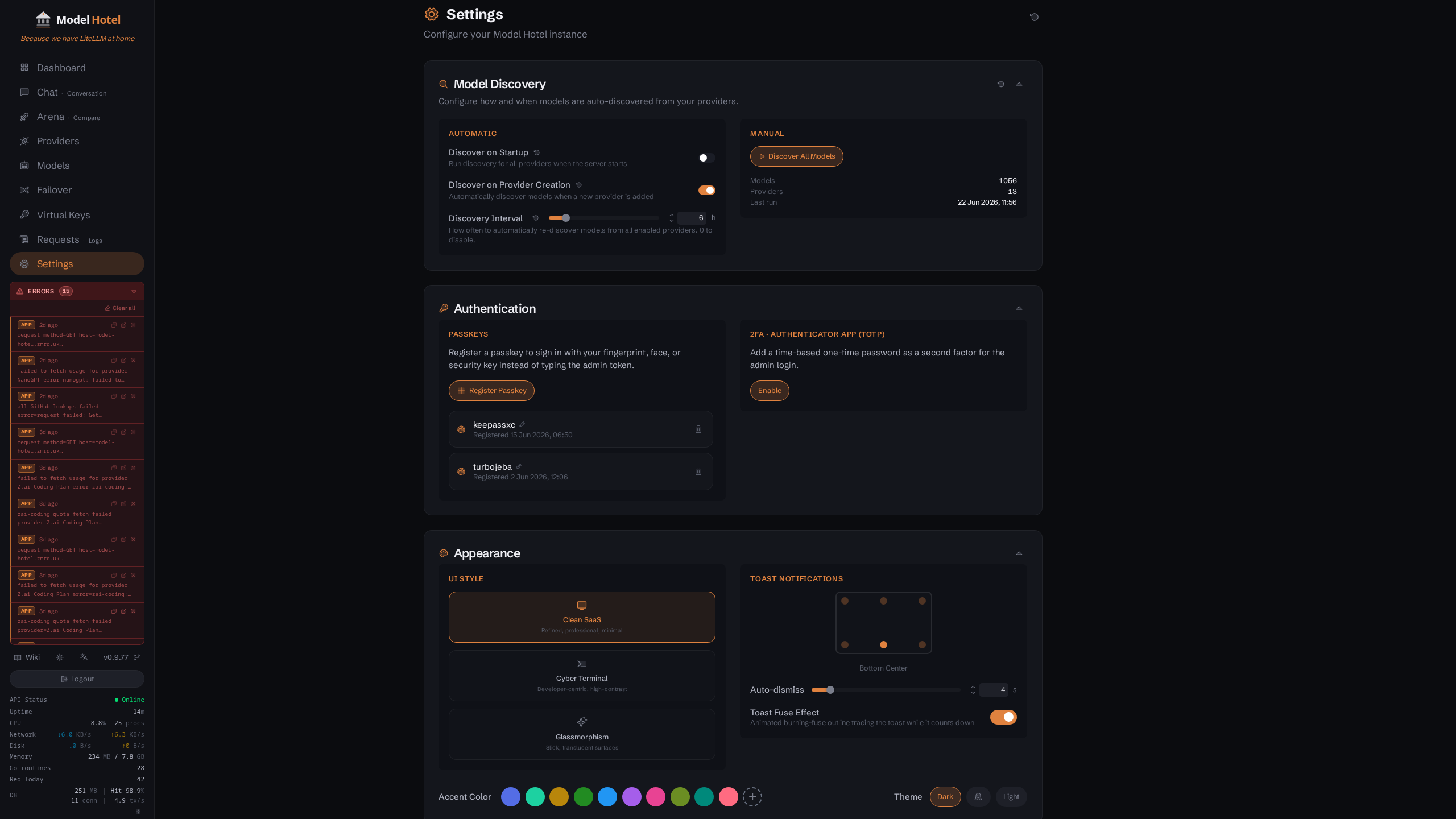 The Settings page header and its collapsible sections. Each section's controls are shown expanded in the screenshots that follow.
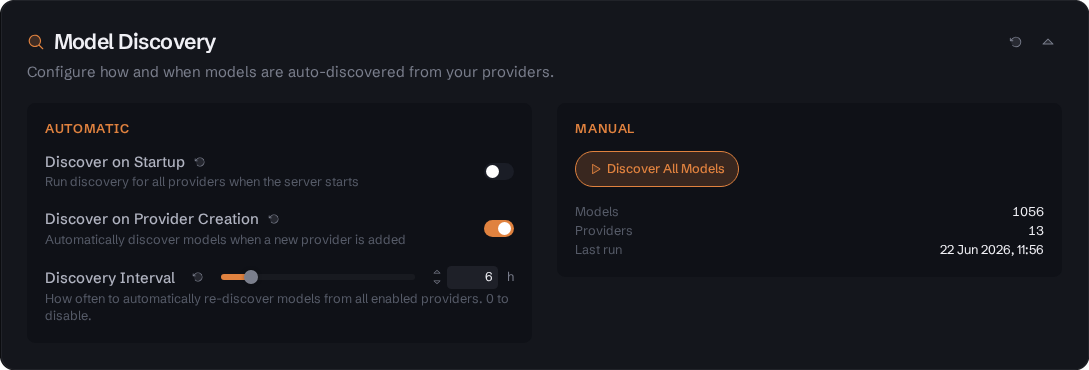 Settings page - Model Discovery section: the automatic toggles (discover on startup, discover on provider creation, re-discovery interval) alongside the manual "Discover All Models" trigger and a live count of discovered models, providers, and last run.
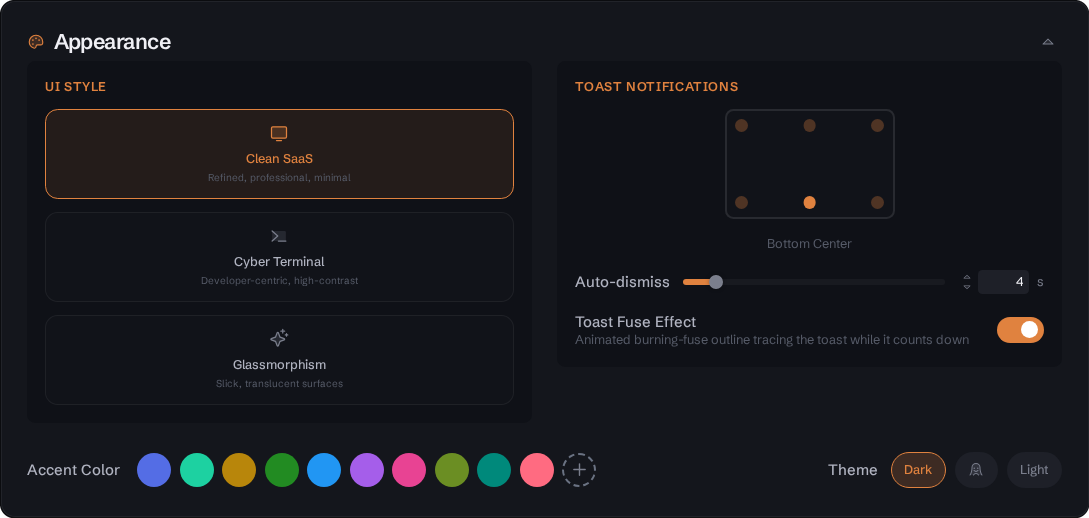 Settings page - Appearance section expanded, showing the UI Style cards (Clean SaaS, Cyber Terminal, Glassmorphism), Theme toggle, and Accent Color picker.
The three UI styles applied to the dashboard (dark mode, each style's default accent):

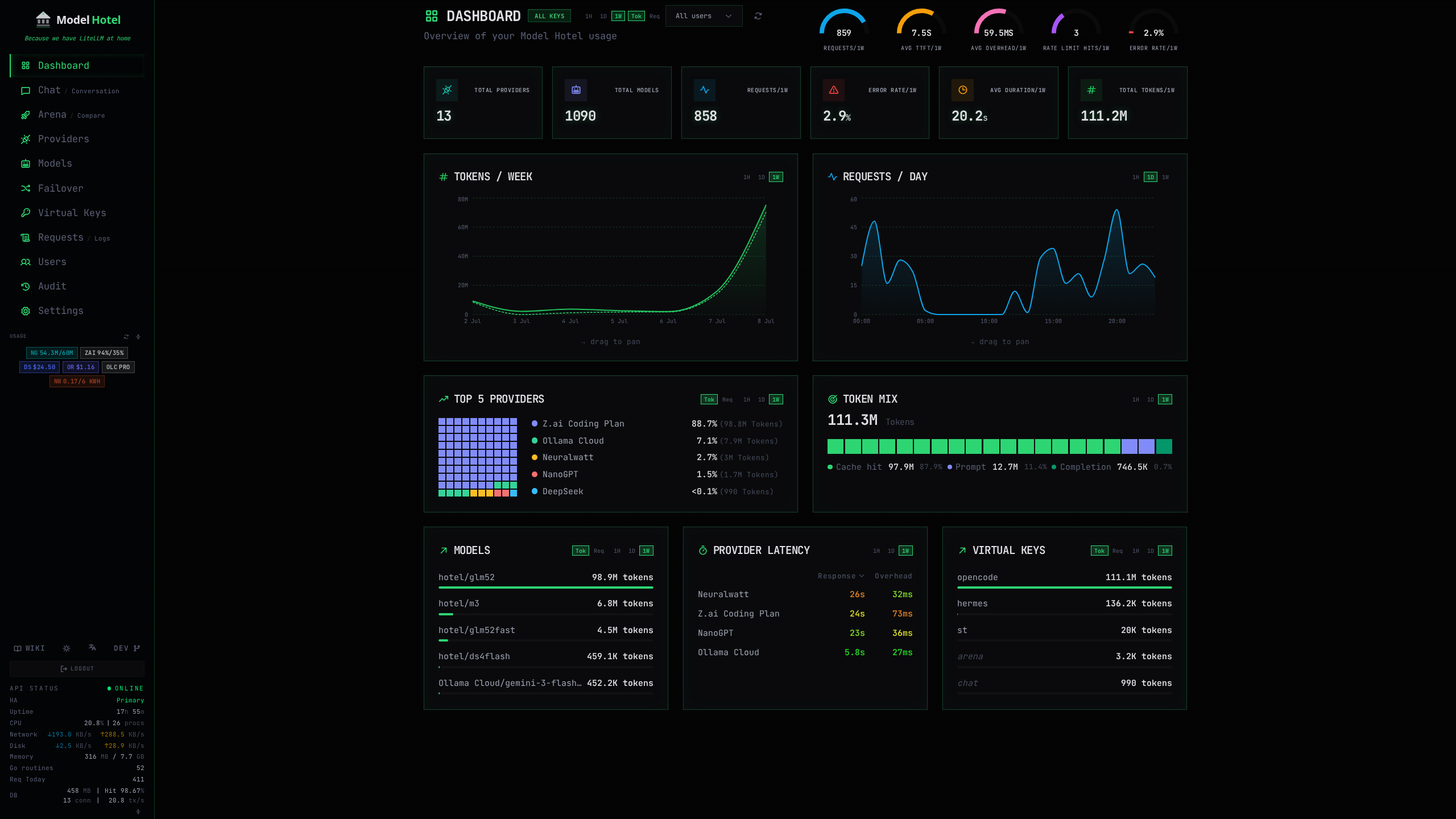

Left to right: Clean SaaS (default), Cyber Terminal, Glassmorphism.
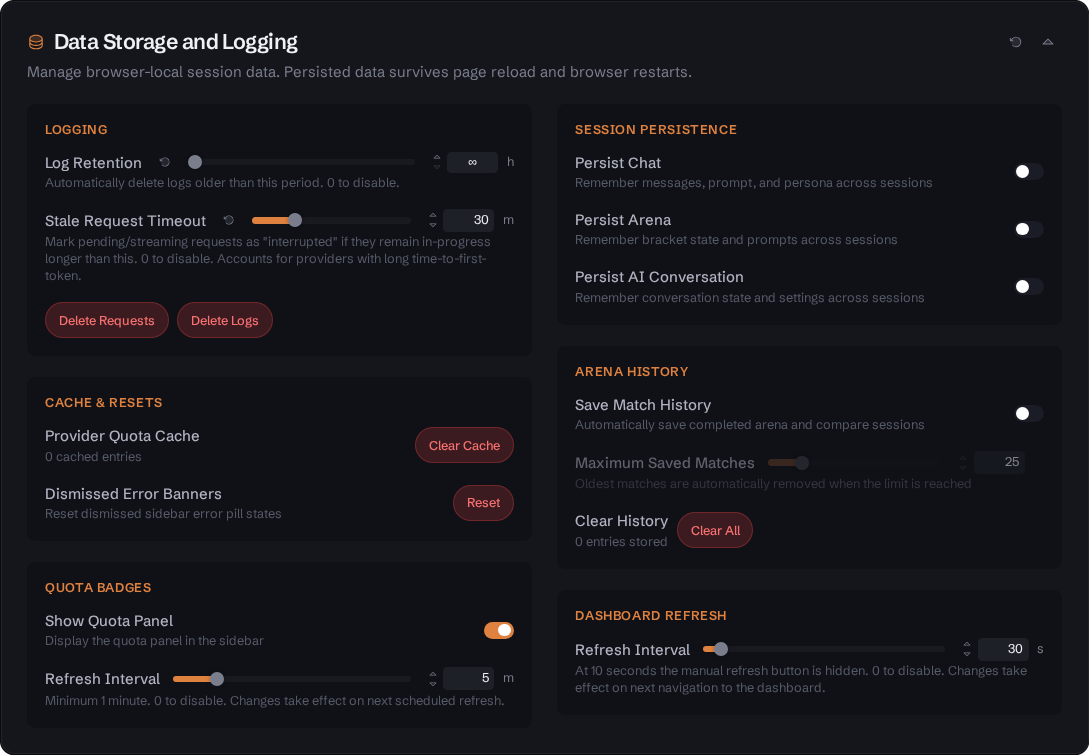 Settings page - Data Storage and Logging section: log retention and stale-request timeout with one-click purge of request and app logs, cache and dismissed-banner resets, sidebar quota-badge controls, browser-local session persistence (chat, arena, conversation), arena history limits, and the dashboard refresh interval.
 Settings page - Observability & Log Export section: read-only status of the three log-export integrations. JSON logs enabled here; Prometheus and OTLP disabled, each showing its copyable enable instruction.
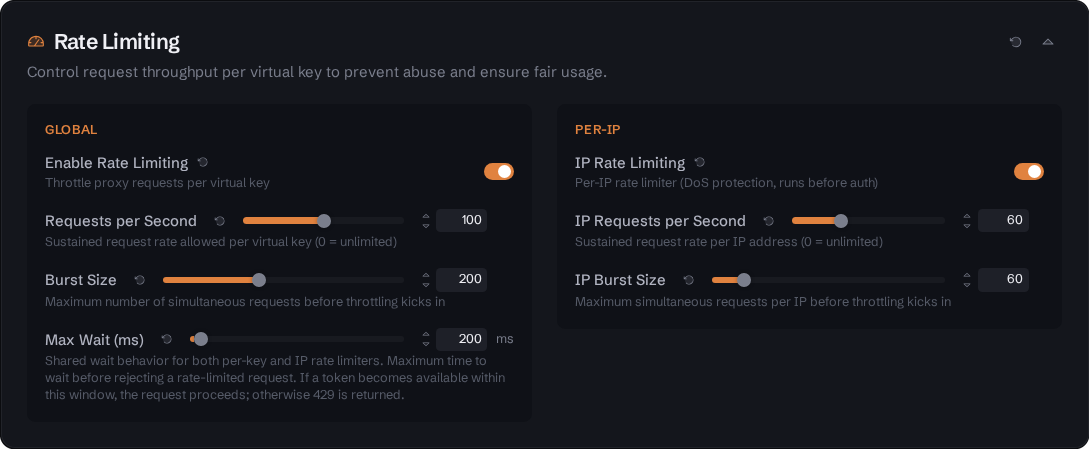 Settings page - Rate Limiting section expanded, showing the enable toggle, RPS selector, and Burst selector.
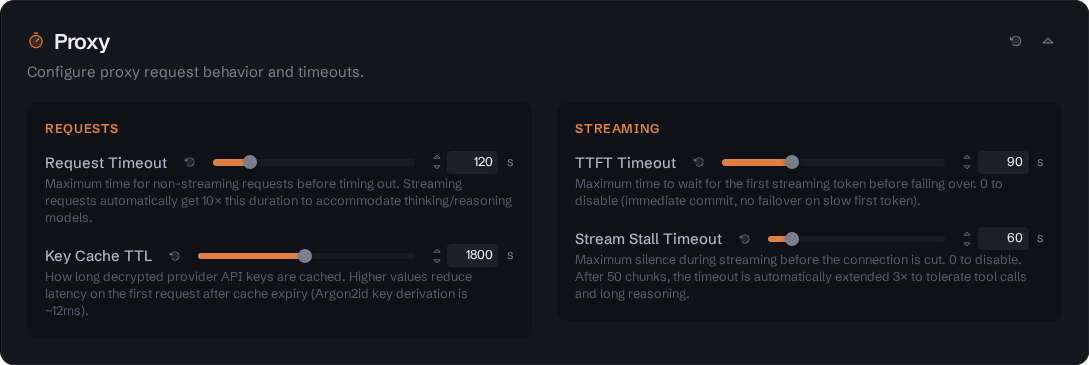 Settings page - Proxy section, showing TTFT Timeout and Stream Stall Timeout settings.
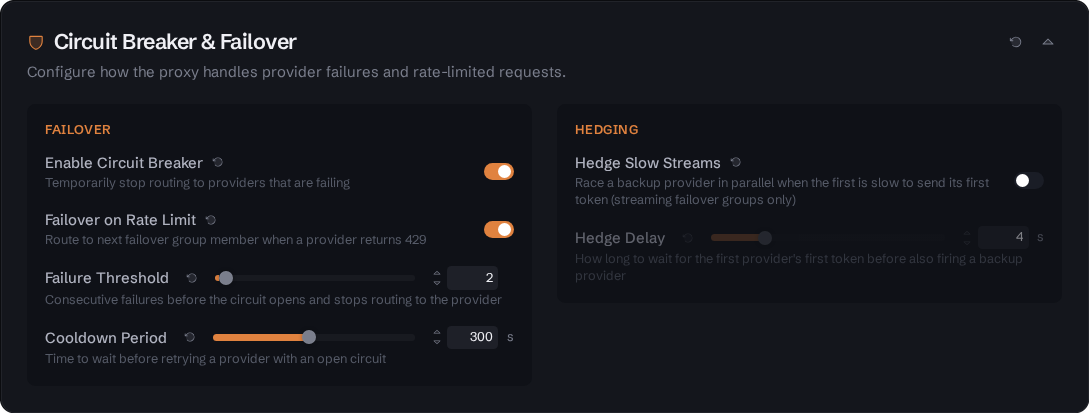 Settings page - Circuit Breaker & Failover section, showing cooldown, failure threshold, and half-open request settings.
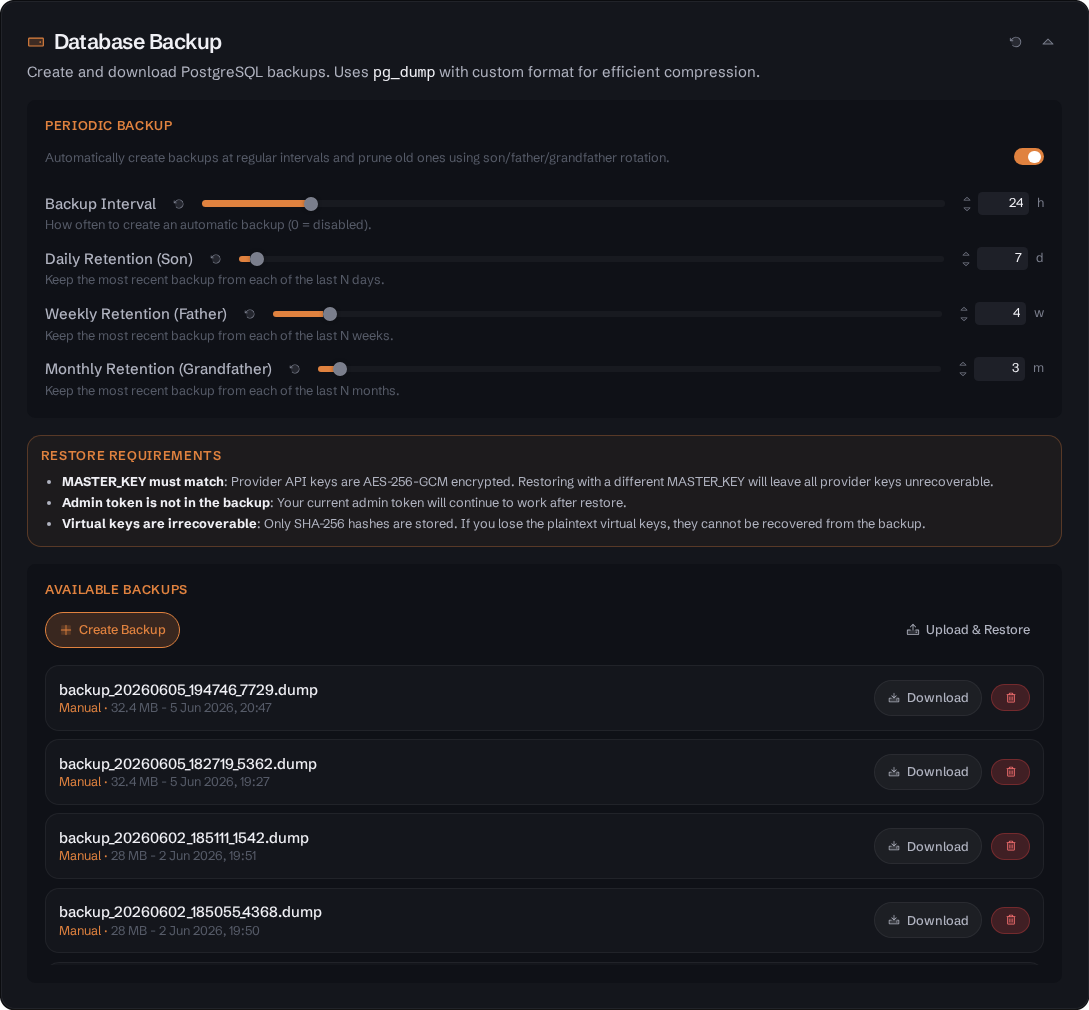 Settings page - Database Backup section, showing backup and restore controls.
The docker-compose.yml sets up the following services:
| Configuration | Value | Description |
|---|---|---|
| Build |
. (arg VERSION) |
Builds from the root Dockerfile; prebuilt ghcr.io/Docker Hub images can be used instead (commented alternatives in the file) |
| Ports | ${HOST_PORT:-8081}:8080 |
Maps host port (default 8081) to container port 8080 |
| Environment | See below | Environment variables passed to the container |
| Volumes | ./.data:/data |
Persistent data storage (admin token, etc.) |
| Volumes |
/var/run/docker.sock:/var/run/docker.sock:ro (commented out by default)
|
Read-only Docker socket access for container stats in sidebar |
| Restart | unless-stopped |
Auto-restart on failure or daemon restart |
| Depends on |
db (healthy) |
Waits for PostgreSQL to be ready |
Environment variables (docker-compose.yml):
environment:
  - MASTER_KEY=${MASTER_KEY:?MASTER_KEY must be set in .env}
  - POSTGRES_USER=${POSTGRES_USER:-modelhotel}
  - POSTGRES_PASSWORD=${POSTGRES_PASSWORD:?POSTGRES_PASSWORD must be set in .env}
  - POSTGRES_HOST=db
  - POSTGRES_DB=${POSTGRES_DB:-modelhotel}
  - ADMIN_TOKEN=${ADMIN_TOKEN:-}
  - ALLOW_HTTP_PROVIDERS=false
  - ALLOW_EMBED=false
  - DATA_DIR=/data
  - RATE_LIMIT_ENABLED=true
  - DEBUG_LOG=false
  - CORS_ORIGINS=http://localhost:5173,http://localhost:${HOST_PORT:-8081}
  - WEBAUTHN_RP_ID=${WEBAUTHN_RP_ID:-}
  - WEBAUTHN_RP_ORIGINS=${WEBAUTHN_RP_ORIGINS:-}
  - ALLOWED_PROVIDER_HOSTS=
  - TRUSTED_PROXIES=
- KNOWN_PROXIES=| Configuration | Value | Description |
|---|---|---|
| Image | postgres:16-alpine |
PostgreSQL 16 on Alpine Linux |
| Ports | (none) | Not exposed to the host - reachable only from the app container on the compose network |
| Command | postgres -c log_min_error_statement=panic ... |
Quietened logging (errors only, no checkpoint logs) |
| Environment |
POSTGRES_USER, POSTGRES_PASSWORD, POSTGRES_DB
|
Database credentials |
| Volumes | ./.data/pgdata:/var/lib/postgresql/data |
Persistent database storage |
| Restart | unless-stopped |
Auto-restart on failure or daemon restart |
| Healthcheck | pg_isready -U ${POSTGRES_USER} |
Checks database readiness every 5s |
git clone https://github.com/hugalafutro/model-hotel.git
cd model-hotel

cp .env.example .env
nano .env          # set a strong MASTER_KEY and POSTGRES_PASSWORD

docker compose up --build
Get the admin token:
docker compose logs app | grep "ADMIN_TOKEN="If you lose the token, delete .data/admin-token and restart to generate a new one.
You can also set a fixed admin token via the ADMIN_TOKEN environment variable in your .env file.
The Dockerfile uses a multi-stage build:
-
Base:
node:26-alpine - Package manager: pnpm (via corepack)
-
Working directory:
/app/web -
Build command:
pnpm run build -
Output:
dist/directory (embedded in backend)
-
Base:
golang:1.26-alpine -
Working directory:
/app -
Build command:
go build -o server ./cmd/server/ -
Embeds: Frontend
dist/intocmd/server/static/
-
Base:
alpine:3.23 -
Dependencies:
ca-certificates,postgresql-client -
Working directory:
/app -
Binary:
./server -
Exposed port:
8080 -
Healthcheck:
wget --spider http://localhost:8080/health(30s interval, 40s start period) -
CMD:
["./server"]
| Path | Source | Purpose |
|---|---|---|
/app/server |
Backend binary | Main application executable |
/app/web/dist/ |
Frontend build | Static assets served by the backend |
/app/migrations/ |
DB migrations | Reference copy (migrations are embedded in binary) |
Template file showing the most common environment variables:
# Required: Generate strong secrets before deploying.
#   MASTER_KEY:        openssl rand -base64 32
#   ADMIN_TOKEN:       openssl rand -hex 16
#   POSTGRES_PASSWORD: openssl rand -hex 16
# ⚠️  Rotating MASTER_KEY invalidates ALL encrypted provider API keys.

MASTER_KEY=
POSTGRES_PASSWORD=

# PostgreSQL (DATABASE_URL is auto-constructed from these; set it only to override)
POSTGRES_USER=modelhotel
POSTGRES_HOST=db
POSTGRES_DB=modelhotel

# Server configuration
PORT=:8080
HOST_PORT=8081
DISCOVERY_INTERVAL=30m
DATA_DIR=./data
ADMIN_TOKEN=

# Feature flags
ALLOW_HTTP_PROVIDERS=false
RATE_LIMIT_ENABLED=true
RATE_LIMIT_IP_RPS=30
RATE_LIMIT_IP_BURST=60
MAX_REQUEST_SIZE=52428800
CORS_ORIGINS=http://localhost:5173,http://localhost:8081
ALLOWED_PROVIDER_HOSTS=
TRUSTED_PROXIES=
KNOWN_PROXIES=
DATABASE_MAX_CONNS=25
DATABASE_MIN_CONNS=5
MODELSDEV_ENABLED=true
DEBUG_LOG=false
# DEBUG_LOG_SCOPES=failover,ratelimit   # Debug for only these scopes (when DEBUG_LOG is off)
# LOG_FORMAT=text                       # "json" for log collectors
Notes:
DISCOVERY_INTERVALappears in the template for historical reasons but is a DB setting - it is not read from the environment (set it viaPUT /api/settingsor the Settings UI).ALLOW_EMBEDand theWEBAUTHN_*variables are not in the template but are read from the environment (see the tables above).
| Category | Count | Runtime Changeable |
|---|---|---|
| Environment Variables | 29 | No (restart required) |
| Database Settings | 25 | Yes (via API/UI) |
| Frontend localStorage | 15 | Yes (client-side only) |
Key Architecture Points:
-
Environment variables are loaded once at startup via
godotenv.Load()and theconfig.Load()function. -
Database settings use a 30-second cache with change notifications via
Subscribe()for immediate updates. -
Rate limiting has a hard kill-switch (
RATE_LIMIT_ENABLEDenv var) that completely disables the middleware whenfalse. -
Provider host validation always allows built-in providers;
ALLOWED_PROVIDER_HOSTSis only for custom/local providers. - Admin token is auto-generated on first run and stored as a SHA-256 hash.