Virtual Keys
Virtual keys are client-facing API keys that provide authenticated access to the /v1/* proxy endpoints. They enable per-client rate limiting, token usage tracking, and audit logging without exposing provider API keys.
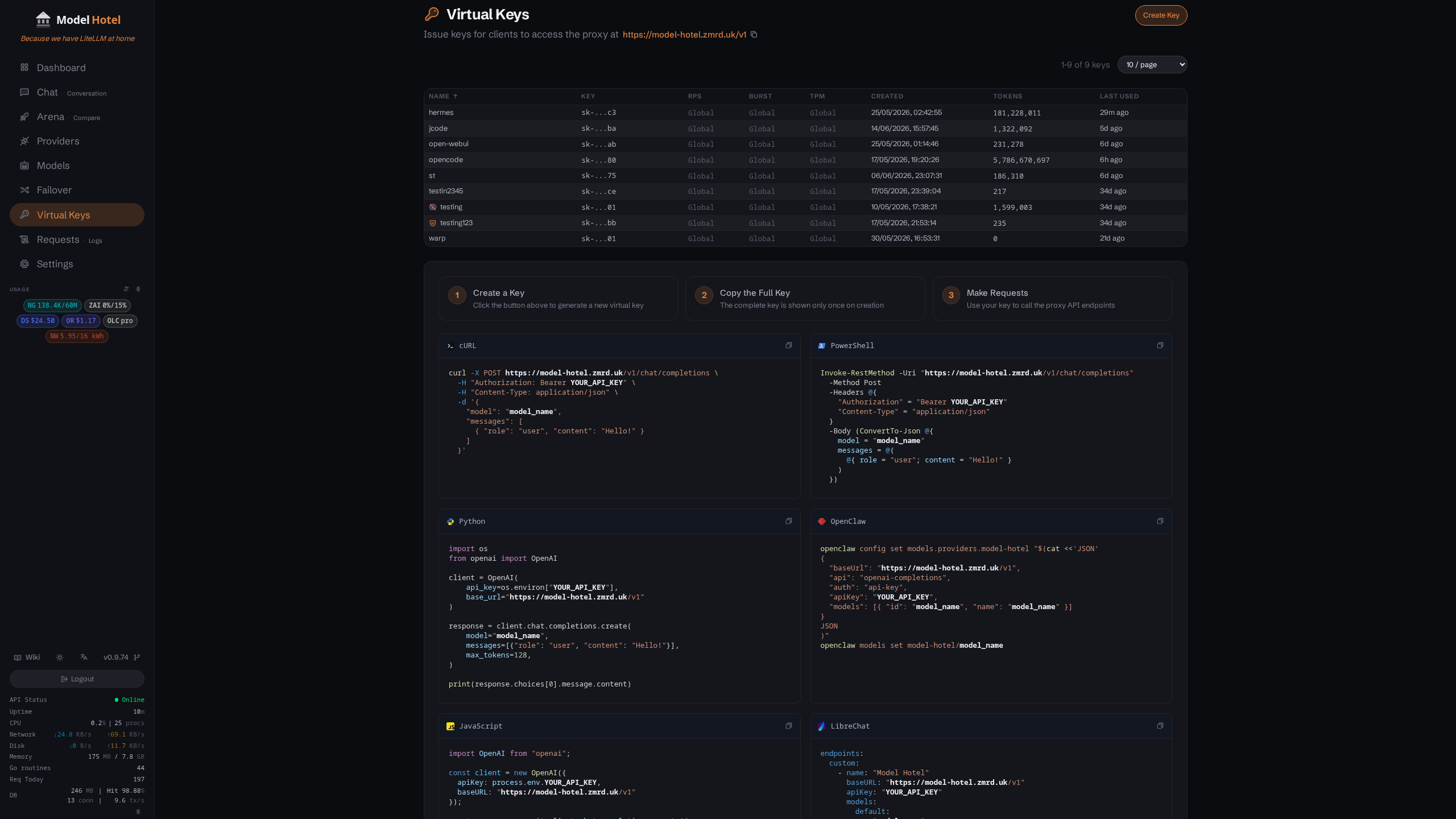
Virtual Keys page with name, preview, tokens used, last used timestamp, and delete button
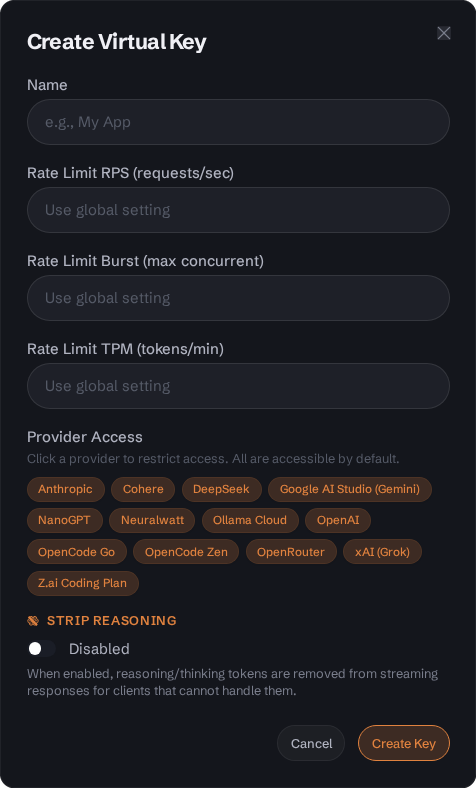
Key creation dialog - the plaintext key is shown only once
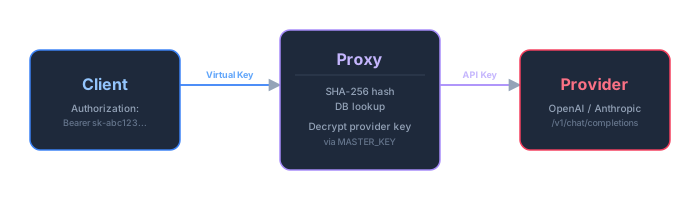
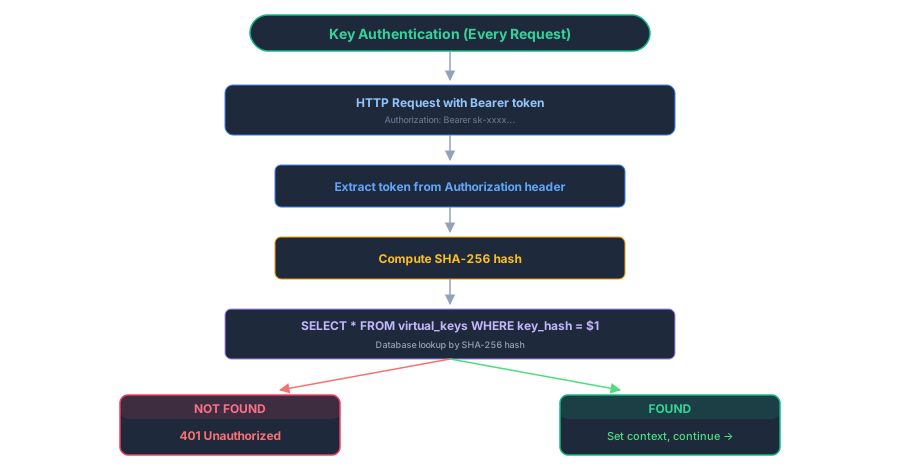
- Client includes a virtual key in the
Authorization: Bearer <virtual-key>header - Proxy hashes the key with SHA-256 and looks it up against the
virtual_keystable (1 DB query) - If the hash matches, the proxy sets the key identity in the request context
- Proxy looks up the requested model and provider
- Proxy decrypts the provider's real API key using
MASTER_KEY - Request is forwarded to the provider with the real API key
- Proxy streams the response back, logging token usage against the virtual key
Virtual keys follow the format: sk-<32 hex characters>
-
Prefix:
sk-(secret key identifier) - Payload: 32 hexadecimal characters (16 bytes of cryptographic randomness)
- Total length: 35 characters
-
Example:
sk-a1b2c3d4e5f6789012345678abcdef01
Keys are generated using Go's crypto/rand package (CSPRNG):
func Generate() (string, error) {
    key := make([]byte, 16)
    if _, err := io.ReadFull(cryptoRand.Reader, key); err != nil {
        return "", err
    }
    return "sk-" + hex.EncodeToString(key), nil
}-
Source:
crypto/rand- cryptographically secure pseudo-random number generator - Entropy: 128 bits (16 bytes × 8 bits)
- Encoding: Lowercase hexadecimal
- Uniqueness: Probability of collision is negligible (~1 in 2¹²⁸)
The key_preview field stores a human-readable identifier for the key:
-
Format: First 3 characters (including
sk-prefix) +...+ last 2 characters -
Example:
sk-a1b2c3d4e5f6789012345678abcdef01→sk-...01 - Purpose: UI identification without exposing the full key
-
Storage: Stored in plaintext alongside the hash in the
virtual_keystable
Virtual keys are never stored in plaintext. Only the SHA-256 hash is persisted:
func Hash(key string) string {
    hash := sha256.Sum256([]byte(key))
    return hex.EncodeToString(hash[:])
}| Property | Value |
|---|---|
| Algorithm | SHA-256 (FIPS 180-4) |
| Output | 256-bit (32-byte) digest |
| Encoding | Lowercase hexadecimal (64 characters) |
| Deterministic | Same input → same output |
| One-way | Cannot recover key from hash |
-
Storage: Only 64-character hex hash stored in
key_hashcolumn - Lookup: Incoming requests hash the provided token and compare hashes
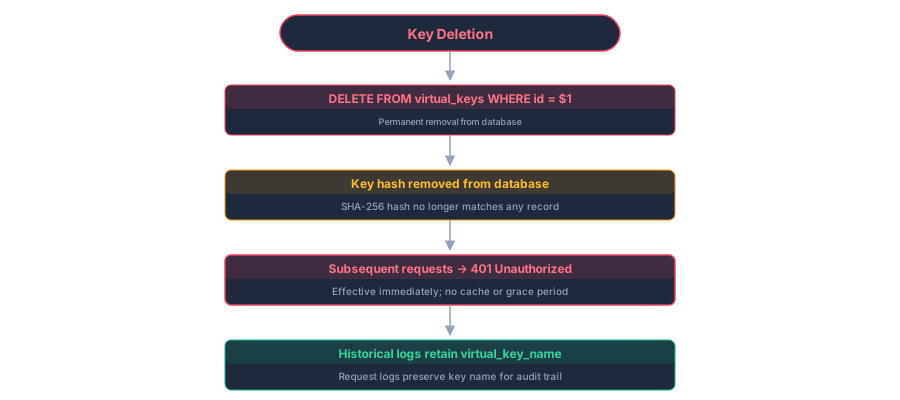
- Deletion: Removing a key from the database immediately invalidates it
- Rotation: Create a new key, update clients, delete the old key
- Recovery: Lost keys cannot be recovered - generate a new one
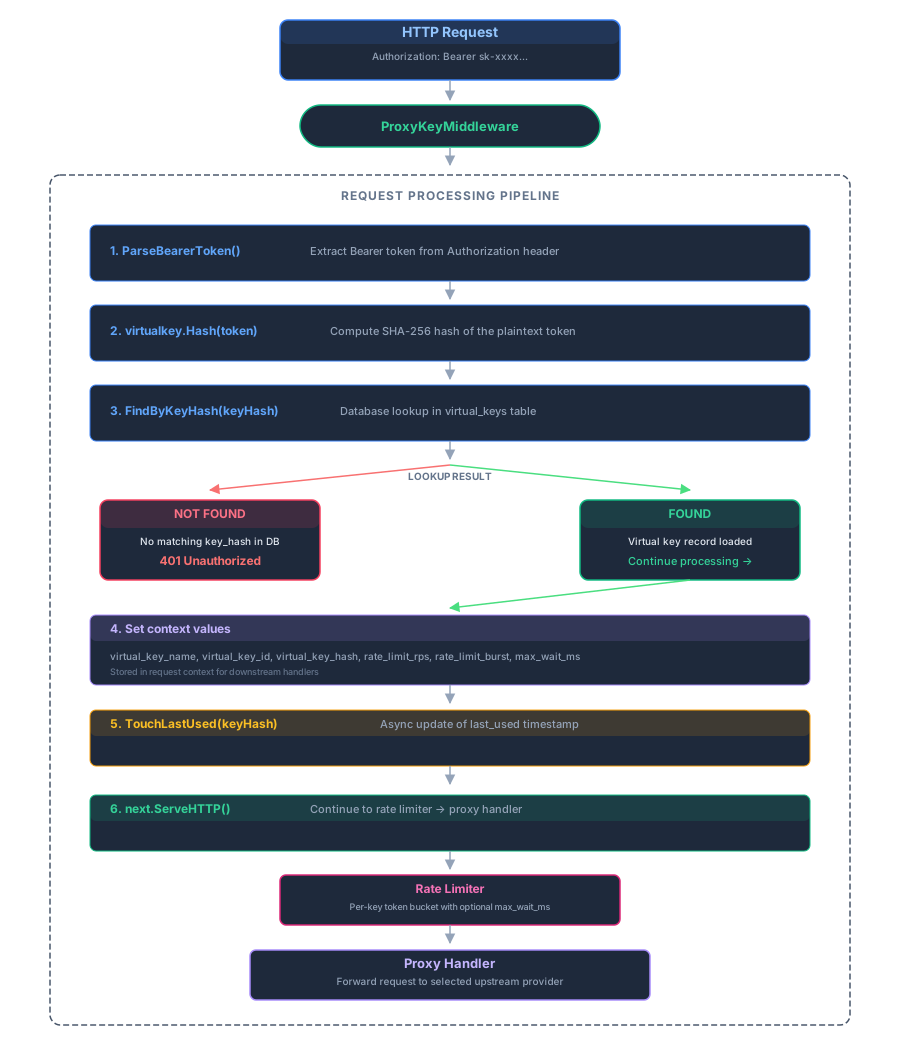
func (h *Handler) ProxyKeyMiddleware(next http.Handler) http.Handler {
    return http.HandlerFunc(func(w http.ResponseWriter, r *http.Request) {
        // 1. Extract Bearer token
        token, ok := util.ParseBearerToken(r)
        if !ok {
            writeOpenAIError(w, "Authorization header required (Bearer token)", http.StatusUnauthorized)
            return
        }

        // 2. Hash the token
        keyHash := virtualkey.Hash(token)

        // 3. Database lookup
        vk, err := h.virtualKeyRepo.FindByKeyHash(r.Context(), keyHash)
        if err != nil {
            if errors.Is(err, virtualkey.ErrNotFound) {
                writeOpenAIError(w, "Invalid virtual key", http.StatusUnauthorized)
            } else {
                writeOpenAIError(w, "Internal error", http.StatusInternalServerError)
            }
            return
        }

        // 4. Set context values for downstream handlers
        ctx := context.WithValue(r.Context(), virtualKeyNameKey, vk.Name)
        ctx = context.WithValue(ctx, virtualKeyIDKey, vk.ID)
        ctx = context.WithValue(ctx, VirtualKeyHashKey, keyHash)
        ctx = context.WithValue(ctx, ctxkeys.VirtualKeyRateLimitRPSKey, vk.RateLimitRPS)
        ctx = context.WithValue(ctx, ctxkeys.VirtualKeyRateLimitBurstKey, vk.RateLimitBurst)

        // 5. Async last-used update (non-blocking)
        go func(hash string) {
            tctx, tcancel := context.WithTimeout(context.Background(), 5*time.Second)
            defer tcancel()
            h.virtualKeyRepo.TouchLastUsed(tctx, hash)
        }(keyHash)

        next.ServeHTTP(w, r.WithContext(ctx))
    })
}After successful authentication, the following values are available in request context:
| Key | Type | Purpose |
|---|---|---|
virtual_key_name |
string |
Human-readable key name (e.g., "production-app") |
virtual_key_id |
uuid.UUID |
Database primary key |
virtual_key_hash |
string |
SHA-256 hash (64 hex chars) |
virtual_key_rate_limit_rps |
*float64 |
Per-key RPS override (nil = use global) |
virtual_key_rate_limit_burst |
*int |
Per-key burst override (nil = use global) |
virtual_key_rate_limit_tpm |
*int |
Per-key tokens-per-minute cap (nil = no cap / global default) |
virtual_key_allowed_providers |
*[]string |
Provider access restriction (nil = all providers) |
virtual_key_strip_reasoning |
bool |
Whether to strip reasoning fields from streaming output |
CREATE TABLE IF NOT EXISTS virtual_keys (
    id              UUID PRIMARY KEY DEFAULT gen_random_uuid(),
    name            TEXT NOT NULL,
    key_hash        TEXT NOT NULL UNIQUE,
    key_preview     TEXT NOT NULL DEFAULT '',
    tokens_used     BIGINT NOT NULL DEFAULT 0,
    last_used_at    TIMESTAMPTZ,
    created_at      TIMESTAMPTZ DEFAULT now(),
    rate_limit_rps  DOUBLE PRECISION DEFAULT NULL,
    rate_limit_burst INTEGER DEFAULT NULL,
    rate_limit_tpm  INTEGER DEFAULT NULL,
    allowed_providers TEXT[] DEFAULT NULL,
    strip_reasoning BOOLEAN NOT NULL DEFAULT false
);

CREATE INDEX IF NOT EXISTS idx_virtual_keys_key_hash ON virtual_keys(key_hash);| Column | Type | Constraints | Description |
|---|---|---|---|
id |
UUID |
PRIMARY KEY, DEFAULT gen_random_uuid()
|
Unique identifier |
name |
TEXT |
NOT NULL | Human-readable name (1-100 chars, printable) |
key_hash |
TEXT |
NOT NULL, UNIQUE | SHA-256 hash (64 hex characters) |
key_preview |
TEXT |
NOT NULL | First 3 + last 2 chars (e.g., sk-...01) |
tokens_used |
BIGINT |
NOT NULL, DEFAULT 0 | Cumulative token count (prompt + completion) |
last_used_at |
TIMESTAMPTZ |
NULLABLE | Last authentication timestamp |
created_at |
TIMESTAMPTZ |
DEFAULT now()
|
Creation timestamp |
rate_limit_rps |
DOUBLE PRECISION |
NULLABLE | Per-key RPS override (null = global default) |
rate_limit_burst |
INTEGER |
NULLABLE | Per-key burst override (null = global default) |
rate_limit_tpm |
INTEGER |
NULLABLE | Per-key tokens-per-minute cap (null = no cap / global default) |
allowed_providers |
TEXT[] |
NULLABLE | Provider IDs this key may use (null = all providers accessible) |
strip_reasoning |
BOOLEAN |
NOT NULL, DEFAULT false | Strip reasoning/reasoning_content fields from streaming output for this key |
| Migration | File | Changes |
|---|---|---|
004 |
internal/db/migrations/004_virtual_keys.sql |
Initial table creation |
005 |
internal/db/migrations/005_virtual_key_preview.sql |
Added key_preview column |
012 |
internal/db/migrations/012_add_virtual_key_id_to_request_logs.sql |
Added virtual_key_id to request_logs
|
029 |
internal/db/migrations/029_virtual_key_rate_limits.sql |
Added per-key rate limit columns |
037 |
internal/db/migrations/037_virtual_key_allowed_providers.sql |
Added allowed_providers (per-key provider access restriction) |
038 |
internal/db/migrations/038_virtual_key_strip_reasoning.sql |
Added strip_reasoning flag |
046 |
internal/db/migrations/046_virtual_key_rate_limit_tpm.sql |
Added rate_limit_tpm (per-key tokens-per-minute cap) |
All virtual key endpoints require Authorization: Bearer $ADMIN_TOKEN header.
Endpoint: POST /api/virtual-keys
Request Body:
{
  "name": "production-app",
  "rate_limit_rps": 5.0,
  "rate_limit_burst": 10,
  "rate_limit_tpm": 50000,
  "allowed_providers": ["provider-uuid-1"],
  "strip_reasoning": false
}| Field | Type | Required | Constraints |
|---|---|---|---|
name |
string |
Yes | 1-100 chars, printable Unicode, not reserved |
rate_limit_rps |
number |
No | Must be ≥ 0 (null = use global default) |
rate_limit_burst |
integer |
No | Must be ≥ 1 (null = use global default) |
rate_limit_tpm |
integer |
No | Tokens-per-minute cap, must be ≥ 1 (null = no cap / global default) |
allowed_providers |
array of UUID strings |
No | Restrict the key to the listed provider IDs (null/omitted = all providers; empty array rejected) |
strip_reasoning |
boolean |
No | Strip reasoning/reasoning_content from streaming output (default false) |
Reserved Names (cannot be used):
chatarenacompletionsadmin
These are reserved because they conflict with built-in URL paths.
Response (201 Created):
{
  "id": "550e8400-e29b-41d4-a716-446655440000",
  "name": "production-app",
  "key": "sk-a1b2c3d4e5f6789012345678abcdef01",
  "key_preview": "sk-...01",
  "tokens_used": 0,
  "last_used_at": null,
  "created_at": "2025-01-15T10:30:00Z",
  "rate_limit_rps": 5.0,
  "rate_limit_burst": 10,
  "rate_limit_tpm": 50000,
  "allowed_providers": ["provider-uuid-1"],
  "strip_reasoning": false
}
⚠️ Critical: Thekeyfield is returned only once on creation. It is never returned in subsequent API calls. Store it securely immediately.
Endpoint: GET /api/virtual-keys
Response (200 OK):
[
  {
    "id": "550e8400-e29b-41d4-a716-446655440000",
    "name": "production-app",
    "key": "",
    "key_preview": "sk-...01",
    "tokens_used": 125000,
    "last_used_at": "2025-01-15T14:22:00Z",
    "created_at": "2025-01-15T10:30:00Z",
    "rate_limit_rps": 5.0,
    "rate_limit_burst": 10,
    "rate_limit_tpm": 50000
  },
  {
    "id": "660e8400-e29b-41d4-a716-446655440001",
    "name": "dev-testing",
    "key": "",
    "key_preview": "sk-...ab",
    "tokens_used": 4500,
    "last_used_at": null,
    "created_at": "2025-01-14T08:15:00Z",
    "rate_limit_rps": null,
    "rate_limit_burst": null,
    "rate_limit_tpm": null
  }
]
Note: key is always empty string in list/get responses. rate_limit_* fields are null if using global defaults.
Endpoint: GET /api/virtual-keys/{id}
Response (200 OK):
{
  "id": "550e8400-e29b-41d4-a716-446655440000",
  "name": "production-app",
  "key": "",
  "key_preview": "sk-...01",
  "tokens_used": 125000,
  "last_used_at": "2025-01-15T14:22:00Z",
  "created_at": "2025-01-15T10:30:00Z",
  "rate_limit_rps": 5.0,
  "rate_limit_burst": 10,
  "rate_limit_tpm": 50000
}Endpoint: PUT /api/virtual-keys/{id}
Request Body:
{
  "name": "production-app-v2",
  "rate_limit_rps": 10.0,
  "rate_limit_burst": 20,
  "rate_limit_tpm": 30000
}
Response (200 OK):
{
  "id": "550e8400-e29b-41d4-a716-446655440000",
  "name": "production-app-v2",
  "key": "",
  "key_preview": "sk-...01",
  "tokens_used": 125000,
  "last_used_at": "2025-01-15T14:22:00Z",
  "created_at": "2025-01-15T10:30:00Z",
  "rate_limit_rps": 10.0,
  "rate_limit_burst": 20,
  "rate_limit_tpm": 30000
}Endpoint: DELETE /api/virtual-keys/{id}
Response: 204 No Content (empty body)
⚠️ Permanent Deletion: Keys are permanently deleted, not disabled. There is no "revoke" or "disable" endpoint. Once deleted:
- The key hash is removed from the database immediately
- Any subsequent request using that key receives
401 Unauthorized- Historical logs retain the
virtual_key_namefor auditing- Recovery is impossible - create a new key if needed
Each virtual key has an independent token bucket rate limiter.
| Setting | Default | Description |
|---|---|---|
rate_limit_enabled |
true |
Runtime toggle (DB setting) |
rate_limit_rps |
10 |
Requests per second (global default) |
rate_limit_burst |
20 |
Maximum burst size (global default) |
rate_limit_tpm |
0 |
Tokens-per-minute cap (global default; 0 = no cap; API-only, no Settings-UI control) |
Virtual keys can override global rate limits via rate_limit_rps and rate_limit_burst columns:
-
null: Use global settings fromsettingstable -
0for RPS: Unlimited requests (no rate limiting for this key) -
0for burst: Invalid - rejected on creation/update (must be ≥ 1)
In addition to the request-rate limiter above, each key can cap its tokens
per minute via rate_limit_tpm (a separate token-budget bucket, refilled at
tpm / 60 per second with a full minute's budget available at once):
-
null: No per-key override — falls back to the globalrate_limit_tpmsetting (default0= no cap). That global default is API-only; there is no Settings-UI control for it (per-VK is the primary surface). -
≥ 1: Cap the key's combined prompt + completion + reasoning tokens per minute.0is rejected on create/update (usenullfor no cap).
Because a request's token cost is unknown until it finishes, enforcement is admit-on-past-consumption, debit-on-completion: admission only checks whether the budget is already drained, and the actual token total is subtracted afterward. Consequently a key can overshoot by roughly one in-flight request's worth of tokens, and a single response larger than the whole minute budget still completes — it just blocks the next request until the budget refills. This is a consumer-side control: the rejected request never reaches the upstream provider, which is never throttled. Like the RPS limiter, the budget is in-process and not shared across replicas (effective limit is ~N× with N instances behind a load balancer).
When a key exceeds its rate limit:
HTTP/1.1 429 Too Many Requests
Retry-After: 2
X-RateLimit-Limit: 10
X-RateLimit-Remaining: 0
X-RateLimit-Burst: 20
Content-Type: application/json

{
  "error": {
    "message": "Rate limit exceeded",
    "type": "rate_limit_error",
    "code": 429
  }
}
- Stale buckets: Automatically removed after 10 minutes of inactivity
- Disable → Re-enable: All buckets reset when rate limiting is re-enabled at runtime
Two additional per-key controls:
-
allowed_providersrestricts which providers a key may route to. When set, requests resolving to a provider outside the list are rejected, andhotel/failover candidates from disallowed providers are skipped.nullmeans all providers are accessible; an empty array is rejected on create/update (usenullto clear the restriction). -
strip_reasoningremovesreasoning/reasoning_contentfields from streaming output for that key - useful for clients that mishandle reasoning deltas from thinking models. Token counting is unaffected.
Both are configurable on key creation and update (API or dashboard).
Token usage is tracked per virtual key:
func (r *Repository) AddTokens(ctx context.Context, keyHash string, tokens int) error {
    _, err := r.pool.Exec(ctx,
        `UPDATE virtual_keys SET tokens_used = tokens_used + $1, last_used_at = now() WHERE key_hash = $2`,
        tokens, keyHash)
    return err
}- When: After successful proxy request completion
-
What:
prompt_tokens + completion_tokensfrom provider response - How: Async fire-and-forget with 5-second timeout
- Accuracy: Best-effort tally - may lag behind actual usage
Updated on every authenticated request:
func (r *Repository) TouchLastUsed(ctx context.Context, keyHash string) error {
    _, err := r.pool.Exec(ctx,
        `UPDATE virtual_keys SET last_used_at = now() WHERE key_hash = $1`,
        keyHash)
    return err
}-
When: During
ProxyKeyMiddleware(async, non-blocking) - Timeout: 5 seconds (prevents blocking proxy path)
- Purpose: Identify active vs. dormant keys for cleanup
# Set virtual key
export PROXY_KEY="sk-a1b2c3d4e5f6789012345678abcdef01"

# List available models
curl http://localhost:8081/v1/models \
  -H "Authorization: Bearer $PROXY_KEY"

# Chat completion
curl -X POST http://localhost:8081/v1/chat/completions \
  -H "Authorization: Bearer $PROXY_KEY" \
  -H "Content-Type: application/json" \
  -d '{
    "model": "hotel/gpt-4o",
    "messages": [{"role": "user", "content": "Hello!"}]
}'import openai
client = openai.OpenAI(
base_url="http://localhost:8081/v1",
api_key="sk-a1b2c3d4e5f6789012345678abcdef01"
)
response = client.chat.completions.create(
model="hotel/gpt-4o",
messages=[{"role": "user", "content": "Hello!"}]
)
print(response.choices[0].message.content)import OpenAI from 'openai';
const client = new OpenAI({
baseURL: 'http://localhost:8081/v1',
apiKey: 'sk-a1b2c3d4e5f6789012345678abcdef01'
});
const response = await client.chat.completions.create({
model: 'hotel/gpt-4o',
messages: [{ role: 'user', content: 'Hello!' }]
});
console.log(response.choices[0].message.content);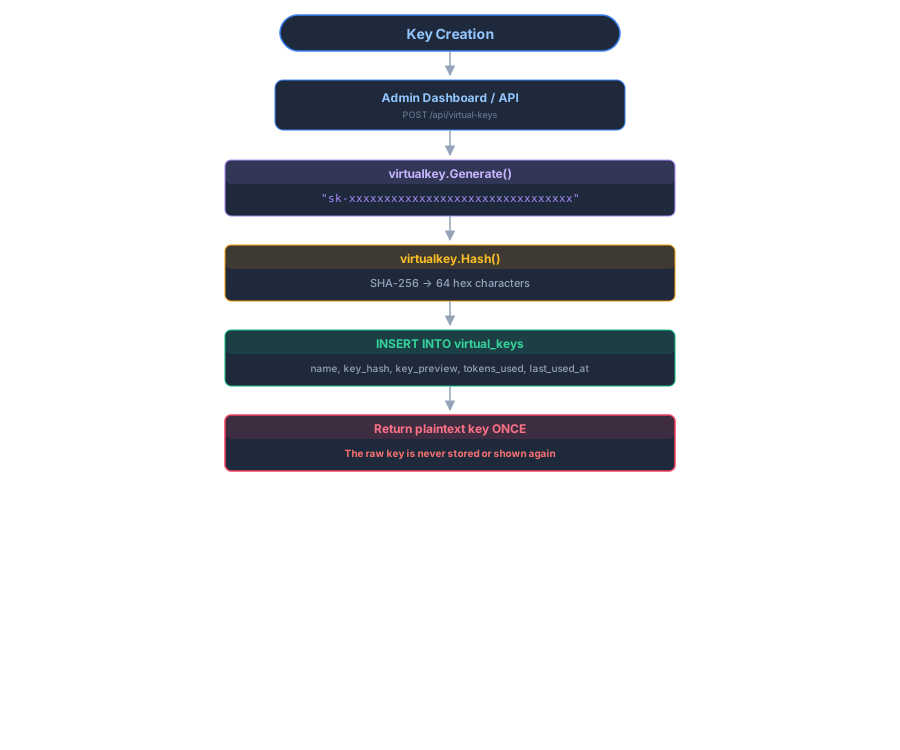
- Create new virtual key via API/dashboard
- Update client applications with new key
- Monitor usage of old key (via
last_used_at) - Delete old key when no longer needed
| Property | Implementation |
|---|---|
| Storage | SHA-256 hash only - raw key never persisted |
| Key format |
sk- + 32 hex chars (128 bits entropy) |
| Key preview | First 3 + last 2 chars stored as key_preview (e.g., sk-...01) |
| Deletion | Permanent - DELETE removes key entirely |
| Per-key tracking | Token usage logged per virtual key |
| Rate limiting | Independent token bucket per key |
| Audit trail | Logs retain virtual_key_name after deletion |
Symptoms: Requests rejected with Invalid virtual key
Causes:
- Key was deleted from database
- Typo in key value
- Missing
Bearerprefix in Authorization header - Key was never created (check creation response)
Resolution:
- Verify key exists:
GET /api/virtual-keys - Check
key_previewmatches your key's last 4 chars - Ensure header format:
Authorization: Bearer sk-...
Symptoms: Rate limit exceeded (request rate) or token rate limit exceeded (TPM), both with a Retry-After header
Resolution:
- Check per-key limits:
GET /api/virtual-keys/{id} - Increase
rate_limit_rpsor set to0for unlimited - Increase
rate_limit_burstfor traffic spikes - For
token rate limit exceeded, raise or clear (null)rate_limit_tpm - Wait for
Retry-Afterseconds before retrying
Symptoms: Plaintext key not saved; only preview available
Resolution:
- Impossible to recover - this is by design
- Create a new key and update clients
- Delete the old key once migrated
- Security - How provider keys are encrypted and managed
- Configuration - Global and per-key rate limit configuration
- Request Logging - How virtual keys appear in audit logs