High Availability
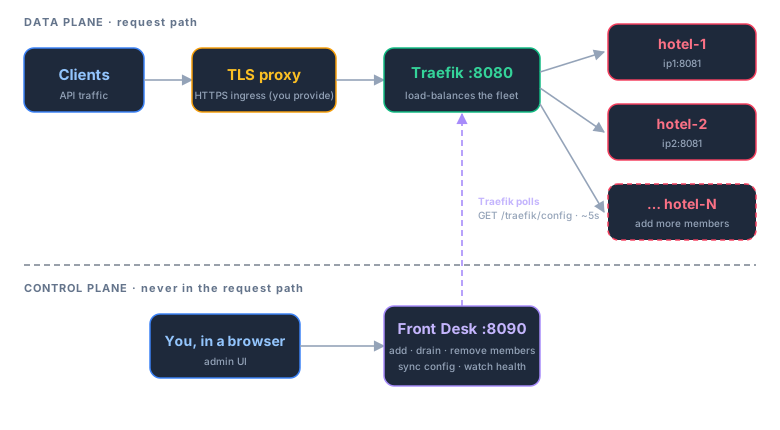
Run two or more independent Model Hotel installations behind a single client endpoint, with no client-side change. This is the Front Desk HA stack: a Traefik v3 data plane that carries traffic, and a small Front Desk control-plane app where you manage membership in a browser.
Front Desk is never in the request path. If it stops, Traefik keeps serving with the last config it fetched; only membership changes pause until it returns.
- Architecture Overview
- What You Deploy
- Prerequisites
- Quick Start
- Drop-in Migration Runbook
- Three Secrets, Three Jobs
- Admin Authentication (Passkeys & TOTP)
- Replicating Config Across the Fleet
- TLS Proxy
- Observability
- Alerting
- What This Does and Does Not Give You
- Acceptance Checks
-
Traefik (data plane) carries all client traffic and load-balances across
members. It pulls its routing config from Front Desk over the internal compose
network via Traefik's HTTP provider, polling
GET /traefik/configevery ~5s. - Front Desk (control plane) is a small Go binary with an embedded SQLite database and its own web UI. You add, drain, and remove members here, replicate config across the fleet, and watch health. It is never in the request path.
- Members are normal, independent Model Hotel installs (app + their own Postgres), each on its own host and update schedule. The HA stack does not touch them beyond reading health/version and pushing config when you sync.
Because Traefik caches the last config it fetched, a Front Desk outage degrades gracefully: traffic keeps flowing, and only membership changes wait.
Everything lives in
deploy/ha/:
-
docker-compose.yml- Traefik + Front Desk, two containers. -
.env.example- copy to.envand fill in the secrets.
- A TLS-terminating reverse proxy in front of the stack. Ingress is HTTPS-only. This stack speaks plain HTTP internally; an external proxy (nginx, Caddy, nginx-proxy-manager, etc.) terminates TLS for both published ports. There is no plain-HTTP ingress path. Passkeys require HTTPS and work the moment TLS is in front.
-
The same
MASTER_KEYon every member (see Three Secrets). -
TRUSTED_PROXIESon every member, including the HA host and the edge proxy, so per-IP rate limiting and logs see real client IPs.
cd deploy/ha
cp .env.example .env
# Edit .env: set FRONTDESK_PUBLIC_ORIGIN, FRONTDESK_MASTER_KEY, etc.
docker compose up -d        # or, from the repo root: make ha-up
docker compose logs -f      # capture the generated FRONTDESK_TOKEN if you left it blank
Build stamping: the Front Desk footer shows the version and commit stamped in at build time.
make ha-up(from the repo root) passes both into the build; a baredocker compose up -dbuilt from source does not, so its footer readsdev. The prebuilt image (uncommentimage:in the compose file) carries its own release stamp.
Traefik answers client traffic on :8080; Front Desk's UI is on :8090. Point
your external TLS proxy at both (see TLS Proxy).
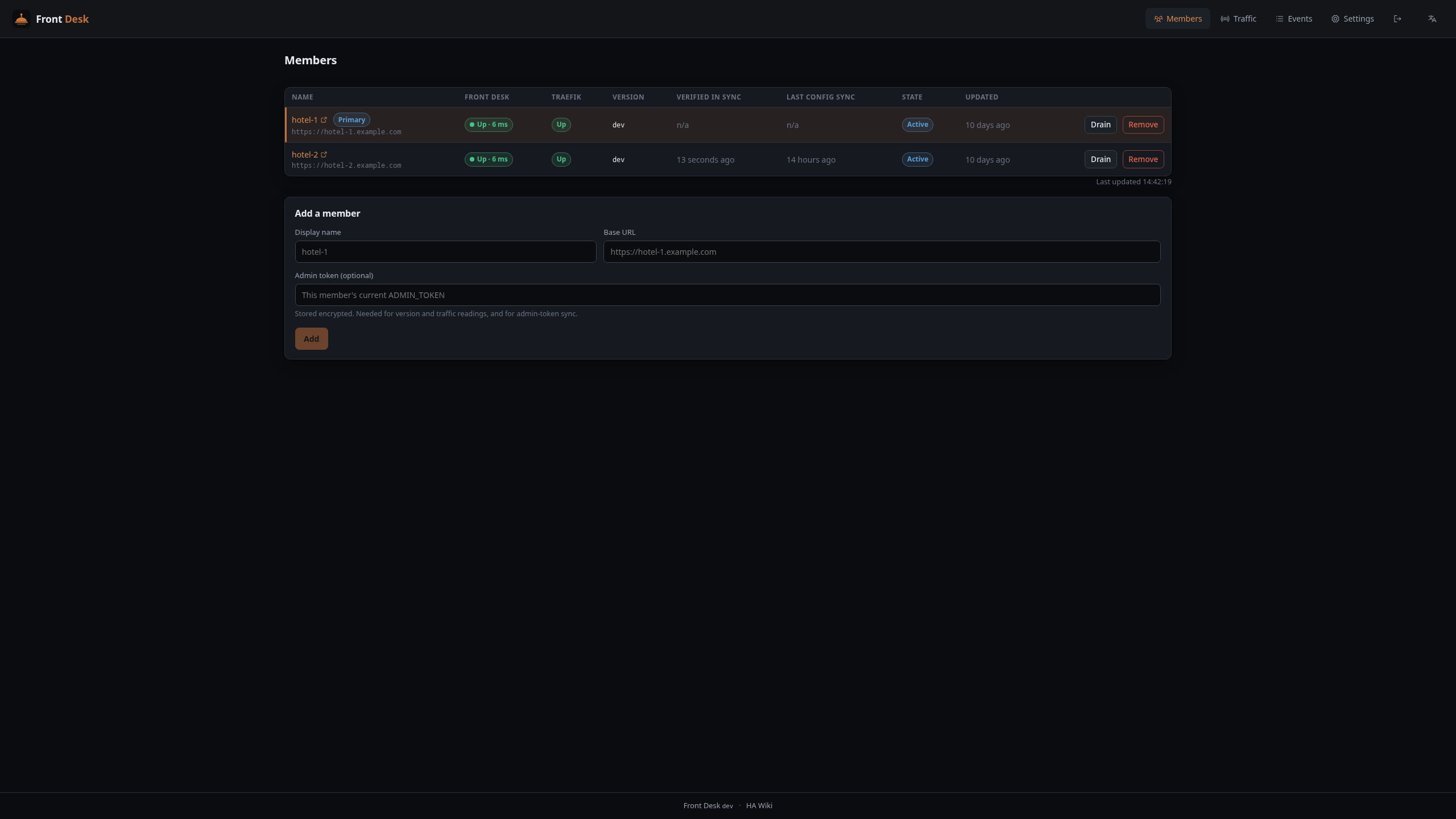
You have one instance at ip1:8080. Move it aside and let the HA stack take over
:8080 so clients never change their base URL.
- On the existing host: change the published port
8080to8081, thendocker compose up -d. - Copy
deploy/ha/to the HA host, fill in.env,docker compose up -d. Traefik now answers on:8080; clients work again. - In Front Desk: add
http://ip1:8081as "hotel-1" (supplying its admin token), confirm the health badge is green. Front Desk highlights the first member as the default config-sync primary (the instance the rest of the fleet copies). - On machine 2: deploy Model Hotel on
:8081with the sameMASTER_KEYandTRUSTED_PROXIESincluding the HA host. Each member keeps its own dashboardADMIN_TOKEN; supply it to Front Desk when adding the member. To sign in to every dashboard with one password, set the sameADMIN_TOKENon each member (a shared env secret, likeMASTER_KEY). - In Front Desk: add
http://ip2:8081as "hotel-2" (supplying its admin token), then converge its config from the primary via Settings -> Fleet sync wizard. - Repeat steps 4-5 for each additional member. Same secrets, add it with its admin token, run the config sync.
- Maintenance: drain a member in Front Desk, rebuild it, re-activate. Re-run the config sync after any provider/key/settings change on the primary.

Do not conflate these:
-
FRONTDESK_TOKENlogs you into the Front Desk UI. Its own secret, unrelated to any member. Leave it blank in.envto auto-generate one printed once to the logs on first boot. -
A member's
ADMIN_TOKENlogs you into that member's dashboard, reached directly by that member's own URL (the LB serves/v1only, not dashboards). It is per-member; set the same value on every member if you want one password to log into them all. Front Desk stores each member's token (you supply it when adding the member) so it can authenticate to it; it never changes them for you. -
MASTER_KEYis not a login. It is the AES-256-GCM key that decrypts each member's provider API keys at rest.
Plus, internal to Front Desk: FRONTDESK_MASTER_KEY encrypts the member
admin tokens (and Front Desk's own TOTP secret) that Front Desk stores. It is
independent of any member's MASTER_KEY.
Backup/restore is raw pg_dump/pg_restore, so provider keys travel as
ciphertext. A member with a different MASTER_KEY restores the rows but cannot
decrypt them, leaving every provider dead there. It is a live decryption secret:
set it out-of-band, the same way you would a shared DB password, never
auto-transmitted between instances.
internal/admin persists the credential as sha256:<hex> in
DATA_DIR/admin-token (a file, not the DB, so pg_dump skips it) and validates
by hash-compare. The file is authoritative; the ADMIN_TOKEN env only seeds it
when missing. To use one password across the fleet, set the same ADMIN_TOKEN on
every member before its first boot (a shared env secret, exactly like
MASTER_KEY). API clients use virtual keys and never see it.
Because the admin-token file is authoritative, editing .env and rebuilding
does not change an existing member's token when DATA_DIR persists (the
normal case). To rotate a member's token, delete its DATA_DIR/admin-token file
(it regenerates on the next boot, printed once to the logs) or set a new
ADMIN_TOKEN on a fresh DATA_DIR, then update that member's stored token in
Front Desk. The data plane (/v1 traffic) is unaffected; clients use virtual keys.
Front Desk's own login supports a raw token (FRONTDESK_TOKEN), and optionally a
passkey (WebAuthn) and authenticator-app TOTP, managed under Front Desk's
Settings → Security. Passkeys require the stack to be reached over HTTPS,
which the external TLS proxy provides.
Two things are worth understanding about authentication in an HA deployment:
- Passkeys and TOTP are per-instance and are never synced. Config sync pushes only providers, virtual keys, and the syncable settings subset; it does not read, write, or transfer WebAuthn credentials or TOTP secrets. Each member keeps its own in its own Postgres, and Front Desk keeps its own in its own SQLite. This is by design: a passkey is bound to an origin (its relying-party ID is the hostname), so a credential created for one origin would not validate against another anyway. Register a passkey on each surface you actually log in to.
- The passkey button only appears once a passkey exists. A freshly provisioned instance shows token (and TOTP, if enabled) login but not a passkey button, because no credential is registered yet. Register one under Settings → Security and the button appears on the next login.

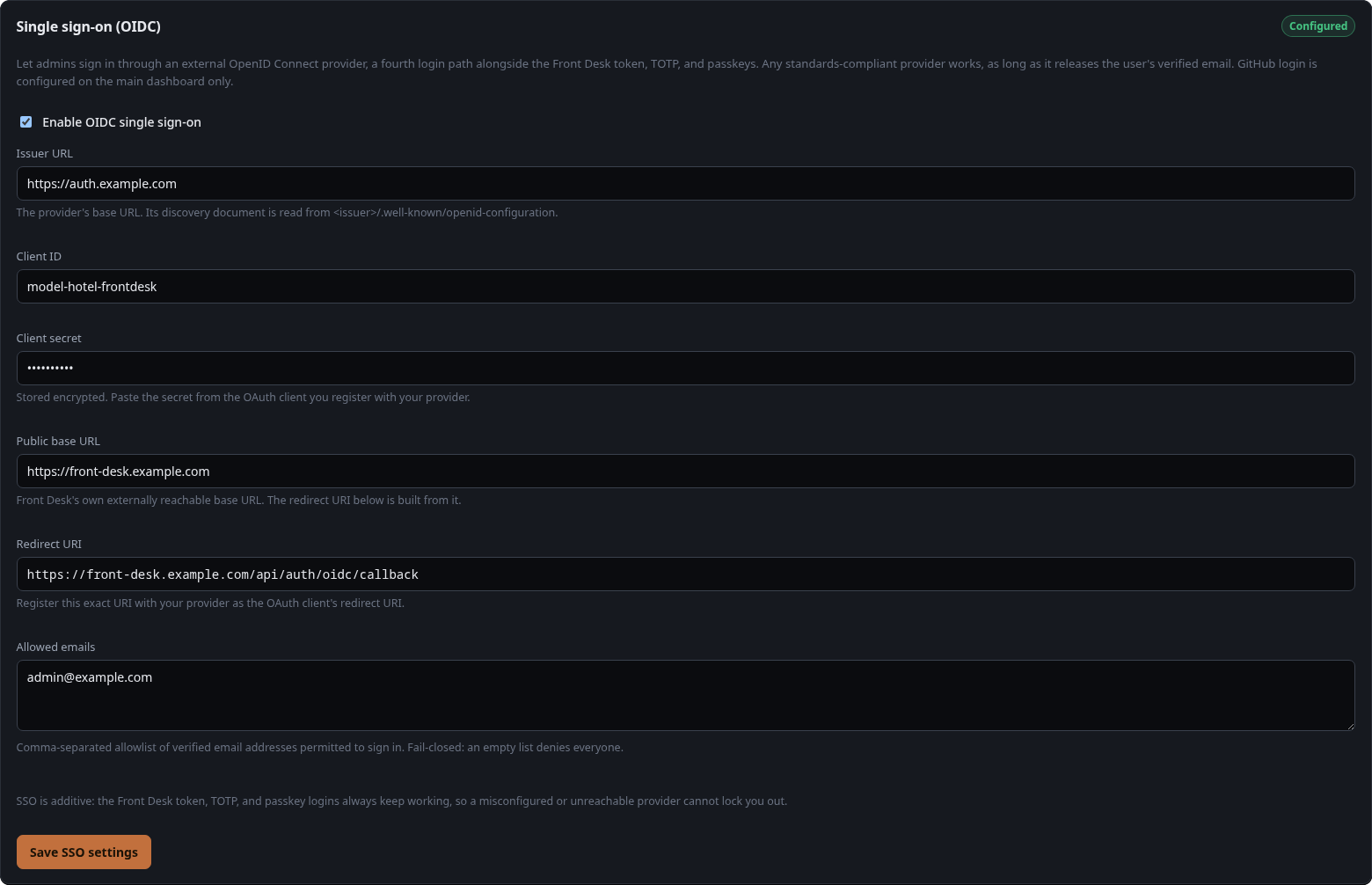
Front Desk's admin login also accepts OpenID Connect single sign-on as a third path alongside the token, passkey, and TOTP — useful when you already operate an OIDC provider (Authentik, Authelia, Keycloak, Pocket ID, Okta, Google, …) for the rest of your infra. Configure it under Settings → Single sign-on (OIDC): paste the issuer URL, client ID, and client secret from an app you register with your provider, point the provider's redirect URI at <Front Desk public origin>/api/auth/oidc/callback, and list the verified emails allowed to sign in. A Sign in with SSO button then appears on the Front Desk login screen.
This is Front Desk's own login — independent of each member's admin login and of the main gateway's SSO — and lives in Front Desk's SQLite, the client secret encrypted at rest with FRONTDESK_MASTER_KEY. Local login (token / passkey / TOTP) never goes away, so a misconfigured or unreachable provider cannot lock you out.
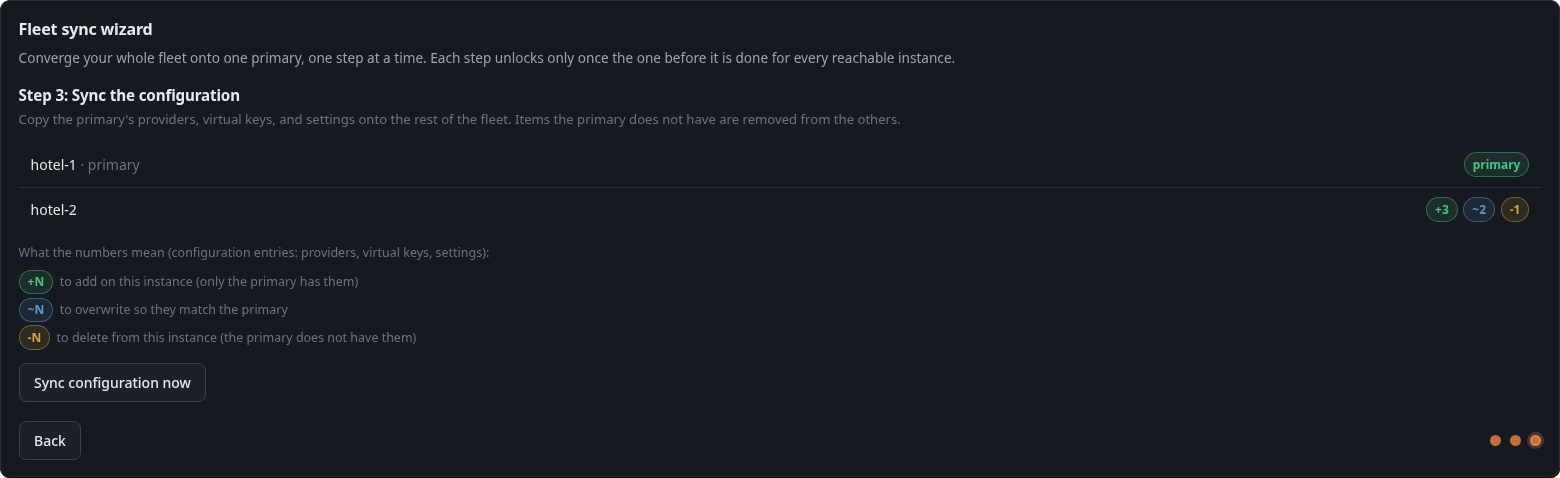
A fresh member starts empty: no providers, no virtual keys. Instead of re-entering everything on each instance, replicate one member's configuration to the rest from Front Desk → Settings → Config sync.
You pick a primary (the config source of truth); Front Desk pulls its config and pushes it to every other member so the fleet converges. Because replacing config can remove providers or keys on a replica, the wizard shows a per-member diff (added / overwritten / removed) and double-confirms before it writes.
What replicates, and what does not:
| Replicated (config) | Stays per-instance |
|---|---|
| Providers (including their encrypted keys) | Request logs, metering, events |
| Virtual keys (matched by hash) | Backups, runtime stats |
| Syncable settings (discovery, timeouts, circuit breaker, hedging, backups, retention) | Passkeys / TOTP (auth is per-instance) |
| Alerting destination (apprise URL/targets) |
Models and failover groups are not copied: each member rediscovers models from the synced providers and re-forms failover groups automatically. Manual model overrides (a custom disable or rename) are a planned follow-up.
Provider keys travel as stored ciphertext and decrypt on each member because the
fleet shares MASTER_KEY. A member whose MASTER_KEY differs is flagged
blocked and nothing is written to it. A virtual key's per-key provider
restriction is carried by provider name and re-resolved to each member's own
provider IDs.
Runbook:
- Configure providers and virtual keys on the primary as usual.
- Front Desk → Settings → Config sync → choose the primary. The preview shows, per member, what will be added, updated, or removed, and flags blocked members. Anything the primary lacks is removed from a replica that has it, so review before confirming.
- Confirm. Before overwriting a member that will actually change, Front Desk asks it to snapshot itself first (badged FD, spared from GFS rotation), so a bad sync can be rolled back; a member whose backup fails is left untouched and reported. Each member is independent, and re-running retries any left behind. Request logs and metering are never touched.
The runbook above is the manual path. For an unattended fleet, Front Desk → Settings → Automatic config sync lets you designate a primary and flip auto-sync on; from then on you only manage the primary. Flipping it on converges the fleet to the primary right away, then Front Desk watches the primary's config and propagates any change to providers, virtual keys, or syncable settings across the fleet by itself. The Members table's Last Config Sync column shows when each member last converged and why.
Two safety properties make this safe to leave running:
- Backed up first. As in the wizard, each member is asked to snapshot itself before being overwritten (badged FD in its backup list and spared from GFS rotation), so a bad propagation can be rolled back.
-
Converges, does not thrash. A change is propagated only after it settles,
members already matching the primary are skipped, and an unreachable or
MASTER_KEY-blocked member is retried later rather than overwritten. - Newer config always wins. Each push carries a monotonic source generation, and a member refuses any import older than the one it has already applied, so repointing the primary while an earlier push is still in flight can never strand a member on the older config. The fence engages when both ends run this build; an older member applies in arrival order as before.
It reacts to changes on the primary; it is not a continuous reconciler. A direct edit on a replica (managed members are read-only, so you shouldn't) sits until the primary next changes, when the full config is pushed and the replica is brought back in line. There is no constant per-replica revert loop.
Automatic sync is off by default: it trades the per-change diff review for convenience. Leave it off to approve every fleet-wide change by hand, or turn it on once you trust the primary as the source of truth.
Put a real TLS proxy in front of both published ports. Example nginx, two hostnames:
# Client traffic: the /v1 proxy API only (the LB 404s everything else).
server {
    listen 443 ssl;
    server_name hotel.example.com;
    # ssl_certificate / ssl_certificate_key ...
    location / {
        proxy_pass http://HA_HOST:8080;
        proxy_set_header Host $host;
        proxy_set_header X-Forwarded-For $proxy_add_x_forwarded_for;
        proxy_set_header X-Forwarded-Proto $scheme;
        proxy_http_version 1.1;          # keep streaming/SSE alive
        proxy_buffering off;
    }
}

# Front Desk admin UI: a separate hostname.
server {
    listen 443 ssl;
    server_name frontdesk.example.com;
    # ssl_certificate / ssl_certificate_key ...

    # Defense in depth: /traefik/config is unauthenticated (Traefik fetches it
    # over the compose network and it carries no secrets, only member URLs and
    # settings). Do not expose it through the public proxy.
    location = /traefik/config { return 404; }
    location /traefik/ { return 404; }

    location / {
        proxy_pass http://HA_HOST:8090;
        proxy_set_header Host $host;
        proxy_set_header X-Forwarded-For $proxy_add_x_forwarded_for;
        proxy_set_header X-Forwarded-Proto $scheme;
        proxy_http_version 1.1;
        proxy_buffering off;
    }
}
Set FRONTDESK_PUBLIC_ORIGIN=https://frontdesk.example.com and
FRONTDESK_TRUSTED_PROXIES to the proxy's address in .env.
The Traefik access log is off by default to avoid logging request lines. Front Desk's Events tab records control-plane facts only: membership changes, health transitions tagged by source, config lifecycle, and a warning when Traefik has not polled for too long (the one silent failure mode of the HTTP-provider design). No request or prompt content is ever logged.
Front Desk also serves Prometheus metrics at /metrics on the admin port,
covering the control-plane domain (Front Desk is never in the request path, so
there are no request or token metrics here): member counts by state
(frontdesk_members_total), per-member health and probe latency
(frontdesk_member_up, frontdesk_member_health_latency_seconds), the last
applied config sync per member
(frontdesk_last_config_sync_timestamp_seconds), poll-loop timing
(frontdesk_poll_duration_seconds), and config-sync plus alert-dispatch
outcome counters (frontdesk_config_sync_total,
frontdesk_alerts_dispatched_total), alongside the standard Go process
metrics. Member names appear as labels; member secrets never do.
The endpoint is never unauthenticated: set FRONTDESK_METRICS_TOKEN in .env
to give Prometheus its own bearer (so the scrape config does not hold the admin
token), or leave it unset and scrape with the admin login. Example scrape
config:
scrape_configs:
    - job_name: frontdesk
      metrics_path: /metrics
      scheme: https
      authorization:
          credentials: <FRONTDESK_METRICS_TOKEN>
      static_configs:
          - targets: ["frontdesk.example.com"]
The Settings page's Observability panel shows whether a dedicated scrape token is configured, next to the JSON-logs and OTLP log-export status.
Front Desk can push a notification when something happens in the fleet, so you do not have to watch the Events tab. It mirrors the main gateway's alerting: Front Desk POSTs a one-line event summary to a stateless apprise-api container you run, which fans it out to Telegram, Discord, email, ntfy, and dozens more. Only routing metadata is sent, never request or prompt content.
Run an apprise service reachable from Front Desk (a commented-out example ships
in deploy/ha/docker-compose.yml), then in Front Desk Settings -> Alerts: set
the Apprise API URL (e.g. http://apprise:8000), paste your notification
target(s), and pick which events to be notified about. The picker defaults to the
high-signal HA events (a member going down or recovering, a config sync failing, a
member's version read failing repeatedly); membership and routing events are
available but off by default. The target is encrypted at rest with
FRONTDESK_MASTER_KEY, and a Send test button confirms delivery end to end.
This is the same apprise-api the main gateway uses, so one container can serve
both.
- Bounded loss. Unplanned death of a member loses only its in-flight requests; Traefik retries not-yet-streamed failures onto a healthy member.
- Zero-loss planned maintenance. Drain a member: established streams finish, new requests go elsewhere.
- Not Postgres HA, not LB redundancy: the HA host and each member's Postgres remain single points of failure for their own scope (accepted at homelab scale). Cross-instance config replication is built in (the fleet-sync wizard, or automatic config sync), but member databases themselves still rely on per-member backup/restore discipline.
- Drop-in swap (runbook 1-3); client traffic uninterrupted after step 2.
- Kill member 1 mid-stream: that stream breaks, retry lands on member 2, badge goes red within seconds.
- Drain member 2 during a long stream: the stream completes, no new requests arrive; rebuild, re-activate, badge green; browser SSE reconnects.
- A virtual key created on member 1 and backup-restored to member 2 authenticates on both.
- Token (and, where registered, passkey/TOTP) login works through the proxy.
- Events carry correct source attribution; the "Traefik stopped polling" warning fires when Traefik is stopped while Front Desk runs.