Admin User Accounts and Roles
- Introduction
- Add user account
- Edit user account
- Managing roles in advanced administration
- Pre-set roles and privileges
Page allowing to manage user accounts is available from the "System Administration" page.
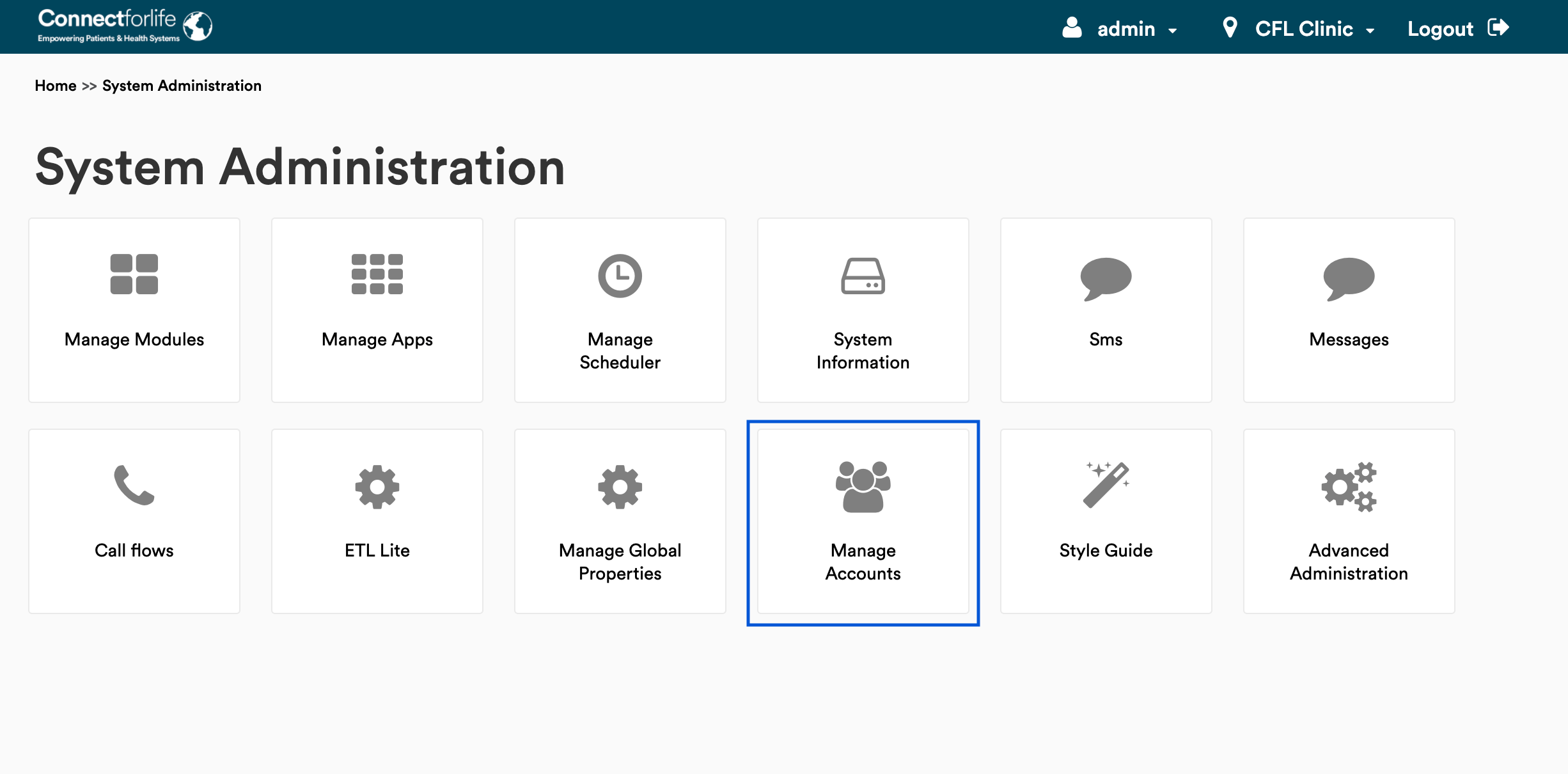
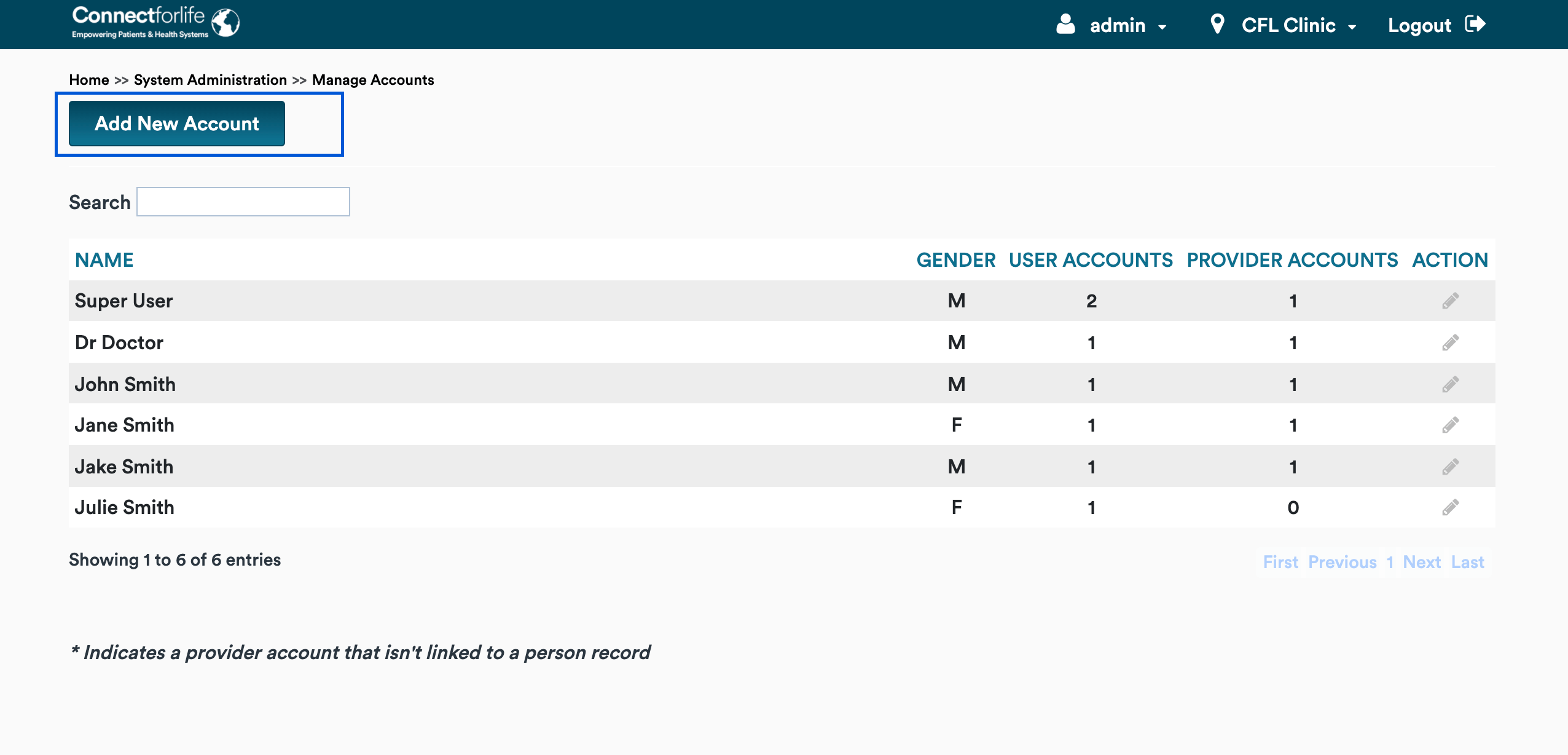
To add a new user account, you need to click the "Add New Account" button.
On this page, in the "Person Details" section, applicable person details need to be filled in.

In the "User Account Details"" section, "Username", "Locations", "User Role" and "Password" are mandatory fields.

- Username must be between 2 and 50 characters and only letters, digits, '.', '-', and '_' are allowed.
- It is possible to add multiple locations to one user by choosing different ones after each other from the dropbox. This location will determine to which location this user can login and view visits.
- The user role will determine the type of account. One user can only be linked to one user role.
| User Role | |
|---|---|
| Admin | System Developer |
| Analyst | Privilege Level: Analyst |
| Doctor | Privilege Level: Doctor |
Password needs to be at least 8 characters long and it should have at least one uppercase, one lowercase and one digit. The password should be retyped in the “Confirm Password” field.
If the "Force Password Change" checkbox is checked, password change is required after the first login.
Clicking the "pen" icon near an account opens it’s "Edit account" page.

More information about administering user accounts can be found on the OpenMRS wiki page.
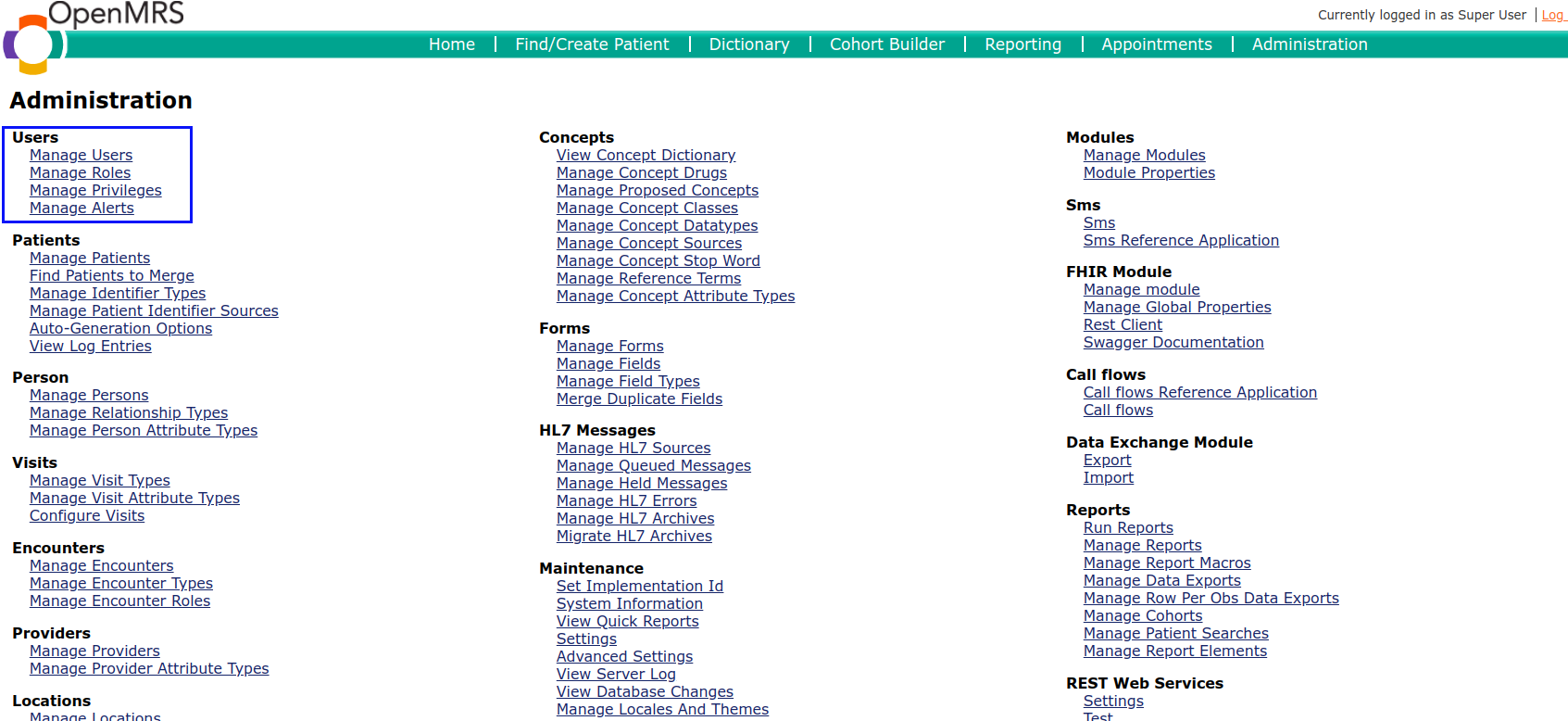
In Advanced Administration, there is a “Manage Roles” link in the "Users" section.
After clicking it, a user is redirected to the "Role Management" Page.
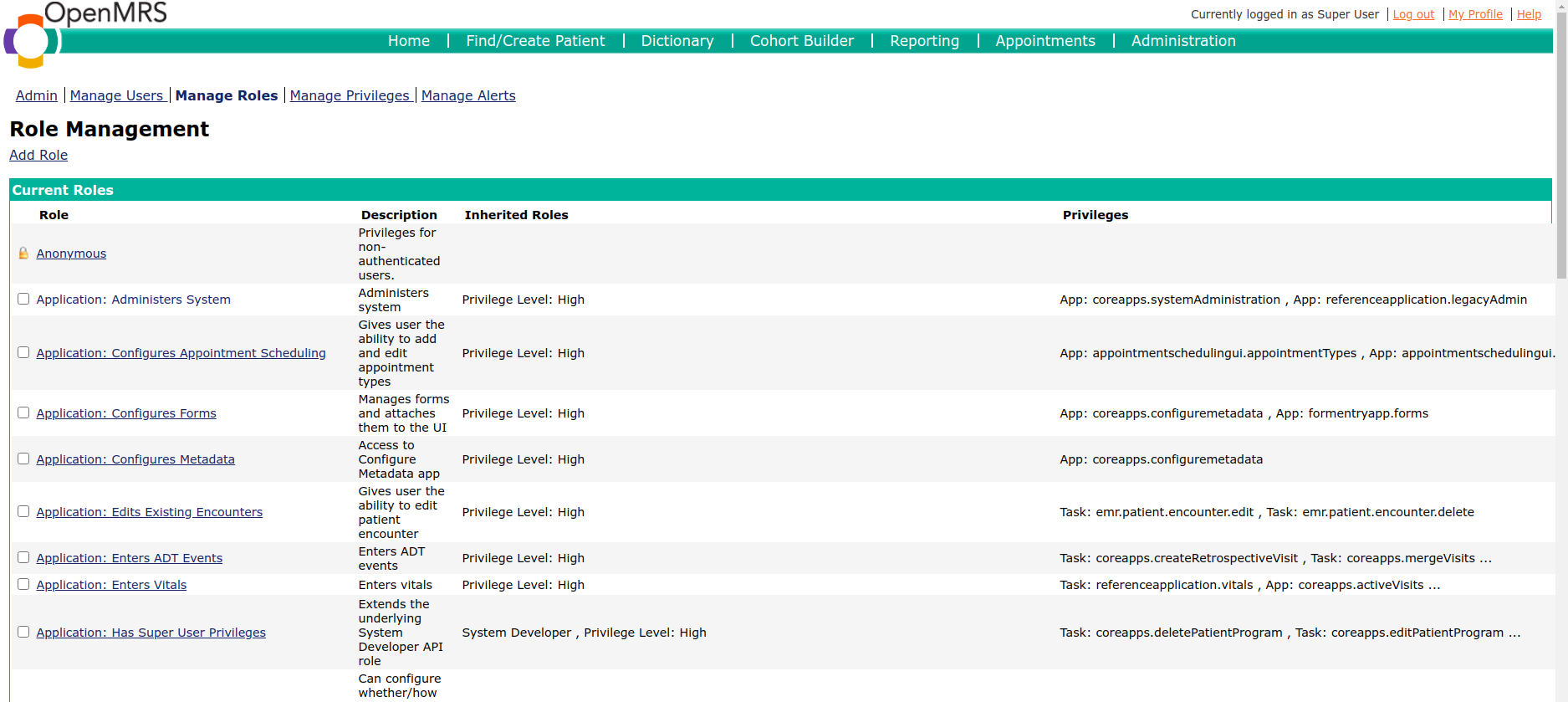
By clicking the “Add Role” link, you can add a new role.
On the "Add role" page, you need to fill in the “Role” and “Description” fields (role field is required) and choose some inherited roles. Inherited roles starting from “Application” represent capabilities on system administration’s manage account feature. Inherited roles starting from “Privilege Level:” represent privilege level on system administration’s manage account feature.
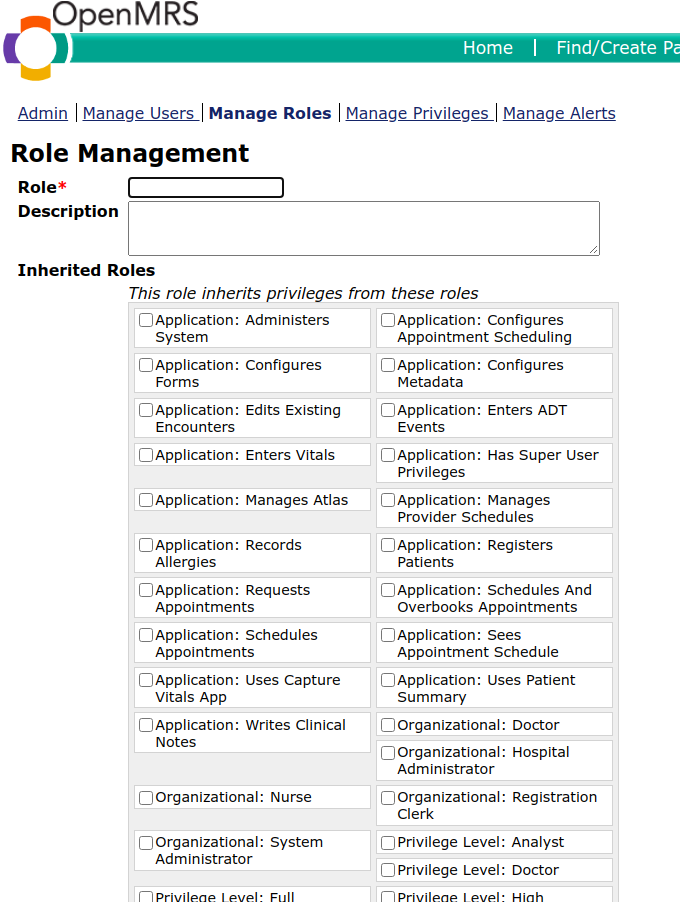
Each inherited role has some privileges, but you can also add privileges manually by marking appropriate checkboxes in the "Privileges" section.
Note: Privileges from inherited roles are visible only after the role is added.

After that, click the “Save Role” button at the bottom to add the role.
By clicking a link in the “Current Roles” table, you can edit a role which is represented in the link. After clicking the link, the "Edit Role" page is displayed. On the "Edit Role" page, "Role description", "Inherited Roles" and "Privileges" can be changed. Privileges from inherited roles are greyed out and can’t be changed.

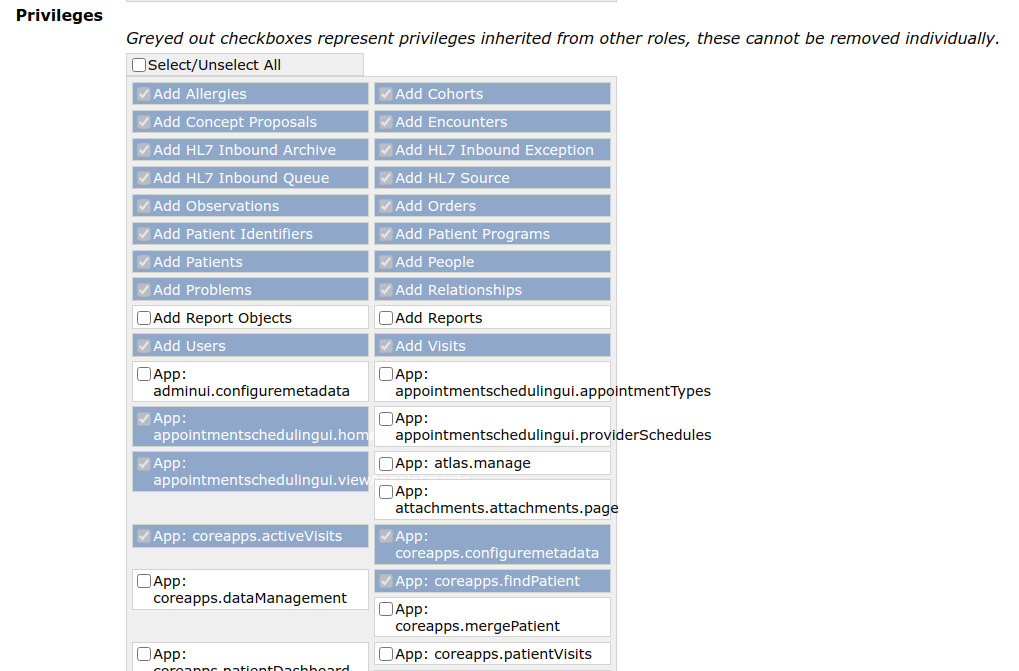
After that, click “Save Role” button at the bottom to finish editing the role.
To delete a role, you need to mark the checkbox on the left from the Role link and click the “Delete Selected Roles” button at the bottom. If there is a user in the system that has a particular role, this role cannot be deleted.

As mentioned in the “Specific account” section, 3 roles can be applied to a user account:
- Analyst – has permission to download reports
- Doctor - has permission to manage all the patient related activities from registration, adding diseases, treatment, messages, visits, lab results etc. also he has permission to view patient alerts.
- System admin - has permissions to configuring the system, manage users and Locations and can download reports as well.
Table below is created based on the requirements listed above and shows an overview of the role.
| Permissions | Admin | Analyst | Doctor |
|---|---|---|---|
| manage users | + | ||
| manage locations | + | ||
| manage reports | + | + | |
| manage all the patient related activities (registration, adding diseases, treatment, messages, visits, lab results etc. also has permission to view patient alerts) | + | + | |
| configure the system | + |
Based on the information above, the next table shows the relation between roles and privileges. The reference application provides a default set of roles/privileges which can be used/extended as well.
| Permissions | Admin | Analyst | Doctor |
|---|---|---|---|
| Add Allergies | + | + | |
| Add Cohorts | + | + | |
| Add Concepts Proposals | + | + | |
| Add Encounters | + | + | |
| Add HL7 Inbound Archive | + | + | |
| Add HL7 Inbound Exception | + | + | |
| Add HL7 Inbound Queue | + | + | |
| Add HL7 Source | + | + | |
| Add Observations | + | + | |
| Add Orders | + | + | |
| Add Patient Identifiers | + | + | |
| Add Patient Programs | + | + | |
| Add Patients | + | + | |
| Add People | + | + | |
| Add Problems | + | + | |
| Add Relationships | + | + | |
| Add Report Objects | + | ||
| Add Reports | + | ||
| Add Users | + | + | |
| Add Visits | + | + | |
| App: adminui.configuremetadata | + | ||
| App: appointmentschedulingui.appointmentTypes | + | ||
| App: appointmentschedulingui.home | + | ||
| App: appointmentschedulingui.providerSchedules | + | ||
| App: appointmentschedulingui.viewAppointments | + | ||
| App: atlas.manage | + | ||
| App: attachments.attachments.page | + | + | |
| App: coreapps.activeVisits | + | + | |
| App: coreapps.configuremetadata | + | ||
| App: coreapps.dataManagement | + | ||
| App: coreapps.findPatient | + | + | |
| App: coreapps.mergePatient | + | + | |
| App: coreapps.patientDashboard | + | + | |
| App: coreapps.patientVisits | + | + | |
| App: coreapps.summaryDashboard | + | + | |
| App: coreapps.systemAdministration | + | ||
| App: formentryapp.forms | + | + | |
| App: referenceapplication.legacyAdmin | + | ||
| App: referenceapplication.manageApps | + | ||
| App: referenceapplication.styleGuide | + | ||
| App: referenceapplication.vitals | + | + | |
| App: registrationapp.registerPatient | + | + | |
| Assign System Developer Role | + | ||
| Configure Visits | + | + | |
| Delete Cohorts | + | + | |
| Delete Concepts Proposals | + | + | |
| Delete Encounters | + | + | |
| Delete HL7 Inbound Archive | + | + | |
| Delete HL7 Inbound Exception | + | + | |
| Delete HL7 Inbound Queue | + | + | |
| Delete Notes | + | + | |
| Delete Observations | + | + | |
| Delete Orders | + | + | |
| Delete Patient Identifiers | + | + | |
| Delete Patient Programs | + | + | |
| Delete Patients | + | + | |
| Delete People | + | + | |
| Delete Relationships | + | + | |
| Delete Report Objects | + | + | |
| Delete Reports | + | ||
| Delete Users | + | + | |
| Delete Visits | + | + | |
| Edit Allergies | + | + | |
| Edit Cohorts | + | + | |
| Edit Concepts Proposals | + | + | |
| Edit Conditions | + | + | |
| Edit Encounters | + | + | |
| Edit Notes | + | + | |
| Edit Observations | + | + | |
| Edit Orders | + | + | |
| Edit Patient Identifiers | + | + | |
| Edit Patient Programs | + | + | |
| Edit Patients | + | + | |
| Edit People | + | + | |
| Edit Problems | + | + | |
| Edit Relationships | + | + | |
| Edit Report Objects | + | ||
| Edit Reports | + | ||
| Edit User Passwords | + | + | |
| Edit Users | + | + | |
| Edit Visits | + | + | |
| ETL Mappings Privilege | + | + | |
| ETL Settings Privilege | + | ||
| Form Entry | + | + | |
| Generate Batch of Identifiers | + | + | |
| Get Allergies | + | + | |
| Get Care Settings | + | + | |
| Get Concept Attribute Types | + | + | |
| Get Concept Classes | + | + | |
| Get Concept Datatypes | + | + | |
| Get Concept Map Types | + | + | |
| Get Concept Proposals | + | + | |
| Get Concept Reference Terms | + | + | |
| Get Concept Sources | + | + | |
| Get Concepts | + | + | |
| Get Conditions | + | + | |
| Get Database Changes | + | ||
| Get Encounter Roles | + | + | |
| Get Encounter Types | + | + | |
| Get Encounters | + | + | |
| Get Field Types | + | + | |
| Get Forms | + | + | |
| Get Global Properties | + | + | |
| Get HL7 Inbound Archive | + | + | |
| Get HL7 Inbound Exception | + | + | |
| Get HL7 Inbound Queue | + | + | |
| Get HL7 Source | + | + | |
| Get Identifier Types | + | + | |
| Get Location Attribute Types | + | + | |
| Get Locations | + | + | |
| Get Notes | + | + | |
| Get Observations | + | + | |
| Get Order Frequencies | + | + | |
| Get Order Sets | + | + | |
| Get Order Types | + | + | |
| Get Orders | + | + | |
| Get Patient Cohorts | + | + | |
| Get Patient Identifiers | + | + | |
| Get Patient Programs | + | + | |
| Get Patients | + | + | |
| Get People | + | + | |
| Get Person Attribute Types | + | + | |
| Get Privileges | + | + | |
| Get Problems | + | + | |
| Get Programs | + | + | |
| Get Providers | + | + | |
| Get Relationship Types | + | + | |
| Get Relationships | + | + | |
| Get Roles | + | + | |
| Get Users | + | + | + |
| Get Visit Attribute Types | + | + | |
| Get Visit Types | + | + | |
| Get Visits | + | + | |
| Manage Address Hierarchy | + | + | |
| Manage Address Templates | + | + | |
| Manage Alerts | + | + | |
| Manage Appointment Types | + | + | |
| Manage Appointments Settings | + | + | |
| Manage Atlas Data | + | ||
| Manage Auto Generation Options | + | + | |
| Manage Cohort Definitions | + | + | |
| Manage Concept Attribute Types | + | + | |
| Manage Concept Classes | + | + | |
| Manage Concept Datatypes | + | + | |
| Manage Concept Map Types | + | + | |
| Manage Concept Name tags | + | + | |
| Manage Concept Reference Terms | + | + | |
| Manage Concept Sources | + | + | |
| Manage Concept Stop Words | + | + | |
| Manage Concepts | + | + | |
| Manage Data Set Definitions | + | + | |
| Manage Dimension Definitions | + | + | |
| Manage Encounter Roles | + | + | |
| Manage Encounter Types | + | + | |
| Manage Field Types | + | + | |
| Manage Flags | + | + | |
| Manage FormEntry XSN | + | + | |
| Manage Forms | + | + | |
| Manage Global Properties | + | + | |
| Manage HL7 Messages | + | + | |
| Manage Identifier Sources | + | + | |
| Manage Identifier Types | + | + | |
| Manage Implementation Id | + | + | |
| Manage Indicator Definitions | + | + | |
| Manage Location Attribute Types | + | + | |
| Manage Location Tags | + | + | |
| Manage Locations | + | + | |
| Manage Metadata Mapping | + | + | |
| Manage Modules | + | + | |
| Manage Order Frequencies | + | + | |
| Manage Order Sets | + | + | |
| Manage Order Types | + | + | |
| Manage OWA | + | + | |
| Manage Person Attribute Types | + | + | |
| Manage Privileges | + | ||
| Manage Programs | + | + | |
| Manage Provider Schedules | + | ||
| Manage Providers | + | + | |
| Manage Relationship Types | + | + | |
| Manage Relationships | + | + | |
| Manage Report Definitions | + | + | |
| Manage Report Designs | + | + | |
| Manage Reports | + | + | + |
| Manage REST WS | + | + | |
| Manage Roles | + | ||
| Manage Rule Definitions | + | ||
| Manage Scheduled Report Tasks | + | + | + |
| Manage Scheduler | + | ||
| Manage Search Index | + | + | |
| Get Users | + | + | + |
| Get Visit Attribute Types | + | + | |
| Get Visit Types | + | + | |
| Get Visits | + | + | |
| Manage Address Hierarchy | + | + | |
| Manage Address Templates | + | + | |
| Manage Alerts | + | + | |
| Manage Appointment Types | + | + | |
| Manage Appointments Settings | + | + | |
| Manage Atlas Data | + | ||
| Manage Auto Generation Options | + | + | |
| Manage Cohort Definitions | + | + | |
| Manage Concept Attribute Types | + | + | |
| Manage Concept Classes | + | + | |
| Manage Concept Datatypes | + | + | |
| Manage Concept Map Types | + | + | |
| Manage Concept Name tags | + | + | |
| Manage Concept Reference Terms | + | + | |
| Manage Concept Sources | + | + | |
| Manage Concept Stop Words | + | + | |
| Manage Concepts | + | + | |
| Manage Data Set Definitions | + | + | |
| Manage Dimension Definitions | + | + | |
| Manage Encounter Roles | + | + | |
| Manage Encounter Types | + | + | |
| Manage Field Types | + | + | |
| Manage Flags | + | + | |
| Manage FormEntry XSN | + | + | |
| Manage Forms | + | + | |
| Manage Global Properties | + | + | |
| Manage HL7 Messages | + | + | |
| Manage Identifier Sources | + | + | |
| Manage Identifier Types | + | + | |
| Manage Implementation Id | + | + | |
| Manage Indicator Definitions | + | + | |
| Manage Location Attribute Types | + | + | |
| Manage Location Tags | + | + | |
| Manage Locations | + | + | |
| Manage Metadata Mapping | + | + | |
| Manage Modules | + | + | |
| Manage Order Frequencies | + | + | |
| Manage Order Sets | + | + | |
| Manage Order Types | + | + | |
| Manage OWA | + | + | |
| Manage Person Attribute Types | + | + | |
| Manage Privileges | + | ||
| Manage Programs | + | + | |
| Manage Provider Schedules | + | ||
| Manage Providers | + | + | |
| Manage Relationship Types | + | + | |
| Manage Relationships | + | + | |
| Manage Report Definitions | + | + | |
| Manage Report Designs | + | + | |
| Manage Reports | + | + | + |
| Manage REST WS | + | + | |
| Manage Roles | + | ||
| Manage Rule Definitions | + | ||
| Manage Scheduled Report Tasks | + | + | + |
| Manage Scheduler | + | ||
| Manage Search Index | + | + | |
| Manage Synonym Group | + | + | |
| Manage Synonym Groups | + | + | |
| Manage Token Registrations | + | + | |
| Manage Tokens | + | + | |
| Manage Visit Attribute Types | + | + | |
| Manage Visit Types | + | + | |
| Patient Dashboard - View Chart Search Section | + | + | |
| Patient Dashboard - View Demographic Section | + | + | |
| Patient Dashboard - View Encounters Section | + | + | |
| Patient Dashboard - View Forms Section | + | + | |
| Patient Dashboard - View Graphs Section | + | + | |
| Patient Dashboard - View Overview Section | + | + | |
| Patient Dashboard - View Patient Summary | + | + | |
| Patient Dashboard - View Regimen Section | + | + | |
| Patient Dashboard - View Visits Section | + | + | |
| Patient Overview - View Allergies | + | + | |
| Patient Overview - View Patient Actions | + | + | |
| Patient Overview - View Patient Flags | + | + | |
| Patient Overview - View Problem List | + | + | |
| Manage Synonym Group | + | + | |
| Manage Synonym Groups | + | + | |
| Manage Token Registrations | + | + | |
| Manage Tokens | + | + | |
| Manage Visit Attribute Types | + | + | |
| Manage Visit Types | + | + | |
| Patient Dashboard - View Chart Search Section | + | + | |
| Patient Dashboard - View Demographic Section | + | + | |
| Patient Dashboard - View Encounters Section | + | + | |
| Patient Dashboard - View Forms Section | + | + | |
| Patient Dashboard - View Graphs Section | + | + | |
| Patient Dashboard - View Overview Section | + | + | |
| Patient Dashboard - View Patient Summary | + | + | |
| Patient Dashboard - View Regimen Section | + | + | |
| Patient Dashboard - View Visits Section | + | + | |
| Patient Overview - View Allergies | + | + | |
| Patient Overview - View Patient Actions | + | + | |
| Patient Overview - View Patient Flags | + | + | |
| Patient Overview - View Problem List | + | + | |
| Patient Overview - View Programs | + | + | |
| Patient Overview - View Relationships | + | + | |
| Provider Management - Admin | + | ||
| Provider Management API | + | ||
| Provider Management API - Read-only | + | + | |
| Provider Management Dashboard - Edit Patients | + | + | |
| Provider Management Dashboard - Edit Providers | + | + | |
| Provider Management Dashboard - View Historical | + | + | |
| Provider Management Dashboard - View Patients | + | + | |
| Provider Management Dashboard - View Providers | + | + | |
| Purge Field Types | + | + | |
| Remove Allergies | + | + | |
| Remove Problems | + | + | |
| Request Appointments | + | + | |
| Run Chart Search Commands | + | + | |
| Run Reports | + | + | + |
| Schedule Appointments | + | ||
| Share Metadata | + | ||
| SMS module Privilege | + | + | |
| Squeezing Appointments | + | ||
| Task: appointmentschedulingui.bookAppointments | + | ||
| Task: appointmentschedulingui.overbookAppointments | + | ||
| Task: appointmentschedulingui.requestAppointments | + | ||
| Task: appointmentschedulingui.viewConfidential | + | ||
| Task: coreapps.createRetrospectiveVisit | + | + | |
| Task: coreapps.createVisit | + | + | |
| Task: coreapps.deletePatient | + | + | |
| Task: coreapps.deletePatientProgram | + | + | |
| Task: coreapps.editPatientProgram | + | + | |
| Task: coreapps.editRelationships | + | ||
| Task: coreapps.endVisit | + | + | |
| Task: coreapps.enrollInProgram | + | + | |
| Task: coreapps.markPatientDead | + | + | |
| Task: coreapps.mergeVisits | + | + | |
| Task: emr.patient.encounter.delete | + | + | |
| Task: emr.patient.encounter.edit | + | + | |
| Task: Manage Condition Lists | + | + | |
| Task: Modify Allergies | + | + | |
| Task: referenceapplication.simpleAdmission | + | + | |
| Task: referenceapplication.simpleDischarge | + | + | |
| Task: referenceapplication.simpleTransfer | + | + | |
| Task: referenceapplication.simpleVisitNote | + | + | |
| Task: referenceapplication.vitals | + | + | |
| Test Flags | + | + | |
| Update Appointment Status | + | + | |
| Update HL7 Inbound Archive | + | + | |
| Update HL7 Inbound Exception | + | + | |
| Update HL7 Inbound Queue | + | + | |
| Update HL7 Source | + | + | |
| Upload Batch of Identifiers | + | + | |
| Upload XSN | + | + | |
| View Administration Functions | + | + | |
| View Allergies | + | + | |
| View Appointment Types | + | ||
| View Appointments | + | + | |
| View Appointments Blocks | + | ||
| View Appointments Statistics | + | ||
| View Calculations | + | + | |
| View Concept Classes | + | + | |
| View Concept Datatypes | + | + | |
| View Concept Map Types | + | + | |
| View Concept Proposals | + | + | |
| View Concept Reference Terms | + | + | |
| View Concept Sources | + | + | |
| View Concepts | + | + | |
| View Data Entry Statistics | + | + | |
| View Database Changes | + | + | |
| View Encounter Roles | + | + | |
| View Encounter Types | + | + | |
| View Encounters | + | + | |
| View FHIR Client | + | + | |
| View Field Types | + | + | |
| View Forms | + | + | |
| View Global Properties | + | + | |
| View HL7 Inbound Archive | + | + | |
| View HL7 Inbound Exception | + | + | |
| View HL7 Inbound Queue | + | + | |
| View HL7 Source | + | + | |
| View Identifier Types | + | + | |
| View Location Attribute Types | + | + | |
| View Locations | + | + | |
| View Metadata Via Mapping | + | + | |
| View Navigation Menu | + | + | |
| View Observations | + | + | |
| View Order Types | + | + | |
| View Orders | + | + | |
| View Patient Appointment History | + | + | |
| View Patient Cohorts | + | + | |
| View Patient Identifiers | + | + | |
| View Patient Programs | + | + | |
| View Patients | + | + | |
| View People | + | + | |
| View Person Attribute Types | + | + | |
| View Privileges | + | + | |
| View Problems | + | + | |
| View Programs | + | + | |
| View Provider Schedules | + | + | |
| View Providers | + | + | |
| View Relationship Types | + | + | |
| View Relationships | + | + | |
| View Report Objects | + | + | + |
| View Reports | + | + | + |
| View REST WS | + | + | |
| View Roles | + | + | |
| View Rule Definitions | + | + | |
| View Token Registrations | + | + | |
| View Unpublished Forms | + | + | |
| View Users | + | + | |
| View Visit Attribute Types | + | + | |
| View Visit Types | + | + | |
| View Visits | + | + | |
| Messages schedule privilege | + | + | |
| Messages manage privilege | + |
For more information, check the OpenMRS wiki page and access control management document.