Repository navigation
Mods
From 15.3 the server can run your own mods. Press o in the menu, or choose option 19 (Add or remove mods).
The server runs Fabric mods. Forge, NeoForge and Quilt mods don't work, and neither do Paper or Spigot plugins. If you try one, the menu says what it is.
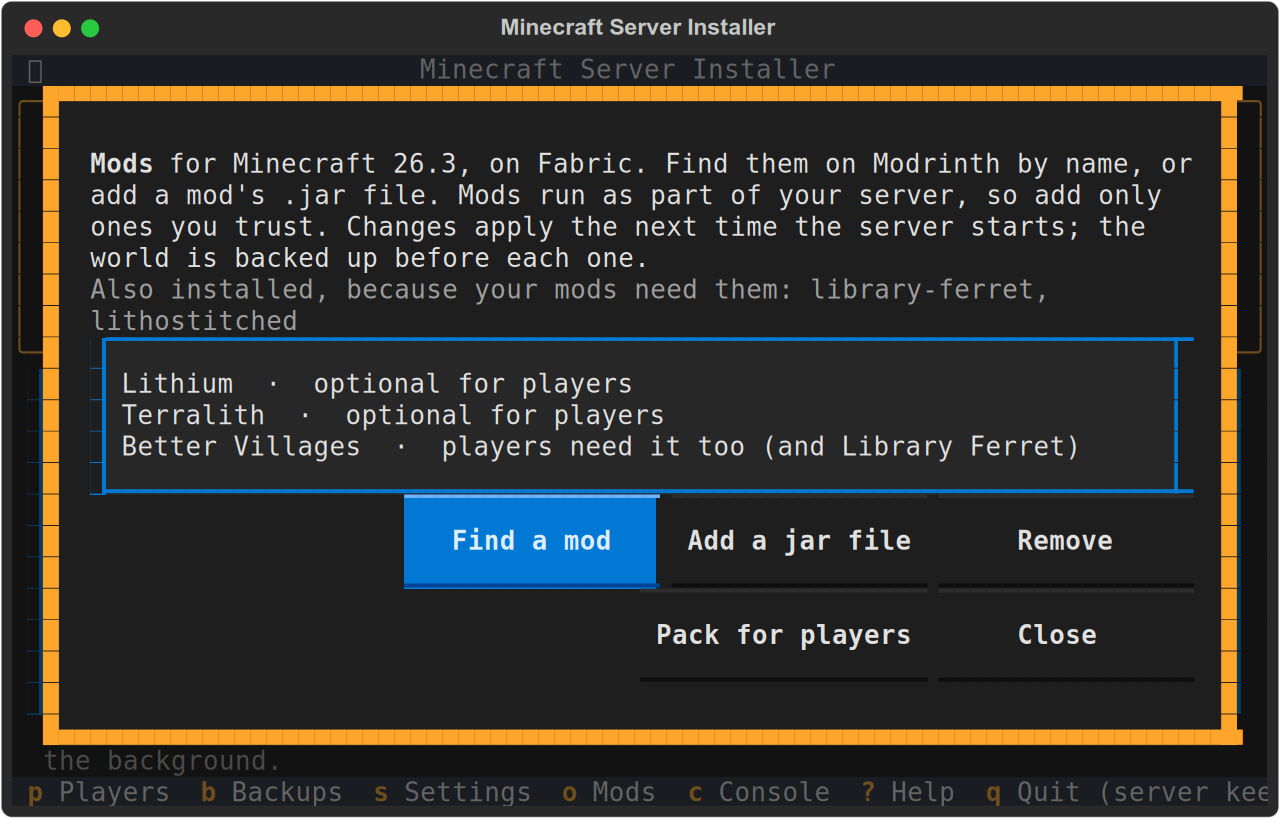
Find a mod searches Modrinth by name, for example storage, villages or performance. It only lists mods that run on a server and have a version for your server's Minecraft. Choose one to read what it does, whether players need it too, and a link to its page. Then choose Add it.
The server gets:
- the build of the mod made for your Minecraft version, checked against Modrinth's checksum
- any mods it needs (they show as Also installed, because your mods need them)
After that it looks after them:
- Daily, it fetches newer builds for the same Minecraft (bug fixes). If nobody is playing, the server restarts to use them. Otherwise the top of the menu says a restart is waiting.
- When Minecraft updates, or you choose a version with option 18 or go back to the previous one, the mods switch to builds for that version. If a mod has no build for the new version yet, the update waits and the menu names the mod. Mods usually catch up within days or weeks, or you can remove the mod and update without it.
For a mod that isn't on Modrinth, or a particular version you downloaded, choose Add a jar file and type where it is, for example ~/Downloads/mymod.jar.
The menu checks that it is a Fabric mod that runs on a server. If it needs other mods, the menu lists them: add those with Find a mod. Fabric API is added for you if the jar needs it.
Jar files are used as they are: nothing updates them. After a Minecraft update, check that they still work. If one doesn't, the server won't start, and the console (c) says which mod is the problem.
It depends on the mod, and the Mods screen shows it for each one:
| The menu says | Meaning |
|---|---|
| server only | Players don't install anything. |
| optional for players | It works without them, but players can add it too. |
| players need it too | Each player must install Fabric and this mod, for the same Minecraft version, or they can't join. |
| players may need it too | The mod doesn't say. Check its page. |
A mod can run on the server alone and still need another mod that players must have. From 16.0 the menu follows what each mod needs. When you add such a mod, the menu names the extra mod, and the Mods screen shows it, for example Better Villages · players need it too (and Library Ferret). Each player then installs Fabric and that extra mod, for the server's Minecraft version. From 16.1 the menu works this out again about a minute after each snap update, so the list is right soon after an update.
Mods that change how the server works (performance, world generation, admin tools) usually run on the server alone. Mods that add new blocks, items or creatures need to be on every player's computer too. Mods like that generally don't work for Bedrock Players.
Mods that only change what a player sees, such as minimaps, shaders or Sodium, aren't for the server at all. Each player adds them to their own Minecraft. The menu won't add them to the server.
A server can't send mods to someone's Minecraft by itself, so players have to install them first. From 16.1, Pack for players on the Mods screen makes that easier:
- Choose Pack for players. The menu suggests a file in your Home folder named after your server, such as
~/bobbys-world.mrpack. - Send that file to your players.
- Each player opens it in MC Mods, from the mc-installer snap, or in another launcher that reads Modrinth modpacks. That sets up Fabric and a profile for your server with the mods in it.
- They join from that profile.
The file is small because it holds no mods, only which ones to get. The launcher downloads them from Modrinth, checked against Modrinth's checksum.
- What's in it: the mods players must have, and what those need, in the builds your server has. Server-only and optional mods stay out.
- Your own jar files aren't on Modrinth, so they aren't in the pack. The menu reminds you to send those yourself if players need them. If they need Fabric API, the pack includes it.
- "Players may need it too": if Modrinth doesn't say, the mod stays out of the pack and the menu names it, so you can check its page.
- Nothing to share: if players don't need any mods, the menu says so and makes no file.
- It's a separate profile: a pack gets its own game folder, so a player's resource packs, settings, worlds and saved servers don't show up in it at first. Nothing is deleted: they're still in the player's usual profile, and can be copied over.
- Keeping it current: make a new pack when the mods or Minecraft change. Opening it updates the same profile, as long as the server name is the same.
Bedrock players can't use a pack.
Adding or removing a mod counts from the next time the server starts. While it is running, the top of the menu reminds you: stop it (13) and start it again.
From 16.0 the world is backed up before every mod change (adding a mod, adding a jar file or removing one). These backups show as before a mod change under Backups and Restore, and the newest 7 are kept. If the backup can't be made, the mods stay as they were.
Adding a mod never removes anything from the world. Mods that add new structures, such as villages, only put them in land nobody has explored yet.
Choose the mod in the list, then Remove. Mods it needed are removed too, unless another mod still needs them.
Removing a mod that added blocks or items removes those from the world, and its items from inventories and chests. If that was a mistake, restore the before a mod change backup under Backups and Restore.
- Only add mods you trust. A mod runs as part of the server and can do anything the server can. It still can't touch the rest of your computer: the server runs as an unprivileged user inside the snap's confinement.
- Memory: big content mods use more memory. If the server gets slow or stops, give it more in Settings.
- Backups hold the world, not the mods. The mod list stays the same when you restore one.
- Mods need the standard Minecraft server, not a custom server jar (option 12).