Repository navigation
Family mode ask someone you trust
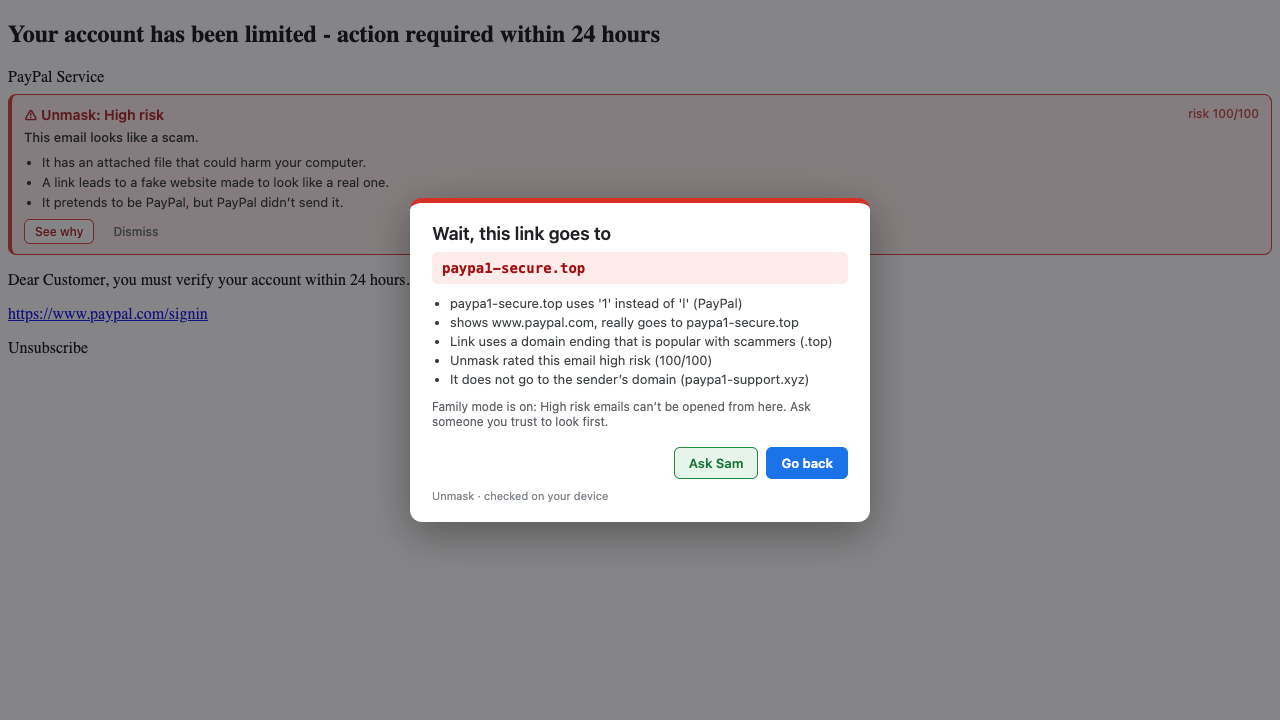
For a parent, a grandparent, or anyone who'd rather have a second pair of eyes. In Settings → Family mode, tick Ask someone I trust before risky emails and enter the helper's name and email.
- On a High risk email, the warnings before a link or a reply no longer have Open anyway or Reply anyway. They offer Ask Sam (the helper's name) and Go back.
-
Ask Sam opens a ready-written email to the helper in the person's own mail app: who sent the suspicious email, its subject, Unmask's verdict and the reasons in plain words. Links are written so they can't be clicked (
paypa1-support[.]xyz). Nothing goes through Unmask; they choose whether to send it. - The panel shows a Not sure? Ask Sam card on Suspicious and High risk emails.
- Turning family mode on also turns on Simple mode (plain words first).
- Lock Settings with a PIN (4 to 8 digits) so family mode isn't switched off by accident. Only a salted fingerprint of the PIN is stored. If it's forgotten, removing and reinstalling Unmask clears it, along with the other settings.
Family mode is a guard rail, not a cage: someone determined can still copy a link by hand or remove the extension.
This page is generated from docs/USER_GUIDE.md. Edit it there, not in the wiki.