Repository navigation
Looking inside attachments the Documents tab
When an email has attachments, a Documents tab appears next to Files. It opens every attachment on your computer and shows what is inside, without ever running it:
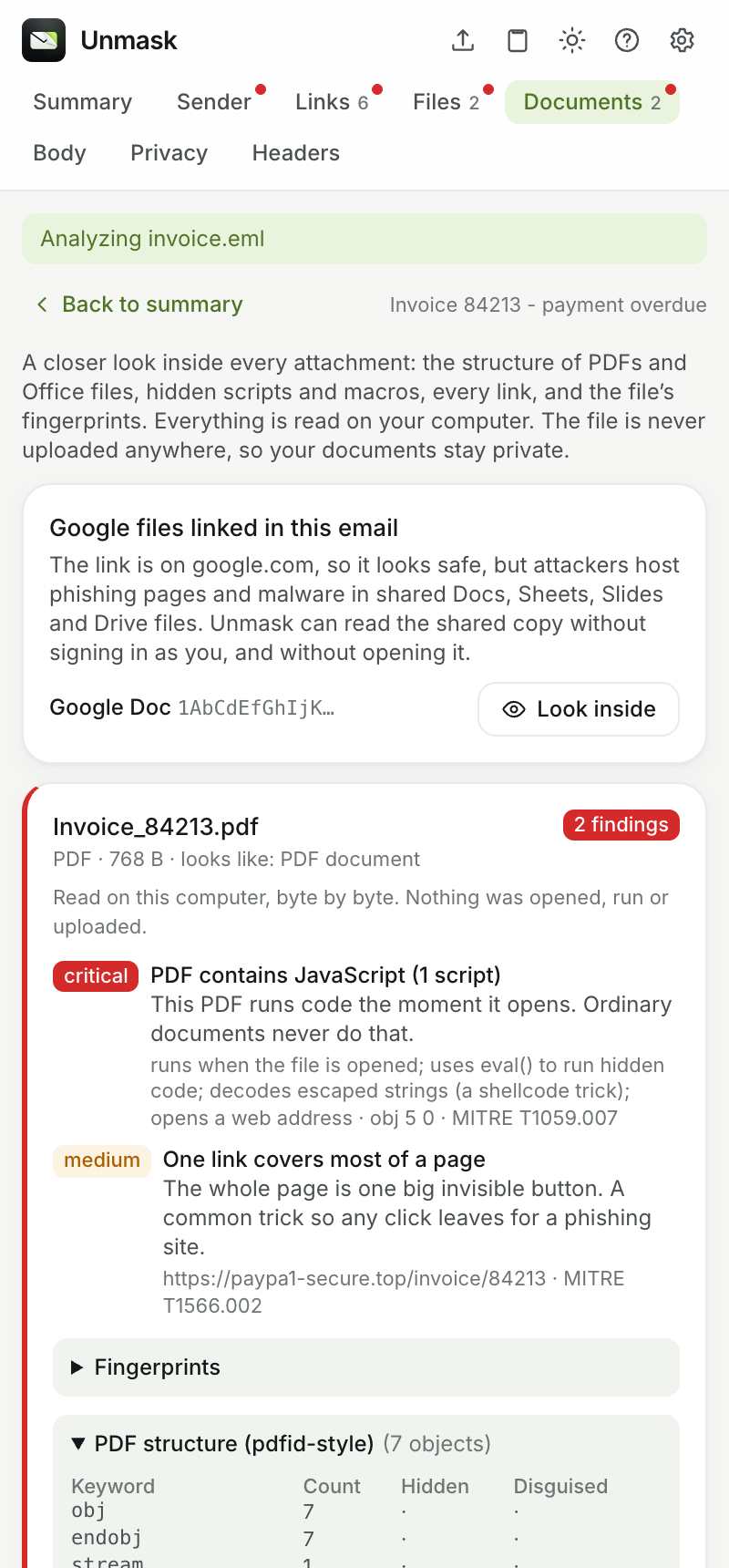
- Findings in everyday words, such as "This PDF runs code the moment it opens", with the technical detail underneath.
- PDF structure, macros, fields, links and embedded files, each in a section you can open.
- Fingerprints (SHA-256, SHA-1, MD5) and how random the data looks.
- Look this file up by its fingerprint on VirusTotal, Hybrid Analysis or MalwareBazaar. Only the fingerprint is sent. The file is never uploaded. "No record" means unknown, never safe.
- Test these links (VirusTotal) and Check phishing lists (PhishTank, URLhaus) for every link found inside the file.
- Google Docs, Sheets, Slides and Drive links in the email get a Look inside button that reads the publicly shared copy without signing in as you.
To use Hybrid Analysis or MalwareBazaar, add a free key under Settings → Extra checks: the same step-by-step setup used for VirusTotal appears when you first click the button. PhishTank needs no key.
Details: File forensics.
This page is generated from docs/USER_GUIDE.md. Edit it there, not in the wiki.