Repository navigation
Home
Thread Pulse is a live map of your Thread network for Home Assistant. It shows how your Matter-over-Thread devices are connected, how good their radio links are, and – as it happens – every message travelling between your devices and Home Assistant.
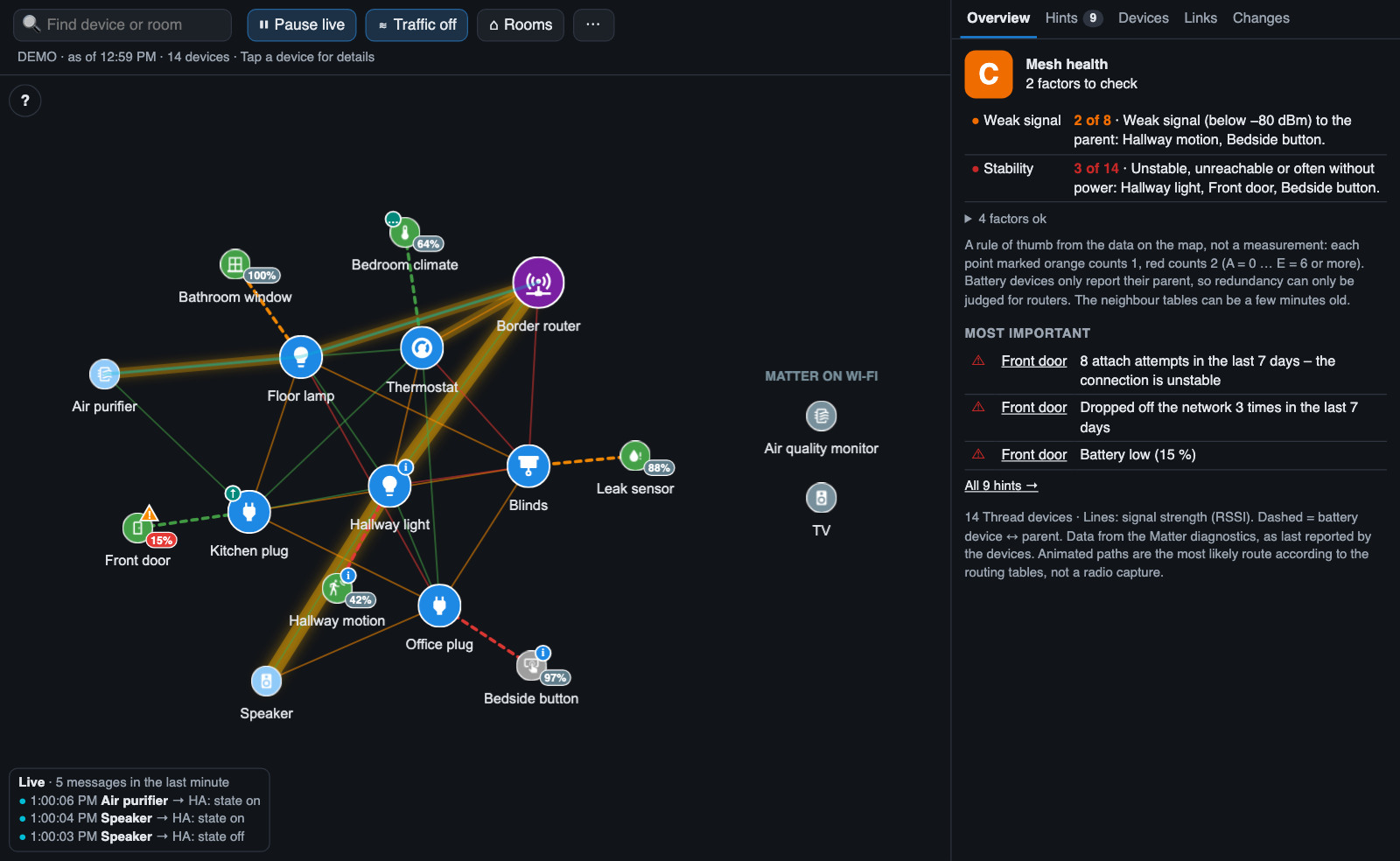
All screenshots in this guide come from the built-in demo mode with invented devices.
| See the mesh | Routers, battery devices, the border router and the signal strength of every link |
| Watch it live | A dot travels along the route for every message to and from Home Assistant |
| Find the busy routes | Links glow brighter the more traffic they carried in the last 10 minutes |
| Inspect a device | Tap it for firmware, parent, neighbours, battery, stability counters, response time … – and the border router for the Thread network itself (from version 1.4.0) |
| Find weak spots | Hints for weak parent signals, unstable connections and routers that lose power; a mesh health grade with its reasons (from version 1.6.0) |
| Notice changes | A change log of new parents, devices dropping out and coming back |
| Think in rooms | Arrange the devices by Home Assistant area |
| Hear it | Optional quiet tick for every message (from version 1.4.0) |
| Share it | Save the map as an image, optionally anonymised – for documentation or a forum post (from version 1.5.0). Or copy a text report as Markdown (from version 1.6.0) |
| Hang it on the wall | Ambient mode: only the pulsing mesh, dark, for wall tablets (from version 1.4.0) |
- Installation – HACS, manual card or standalone page
- Configuration – card options and dashboard examples
- Reading the map – what the colours, lines and badges mean
Then explore the features:
- Live data flow and traffic heat
- Detail panel
- Hints and warnings
- Response time
- Change log
- Room view
- Search
- Network panel below the map
- Ambient mode
- Demo mode
Background and help:
- How it works – data sources, route calculation, privacy
- Troubleshooting & FAQ
- Limitations
- Development
- Home Assistant with the Matter integration and Matter devices on Thread
- A user with administrator rights
- Recommended: the OpenThread Border Router add-on
This guide describes version 1.6.0. The changelog lists what changed in each version.
This wiki is generated from the folder
docs/wikiof the repository and updated with every release. Changes made directly in the wiki are overwritten – please suggest corrections with a pull request or an issue.