Repository navigation
Hints and Warnings
Thread Pulse points out devices that may need attention. There are two levels:
| Badge on the map | In the detail panel | Meaning | |
|---|---|---|---|
| Warning | orange ⚠ | orange box | Something is not right at the moment |
| Hint | blue i | blue box with 💡 | A possible weak spot, with a suggestion |
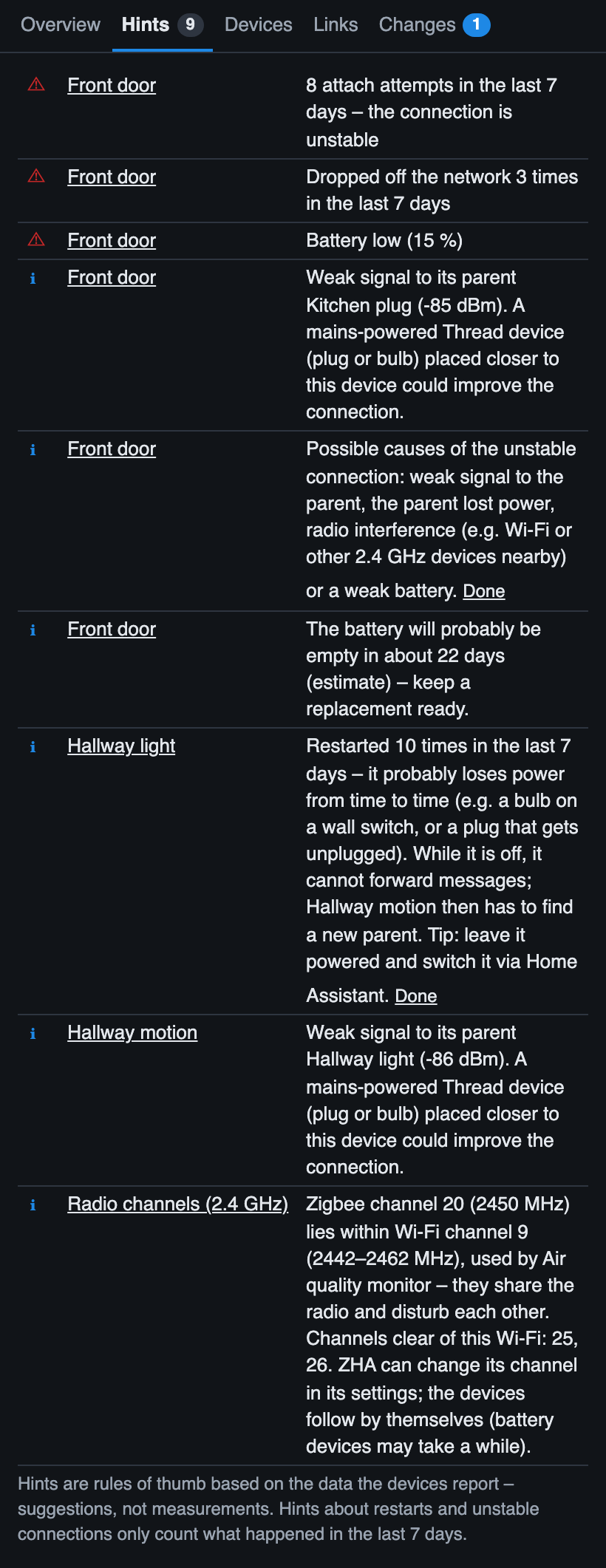
A device shows the i badge only if it has no warning. All warnings and hints are also listed in the tab Hints of the network panel (from version 1.6.0; before: at the top of the list); the tab shows how many there are.
Hints are rules of thumb based on the data the devices report. They are suggestions, not measurements.
| Warning | Condition |
|---|---|
| Unstable connection | 5 or more attach attempts in the last 7 days (from version 1.7.0; before: since the device's last restart) |
| Dropped off the network | 3 or more times in the last 7 days (from version 1.7.0; before: since the device's last restart) |
| Battery low | Battery level below 20 % |
The thresholds come from a real network of about 20 devices, where healthy devices showed 0–2 attach attempts and 1–2 drop-offs.
From version 1.7.0. The devices report restarts over their whole lifetime and attach attempts and drop-offs since their last restart. Taken as totals, a warning or hint about them would never go away – a bulb with 376 restarts would keep its hint forever, even if it has not lost power for months.
Thread Pulse therefore keeps a history of these counters and only counts what happened in the last 7 days (the time window can be changed, see Configuration):
- If the counters stay the same, the warning or hint disappears by itself.
- A device restart resets the attach and drop-off counters; that is not read as a change in the wrong direction.
- The history is stored in Home Assistant, per user (like the change log), so it is the same on every device. It starts when you install this version: during the first day, the totals are used as before, with the note (total so far – the trend is known after one day).
- The detail panel shows the changes of the window in the section Stability, e.g. Last 7 days: +2 restarts · +5 attach attempts · +1 drop-offs.
The hints Router probably loses power and Unstable connection have a Done button (in the detail panel and in the tab Hints of the network panel). A hint marked as done stays hidden – together with the related warnings – until its counter increases again; then it comes back by itself. The tab Hints lists the hints marked as done with Show again.
When: a battery device or end device receives its parent with less than −80 dBm.
Suggestion: a mains-powered Thread device that can act as a router (a plug or a bulb) placed closer to this device could improve the connection. If the value was measured by the device itself (not by the router), the hint says so – such values are less reliable.
When: the warning unstable connection or dropped off the network applies.
Lists the likely causes: weak signal to the parent, the parent lost power, radio interference (Wi-Fi or other 2.4 GHz devices nearby) or a weak battery.
When: a router has restarted 3 times or more in the last 7 days (from version 1.7.0; before: 50 times or more in total).
Meaning: it probably loses power from time to time – typically a bulb on a wall switch, or a plug that gets unplugged. While it is off, it cannot forward messages, and battery devices using it as their parent (named in the hint) have to find a new one.
Suggestion: leave it powered and switch it via Home Assistant.
From version 1.7.0.
When: a battery device sent 60 or more messages in the last hour (one a minute), counted over at least 30 minutes. Normal is a few to about 20 an hour.
Meaning: every message costs battery and adds load to the mesh. Typical causes: a very short report interval, a motion or presence sensor that is too sensitive, or a temperature sensor that reports every small change.
Suggestion: check the report interval or sensitivity in the device's app. The counts are in the network panel (tab Devices, Most messages in the last hour).
Switching a smart plug off does not stop it from routing – only its socket is switched off, the plug itself stays powered. That is why this is not a reason for a hint.
When: the best link of a router to any other router is weaker than −80 dBm.
Suggestion: another router in between would connect it better.
From version 1.4.0.
When: the battery forecast says the battery will probably be empty within 30 days.
Suggestion: keep a replacement ready. It is an estimate based on the trend of the last weeks.
When: the response time median is 1 second or more over at least 3 commands.
Possible causes: weak signal, many hops, a busy or restarting router, or the device itself.
From version 1.5.2.
Some devices report the same hardware address as another device – for example several Aqara P2 motion sensors. It is a firmware quirk: the devices work normally, because inside the Thread network they use different addresses. Thread Pulse identifies devices on the map by this address, so it keeps them apart by adding their Home Assistant device ID and shows this hint. Links that other devices report for them cannot be matched, so their connections on the map may be incomplete; the link to their parent (from their own data) is shown.
Up to version 1.5.1 such devices stopped the whole map with the error Cannot add item: item with id … already exists.
The hints unstable connection and router probably loses power are based on counters that do not go back down:
- attach attempts and drop-offs count since the device's last restart,
- restarts count over the device's whole lifetime.
So these hints can stay visible after the problem is gone – until the device restarts (e.g. after a battery change) or, for the restart count, practically forever. Showing only recent increases and a Done button are planned: issue #24.
From version 1.7.0.
When: the Thread or Zigbee (ZHA) channel lies inside the Wi-Fi channel of a Matter device on Wi-Fi, or Thread and Zigbee use the same channel. Listed in the tab Hints as Radio channels, not tied to a device.
Suggestion: for Zigbee the channels clear of the known Wi-Fi; for Thread moving the Wi-Fi, because changing the Thread channel is disruptive. Details: Radio channels.