Repository navigation
Change Log
Thread Pulse notices when something changes in your Thread network and lists it with a time stamp.
The change log only works while a Thread Pulse page is open. For a message on your phone when a device goes offline, use the offline notification blueprint.
| Change | Colour | How it is detected |
|---|---|---|
| Device not reachable / reachable again | red / green | Live, as soon as Home Assistant marks the device's main entities as unavailable or available again |
| Device new in the network / no longer in the network | green / red | at the next check |
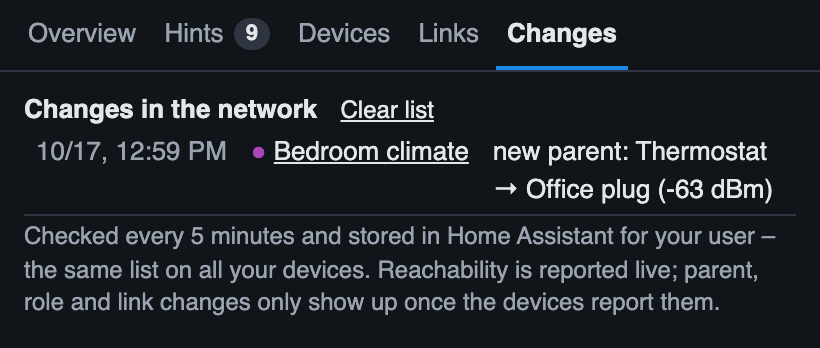
| New parent of a battery or end device, e.g. new parent: Hallway light → Blinds (−58 dBm) | purple | at the next check |
| Signal to the parent changes quality (good / medium / weak) | orange | at the next check |
| Role changes, e.g. router → end device | purple | at the next check |
| A usable link between two routers appears or is lost | orange | at the next check; only links of −80 dBm or better are watched, to avoid noise |
| The mesh health grade changes, e.g. Mesh health B → C (from version 1.6.0) | green (better) / red (worse) | when two checks in a row agree |
The affected device flashes three times on the map.
- Every 5 minutes while a Thread Pulse page is open. The data is loaded again and compared with the previous state. The map keeps its positions and zoom; only devices whose data changed move.
- When you click ↻ Reload (in the ⋯ menu from version 1.6.0) or tap the status line.
- Reachability changes are logged immediately.
The tab Changes of the network panel (from version 1.6.0; before: the section at the top of the list) shows how many entries are new since you last looked, and the latest 30 entries: time, coloured dot, device (a link to its detail panel) and the change. Clear list empties it – on all your devices.
From version 1.6.0; up to 1.5.2 every browser had its own list.
- The list is stored in Home Assistant, per user (up to 200 entries; the signal trend is stored the same way) – the same list on your phone, tablet and computer. Other Home Assistant users have their own list.
- Open pages synchronise live: a change seen on the wall tablet appears in the list on the phone right away.
- When several pages are open, each of them notices the same change; it is kept once (same device, same change, within 10 minutes). A device that goes offline, online and offline again still shows all three entries.
- The first time a page connects, the entries that were stored in this browser by older versions are moved to Home Assistant and removed from the browser.
- If Home Assistant refuses to store the list (very old versions), it is kept in the browser as before.
- Parent, role and link changes only appear once the devices report them to Home Assistant, which can take a while.
- Changes that happen while no Thread Pulse page is open are not seen (except that the next comparison shows the new state).
- In demo mode an invented change happens every 40 seconds; the demo list is not stored.