Repository navigation
Configuration
All options are optional. They can be set in the visual card editor or in YAML.
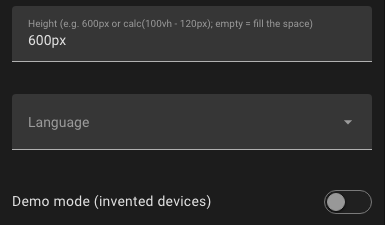
| Option | Default | Description |
|---|---|---|
height |
fills the available space, at least 450 px | Any CSS height, e.g. 600px, 70vh or calc(100vh - 120px)
|
language |
language of your Home Assistant profile |
en (English), de (German); from version 1.4.0 also fr (French), it (Italian), es (Spanish), nl (Dutch) |
show_wifi |
true |
Show Matter devices on Wi-Fi / Ethernet as a separate group (from version 1.4.0) |
ambient |
false |
Ambient mode for wall tablets: only the mesh, dark (from version 1.4.0) |
ambient_motion |
true |
In ambient mode: slow automatic zoom on or off (from version 1.4.0) |
demo |
false |
Show invented devices and simulated traffic instead of your network |
type: custom:thread-pulse-cardA panel view shows a single card over the whole width. Set the height so that the map fills the screen below the header:
views:
  - title: Thread
    path: thread
    type: panel
    cards:
      - type: custom:thread-pulse-card
        height: calc(100vh - var(--header-height, 56px))
In a sections view the card behaves like other cards and can be resized in the dashboard editor. By default it takes the full width and 10 rows (minimum 6 columns × 6 rows). Leave height empty there, so the card fills the space you give it.
type: custom:thread-pulse-card
height: 650px
language: deThe standalone page (installation option C) is configured with URL parameters:
| Parameter | Example | Description |
|---|---|---|
demo |
/local/thread-pulse.html?demo |
Demo mode with invented devices |
lang |
/local/thread-pulse.html?lang=de |
Force the language (en, de, fr, it, es, nl – the last four from version 1.4.0) |
ambient |
/local/thread-pulse.html?ambient |
Ambient mode (from version 1.4.0) |
still |
/local/thread-pulse.html?ambient&still |
Ambient mode without the automatic zoom (from version 1.4.0) |
nowifi |
/local/thread-pulse.html?nowifi |
Hide Matter devices on Wi-Fi / Ethernet (from version 1.4.0) |
v |
/local/thread-pulse.html?v=3 |
No function – raise it after an update so browsers load the new version |
Parameters can be combined: /local/thread-pulse.html?v=3&lang=en.
Some choices are remembered per browser (and per Home Assistant address), not per card:
| Setting | Where |
|---|---|
| Network panel below the map shown or hidden, its tab | 📊 Network (up to version 1.5.2: ☰ Show list) |
| Legend shown or hidden | ? on the map (up to version 1.5.2: ⓘ Legend in the toolbar) |
| Traffic heat on or off | ≋ Traffic |
| Room view on or off | ⌂ Rooms |
| Sound on or off, volume | ⋯ → 🔇 Sound (up to version 1.5.2: in the toolbar) |
| Change log entries | – |
The legend starts hidden (from version 1.6.0; before, it started shown on screens wider than 700 px). Whether a device was opened once is also remembered: until then the status line shows Tap a device for details.
Thread Pulse follows the language of your Home Assistant user profile. Supported are English and German, and from version 1.4.0 also French, Italian, Spanish and Dutch; other languages fall back to English. Entity names come from Home Assistant; common English measurement names (e.g. Active current, Voltage) are translated in the live ticker and the detail panel.
The French, Italian, Spanish and Dutch texts have not been checked by native speakers yet. Corrections are welcome – every language has its own file in src/i18n/ (e.g. fr.js).
The card uses the colours of your Home Assistant theme, including dark mode. Switching between light and dark is picked up automatically.