Repository navigation
Blending and projection
StableGen generates one image per camera and projects each image back onto the surfaces that camera sees. Where several cameras see the same surface, their colors are mixed. The Blending page of the StableGen panel controls that mix. (The legacy panel calls this section Viewpoint Blending Settings.)
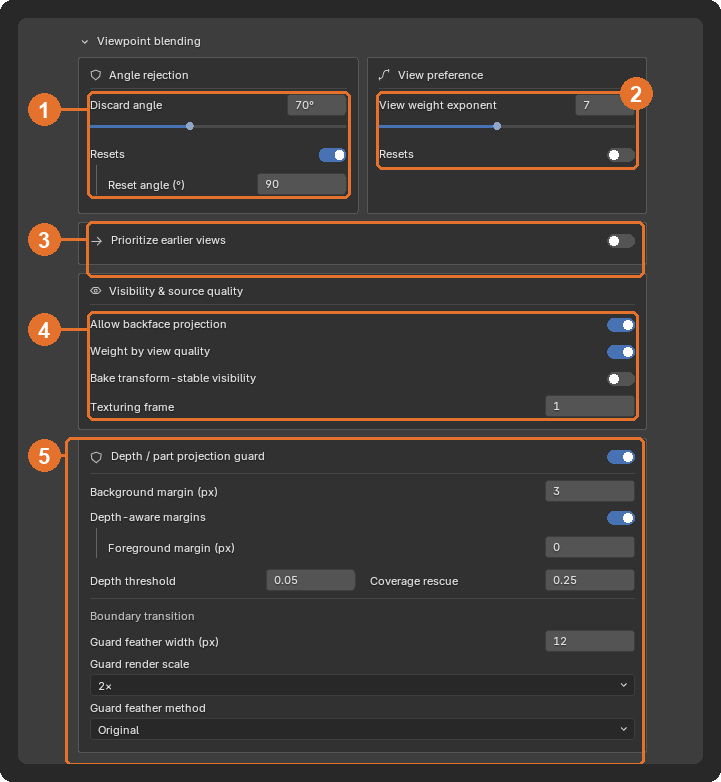
For every surface point and every camera, StableGen computes a weight:
- The weight is 0 if the point is outside the camera's frame or hidden behind other geometry.
- It is 0 if the surface faces away from the camera by more than the Discard angle.
- Otherwise it is cos(angle)exponent, where angle is between the camera's view ray and the surface normal and exponent is the View weight exponent. A surface seen straight on gets the most weight.
Each point takes the weighted average of the cameras' colors. A point seen by only one camera takes that camera's color; a point seen by none shows the Fallback Color (in Output & materials on the Texture page).
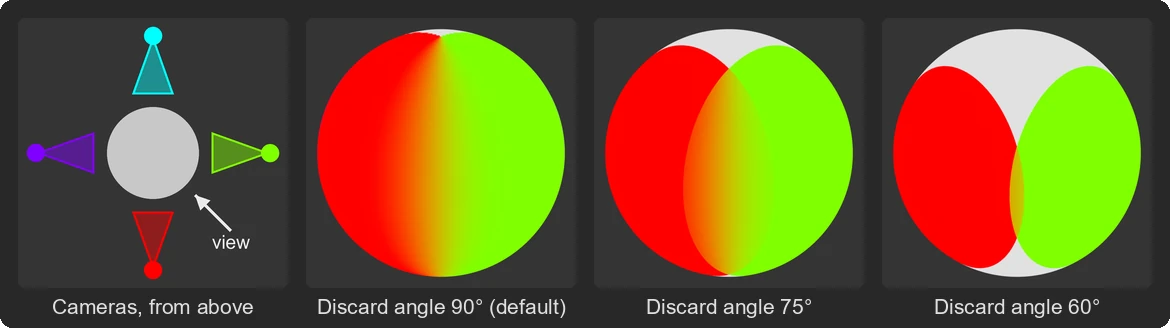
To see how your own cameras blend, turn on Enable Debug Settings in the add-on preferences and choose View colors on the Diagnostics page (Solid Colors in the legacy panel). It projects one solid color per camera through the same projection as generation, without generating anything. The figures below use it on a sphere with four cameras.
Blending settings affect generation as well as the finished texture: in Generate Sequentially and the image-editing workflows, each new view receives a render of the texture blended so far as context. After generating, Reproject (in the footer) rebuilds the projection from the saved images with the current settings, without generating anything. Settings whose tooltip says "Reproject to apply" take effect only after reprojecting.
| Setting | Default | Effect |
|---|---|---|
| Discard angle | 90° | A camera contributes nothing to surfaces it sees at a steeper angle than this. Grazing views carry stretched, low-detail texture; lowering the angle to around 65° hides it when cameras surround the object. Too low leaves gaps that show the fallback color. |
| Resets, Reset angle (°) | off, 90° | Apply a different angle to the finished material after generation. Generation keeps the main angle; the generated images are not changed. |
| Setting | Default | Effect |
|---|---|---|
| View weight exponent | 3 | How strongly each point prefers its most direct camera. Low values blend overlapping views evenly, which smooths seams but can blur detail or show faint doubles where views disagree. High values let one camera dominate each area: sharper, with visible seams where cameras disagree. Very high values (the Voronoi presets use 1000) split the surface into hard camera regions. |
| Resets, Reset exponent | off, 15 | Apply a different exponent to the finished material after generation, for example a soft blend while generating and a sharper one afterwards. |
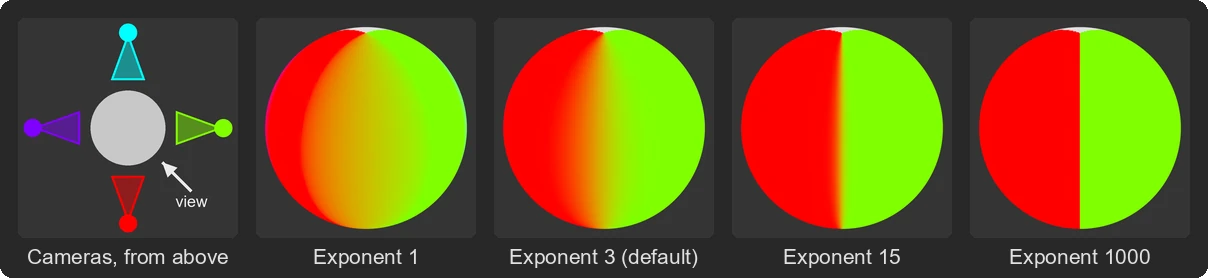
With generated images, a wide mix averages views that disagree slightly, which shows as soft or doubled detail; a narrow one keeps each view's detail and makes the seam between views sharper.
| Setting | Default | Effect |
|---|---|---|
| Prioritize earlier views | off | Bias the mix toward views generated earlier, so later views replace their colors less readily. Useful in sequential generation, where the first views set the appearance. |
| Priority Strength | 0.5 | How strongly earlier views resist replacement. |
This changes only the color mix. It does not mark earlier views as more reliable; see Protect reliable context below for that.
| Setting | Default | Effect |
|---|---|---|
| Allow backface projection | on | Use two-sided projection weights, as in earlier versions. Disable it for characters and closed meshes so a camera cannot write through back-facing surfaces. |
| Weight by view quality | off | Prefer views that see the surface more directly and with more projected detail. This estimates geometric observation quality, not the artistic quality of the images. Part of the Precise+ presets ("Acquisition Quality Weighting"). |
| Bake transform-stable visibility | off | Compute visibility once per vertex instead of with shader raycasts, so the projected texture survives moving, rotating or scaling the object. Weights are then per vertex rather than per pixel, so use it on meshes with enough vertices. |
| Texturing frame | 1 | For animated or rigged objects, the frame whose pose is used for visibility, projection and baking. |
At depth boundaries, such as a hand in front of a dress, each generated image paints the foreground color right up to the silhouette. A small misalignment between the image and the mesh then spills that color onto the surface behind. The Depth/Part Projection Guard (DPPG) stops each camera from projecting in a band along depth and object or material boundaries, so cameras that see the hidden surface cleanly fill it instead. It is off by default and part of the Precise+ presets.
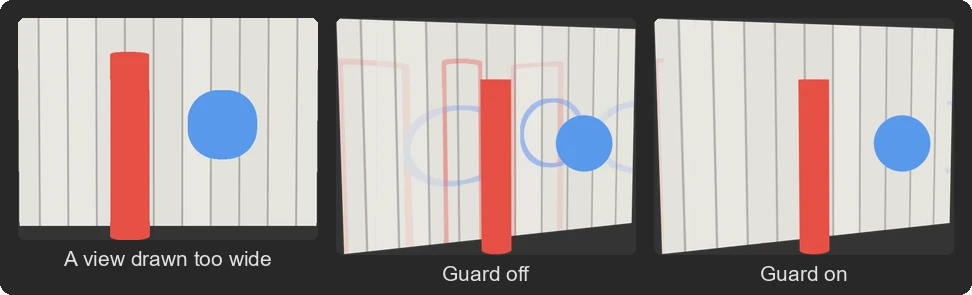
In this synthetic scene, each of the three views paints the objects about 10 pixels wider than the geometry. The figure uses a Background margin of 20 px; widen the margin when generated views are misaligned by more than the default 3 px.
| Setting | Default | Effect |
|---|---|---|
| Background margin (px) | 3 | Width of the suppressed band on the farther (background) surface, in pixels of the generated image. 0 disables it. |
| Depth-aware margins | on | Use separate margins for the nearer and the farther surface where depth order is clear. Without it, protection is symmetric. |
| Foreground margin (px) | 0 | Width of the suppressed band on the nearer side. 0 keeps the visible foreground, such as a chin or a hand, intact. |
| Depth threshold | 0.05 | Smallest depth change treated as a boundary. Higher values ignore small steps. |
| Coverage rescue | 0.25 | When guarding would leave a surface only to much weaker views, relax the guard there instead of leaving it poorly covered. 0 disables rescue. |
| Guard feather width (px) | 12 | Width of the transition beside a guarded boundary. 0 gives a hard edge. |
| Guard render scale | 2× | Render the guard masks at a higher resolution to reduce jagged edges. Higher scales cost render time and memory. |
| Guard feather method | Original | How the feather interacts with the View weight exponent: Original multiplies the sharpened weights by the feather; Local Unsharpen uses unsharpened weights inside the feather band; Boundary Crossfade crossfades between camera combinations as the masks fade; Surface Blend (Preview) solves the camera contributions along the mesh (depends on mesh density, base projection only). |
All guard settings apply on Reproject.
| Setting | Where | Effect |
|---|---|---|
| Protect reliable context | Texture page, Image guidance, Qwen sequential context | Protects texture that earlier cameras saw reliably and marks the rest for regeneration in later views. Minimum trusted view quality (default 0.7) sets how good a view must be to count as reliable. Part of the Precise+ presets ("Confidence-Gated Context"). It decides what later views must keep, not how colors are mixed. |
| Hard view segmentation | Texture page, Image guidance, Qwen sequential context | With a high View weight exponent, each surface region belongs to the camera with the dominant projection weight during generation. Used by the Voronoi presets. |
| Smooth previous-view coverage, Apply view exponent to visibility mask | Texture page, Mode settings (Generate Sequentially) | Shape the mask of already-covered surface that each new view inpaints around. |
| Angle-based blending, Image-frame fade, Projection silhouette fade, Match viewport colors | Texture page, Mode settings (Local Edit) | How Local Edit views blend over the existing texture. See Generation modes. |