Repository navigation
Installation
StableGen has two parts: the Blender add-on and a ComfyUI server that runs the models. The server can run on the same computer or on another machine on your network.
Installation takes four steps:
- Install ComfyUI.
- Install the custom nodes and models StableGen needs.
- Install the add-on in Blender.
- Configure the add-on preferences.
A video walkthrough of an earlier version is available from Polynox: StableGen installation and basic usage. Some labels have changed since it was recorded.
| Component | Requirement |
|---|---|
| Blender | 4.2 to 4.5, or 5.1 and later. Blender 5.0 is not supported. |
| Operating system | Windows (x64), Linux (x64) or macOS on Apple Silicon. These are the platforms the add-on package declares. |
| GPU | An NVIDIA GPU with CUDA is recommended for the ComfyUI server. See the ComfyUI documentation for other hardware. |
| VRAM | About 8 GB for SDXL. Plan for 16 GB or more for Qwen Image Edit. |
| ComfyUI | A working ComfyUI installation. |
| Installer script | Python 3.8 or later and Git on the PATH. No extra Python packages are needed; with tqdm installed, downloads show progress bars. |
| Disk space | ComfyUI, its models (roughly 10 GB to over 50 GB depending on the packages) and generated output. |
On Blender 4.2 to 4.5, projection uses Open Shading Language and StableGen switches Cycles to CPU rendering while it builds projection materials. Blender 5.1 and later use native Raycast shader nodes and do not need OSL.
TRELLIS.2 depends on compiled CUDA extensions. The installer warns that pre-built wheels are not available for Python 3.13 and recommends running ComfyUI with Python 3.12 if you use TRELLIS.2.
Follow the official ComfyUI installation guide. Install it in a dedicated directory, referred to below as <ComfyUI>, and check that ComfyUI starts and runs before continuing.
If ComfyUI will run on a separate machine, do steps 1 and 2 on that machine.
installer.py in the root of this repository downloads the ComfyUI custom nodes and models StableGen uses and places them in the correct folders.
python installer.py <ComfyUI>If you omit the path, the script asks for it. It checks that the folder contains models and custom_nodes (for the Windows portable build, either the outer folder or the ComfyUI folder inside it works), finds the Python ComfyUI runs with, then shows a menu of packages. Choose one package or several, for example 3,8. The installer lists every component, the download size and the free disk space, and asks for confirmation. At the end it prints a summary of what was installed, what was already there and what failed. Files that are already complete are skipped, and an interrupted download resumes where it stopped, so you can run it again at any time. Restart ComfyUI afterwards so it loads the new custom nodes.
| # | Package | Enables | Approx. download |
|---|---|---|---|
| 1 | Minimal Core | IPAdapter and SDXL Lightning LoRA. You supply an SDXL checkpoint and ControlNet models. | 7.3 GB |
| 2 | Core + Preset Essentials | Package 1 plus the depth ControlNet the built-in SDXL presets use. You supply an SDXL checkpoint. | 9.8 GB |
| 3 | Full SDXL Setup (recommended) | Package 2 plus optional ControlNet and LoRA models and the PBR nodes (Marigold, StableDelight). You supply an SDXL checkpoint. | 19.3 GB |
| 4 | Complete SDXL | Package 3 plus the RealVisXL V5.0 checkpoint. | 26.3 GB |
| 5 | Qwen Core | Qwen Image Edit 2509 (GGUF), its VAE and text encoder, a Lightning LoRA and the GGUF loader node. | 20.3 GB |
| 6 | Qwen Extras | Package 5 plus additional Qwen Lightning LoRAs. | 22.6 GB |
| 7 | Qwen Nunchaku | Package 5 plus the Nunchaku nodes, the Nunchaku engine built for your Python, PyTorch and platform, and the Int4 Nunchaku model. | 33.0 GB |
| 8 | TRELLIS.2 | The ComfyUI-TRELLIS2 custom node and its Python environment. The models (about 15.4 GB) download on first use. | 20.4 GB |
| 9 | Marigold IID | The Marigold node for PBR extraction. Its models download on first use. | 0.01 GB |
| 10 | StableDelight | The StableDelight node and model, plus the Marigold node. | 3.3 GB |
| 12 | Marigold V2 | Optional Marigold V2 albedo and normal models: the int8 Qwen Image Edit 2509 base plus LoRAs, VAEs and conditionings. Uses ComfyUI core nodes (September 2026 or newer). See PBR maps. | 23.3 GB |
| 13 | Qwen Image 2.1 | The Qwen Image 2.1 int8 model, its Qwen3-VL 8B text encoder (qwen3vl_8b_w4a8.safetensors) and VAE (qwen_image_2.1_vae_bf16.safetensors), the file names StableGen expects. Uses ComfyUI core nodes (September 2026 or newer). |
14.3 GB |
| 14 | SkinTokens | The StableGen SkinTokens node for auto-rigging. Its setup builds SkinTokens in a separate Python environment with its own PyTorch and downloads the checkpoints, leaving ComfyUI's Python untouched. Needs an NVIDIA GPU. | 9.0 GB |
| 15 | Qwen Image 2.1 Turbo (experimental) | The Qwen Image 2.1 Turbo int8 model, plus the Qwen Image 2.1 text encoder and VAE unless package 13 installed them. | 13.9 GB |
| 16 | MOSS Image (experimental) | The MOSS-Image int8 model, its Qwen3.5 9B text encoder, VAE and color/depth control adapter. Needs ComfyUI 0.42.3 or newer. | 15.0 GB |
| 17 | FIBO 2.0 Edit (experimental) | The Bria FIBO 2.0 Edit Turbo int8 model, its Qwen3-VL 4B text encoder and the FLUX.2 VAE. Needs a ComfyUI build with native FIBO 2.0 support (master branch, October 2026). | 13.0 GB |
The experimental architectures use ComfyUI core nodes, so no custom nodes are installed for them. Package 11 installs the deprecated FLUX.2 Klein and is kept only for existing setups.
Sizes include first-use downloads where noted. The first run that needs those models takes longer.
Common combinations:
| Goal | Packages |
|---|---|
| Texturing with SDXL | 3, or 4 to include a checkpoint |
| Texturing with Qwen Image Edit | 5, 6 or 7 |
| Texturing with Qwen Image 2.1 | 13 |
| Mesh generation and SDXL texturing | 3 (or 4) and 8 |
| Mesh generation and Qwen texturing | 6 and 8 |
| Prompt to a rigged character | 8, 13 and 14 |
| Add PBR extraction to a Qwen setup | 10 (packages 3 and 4 already include it) |
| Try the experimental architectures | 15, 16 and 17 |
The installer shows a license notice and asks you to acknowledge it for these packages:
- TRELLIS.2 (8): NVIDIA libraries used by its native texture mode. See TRELLIS.2 third-party licenses.
- Qwen Image 2.1 (13) and Qwen Image 2.1 Turbo (15): released under the Qwen Research License, which allows non-commercial use only (research or evaluation). Qwen Image Edit 2509 is Apache 2.0.
- FIBO 2.0 Edit (17): released under CC BY-NC 4.0, non-commercial use only; commercial use needs an agreement with Bria.
MOSS Image (16) is Apache 2.0.
The SkinTokens code and model weights are MIT-licensed.
Custom nodes are installed at the commits StableGen was tested with. Nodes you already have are left at their current version with a note in the summary; add --update-nodes to move them to the tested commits.
To install everything by hand instead, follow Manual installation.
| Option | Effect |
|---|---|
--packages 3,8 |
Install these packages without the menu. |
--yes |
Answer yes to every question, including the license notices, for unattended installs. |
--list |
List the packages and what each one installs. |
--dry-run |
Show what would be installed and change nothing. |
--verify |
Check the installation: model files are in place and ComfyUI registers every node the packages need. The installer starts ComfyUI briefly in the background for this, or uses a running one with --server 127.0.0.1:8188. With --packages it runs after installing; with --packages and --dry-run it only checks; alone it checks every package that is completely installed. |
--verify-hashes |
Also check the SHA-256 of Hugging Face downloads, including files already present. Slow for large files. |
--update-nodes |
Move custom nodes that are already installed to the tested commits. |
--python <path> |
The Python ComfyUI runs with, if the installer does not find it. It looks for the portable build's python_embeded and for venv or .venv folders. |
--repair, --check
|
See After updating ComfyUI. |
For gated Hugging Face models, set the HF_TOKEN environment variable to your access token.
python installer.py <ComfyUI> --packages 13,14 --yes --verifyThe installer exits with a non-zero code when a component fails, so scripts can tell.
TRELLIS.2 runs in an isolated environment that can fall behind a ComfyUI update. Re-run the installer, or repair without the menu, then restart ComfyUI:
python installer.py <ComfyUI> --repair
--check only reports problems. The installer pins the TRELLIS.2 node to a tested commit, so updating the node through ComfyUI-Manager can break it until the next StableGen installer update.
- Download the add-on ZIP for your system from the Releases page:
windows-x64,linux-x64ormacos-arm64(Apple Silicon). Do not extract it. Blender refuses a ZIP built for another platform. - In Blender, open Edit > Preferences > Get Extensions (or Add-ons).
- Open the drop-down menu in the top-right corner and choose Install from Disk.
- Select the ZIP file. StableGen is enabled after installation; if it is not, enable it in the Add-ons list.
You can also drag the ZIP file into the Blender window.
The add-on bundles its Python dependencies as wheels, so nothing else needs to be installed into Blender.
Open Edit > Preferences > Add-ons > StableGen. In the StableGen panel, the gear icon in the panel header opens the same page.
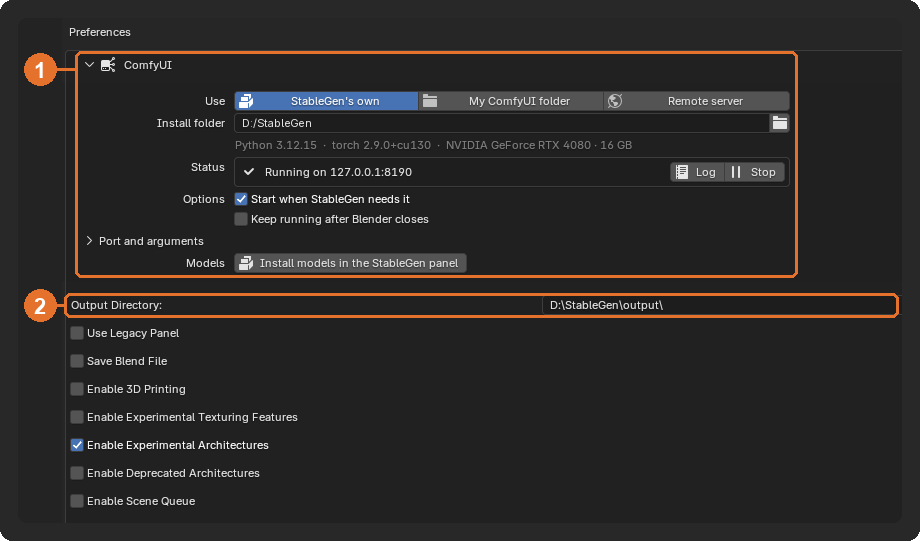
| Preference | Purpose |
|---|---|
| Output Directory (1) | Folder where StableGen saves generated images, bakes and exports. Generation is disabled until this is set to an existing folder. See Output files. |
| Server Address (2) | Host and port of the ComfyUI server. Default 127.0.0.1:8188. The refresh button next to it checks the connection and reloads the model lists. |
| Use Legacy Panel | Show the original sidebar panel instead of the current one. Reset Tips shows dismissed hints again. |
| Save Blend File | Save a copy of the .blend file with packed textures in the output folder after each generation. |
| Enable 3D Printing | Show the 3D printing palette and exporters. See Export. |
| Enable Experimental Texturing Features | Show research controls and let their saved values take effect. |
| Enable Experimental Architectures | Show MOSS Image, Qwen Image 2.1 Turbo and FIBO 2.0 Edit and their presets. On by default. See Architectures and presets. |
| Enable Deprecated Architectures | Show FLUX.1 and FLUX.2 Klein and their presets. |
| Enable Scene Queue | Show the Scene Queue. See Batch processing. |
| ControlNet Model Assignments | Which guidance types (Depth, Canny, Normal) each ControlNet model on the server supports. Refresh the list after adding models. StableGen guesses the types from the file names; correct any that are wrong. |
Advanced Preferences contains the viewport camera overlay color, Enable Debug Settings (diagnostic tools) and network timeouts. Raise Mesh Generation Timeout if TRELLIS.2 post-processing on a slow server times out.
StableGen communicates with ComfyUI over HTTP and WebSocket, so Blender's online access must be enabled even when the server runs locally. Open Edit > Preferences > System > Network and enable Allow Online Access. Without it, the generate button reads Enable online access in preferences.
Set Server Address to the remote machine's address and port, for example 192.168.1.20:8188. ComfyUI only accepts connections from the local machine by default, so start it with --listen (for example python main.py --listen 0.0.0.0) and allow the port through the firewall.
StableGen uploads its renders to the server and downloads the results through the ComfyUI API, so the two machines do not need a shared file system. Large transfers are subject to Transfer Timeout in the advanced preferences.