Repository navigation
Update Notifications
Home / Application Updates / Update Notifications
A verified newer release appears as Update Available in the hover monitor and expanded window, and below the tray menu heading. When a verified download is ready, those surfaces can show Update Ready to Install. Use the action to open the update controls in About. About shows package details and verification state.
When Windows notifications are enabled, ARM uses its existing tray icon to send an alert once per verified version. Windows notification policy can still affect what you see. When the same or newer excluded channel is listed, inspect the details in About rather than expecting a download action.
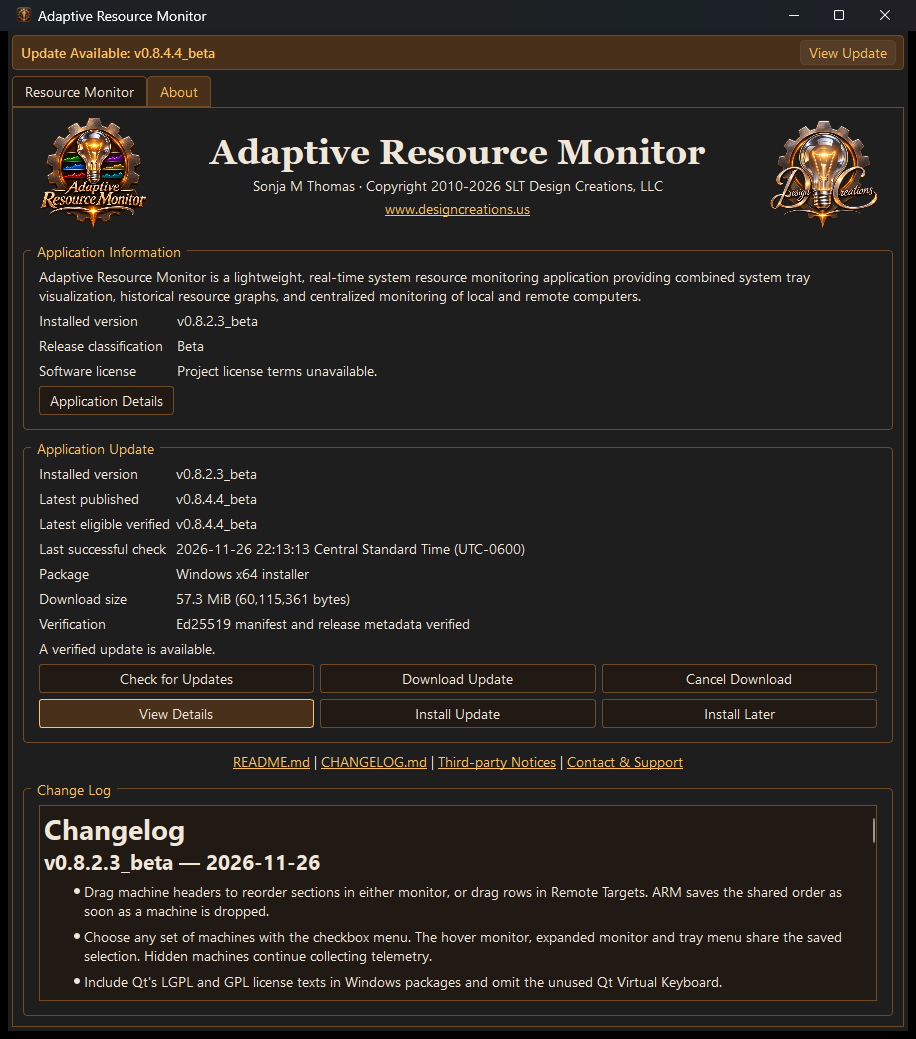
The example records the v0.8.2.3_beta to v0.8.4.4_beta upgrade. The current toolbar arrangement is shown in About.
Previous · Checking for Updates · Next · Downloading Updates

Original application developed by Sonja M Thomas, SLT Design Creations, LLC. Copyright 2010-2026 SLT Design Creations, LLC. Design Creations